A Z370 motherboard is a deliberate choice, not a default one. The chipset launched for Intel’s 8th generation Coffee Lake processors on the LGA 1151 socket, and it is the one that lets unlocked K-series chips be overclocked on that generation. Buying one today usually means one of two goals: reviving an existing 8th or 9th generation system, or building a low-cost machine around a processor you already own. That makes compatibility, not novelty, the main question.
This guide compares eight Z370 boards, from full-size ATX gaming models to Micro ATX options, using only what each listing states. It is for upgraders who want a clear sense of memory support, M.2 slots, display outputs, and multi-GPU support before they commit. As of 2026 these are legacy platform boards, so supply can be thin and stock can change, and the sections below explain how to read the listing carefully to avoid a mismatch.
Our Top Picks


Top 3 picks at a glance
Quick Picks
As an Amazon Associate we earn from qualifying purchases at no extra cost to you.


| Product | Best for | Key spec from the title |
|---|---|---|
| MSI Z370-A PRO | Straightforward ATX builds | LGA 1151, 64GB DDR4, CrossFire, VR Ready |
| ASUS TUF Z370 Plus Gaming | Durable gaming builds | HDMI, DVI, M.2, Gigabit LAN, USB 3.1 |
| ASUS Prime Z370-A | Multiple display outputs | DP, HDMI, DVI, M.2, USB 3.1 |
| Gigabyte Z370M DS3H | Compact Micro ATX builds | Micro ATX, USB 3.1 Gen1, M.2, HDMI |
| Prime Z370M-PLUS II (QYYVVRZQZ) | Lowest-cost Micro ATX | Micro-ATX, Z370, LGA 1151 |
| ASUS ROG Strix Z370-H | Gaming-focused ATX | DDR4, ATX gaming board |
| Gigabyte Z370 AORUS Gaming 7 | Storage and audio-rich builds | 3 x M.2, thermal guard, ESS Sabre DAC, SLI |
| ASUS Prime Z370-P | Basic ATX value | HDMI, DVI, M.2, USB 3.1 |
How to Choose
Confirm the processor and the BIOS
Z370 boards support 8th generation Core processors, as several titles state. LGA 1151 is shared with older generations, but 6th and 7th generation chips will not work on the 300-series chipset. Ninth generation chips need a compatible BIOS, and a used or old-stock board may not have it. If the listing does not mention 9th generation, check the maker’s support page and look for a BIOS flashing option before you buy. A board that can update without a CPU installed is a real convenience if your old chip is gone.
Match the board size to the case
ATX boards have more expansion slots and memory slots, while Micro ATX models like the Gigabyte Z370M DS3H and the Prime Z370M-PLUS II fit smaller cases. Check your case before buying, since an ATX board does not fit a Micro ATX chassis. Fewer slots also means fewer places to add storage and cards, so count your parts first. Two sticks of DDR4 are enough for most desktops, but four slots, found on ATX and most Micro ATX boards, leave room to add memory later.
Look at M.2, memory, and display outputs
The MSI lists support for 64GB of DDR4, which is a useful ceiling for heavy multitasking. M.2 slots matter if you want NVMe storage, and the AORUS Gaming 7 lists three. If you plan to use the processor’s integrated graphics, check for HDMI, DVI, or DisplayPort, as the ASUS Prime Z370-A lists all three. Ignore labels like VR Ready as marketing, since a graphics card does the real work.
Multi-GPU, audio, and budget cut points
CrossFire and SLI support, listed on the MSI and the AORUS, matter only if you plan two cards, which few buyers do today. Audio extras like the ESS Sabre DAC are nice but optional. Budget boards cut corners on heatsinks, rear ports, and extra M.2 slots, so compare the lists before you decide that the lowest tier is enough. Also consider the cooler: overclocking a K-series chip on any Z370 board needs a capable CPU cooler and good case airflow, and the board alone does not guarantee stable clocks.
The 8 Best Options
MSI Z370-A PRO
The MSI Z370-A PRO is an ATX board for Intel Coffee Lake processors on LGA 1151, with support for 64GB of DDR4 and CrossFire, and a VR Ready label. It suits builders who want a dependable ATX base for an 8th generation system without a long list of premium extras. The CrossFire mention also shows its target buyer: someone who may want to keep a second graphics card option open, even if most builds never use it. Recognized branding and a straightforward ATX layout make it easy to find BIOS updates and manuals.
- Strength: 64GB DDR4 support gives room for memory-heavy tasks.
- Strength: CrossFire support keeps a second graphics card possible.
- Trade-off: the title lists few connectivity details, so check M.2 and port counts.
Skip it if you need a confirmed count of M.2 slots or display outputs, since the title lists neither and you would have to rely on the maker’s spec sheet.
ASUS TUF Z370 Plus Gaming
The TUF Z370 Plus Gaming is an ATX board for 8th generation Intel Core processors, with DDR4, HDMI, DVI, M.2, Gigabit LAN, and USB 3.1. It fits gamers who want a no-nonsense board with display outputs for an integrated graphics fallback. The TUF line is positioned around durability, which suits a machine that will run for years as a general-purpose gaming PC, and Gigabit LAN keeps wired networking simple.
- Strength: HDMI and DVI outputs allow use with integrated graphics.
- Strength: USB 3.1 and Gigabit LAN cover everyday connectivity.
- Trade-off: only one M.2 slot is implied by the title, so storage expansion may be limited.
Skip it if you want DisplayPort output or several M.2 drives.
ASUS Prime Z370-A
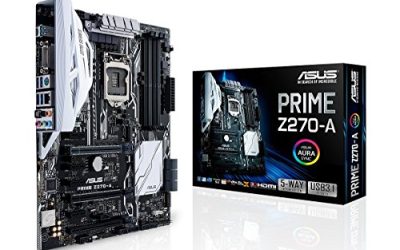
The Prime Z370-A is an ATX board with DisplayPort, HDMI, DVI, M.2, USB 3.1, and DDR4 for 8th generation Intel Core processors. It is a good match for a multi-display or integrated-graphics setup, thanks to three output types. That flexibility helps if you are carrying over an older DVI monitor and also want a modern DisplayPort screen, without buying adapters on day one of the build.
- Strength: DisplayPort, HDMI, and DVI cover most monitor combinations.
- Strength: M.2 and USB 3.1 add modern storage and connectivity.
- Trade-off: the title does not mention gaming-focused extras like multi-GPU support.
Skip it if you plan a dual graphics card setup.
Gigabyte Z370M DS3H
The Z370M DS3H is a Micro ATX board for LGA 1151 with USB 3.1 Gen1, M.2, DDR4, and HDMI. It fits small-case builders who want a compact board with a modern storage slot. Fewer slots does not mean fewer features, and for a living-room PC or small office machine a Micro ATX layout is usually plenty, since many builds use only one graphics card and one or two drives.
- Strength: Micro ATX size suits compact cases.
- Strength: M.2 and HDMI are listed.
- Trade-off: fewer expansion slots than an ATX board, which limits add-in cards.
Skip it if you need many PCIe slots or multi-GPU support.
Prime Z370M-PLUS II (QYYVVRZQZ)
This listing is a Micro-ATX Z370 board on LGA 1151, carrying the Prime Z370M-PLUS II name under an unfamiliar seller brand. The title gives no ports, memory limits, or M.2 details, so it suits only careful buyers who will verify specs.
- Strength: Micro-ATX size fits small cases.
- Strength: Z370 and LGA 1151 are stated plainly.
- Trade-off: the title lists almost nothing else, and the unfamiliar brand adds uncertainty.
Skip it if you want a recognizable maker or documented features, or if you need warranty support from a well-known brand.
ASUS ROG Strix Z370-H
The ROG Strix Z370-H is an ATX gaming motherboard with DDR4 support. It targets gamers who prefer the Republic of Gamers line and the styling that goes with it. Because the listing is short, treat it as a brand-and-form-factor match and confirm details such as M.2 count and rear ports on the manufacturer’s page before purchase.
- Strength: ROG Strix branding indicates a gaming-focused design.
- Strength: ATX size leaves space for expansion cards.
- Trade-off: the title is brief, so port and slot counts are not confirmed.
Skip it if you need detailed specs in the listing before buying.
Gigabyte Z370 AORUS Gaming 7
The AORUS Gaming 7 lists three M.2 slots, an M.2 thermal guard, an ESS Sabre DAC, Fan Stop, and SLI support on an ATX board. It is the most feature-rich Z370 here, for builders with several NVMe drives and an interest in onboard audio.
- Strength: three M.2 slots and a thermal guard suit storage-heavy builds.
- Strength: ESS Sabre DAC and SLI support add premium touches.
- Trade-off: it is feature-heavy, which is more than a basic single-drive build needs.
Skip it if you only want a single drive and a simple board, because the extra slots and audio hardware would go unused in that build.
ASUS Prime Z370-P
The Prime Z370-P is an ATX board with DDR4, HDMI, DVI, M.2, and USB 3.1 for 8th generation processors. It is a straightforward value option for a standard desktop. It is the sort of board that suits a first Coffee Lake build or a replacement for a failed board in a working system, where you want the same platform with familiar outputs and no surprises.
- Strength: HDMI and DVI support integrated graphics use.
- Strength: M.2 and USB 3.1 round out the basics.
- Trade-off: no DisplayPort or gaming extras appear in the title.
Skip it if you want DisplayPort or multi-GPU support, or if you want more than the basic feature set in the listing.
Which One Fits Your Situation
You want lots of NVMe storage
The Gigabyte Z370 AORUS Gaming 7 lists three M.2 slots with a thermal guard, which helps keep fast drives from throttling when several are busy at once.
You need several video outputs
The ASUS Prime Z370-A lists DisplayPort, HDMI, and DVI together.
You are building small
The Gigabyte Z370M DS3H is a recognizable Micro ATX option with M.2 and HDMI listed.
You want a simple, familiar ATX board
The MSI Z370-A PRO lists 64GB DDR4 support and CrossFire, which makes it a clean base for an overclockable 8th generation CPU.
Common Mistakes
- Pairing a 6th or 7th generation processor with a Z370 board.
- Assuming a 9th generation chip will boot without checking the BIOS version.
- Choosing a Micro ATX board and then needing more PCIe slots.
- Buying an unfamiliar brand without confirming features and warranty terms.
- Forgetting that Z370 uses DDR4, so older DDR3 memory will not fit, and the sticks must match the board’s supported speeds.
Related guides
- How To Check Gpu Compatibility With Your Motherboard And Cpu
- High-Performance Gaming Desktop Specifications
- Prebuilt Gaming Pc Rtx 5070 Under 1500
Frequently Asked Questions
Does Z370 support 9th generation CPUs?
Often, with a BIOS update. A listing that mentions only 8th generation may ship with an older BIOS, so confirm support on the maker’s page.
Do I need Z370 to overclock?
For K-series processors on the 8th generation, Z370 is the chipset that allows overclocking. If you do not overclock, other 300-series boards may cost less.
How many M.2 slots do I need?
One is enough for most builds. Three, as on the AORUS Gaming 7, matter only for storage-heavy systems.
Is a used Z370 board a good idea?
It can be, if the socket pins look intact and the BIOS is current. Check the return policy because older boards sometimes arrive with bent pins or missing accessories.