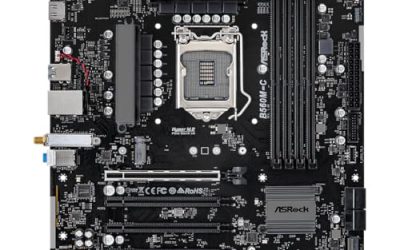
Shopping for an X99 board in 2026 means you already know what the platform is: a mature LGA 2011-3 socket that happily takes cheap, many-core Xeon E5 V3 and V4 chips and quad-channel DDR4. The decision is not about chasing the newest standard. It is about which board lets you reuse a bargain Xeon or a Core i7 from the 5th and 6th generation and still get an M.2 slot, enough memory capacity, and a PCIe 3.0 graphics slot for a modern card.
This guide is for tinkerers building a budget gaming and multitasking rig around a used or inexpensive processor, plus anyone refreshing an older X99 system. The boards here are mostly lesser-known brands that bundle features aimed at the Xeon crowd, so a few sensible checks on form factor, memory support, and storage matter more than a big-name logo. Everything below is judged from the stated specs, with no claims beyond them.
Our Top Picks
Top 3 picks at a glance
Quick Picks
As an Amazon Associate we earn from qualifying purchases at no extra cost to you.




| Product | Best for | Key spec from the title |
|---|---|---|
| MACHINIST X99 MR9S | Full-size ATX builds | LGA 2011-3, ATX, DDR4, PCIe 3.0, NVMe |
| MACHINIST X99 Micro ATX | Compact cases | Micro ATX, DDR4 max 128GB, M.2, Gigabit LAN |
| MACHINIST X99 M-ATX with WiFi M.2 | Wireless upgrades | M-ATX, NVMe M.2, WiFi M.2, DDR4 max 128GB |
| MACHINIST X99 Dual CPU | Heavy multitasking | Dual CPU, DDR4 max 256GB, NGFF/NVMe M.2 |
| SHANGZHAOYUAN X99 | Simple Micro ATX builds | Micro ATX, DDR4 max 128GB, M.2 protocol |
| MACHINIST X99 F-X9D | Storage and wireless options | 4-channel DDR4, NVMe and NGFF M.2, WiFi M.2, SATA 3.0 |
How to Choose
Confirm socket and processor family first
Every board here uses LGA 2011-3, which accepts Xeon E5 V3 and V4 processors, and several also list Core i7 5th and 6th generation chips. Match your processor to the board before you buy, and look for a BIOS version that supports your exact chip. Do not mix this socket with the older LGA 2011 generation, because the key notches and pin layout differ and the chips will not fit. If you are buying a used Xeon, confirm the model number against the board listing instead of assuming every V3 or V4 part is accepted.
Pick form factor by your case, not by feature lists
ATX boards give the most expansion slots and the easiest layout, while Micro ATX fits smaller cases but trims slots and sometimes memory slots. Check how many DIMM slots the board has, because capacity limits like 128GB or 256GB only apply if all slots are populated, and quad-channel memory needs four matched sticks to reach full bandwidth. A dual-CPU board is far larger in practice and needs a case built for it, with room for two coolers and a robust power supply.
Storage and wireless matter more than flash
Look for an M.2 slot that supports NVMe so you can boot from a fast drive. Some boards add a second NGFF or WiFi M.2 slot, which gives you a place for a wireless card without using a PCIe slot. SATA 3.0 ports let you keep older drives. Be aware that an M.2 slot on these boards is limited to PCIe 3.0 speeds, which is fine for most gaming and keeps drive choices simple. Also confirm that the graphics slot is PCIe 3.0, since that is what the listings advertise.
Know where budget boards cut corners
Boards from lesser-known brands often skip premium audio, detailed BIOS tuning, and clear warranty paths. Read the listed networking: Gigabit LAN is standard, and wireless is only present when the title says so. Ignore claims of server-grade features if you are building a gaming rig, and pay attention to ECC or registered memory notes if you plan to reuse server RAM. Expect fewer fan headers and less polished software than boards from the big brands.
The 6 Best Options
MACHINIST X99 MR9S
This is an ATX board for buyers who want full-size layout and room for a large graphics card, pitched at both gaming PCs and light server duty. It is the most conventional pick in the group and the easiest to build around.
- LGA 2011-3 with DDR4 and PCIe 3.0 supports Xeon E5 V3 and V4 plus Core i7 5th and 6th generation processors.
- NVMe support lets you boot from an M.2 drive instead of relying on older SATA storage.
- Trade-off: the brand is not a household name, so read BIOS and warranty details before buying.
Skip it if you need a compact case, or a recognized brand warranty is a priority for you. Buyers new to the platform should also budget time for a BIOS check after the first boot.
MACHINIST X99 Micro ATX
A Micro ATX board for compact builds that still want an X99 processor and DDR4 memory, sized for smaller cases and tidy desktops. It suits a spare-parts build where the case is already chosen and space is the limit.
- Supports DDR4 up to 128GB, which is generous for a gaming and multitasking rig.
- M.2 protocol support and Gigabit LAN cover fast storage and wired networking.
- Trade-off: Micro ATX means fewer expansion slots than a full ATX model, so extra cards compete for room.
Skip it if you need several PCIe slots for capture cards, sound cards, or storage controllers. A full ATX model is the safer path in that case, even if the case is larger.
MACHINIST X99 M-ATX with WiFi M.2
This M-ATX board stands out for listing a WiFi M.2 slot alongside NVMe, aimed at builders who want wireless without eating a PCIe slot. It is a sensible choice for a desk that has no Ethernet drop nearby.
- NVMe M.2 plus a WiFi M.2 slot add flexibility for storage and networking.
- DDR4 up to 128GB with Xeon E5 V3 and V4 and Core i7 5th and 6th generation support.
- Trade-off: the title mentions a WiFi M.2 slot, which suggests you may need to supply the wireless card yourself.
Skip it if you want a board that already includes wireless hardware out of the box with nothing to add. Plan on a separate wireless module and antenna, and verify its form factor against the slot.
MACHINIST X99 Dual CPU
The dual-CPU board is for heavy multitaskers and workstation hobbyists who want two Xeon E5 V3 or V4 processors on one board. It is a specialist piece rather than a typical gaming choice.
- Supports DDR4 up to 256GB, the highest capacity in this list.
- NGFF and NVMe M.2 storage options sit beside PCIe 3.0 and Gigabit LAN.
- Trade-off: dual-processor builds need a compatible case, cooling, and power supply, and games rarely use two CPUs well.
Skip it if gaming is your main goal, since a single-processor board is simpler and cheaper to run. Power draw and heat from two processors are real costs over time.
SHANGZHAOYUAN X99
A Micro ATX X99 board that keeps the spec list simple for a no-fuss processor swap into a compact case. It is aimed at buyers who know what they want from the platform and do not need extras.
- Supports Xeon E5 V3 and V4 and Core i7 series processors, covering the common choices for this socket.
- DDR4 up to 128GB, PCIe 3.0, and M.2 protocol round out a sensible budget feature set.
- Trade-off: the title is shorter on extras such as wireless, so you may add accessories separately.
Skip it if you want a board that lists more ports and storage options up front. Reading the full listing for rear I/O details is worthwhile before ordering.
MACHINIST X99 F-X9D
This one lists a wide set of features, including four-channel DDR4, NVMe, NGFF, and WiFi M.2 slots, which makes it a good all-around platform for tinkering and for a PC that will change over time.
- Four-channel DDR4 is highlighted, which is a core strength of the X99 platform.
- NVMe M.2, NGFF M.2, WiFi M.2, and SATA 3.0 provide plenty of storage and expansion choices.
- Trade-off: the title mentions TPM, but you should confirm the exact connector and whether a module is included.
Skip it if you want a simple board and have no use for several M.2 slots. Builders who plan to keep the system for years will appreciate the extra headroom, but a simpler board costs less to troubleshoot.
Which One Fits Your Situation
A budget gaming build around a used Xeon
The MACHINIST X99 MR9S gives you ATX room, PCIe 3.0, and NVMe, which is plenty for a bargain Xeon plus a modern graphics card and a roomy mid-tower case.
A compact case or living-room PC
The MACHINIST X99 Micro ATX or SHANGZHAOYUAN X99 fits smaller enclosures. Choose the former if you want clearer Gigabit LAN and M.2 listings, and the latter if you prefer a plain feature set.
A wireless desktop with no spare PCIe slots
The MACHINIST X99 M-ATX with WiFi M.2 or the F-X9D give you a dedicated M.2 slot for a wireless card, so a graphics card keeps the PCIe slot it needs.
A creator box that renders and games
The MACHINIST X99 Dual CPU pairs two processors with up to 256GB DDR4, a better fit for rendering and virtual machines than for pure gaming. Make sure the case and power supply are chosen with that second socket in mind.
Common Mistakes
- Buying a board without checking that its BIOS supports your exact Xeon or Core i7 model.
- Assuming the listed memory maximum applies when you only populate two slots.
- Choosing a dual-CPU board for a gaming rig that will only use one processor.
- Forgetting that WiFi M.2 means a slot, not necessarily an included card.
- Ignoring cooler compatibility for the LGA 2011-3 socket mounting pattern.
Related guides
- How To Check Gpu Compatibility With Your Motherboard And Cpu
- High-Performance Gaming Desktop Specifications
- Desktop Computer For Working From Home
Frequently Asked Questions
Is X99 still good for gaming?
It can be, especially paired with an inexpensive Xeon or Core i7 and a current graphics card. Newer platforms offer faster per-core speed, but X99 gives many threads for the money, which suits streaming and multitasking. Pairing it with a recent graphics card keeps frame rates healthy in most titles.
Do I need special RAM?
These boards use DDR4. Standard desktop DDR4 works in most cases, but check whether the board supports ECC or registered modules if you want to reuse server memory. Mixing types usually does not work.
Will an NVMe drive work on these boards?
Boards that list NVMe M.2 can boot from compatible drives. Check the BIOS notes and the slot’s PCIe 3.0 limit before buying a fast drive, because newer drives will run at the slower rate. For most game libraries, the difference in loading times is small, so a mid-range NVMe drive is a sensible match here.
What cooler fits LGA 2011-3?
You need a cooler with LGA 2011-3 mounting support. Many tower coolers include the hardware, but confirm it before ordering, especially for compact boards where clearance matters. Large tower coolers also need space around the memory slots, so check the height of your DIMMs against the cooler fins before assembly.