Choosing a Mini-ITX motherboard is the point where a small build either works or becomes a headache. The board is only about 6.7 inches square, so every decision is compressed: one PCIe slot, two memory slots, and a limited number of M.2 and SATA connections. The keyword really asks which compact board gives you the right socket, memory type, and connectivity without wasting the few slots you have. In 2026, that usually means picking between a modern AM5 board with DDR5 and PCIe 5.0, or a budget Intel LGA 1700 board with DDR4.
This guide is for builders working inside small cases: compact gaming PCs, living-room machines, portable LAN rigs, and quiet office systems. It covers six AM5 boards at different tiers and two Intel H610 boards for low-cost builds, and the sections below explain how to check socket support, memory, storage, and networking before you buy.
Our Top Picks
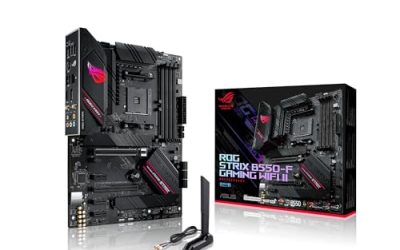
 ASUS ROG Strix B850-I Gaming WiFi AMD AM5Mini-ITX | M.2x2 | WiFi 79 x 3.8 x 7.3 inches2.3 PoundsCheck on Amazon



Top 3 picks at a glance
Quick Picks
As an Amazon Associate we earn from qualifying purchases at no extra cost to you.


| Product | Best for | Key spec from the title |
|---|---|---|
| ASRock B650I Lightning WiFi | Value AM5 compact gaming builds | DDR5 7200+ OC, PCIe 5.0 M.2, 2.5G LAN |
| MSI MPG B850I Edge TI WiFi | High-end compact AM5 builds | 90A SPS VRM, DDR5 8200+ OC |
| ASRock B850I Lightning WiFi | Memory-heavy builds on B850 | WiFi 6E, DDR5 8200+ OC, 128GB support |
| ASUS ROG Strix B850-I Gaming WiFi | Feature-rich flagship small builds | 10+2+1 stages, WiFi 7, 2 M.2, USB 20Gbps |
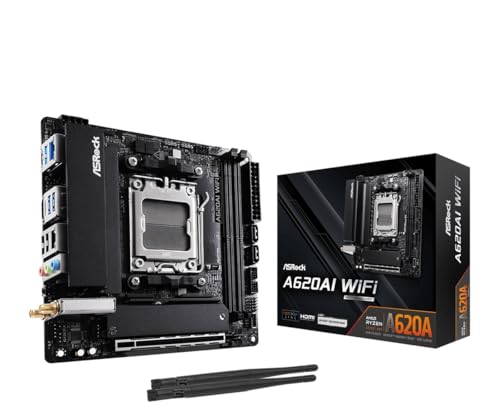
| ASRock A620AI WiFi | Entry-level AM5 builds | PCIe 4.0, dual LAN, WiFi 6E |
| ASUS TUF Gaming B850I WiFi NEO | Balanced mid-range builds | 2 M.2, 2 USB-C, WiFi 6E, 2.5Gb LAN |
| ASUS PRIME H610I-PLUS D4 | Budget 12th Gen Intel builds | LGA 1700, DDR4, PCIe 4.0, 1Gb LAN |
| ASUS PRIME H610I-PLUS D4-CSM | Commercial or office small-form-factor use | Intel H610, DDR4, M.2, DisplayPort, HDMI |
How to Choose
Socket and platform
Start with the CPU. AM5 boards such as the ASRock B650I, MSI B850I Edge TI, ASRock B850I, ASUS ROG Strix B850-I, ASRock A620AI, and ASUS TUF B850I list support for Ryzen 9000, 8000, and 7000 series processors, which gives you a long upgrade runway. The two ASUS PRIME H610I boards use LGA 1700, so they pair with 12th Gen Intel chips. Pick the platform that matches the processor you already own or plan to buy this year, since swapping later means replacing the board, and often the memory too. Do not mix and match: a socket mismatch is the most expensive mistake in this category, and BIOS updates may be needed for newer processors on some boards.
Memory type and speed
AM5 boards use DDR5, and titles here list overclocked speeds from 7200 up to 8200 and beyond. Those are maximum overclock figures, not guaranteed speeds, so for most users a common 6000-class kit is a realistic target. Mini-ITX boards have just two memory slots, which means you should buy the capacity you need up front, since one 32GB or two 16GB modules are easier to manage than a later upgrade. The PRIME H610I boards use DDR4, which saves money if you already own sticks but caps memory performance.
Storage, expansion, and I/O
Look at how many M.2 slots you get, because a Mini-ITX board has no room for extras. The ROG Strix B850-I and TUF B850I list two M.2 slots, while the others list at least one. For graphics, most AM5 listings mention PCIe 5.0 or PCIe 4.0 for the single slot. Front-panel connectivity matters too: the TUF board lists two USB-C ports and the ROG Strix lists a 20Gbps USB-C. If you plan to use a small case with a USB-C front panel, verify the header exists on the board.
Networking, power delivery, and where budget boards cut corners
Wireless support ranges from WiFi 6E on several boards to WiFi 7 on the ROG Strix. Wired speed is typically 2.5G on AM5 boards, and 1Gb on the PRIME models. Power delivery matters for high-core-count CPUs: the MSI lists a 90A SPS VRM and the ROG lists 10+2+1 power stages. Entry boards like the A620AI and H610I trim features, such as fewer USB ports, fewer M.2 slots, or no PCIe 5.0, so check that the connectors you need are present before you commit. Cooling is the last item on the list: compact boards pack the VRM heatsinks close to the CPU socket, so measure cooler height and radiator clearance in your case, and confirm the board’s fan and pump headers match what you plan to connect.
The 8 Best Options
ASRock B650I Lightning WiFi
This board is the value anchor for compact AM5 gaming builds. The title lists support for Ryzen 9000, 8000, and 7000 series, DDR5 up to 7200 with overclocking, PCIe 5.0 M.2, 2.5G LAN, and WiFi. It covers the essentials of a modern small build without chasing premium extras, which makes it a sensible foundation for a mid-range gaming PC.
- Strength: PCIe 5.0 M.2 support is rare at this tier.
- Strength: 2.5G LAN and WiFi cover networking for most homes.
- Trade-off: B650 is an older chipset generation than B850.
Skip it if you want WiFi 7 or the strongest power delivery for heavy CPUs.
MSI MPG B850I Edge TI WiFi
The Edge TI is positioned as a high-end compact board. The title lists an AM5 socket, Ryzen 9000, 8000, and 7000 support, a 90A SPS VRM, and DDR5 Memory Boost up to 8200 MT/s with overclocking. That VRM spec signals that the board is built for demanding processors in a tight space, and it fits builders who want strong electrical headroom.
- Strength: a 90A SPS VRM suits powerful CPUs.
- Strength: DDR5 memory speeds reach 8200 MT/s with overclocking.
- Trade-off: it sits at the premium end for a small board.
Skip it if you plan a modest CPU and want to save money.
ASRock B850I Lightning WiFi
This B850 board lists WiFi 6E, DDR5 8200+ overclocking, support for up to 128GB of memory, M.2 slots, SATA3, and PCIe 5.0. The B850 chipset brings a newer feature set than B650, and the 128GB memory ceiling is useful for creators who run virtual machines or large projects on a compact system.
- Strength: it supports up to 128GB of memory in a small form factor.
- Strength: PCIe 5.0 and WiFi 6E modernize the platform.
- Trade-off: the title lists WiFi 6E instead of WiFi 7.
Skip it if you want WiFi 7 or additional USB-C connectivity.
ASUS ROG Strix B850-I Gaming WiFi
This is the feature-rich option for enthusiasts. The title lists 10+2+1 power stages, DDR5, 2.5G LAN, WiFi 7, two M.2 slots, a PCIe 5.0 x16 slot, and a USB 20Gbps Type-C port. It packs most of the modern checklist into a Mini-ITX layout, so it suits a showcase build with a high-end GPU.
- Strength: WiFi 7 and a 20Gbps USB-C port are included.
- Strength: two M.2 slots give flexible storage options.
- Trade-off: it carries a premium price tier among compact boards.
Skip it if you do not need WiFi 7 or flagship power delivery.
ASRock A620AI WiFi
The A620AI is the entry point for AM5 in Mini-ITX. The title lists Ryzen 9000, 8000, and 7000 support, DDR5 8200+ overclocking, PCIe 4.0, dual LAN, and WiFi 6E. It skips PCIe 5.0, which is fine if your GPU and SSD do not use it, and its dual LAN ports are unusual for a board this small.
- Strength: dual LAN suits home servers and routers.
- Strength: it is the most budget-friendly AM5 option in this list.
- Trade-off: it limits you to PCIe 4.0 rather than PCIe 5.0.
Skip it if you plan to overclock heavily or want PCIe 5.0 storage.
ASUS TUF Gaming B850I WiFi NEO
The TUF B850I sits in the middle of the lineup. Its title lists DDR5, DIMM Fit, WiFi 6E, 2.5Gb LAN, PCIe 5.0, two M.2 slots, two USB-C ports, AI Cooling II, and a pre-mounted I/O shield. The pre-mounted shield and two USB-C connectors save assembly time, which is a real convenience in tight cases.
- Strength: two USB-C ports and two M.2 slots add flexibility.
- Strength: a pre-mounted I/O shield simplifies installation.
- Trade-off: WiFi 6E trails the WiFi 7 of the ROG board.
Skip it if you need WiFi 7 or the highest-end VRM design.
ASUS PRIME H610I-PLUS D4
This is a budget Intel option for 12th Gen processors. The title lists LGA 1700, DDR4, PCIe 4.0, USB 3.2 Gen 1 Type-A, 1Gb LAN, and DisplayPort, HDMI, and D-Sub outputs. The video outputs make it practical for integrated graphics builds, and DDR4 compatibility helps if you already have sticks.
- Strength: DDR4 and multiple video outputs suit low-cost, integrated-graphics builds.
- Strength: PCIe 4.0 support is listed for the graphics slot.
- Trade-off: it is limited to 12th Gen processors and 1Gb LAN.
Skip it if you want AM5, DDR5, or built-in WiFi.
ASUS PRIME H610I-PLUS D4-CSM
The CSM version targets commercial and office deployments. The title lists Intel H610, LGA 1700, DDR4, PCIe 4.0, M.2, 1G LAN, DisplayPort, HDMI, and D-Sub. It is a quiet, simple platform for small business machines, digital signage, and basic desktops, and it shares most of its specs with the standard PRIME board.
- Strength: it offers the same practical I/O as the standard H610I.
- Strength: it suits office and commercial small-form-factor builds.
- Trade-off: like the standard model, it lacks wireless and 2.5G networking in the title.
Skip it if you want gaming-oriented features or wireless connectivity.
Which One Fits Your Situation
You want a compact gaming PC with room to upgrade
The ASRock B650I Lightning WiFi gives a modern AM5 base at a sensible tier, while the ASUS TUF B850I adds a second M.2 slot and extra USB-C.
You are building a flagship small-form-factor system
The ASUS ROG Strix B850-I and MSI MPG B850I Edge TI are the strongest picks, with strong power delivery and fast memory support.
You need a low-cost office or media PC
The ASUS PRIME H610I-PLUS D4 is the simplest route if you already own a 12th Gen Intel chip and DDR4 memory.
You need two network ports
The ASRock A620AI WiFi lists dual LAN, which suits a compact router, NAS, or home server. If easy assembly matters more, the ASUS TUF Gaming B850I WiFi NEO lists a pre-mounted I/O shield and DIMM Fit, two conveniences that reduce fiddly steps inside a small case.
Common Mistakes
- Buying an AM5 board without confirming that your CPU is supported by the BIOS.
- Treating overclocked memory speeds as guaranteed, rather than as best-case figures.
- Overlooking that Mini-ITX boards have only two memory slots and plan capacity accordingly.
- Choosing a board with one M.2 slot and later running out of storage.
- Ignoring case compatibility with cooler height, GPU length, and power supply size.
Related guides
- How To Check Gpu Compatibility With Your Motherboard And Cpu
- High-Performance Gaming Desktop Specifications
- Desktop Computer For Working From Home
Frequently Asked Questions
Is Mini-ITX good for gaming?
Yes, as long as the case allows a full-size graphics card and good airflow. The board itself supports the same CPUs and GPUs as larger boards, but cooling is tighter.
Should I choose AM5 or Intel LGA 1700?
AM5 offers DDR5, PCIe 5.0, and a longer upgrade path, according to the listed specs. LGA 1700 H610 boards suit budget builds that reuse DDR4 and 12th Gen processors.
How many M.2 slots do I need?
One is enough for a single fast SSD, but two give flexibility for a second drive. The ROG Strix and TUF boards list two M.2 slots in their titles.
Is WiFi 7 worth paying extra for?
Only if your router supports it. Most home setups work well with WiFi 6E or wired 2.5G networking, so WiFi 7 is a nice-to-have.