Searching for a Z270 motherboard in 2026 means you are not shopping for a new build. You are keeping, repairing, or reviving an LGA 1151 system, usually one built around a Skylake or Kaby Lake processor, and the board has failed, the BIOS has gone bad, or you picked up a CPU and need something to run it. The decision is therefore less about features and more about availability, condition, and compatibility: new-stock boards, used pulls, and unbranded listings all sit under the same keyword.
This guide is for upgraders extending an older gaming or workstation PC, hobbyists building a budget retro rig, and repair buyers replacing a dead board. It reviews eight listings: three ASUS and MSI-labeled retail boards, an ASRock and a Gigabyte board, two used MSI boards, and one unbranded listing whose title leans on another brand’s name. Read the sections below to separate the clear picks from the ones that need extra verification.
Our Top Picks
Top 3 picks at a glance
Quick Picks
As an Amazon Associate we earn from qualifying purchases at no extra cost to you.


| Product | Best for | Key spec from the title |
|---|---|---|
| ASUS Prime Z270-A | Balanced upgrade board | LGA 1151, DDR4, DP, HDMI, DVI, M.2, USB 3.1 |
| MSI Z270 Gaming Plus (Used) | Low-cost replacement | Z270, LGA 1151, I/O back plate included |
| MSI Z270-A PRO (Used) | Low-cost replacement | Z270, LGA 1151, I/O back plate included |
| ASUS Prime Z270-K | Straightforward office builds | DDR4, HDMI, DVI, VGA, M.2, USB 3.1 |
| MSI Z270 Gaming PRO Carbon | Gaming-themed refresh | Z270 gaming motherboard |
| Z270-F Gaming (Unbranded Listing) | Buyers who verify details first | LGA 1151, DDR4, USB 3.0, i7 i5 i3 |
| ASRock Z270 EXTREME4 | Multi-GPU and feature-rich builds | Quad CrossFireX and Quad SLI, M.2, USB 3.1 |
| GIGABYTE GA-Z270P-D3 | Basic ATX builds | 2-Way Crossfire, DDR4, ATX |
How to Choose
Socket and processor compatibility
Z270 boards use the LGA 1151 socket and are built for 6th and 7th generation Intel Core processors. They do not support the later 8th and 9th Gen chips that moved to a different chipset, so confirm your CPU generation before ordering. Also check the BIOS version if you are pairing a board with a newer Kaby Lake chip, since older stock may need an update to boot. If you do not own a processor yet, remember that LGA 1151 parts are no longer new, which means a used CPU is common.
Memory and storage
All of these boards use DDR4. Most also list M.2 for modern SSDs, and some list SATA3 and USB 3.1. Check how many memory slots and how much capacity the board supports; a Z270 ATX board normally has four slots, which gives upgrade room. For storage, an M.2 slot means you can use a compact SSD, but confirm whether it supports NVMe, SATA, or both in the manual. If you reuse an old hard drive, a SATA3 port is the more important line.
Video output, expansion, and multi-GPU
If you use the processor’s integrated graphics, look at the video outputs. The Prime Z270-A lists DisplayPort, HDMI, and DVI; the Prime Z270-K lists HDMI, DVI, and VGA. For multi-GPU, the ASRock EXTREME4 lists Quad CrossFireX and Quad SLI, while the Gigabyte lists 2-Way Crossfire. Multi-GPU is rarely worth the effort today, so treat it as a bonus rather than a reason to buy. A single full-length PCIe slot is what most builders need, so spend your attention on whether the board offers the display outputs and drive connectors that match your monitor and storage. Also count your fan and USB headers, since older boards can be short on the ports a modern case expects.
Condition and where listings cut corners
Condition is the biggest risk. Two listings here are labeled as used and come with an I/O back plate, and one lists a gaming board with a title that borrows another brand’s name, which is a flag to verify what you are actually receiving. Check for bent socket pins, missing screws, and a return policy before you buy. New boards from ASUS, ASRock, and Gigabyte are easier to trust, but even they are older stock, so inspect the box and the socket cover on arrival. Keep the packaging until the system has run stable for a few days, and photograph the socket before installing a CPU so that any defect is documented if you need to return the board. Power supply connectors are another quiet check: confirm your PSU still has the 24-pin and 8-pin cables the board expects.
The 8 Best Options
ASUS Prime Z270-A
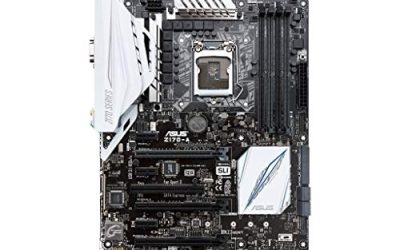
The Prime Z270-A is the most complete retail board in this group. The title lists an LGA 1151 socket, DDR4 memory, DisplayPort, HDMI, DVI, M.2, USB 3.1, and an ATX layout. That mix of video outputs and storage options makes it a practical base for an upgrade that still uses integrated graphics or a modern SSD.
- Strength: DisplayPort, HDMI, and DVI outputs cover most monitors.
- Strength: M.2 and USB 3.1 add modern storage and port options.
- Trade-off: it is an older platform, so no support for newer Intel generations.
Skip it if you are building on a current-generation CPU.
MSI Z270 Gaming Plus (Used)
This listing is a used MSI Z270 Gaming Plus board with an I/O back plate shield. The title notes an Intel Z270 chipset and an LGA 1151 socket. Used boards can be a cheap way to repair an older system, and a back plate means one less item to hunt down.
- Strength: it comes with an I/O back plate.
- Strength: used pricing tiers usually cost less than new stock.
- Trade-off: used condition means you should confirm socket pins and the return window.
Skip it if you want a new board with a clear warranty path.
MSI Z270-A PRO (Used)
The Z270-A PRO is another used MSI board, also listed with an I/O back plate. It uses the same Z270 chipset and LGA 1151 socket, and it suits builders who need a replacement for an existing MSI system. As with the other used listing, the main questions are condition and return terms, not specifications.
- Strength: it includes an I/O back plate and uses the Z270 chipset.
- Strength: it offers an economical replacement for a failed board.
- Trade-off: used condition carries risk that the title cannot describe.
Skip it if you want guaranteed new condition.
ASUS Prime Z270-K
The Prime Z270-K trims the feature set compared with the Z270-A. The title lists LGA 1151, DDR4, HDMI, DVI, VGA, M.2, USB 3.1, and an ATX layout. VGA output is a useful detail for older monitors, and the board suits office, home, or light gaming builds that do not need premium extras.
- Strength: it offers HDMI, DVI, and VGA outputs for flexible displays.
- Strength: M.2 and USB 3.1 keep the board usable with modern drives.
- Trade-off: it is a simpler board than the Z270-A, with fewer video outputs listed.
Skip it if you need DisplayPort or want a gaming-oriented feature set.
MSI Z270 Gaming PRO Carbon
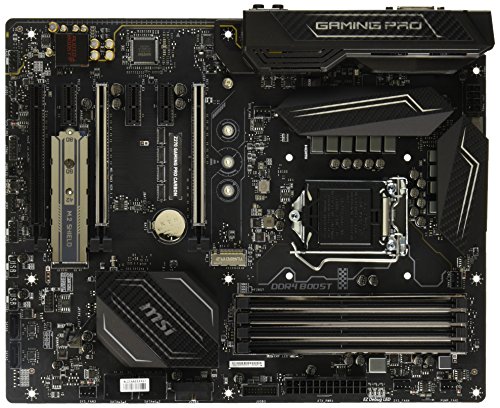
The Gaming PRO Carbon is listed only as a motherboard in the title, with no further detail. Its name points to MSI’s gaming line, and it is a reasonable pick for builders who want a branded, gaming-oriented Z270 board. Because the title is brief, confirm condition, included accessories, and the exact specifications before buying.
- Strength: it belongs to MSI’s gaming-oriented Z270 lineup.
- Strength: it is a named, recognizable board that is easier to research.
- Trade-off: the title gives no specifications or condition details.
Skip it if you want listed features up front.
Z270-F Gaming (Unbranded Listing)
This listing describes a Z270-F Gaming desktop board with an LGA 1151 socket, DDR4, USB 3.0, and compatibility with i7, i5, and i3 processors, but its title also says compatible with ASUS ROG Strix. That wording suggests it is not clearly the branded board itself, so be careful. Treat it as a verification-first option and confirm the actual brand and condition.
- Strength: it lists LGA 1151 and DDR4 with broad Core i3, i5, and i7 compatibility.
- Strength: it may be a lower-cost route into a Z270 platform.
- Trade-off: the title is ambiguous about brand and origin.
Skip it if you want a clearly branded board with a documented warranty.
ASRock Z270 EXTREME4
The EXTREME4 is the most feature-rich option. The title lists LGA 1151, DDR4, Quad CrossFireX and Quad SLI support, SATA3, USB 3.1, M.2, and gigabit Ethernet. It targets builders who want multi-GPU capability and a wider feature list than the entry boards offer, in a full ATX layout.
- Strength: Quad CrossFireX and Quad SLI support is the broadest multi-GPU claim here.
- Strength: SATA3, USB 3.1, and M.2 cover storage and ports.
- Trade-off: multi-GPU support matters little for most modern builds.
Skip it if you only need a simple single-GPU board.
GIGABYTE GA-Z270P-D3
The GA-Z270P-D3 is a basic ATX board with an LGA 1151 socket, Intel Z270 chipset, 2-Way Crossfire, and DDR4 memory. It is a plain choice for builders who want a name-brand Z270 board without the extras of a gaming-labeled model.
- Strength: it is a name-brand Z270 ATX board with DDR4 support.
- Strength: 2-Way Crossfire is enough for simple dual-GPU setups.
- Trade-off: the title lists fewer features than the Prime Z270-A or EXTREME4.
Skip it if you want M.2 and USB 3.1 confirmed in the title.
Which One Fits Your Situation
You are upgrading an older system and want a solid base
The ASUS Prime Z270-A offers the broadest list of outputs and storage options among the plain retail boards, so it covers the most scenarios.
You are replacing a failed MSI board
The used MSI Z270 Gaming Plus or Z270-A PRO may match your existing layout, with the I/O back plate included. Check condition first.
You want multi-GPU support
The ASRock Z270 EXTREME4 lists Quad CrossFireX and Quad SLI, which is the most extensive option in the group.
You need a basic, low-fuss board
The ASUS Prime Z270-K or GIGABYTE GA-Z270P-D3 fit simple builds without extra features.
Common Mistakes
- Pairing a Z270 board with an 8th or 9th Gen Intel processor that needs a different chipset.
- Buying a used board without checking for bent socket pins and the return policy.
- Trusting an ambiguous title that borrows another brand’s name.
- Forgetting the BIOS update that Kaby Lake processors may require on older boards.
- Paying for multi-GPU features that a single graphics card build will never use.
Related guides
- How To Check Gpu Compatibility With Your Motherboard And Cpu
- High-Performance Gaming Desktop Specifications
- Desktop Computer For Working From Home
Frequently Asked Questions
Which Intel processors work on Z270?
Z270 boards use LGA 1151 and are intended for 6th and 7th generation Core processors. Later generations need a different chipset, so always match the CPU to the board.
Is a used Z270 board a good idea?
It can be, especially for repairs, but condition is the risk. Look for bent pins and clear return terms, and expect that an I/O back plate may be the only accessory.
Do Z270 boards support NVMe SSDs?
Many list an M.2 slot, but support for NVMe versus SATA varies by board. Check the manual for the specific model before buying an SSD.
Is Z270 still worth building on today?
Only for budget or repair projects. The platform lacks the newer standards of current boards, so it makes sense mainly when you already own compatible parts.