The best desktop computer for working from home is usually a plain business machine: a quiet micro PC or tower with an SSD, 16GB of RAM or more, a processor from the 8th generation on, and Windows 11 Pro. All eight picks below are Dell OptiPlex or Dell Pro desktops, the kind of hardware offices run on. They suit spreadsheets, video meetings, remote desktop sessions and a heavy browser load, and they do not suit gaming, video editing or any job that needs a dedicated graphics card. Most are renewed, so we flag condition, seller and Windows 11 support on each.
Our Top Picks
 Dell Pro 2027 Desktop Tower 16GB DDR5 RAM16GB DDR5 RAM, 512GB PCIe SSD11.54 x 6.06 x 12.77 inches9.17 PoundsCheck on Amazon
Top 3 picks at a glance
Quick picks
As an Amazon Associate we earn from qualifying purchases at no extra cost to you.


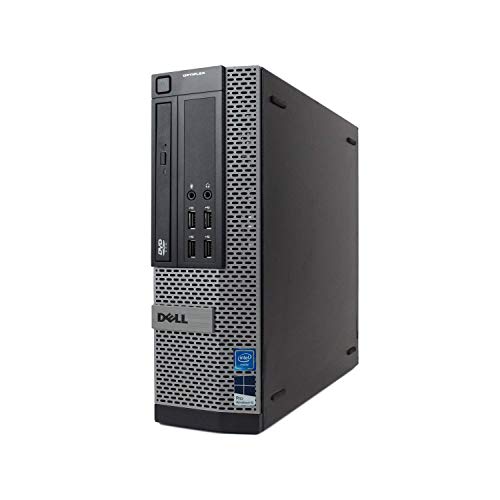

- Dell OptiPlex 3070 Micro – best for a tidy small desk
- Dell OptiPlex 3060 (32GB, 1TB SSD) – best for heavy multitasking on a budget
- Dell OptiPlex 7050 – best only for personal use, because of the Windows 11 CPU caveat
- Dell Pro Desktop Tower – best newer tower with a warranty path
- Dell Pro Micro QCM1250 – best newer compact machine
- Dell OptiPlex 3080 Micro – best low-power small machine with a newer chip
- Dell OptiPlex 5060 – best for bulk local files (SSD plus HDD)
- Dell OptiPlex 7060 Tower – best all-round performance and upgrade room
Side-by-side comparison
| Model | Type | Key specs as stated in the title | Best for |
|---|---|---|---|
| OptiPlex 3070 Micro | Micro PC, renewed | i5-9500, 16GB, 500GB SSD, Win 11 Pro | Compact setups |
| OptiPlex 3060 | Desktop, renewed (check the listing for case size) | i5-8500, 32GB DDR4, 1TB SSD, Win 11 Pro | Multitasking |
| OptiPlex 7050 | Desktop, renewed | Core i5 7500, 16GB DDR4, 512GB SSD, Win 11 Pro | Personal budget use |
| Dell Pro Desktop Tower | Tower, not marked renewed | 14th Gen Intel Core (check the listing), 16GB DDR5, 512GB SSD | Warranty and growth |
| Dell Pro Micro QCM1250 | Micro PC, third-party seller | Intel Ultra 5 235T, 16GB DDR5, 512GB SSD | Compact and current |
| OptiPlex 3080 Micro | Micro PC, renewed | i5-10500T, 16GB, 512GB SSD, Win 11 Pro | Quiet, cool running |
| OptiPlex 5060 | Desktop, renewed (check the listing for case size) | i5-8500, 16GB DDR4, 500GB SSD plus 1TB HDD | Bulk file storage |
| OptiPlex 7060 Tower | Tower, renewed | i7-8700, 32GB DDR4, 1TB SSD, Win 11 Pro | Top performance here |
The eight desktops in detail
Dell OptiPlex 3070 Micro (Core i5-9500, 16GB, 500GB SSD)
The listing describes a renewed OptiPlex 3070 Micro PC with an Intel i5-9500, 16GB of RAM and a 500GB SSD, running Windows 11 Pro, with 5G Wi-Fi and Bluetooth. A 9th-generation processor clears the Windows 11 processor list, which is the first box a home-office desktop should tick. The micro format means the whole computer can hang behind a monitor or sit on a shelf, leaving the desk free for paperwork.
For email, spreadsheets, video meetings and a dozen browser tabs, 16GB and an SSD are the right ballpark. A micro case has no room for a graphics card, so check the listing for display outputs. Because the unit is renewed, confirm the return window, the warranty length and whether a power adapter is included before ordering.
Pros
- Small enough to mount or hide
- Processor generation is on the Windows 11 list
- SSD and 16GB stated in the title
Cons
- Renewed, so condition varies by seller
- 500GB fills quickly if you keep local archives
- Little internal expansion room
Who it’s for: remote workers with a small desk who want one quiet, compact office machine.
Who should skip it: anyone who needs several large displays or lots of local storage.
Dell OptiPlex 3060 Desktop (Core i5-8500, 32GB, 1TB SSD)
This renewed OptiPlex 3060 lists an i5-8500 with a 3.2 clock figure, 32GB of DDR4 RAM and a 1TB SSD, with built-in Wi-Fi, Bluetooth and Windows 11 Professional. The memory and storage figures are the headline here: double the RAM of most listings in this set and a terabyte of solid-state space. The title does not name the case type, so check the listing.
That capacity suits people whose workday involves a browser with many tabs, a remote-desktop window, a chat client and a spreadsheet open at the same time, all of which compete for memory. The processor is 8th generation, the oldest generation that appears on Microsoft’s supported list for Windows 11. As with any renewed machine, read the seller’s warranty terms and the condition grade.
Pros
- 32GB gives real multitasking headroom
- 1TB SSD holds a large local file set
- 8th-generation CPU meets the Windows 11 requirement
Cons
- Form factor is not stated in the title
- Renewed with seller-defined condition
- Not a performance-class processor
Who it’s for: document-heavy and multi-window workers who would rather pay for memory than for a newer chip.
Who should skip it: buyers who need a specific small case size and will not check the listing first.
Dell OptiPlex 7050 Desktop (Core i5-7500, 16GB, 512GB SSD)
The OptiPlex 7050 listing gives an Intel Core i5 7500 at 3.40GHz, 16GB of DDR4, a 512GB SSD, built-in Wi-Fi and Bluetooth, Windows 11 Pro and HD Graphics 630 with 4K support, renewed. The sticking point is the processor: the i5-7500 is a 7th-generation part, and Microsoft’s published list of supported processors for Windows 11 starts at the 8th generation for this class of chip.
Workarounds can install Windows 11 on it, but that is not the same as being supported. If you work from home on an employer-managed setup, your IT team may refuse to enroll a device that fails the compatibility check. Treat this listing as a budget option for personal tasks, and ask the seller how Windows 11 Pro was installed and whether it passes the PC Health Check app.
Pros
- 16GB and 512GB SSD in the title
- Integrated graphics with 4K output stated
Cons
- 7th-generation CPU is not on Microsoft’s supported list
- May be refused by employer device-management rules
- Renewed, condition varies
Who it’s for: home users on a tight budget who will run basic web and office tasks.
Who should skip it: anyone whose employer requires a Windows 11 compatible, managed device.
Dell Pro Desktop Tower (14th Gen Intel Core, 16GB DDR5, 512GB SSD)
This is the newest-generation tower in the set and the only full-size one not marked renewed. The title reads Dell Pro 2026 Desktop Tower, with 16GB of DDR5, a 512GB SSD, Windows 11 Pro, a 14th Gen Intel Core processor, Wi-Fi 6, Bluetooth, DisplayPort, USB Type-C and HDMI. The Copilot AI label refers to Windows features, not a particular chip.
The title does not give the exact Core model, which matters because 14th Gen covers several processor tiers. Check the listing for the full processor name. In practice a new tower has two selling points for a home office: a manufacturer warranty path that a refurbished unit lacks, and a tower case that normally leaves room to add storage or memory later.
Pros
- Not marked renewed
- DDR5 memory and Wi-Fi 6
- Several video output types listed
Cons
- Exact processor model is missing from the title
- Priced well above the renewed units
- 16GB is the same RAM as cheaper listings
Who it’s for: people who want a newer machine with a warranty path and room to grow.
Who should skip it: shoppers comparing on price alone, since renewed units give more RAM for the money.
Dell Pro Micro QCM1250 (Intel Ultra 5 235T, 16GB DDR5, 512GB SSD)
Listed under the third-party seller name ist computers, this item describes a Dell Pro Micro QCM1250 with an Intel Ultra 5 235T, 16GB of DDR5, a 512GB SSD, Wi-Fi 6E, Ethernet, DisplayPort and Bluetooth, running Win 11 Pro. The title also carries a stray comparison fragment about an Ultra 7 165U and a reference to an OptiPlex 7020 MFF. Rely on the Ultra 5 235T and verify it in the item details.
The format is a tiny business PC, suited to a desk where space matters or to mounting on the back of a monitor. Having both Wi-Fi 6E and an Ethernet port is handy for a home office, because a cabled connection is steadier for video calls and VPN sessions. Weigh compact current hardware against the extra RAM in older renewed listings.
Pros
- Current-generation processor class
- Ethernet and Wi-Fi 6E both listed
- Tiny footprint
Cons
- Title contains confusing, unverified comparison text
- Third-party seller, so check support terms
- Pricey for 16GB and 512GB
Who it’s for: people who want a compact, low-power desktop with a current processor.
Who should skip it: buyers who are put off by unclear titles or who want the most memory per dollar.
Dell OptiPlex 3080 Micro (Core i5-10500T, 16GB, 512GB SSD)
A renewed OptiPlex 3080 Micro with an i5-10500T, 16GB of RAM, a 512GB SSD, Windows 11 Pro, Wi-Fi and Bluetooth. The T in the processor name marks a lower-power variant that is common in small-form-factor business desktops, which usually means quieter operation and less heat in a tight space. That matters if the computer sits within arm’s reach of your workspace.
It is a 10th-generation chip, one step newer than the 3070 Micro and well inside the Windows 11 support range, which gives it a longer useful life for the same 16GB and 512GB layout. The title repeats the memory and storage in a trailing parenthesis, a sign that the seller offers several configurations under one listing, so choose the option carefully before you check out. Confirm the included accessories and the return policy.
Pros
- 10th-generation processor with a low-power T suffix
- Compact micro format
- 16GB and 512GB SSD as listed
Cons
- Renewed, with variable condition
- Multi-configuration listing can cause ordering mix-ups
- Limited expansion inside the case
Who it’s for: people who want a small, cool-running machine with a newer CPU than the older micro units.
Who should skip it: anyone planning heavy multitasking beyond 16GB.
Dell OptiPlex 5060 Desktop (Core i5-8500, 16GB, 500GB SSD plus 1TB HDD)
This renewed OptiPlex 5060 pairs an i5-8500 six-core processor, quoted with a 4.3GHz turbo, with 16GB of DDR4, a 500GB SSD and a 1TB hard drive, plus Wi-Fi, Bluetooth and Windows 11. The two-drive layout is useful for home offices: the SSD takes the operating system and active projects, while the larger hard drive holds archives, scans and backups that you rarely open.
Hard drives are slower and more fragile than SSDs, so keep real backups elsewhere. The title does not name the case type, so check the listing. The title says Windows 11 without naming the edition, so confirm Pro if you need domain join or remote desktop hosting.
Pros
- SSD plus a 1TB hard drive for bulk files
- Six-core 8th-generation processor
- Windows 11 supported by CPU generation
Cons
- Edition of Windows is not named in the title
- Mechanical drive adds noise and a failure point
- Renewed
Who it’s for: people who keep a lot of files locally and want fast boot plus cheap bulk storage.
Who should skip it: buyers who want an all-SSD machine or a tiny footprint.
Dell OptiPlex 7060 Tower (Core i7-8700, 32GB, 1TB SSD)
The OptiPlex 7060 listing states an Intel i7-8700 at 3.4, 32GB of DDR4 RAM and a 1TB SSD, with Windows 11 Professional, renewed, and it is described as a tower. That makes it the strongest-specified machine in the set for pure office computing: an i7-class processor, plenty of memory and fast storage. A tower case is also the format most likely to take extra drives or a low-profile graphics card later; confirm the slots on the listing.
Where this one fits is the home worker whose job includes large spreadsheets, local databases, several virtual machines or lots of browser sessions at once. It is an older platform, so it will not match a current processor on single-thread speed, and a tower will take more desk or floor space than the micro units.
Pros
- Strongest processor and memory pairing here
- Tower case with expansion potential
- 1TB SSD
Cons
- Larger footprint than micro PCs
- Older platform than the 10th-generation and newer picks
- Renewed, with variable condition
Who it’s for: power users in office roles who want the most capable all-round machine in the list.
Who should skip it: people with a very small desk or who need a new-in-box warranty.
How we picked these
We started from the Dell desktop listings returned for this search and kept those that are ordinary desktop computers for office work. Each title was read for processor, memory, storage, operating system and form factor, and listings that mixed up their own specifications were flagged. We then ranked by how well the stated parts suit remote-work tasks. Nobody on the team used or measured these units. The basis is published specifications, manufacturer documentation and buyer reviews, and every figure in this article comes from the listing title, which is a seller claim. Where a title was unclear we say so and point you to the listing.
What to look for in a work-from-home desktop
Check the processor generation against Windows 11
Windows 11 is the safest operating system for a work machine over the next several years, and it officially supports Intel Core processors only from the 8th generation onward, along with TPM 2.0 and Secure Boot support. Dell model names follow a simple pattern: the first digit after the i-number is the generation, so an i5-8500 is 8th generation and an i5-7500 is 7th. That one digit decides whether your IT department will accept the machine.
| Processor in listing | Generation | Windows 11 support |
|---|---|---|
| i5-7500 (OptiPlex 7050) | 7th | Not on the supported list |
| i5-8500, i7-8700 | 8th | On the list |
| i5-9500 | 9th | On the list |
| i5-10500T | 10th | On the list |
| 14th Gen Core, Ultra 5 235T | Current | On the list |
How much RAM remote work needs
Memory is the spec that decides whether a desktop feels smooth with a video call running beside a browser, a chat app and an office suite. Sixteen gigabytes is a sensible floor for work from home. Move to 32GB if you run virtual machines, keep dozens of tabs open or work in large spreadsheets. Check whether the memory is upgradable: micro PCs typically use laptop-style modules and have two slots at most, while towers have more room.
SSD size and the second-drive question
Every listing here includes a solid-state drive, which is the biggest single factor in how fast a machine starts and opens files. A 512GB drive is enough for an operating system, applications and a year of work files for most people. Choose 1TB if you store scans, photographs or local copies of cloud folders. A secondary hard drive is a cheap way to add capacity, but treat it as scratch space and back it up.
Form factor, ports and the peripherals you still need to buy
Micro PCs save space and tower PCs leave room to grow. Either way, a desktop has no screen, webcam, microphone or speakers, so budget for a monitor, a camera and a headset. If you use two displays, count the video outputs on the listing and see whether adapters are needed. Ethernet is more reliable than Wi-Fi for long meetings, so note which models list an Ethernet port. Also check for a headphone jack or USB audio support, because a headset with a clean microphone matters more to your colleagues than the processor does.
A worked example: matching a job to a configuration
| Typical workday | Sensible minimum | Comfortable choice |
|---|---|---|
| Email, chat, video calls, web apps | 16GB, 256GB SSD | 16GB, 512GB SSD |
| Large spreadsheets, accounting, many tabs | 16GB, 512GB SSD | 32GB, 1TB SSD |
| Virtual machines, local databases | 32GB, 512GB SSD | 32GB, 1TB SSD |
Renewed units and warranty
Renewed means the item has been refurbished by the seller to its own standard, and the grade, the warranty length and the return period vary between sellers. Ask what the replacement terms are, whether the Windows licence is genuine and whether the SSD was replaced or wiped. A newer machine costs more but may come with the manufacturer’s coverage path; confirm that on the listing. Keep the order confirmation and the seller’s contact details, since the return window starts when the box arrives and a dead-on-arrival claim is easiest when you have the paperwork.
Quick checklist before you click buy
- Processor generation is 8th or newer.
- RAM is at least 16GB and the type (DDR4 or DDR5) is stated.
- The listing shows how many monitors you can connect without adapters.
- The return window is at least 30 days.
- The power cord and any keyboard or mouse are clearly stated as included or not.
Mistakes buyers make with home-office desktops
Buying on the processor name alone. A familiar i5 or i7 label hides a spread of generations. Read the digits after the dash, since the gap between a 7th and an 8th generation part is the gap between unsupported and supported on Windows 11.
Forgetting the peripherals. It is easy to assume a desktop includes a camera or sound. It does not. Add a webcam, a headset and a monitor to your total before comparing machines.
Choosing storage by size alone. A 1TB hard drive is slower than a 256GB SSD for everyday work. Make sure the main drive is an SSD.
Ignoring the seller. At least one listing here is sold by a third-party reseller rather than Dell. Read the warranty and return text, because the brand name in the title is not a promise.
Trusting every phrase in a title. Some titles carry leftover keywords such as comparisons to other processors or older model names. Confirm the rest in the item details.
Verdict
For most remote workers, the OptiPlex 7060 Tower is the strongest all-round pick in this set, with its i7-8700, 32GB and 1TB SSD, and the OptiPlex 3060 offers similar memory and storage in a plainer package. For a small desk, the OptiPlex 3080 Micro balances a newer processor with a compact case, while the Dell Pro Desktop Tower is the choice if you want a newer machine that is not marked renewed. Avoid the OptiPlex 7050 for any employer-managed setup, and check the listing details on every renewed unit before you order.
Related guides
- How To Check Gpu Compatibility With Your Motherboard And Cpu
- High-Performance Gaming Desktop Specifications
- Prebuilt Gaming Pc Rtx 5070 Under 1500
Frequently asked questions
Is a renewed desktop a good idea for working from home?
It can be, if the specifications fit your work and the seller offers a clear warranty and return policy. A renewed business desktop often gives more memory and storage for the money than a new one, which is why most of this list is renewed. The trade-off is condition and support, which vary by seller. Choose a processor from the 8th generation or newer for Windows 11, and keep the return window in mind.
How much RAM do I need for remote work?
Sixteen gigabytes covers email, video calls, spreadsheets and plenty of browser tabs. Go to 32GB if you run virtual machines, handle large files, keep a long list of applications open or want the machine to last longer. Check whether the memory slots can be upgraded later, because small micro cases may have only two.
Do these desktops come with a monitor or webcam?
No. The listings are for computers only, and the titles do not mention a monitor, webcam, microphone or speakers. Plan to buy a display, a camera and a headset, and check whether your cables and adapters match the video outputs on the machine you choose. A sturdy monitor arm and a decent chair are worth including in the same budget.
Will an older Intel processor run Windows 11?
Intel Core processors from the 8th generation onward are on Microsoft’s supported list. A 7th-generation chip such as the i5-7500 is not, and a workaround install may not receive every update. Check compatibility with the PC Health Check app before you rely on the machine for work, and ask the seller how the operating system was installed.
Should I pick a micro PC or a tower?
Pick a micro PC if desk space matters and your needs are office tasks. Pick a tower if you want to add storage or memory later, or want better cooling in a warm room. Towers usually have more room for upgrades, while micro units are easier to mount and tidy in a small space.
Related guides
- How to Choose the Best Laptops for Solidworks (October 2026)
- Google AI Pro vs ChatGPT Plus: Which AI Subscription Fits a PC Builder or Gamer?
- Best Mini PCs for Gaming: Eleven Compact Desktops Sorted by Graphics Class: 10 Compared (2026)
- Best Budget Gaming PCs: Six Entry-Level Prebuilts Compared: 6 Compared (2026)