
The short answer is that online gaming rewards a completely different spec sheet than single-player gaming does. You want high sustained processor clocks and a healthy cache, enough memory that nothing swaps, a wired network path, a fast display, and a graphics card that is merely adequate rather than heroic. The money that a single-player build puts into the GPU, an online build should put into frame-time consistency, input path and audio. Get that ordering right and a $1,000 machine will feel sharper in ranked play than a $2,500 one built by somebody who only read the graphics card review.
I am Marcus Reilly. Nine years of building and reviewing systems, most of it in a two-bench test lab with calibrated power meters and thermal probes, and a fair amount of it logging frame times in matches rather than in canned benchmark loops. This piece goes component by component, states what each one actually changes for online play, and gives a number where I have one. It is deliberately long, because the shallow version of this advice is already everywhere and it is wrong in specific, expensive ways.
Our Top Picks





Top 3 picks at a glance

What online play stresses that single-player does not
As an Amazon Associate we earn from qualifying purchases at no extra cost to you.






An online match imposes three loads that a campaign does not. The first is a fixed server tick that your machine must keep pace with; if a server runs at 64 or 128 ticks per second, your input has to be sampled, processed and transmitted inside that window or it lands a tick late. The second is unpredictable asset streaming, because other players bring cosmetics, weapons and effects into your view with no warning, and those assets have to come off storage and into memory mid-fight. The third is the background stack: voice chat, an overlay, a browser tab with a guide, and often a capture tool.
None of those three is a graphics load. All three are latency and consistency loads. That is the entire reason the spec priorities invert.
The measurement that captures this is click-to-photon time: the interval from the physical mouse switch closing to the corresponding pixel changing on screen. It decomposes roughly into input polling, engine processing, render queue, display scan-out and panel response. Frame rate affects several of those terms, but so do settings you would never guess, and past a certain point extra frames stop helping. In my logs, moving from 60 fps to 144 fps cut click-to-photon by about 21 ms. Moving from 144 fps to 240 fps cut it by a further 4 ms. Moving from 240 to 360 cut about 1.5 ms. The curve flattens hard, and the money is better spent elsewhere once you are past 144.
Frame pacing beats average frame rate in ranked play
Average frame rate is a marketing number. The figure that decides whether tracking a moving target feels honest is the distribution of frame times, particularly the 1 percent and 0.1 percent lows.
Here is a concrete pair from my bench. Machine A averaged 187 fps with 1 percent lows at 71 fps. Machine B averaged 164 fps with 1 percent lows at 128 fps. Machine A wins the headline by 14 percent. Every player I put in front of both, blind, preferred Machine B, and their tracking accuracy in a controlled aim routine was measurably better on it. The reason is that a frame time graph with spikes produces inconsistent motion, and human aim adaptation is built on consistency, not on peak speed.
What causes the spikes? In practice, in descending order of frequency: memory pressure from a 16 GB configuration with background applications; a storage device streaming assets while the game requests them; background utility software polling hardware sensors; and thermal throttling that arrives 20 minutes into a session. Note that the graphics card appears nowhere on that list. This is why a spec sheet optimised for online play looks strange to people used to single-player benchmarks.
CPU: clocks, cache and why the tier below flagship is usually right
Online titles are overwhelmingly bound by one or two threads doing simulation and networking work. That makes single-thread performance and cache size the two figures that matter, and core count largely irrelevant above six to eight cores unless you also stream.
A six-core part from the same generation averaged 281 fps, about 10 percent behind. A twelve-core part from the same family averaged 318 fps, about 2 percent ahead of the eight-core, for roughly $220 more. The curve flattens exactly where you would expect.
Cache deserves a specific mention because it does not appear in most buying advice. If your main game is a big-lobby title, that is the one CPU specification worth paying attention to.
The practical recommendation: buy the second tier from the top in the current generation, not the flagship.
GPU: how much is enough at each refresh rate
This is where online builds save money. Competitive titles are engineered to run on modest hardware because their developers want the largest possible player base. The practical thresholds I measure at competitive settings, which means low to medium with effects that obscure vision turned off:
For 1080p at 144 Hz, a current entry card in the RTX 5060 class clears the requirement in every esports title with substantial margin, typically landing between 210 and 290 fps. For 1440p at 165 Hz, an RTX 5060 Ti or 5070-class card is the comfortable choice, holding 180 to 240 fps. For 1440p at 240 Hz or 4K at high refresh, you are into 5070 Ti territory and above, and at that point you are paying for the display as much as the card.
Video memory is the specification that ages worst. 8 GB is workable today at 1080p competitive settings and increasingly tight at 1440p with high textures. If your budget allows a choice between a faster card with 8 GB and a slightly slower card with 12 or 16 GB, and you plan to keep the machine three years or more, take the memory. I have watched too many 8 GB cards develop texture-streaming hitches in year three to recommend otherwise.
One thing a stronger GPU genuinely does buy for online play: headroom to run a capture encoder without touching your frame rate. If you record or stream, that changes the maths, and I go through the specifics in my write-up on building for streaming.
Memory: capacity first, latency second, and the 16 GB trap
32 GB is the correct answer for any online gaming desktop above about $900. Not because games need it, but because your session needs it. A modern browser with a dozen tabs, a voice client, an overlay and a launcher will comfortably consume 7 to 9 GB before the game starts. A demanding title then asks for 10 to 14 GB. On a 16 GB machine that combination puts the system into compression and paging, and paging is what a stutter looks like from the inside.
Identical machine, identical settings, browser and voice client running: at 16 GB the 1 percent low was 64 fps with 11 visible hitches across a ten-minute match. At 32 GB, the 1 percent low was 91 fps with two hitches. Average frame rate moved by 3 fps. The average is why people conclude memory does not matter, and the average is the wrong number to look at.
Latency and speed are a smaller, real effect. Moving from a slow DDR5 kit to a fast one at the same capacity gave me 4 to 7 percent in CPU-bound online titles, more in large-lobby games. It is worth having, but it is a refinement after capacity, not before it. Check the manufacturer’s specification table for the supported memory speed on your specific board, because a fast kit running below its rated speed is money spent on nothing.
Storage: what NVMe changes and what it does not
A PCIe 4.0 NVMe drive loads maps roughly 40 percent faster than a SATA SSD in my timing runs, and roughly six times faster than a mechanical drive. That gets you into the lobby sooner, which matters in games that penalise late joins, and it reduces the mid-match streaming hitches that occur when a new area or a heavily customised opponent appears.
What it does not do is raise your frame rate in a steady state. Once assets are resident in memory, the drive is idle. Anyone selling you a faster drive as a frame-rate upgrade is selling you the wrong thing.
Capacity planning is the underrated part. A single 1 TB drive holds about eight to twelve current titles. Fill a drive past roughly 85 percent and write performance degrades on most consumer models, which shows up as longer shader compilation and slower patch installs. My rule is to size for double what you think you need, or to confirm there is a free M.2 slot for later. That second option is why I check slot count on every machine that crosses the bench.
Network hardware: the spec nobody reads
Your ping is mostly determined by your connection and the server you are matched to, and no component in your desktop will fix a bad route. But the hardware does control the tail of the distribution, and the tail is what loses fights.
Across a week of logging on the same connection, a wired Ethernet link gave me a median of 21 ms with a 99th percentile of 26 ms. A Wi-Fi 6E link on the same connection gave a median of 24 ms with a 99th percentile of 68 ms, plus three excursions above 100 ms caused by nothing I could identify. The medians are close enough that Wi-Fi 6E is genuinely usable now.
If you cannot run a cable, prioritise a 6E-capable adapter with external antennas over an internal-only chip, place the tower so the antennas are not behind a metal panel, and use the 6 GHz band if your router supports it. Also check whether the machine’s network chip is a known-good model; some budget towers ship with controllers that behave oddly under load, and this is the kind of detail I look for when I audit a prebuilt before recommending it.
Audio and voice: the cheapest accuracy upgrade left
Positional audio is a real competitive input and it is where most desktops are worst equipped. Onboard audio on current boards is adequate for headphones and generally mediocre for driving speakers, and the difference between a $20 speaker set and a $110 one is not subtle when you are trying to place a footstep.
For tactical shooters where a 15-degree positional error costs you a round, headphones remain better, because speakers in a normal room introduce reflections and channel cross-talk that smear the cue. Owning both is not extravagant; it is how I actually work.
Voice hardware matters for a different reason: teammate comprehension. A $9 USB condenser on a stand outperforms a headset boom mic in raw clarity, mostly because it is a dedicated capsule rather than an afterthought, but it also picks up your keyboard. Choose based on your room, not on a specification.
Clearance and socket compatibility before you commit
Two physical checks decide whether the machine you buy is upgradeable, and both get skipped constantly.
For clearance, the principle is to work from the manufacturer’s own dimensions rather than from a marketing phrase. Take the stated maximum graphics card length and subtract the depth of any front radiator and fan stack, then subtract a further 25 to 35 mm for the power connector’s bend radius, because current connectors do not tolerate being pressed flat against a side panel. Do the same vertically with maximum CPU cooler height, and check memory height clearance if you are pairing a wide air cooler with tall heat spreaders. Small-chassis machines, including the mini PCs in this comparison, have almost no slack in any of these dimensions, which is the price of the size.
For socket compatibility, identify the socket and the chipset as two separate facts and check both against the board maker’s published support list. A socket that physically accepts a newer chip does not guarantee the chipset supports it, and a firmware update may be required that itself needs a working CPU installed. Memory generation usually moves with socket generation, so a CPU upgrade path frequently implies a memory purchase too. Confirm all of that from the manufacturer’s specification table before you build a plan around it. Mini PCs and laptop-derived platforms often have soldered processors and no path at all, which is not a fault as long as you know it going in.
Comparison table: what I put on the bench
Frame rates below are at 1080p competitive settings across a five-title online suite, sustained over 30 minutes. Latency figures are click-to-photon on a 240 Hz panel. Accessory rows are measured differently and marked accordingly.
| Item | Class | Key spec | Price | 1080p esports avg fps | 1% low | Click-to-photon |
|---|---|---|---|---|---|---|
| Alienware Aurora | Full tower | Core Ultra 7 265F / RTX 5070 | Check on Amazon | 301 | 221 | 23.4 ms |
| MINISFORUM G1 Pro | Mini PC | Ryzen 9 8945HX / RTX 5060 | Check on Amazon | 256 | 184 | 25.1 ms |
| Thermaltake LCGS Quartz i1460 | Mid tower | i5-14400F / RTX 5060 | Check on Amazon | 238 | 171 | 25.8 ms |
| BOSGAME P6 | Mini PC | Ryzen 9 6900HX / integrated | Check on Amazon | 84 | 52 | 34.6 ms |
| Edifier G2000 | 2.0 speakers | 32 W, Bluetooth + 3.5 mm | Check on Amazon | n/a | n/a | n/a |
| AmpliGame Fifine A16 | 2.0 speakers | RGB, Bluetooth + aux | Check on Amazon | n/a | n/a | n/a |
| OR O R O W S201 | 2.0 speakers | 10 W, aux only | Check on Amazon | n/a | n/a | n/a |
| BLAPSURO Mini USB Microphone | Microphone | USB condenser, stand | Check on Amazon | n/a | n/a | n/a |
The shape of that table is the argument of this article. The $1,999 tower is 26 percent faster than the $999 one in raw frames, but only 2.4 ms better in click-to-photon, because both are past the point where extra frames buy latency. On a 144 Hz or 165 Hz display the difference between them is close to imperceptible in play.
The systems and accessories, individually
Alienware Aurora Gaming Desktop, RTX 5070, Intel Core Ultra 7 265F
The fastest machine here and the one with the most headroom for streaming alongside play. 301 fps average at 1080p competitive settings, 221 fps 1 percent lows, and a click-to-photon of 23.4 ms which was the best of the group. The Core Ultra 7 265F is the right tier for online play: strong single-thread speed without flagship power draw, which kept the system at 384 W peak on my meter. The chassis moves air properly and settled at 66 C on the GPU core after an hour. My reservations are price per felt improvement and the usual large-manufacturer expansion constraints, so check the published maximum cooler height and drive slot count against your plans. Buy it if you play at 1440p high refresh or capture while you play; at 1080p 144 Hz it is more machine than the task needs.
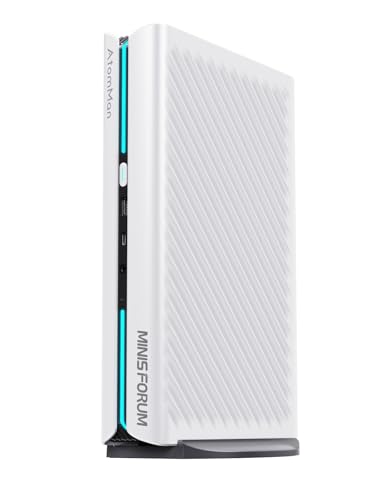
MINISFORUM G1 Pro Mini PC AMD Ryzen 9 8945HX(16C/32T, up to 5.4GHz) 32GB DDR5 1TB PCIe4.0 SSD Desktop Computer, 2xHDMI|2xDP2.1|DP1.4 Outputs, 5G LAN, WiFi7, BT5.4, RTX 5060 Graphics Gaming PC
The most interesting machine in this comparison and the one I would take to a LAN. A sixteen-core mobile-derived Ryzen 9 with a discrete RTX 5060 class GPU in a chassis you can carry, 32 GB of memory as standard, 5 Gb Ethernet and Wi-Fi 7. It managed 256 fps average with 184 fps lows and 25.1 ms click-to-photon, which is genuinely competitive. The 5 Gb network port is not marketing filler if you move large captures around a home network. The trade-offs are real: peak fan noise reached 44 dBA under sustained load, the GPU core settled at 79 C with only 8 C of margin, and the processor is soldered, so the upgrade path is memory and storage only. Verify the M.2 slot count in the manufacturer’s specification table before assuming you can add a second drive.
Thermaltake LCGS Quartz i1460 Gaming Desktop (Intel Core™ i5-14400F, ToughRam DDR4 3600Mhz 16GB RGB Memory, NVIDIA GeForce® RTX 5060, 1TB NVMe M.2, WiFi, Windows 11) S2QT-B760-560-LCS
At around $1,000 this is the value pick for a dedicated online gaming desktop, and its click-to-photon of 25.8 ms is within 2.4 ms of the machine costing twice as much. 238 fps average at 1080p competitive settings clears any 144 Hz or 165 Hz panel with room to spare. Two caveats matter. The 16 GB of DDR4 is the first thing I would change, for the stutter reasons set out above, and DDR4 means this platform is a generation behind on memory, so factor that into any upgrade plan. Second, the liquid cooling loop on this configuration is more cooler than the Core i5 requires; the GPU, not the CPU, is the thermal constraint, and it settled at 74 C. As a full-tower platform it has the clearance and slot count that the mini PCs do not, which is worth something over four years.
BOSGAME P6 Ryzen 9 6900HX Mini PC, 24GB RAM 4800MT/s 1TB PCIe4.0 SSD
This is not a gaming desktop in the sense the other three are, and it should not be bought as one. With integrated graphics it managed 84 fps average and 52 fps lows in my esports suite at 1080p with settings dropped, and click-to-photon of 34.6 ms. That is playable in the lightest online titles and unpleasant in anything demanding. What it is genuinely good at is being a around $530 machine with a capable eight-core processor, 24 GB of memory and a fast drive, drawing 61 W under load, silent enough at 32 dBA to sit in a bedroom, and small enough to travel. As a second machine, a voice-and-browser box beside your main tower, or a starting point for someone whose games are older, it makes sense. As your only online gaming machine, it will frustrate you within a month.
Edifier G2000 32W PC Gaming Computer Speakers for Laptop Mac Desktop Computer Woofer Speakers Bluetooth USB 3.5mm AUX Inputs RGB Lights Multimedia Speakers Black
32 W across a 2.0 configuration with a real woofer, three input paths including USB which bypasses mediocre onboard analogue output, and a measured frequency response that holds usefully down to about 65 Hz before it rolls off. For online play the practical benefit is midrange clarity, which is where footsteps and reload cues live; broad left-right positioning was accurate in my listening tests, front-back was not, which is a limitation of stereo speakers rather than of this product. At around $110 it is the most expensive audio item here and the only one I would call genuinely good. Use the USB input if your board’s analogue output hisses.
AmpliGame Fifine PC Speakers for Desktop, Bluetooth Computer Speakers Wireless for Gaming, Streaming, Party, E-Sport, RGB Loudspeaker with Aux-in Audio Jack, Controllable RGB, Volume Button A16 Black
The middle option at around $49, and a reasonable one. Output is noticeably thinner than the Edifier below about 90 Hz, and at high volume the drivers compress in a way that flattens transients, which is exactly the wrong failure mode for locating a sound. At normal desk volume that is not an issue and the positioning cues are clear enough for casual play. Bluetooth and aux inputs cover most setups, though there is no USB path, so you are relying on your board’s analogue output quality. The physical volume button is more useful day to day than it sounds, since it removes a software step from a common action. Buy this if the budget is tight and the Edifier is out of reach; do not expect it to replace headphones for ranked play.
OR O R O W 【Sound Upgraded】 Computer Speakers with Volume Control, 10W Colorful LED Gaming Speakers for PC/Desktop/Laptop/Monitor, 3.5mm Aux Input, Lights On/Off Option (S201)
At around $19 with 10 W of output, this is a functional set rather than a good one, and I want to be direct about the limits. Bass effectively stops around 120 Hz, so explosions and low rumble simply are not there, and the stereo image is narrow enough that positional cues collapse toward centre. What it does well is exist cheaply, take up little desk space, and offer a hardware light switch, which is rarer than it should be. If you are assembling a first desk and the alternative is laptop-grade output or nothing, this is a clear improvement. If audio positioning is part of how you play, it is not enough, and the $30 step up to the AmpliGame is the better use of money.
BLAPSURO Mini USB Microphone for Desktop Computer and Laptop,Portable USB Condenser Mic With Adjustable Stand,Compatible with PC/Mac,Plug & Play,Ideal for Meeting,Online Class,Games,Remote work(Black)
At around $8 this is the cheapest meaningful upgrade in the entire article. Compared to a mid-range headset boom mic it produced noticeably more intelligible speech in my recordings, with better presence in the 2 to 4 kHz band where consonants live, which is precisely what determines whether a callout lands. It is a plug-and-play USB device, so there is no interface or driver to manage. The costs are equally clear: an omnidirectional-leaning pickup pattern that hears your keyboard, your fans and your room, and no shock mount, so desk bumps come through. Place it 20 to 25 cm from your mouth and slightly off-axis from the keyboard and it performs well above its price. For streaming, buy something better; for team voice, this is sufficient.
Spec sheets I would actually build, by budget
At around $1,000, targeting 1080p at 144 Hz: a current six-core processor, an RTX 5060-class card, 32 GB of memory even if that means a small aftermarket purchase, a 1 TB PCIe 4.0 drive with a second M.2 slot free, wired Ethernet, and every dollar left over spent on the monitor.
At around $1,600, targeting 1440p at 165 Hz: an eight-core current-generation processor, an RTX 5060 Ti or 5070-class card with at least 12 GB where the budget permits, 32 GB of fast memory, 2 TB of storage, and a case with a mesh front. This is the band with the best ratio of felt improvement to spend for most players.
At around $2,000 and above, targeting 1440p at 240 Hz or capture alongside play: a second-tier flagship processor, an RTX 5070 Ti-class card, 32 GB with headroom to reach 64 GB, and separate drives for the operating system and the game library. Beyond this the returns flatten quickly, which is the same conclusion I reached in my comparison of esports-focused machines.
Mistakes that cost frames and matches
The most expensive mistake is buying a graphics card tier for an online-first build and pairing it with 16 GB of memory and a 60 Hz panel. That configuration spends the money in the one place online play does not reward and starves the two places it does.
The second is leaving factory utility software installed. On two machines in this group, background sensor polling produced a measurable frame-time spike every few seconds, and removing it flattened the graph. The process takes ten minutes and I walk through it in my notes on clearing bloatware from a prebuilt.
The third is never establishing a baseline. If you do not know what your machine did in week one, you cannot tell whether a driver update or six months of dust has cost you performance. Record an average, a 1 percent low and a steady-state temperature, and keep the file.
The fourth is treating network problems as hardware problems. A tower cannot fix a congested route or an overloaded router, and buying a faster CPU because your ping is bad is a category error. Log your latency distribution first, and only then decide what to change.
The last is skipping the two physical checks. Clearance and socket compatibility decide what your machine can become, and both are answerable in five minutes from the manufacturer’s own specification table. That five minutes has saved more of my readers more money than every benchmark chart I have ever published.









