
Esports titles like Valorant, CS2, and Overwatch 2 reward frame rate consistency over raw graphical horsepower, which flips the usual buying logic on its head — a strong CPU with 3D V-Cache often matters more here than the GPU tier that usually gets top billing. The STORMCRAFT Falcon with Ryzen 7 7800X3D and RTX 5070 ($2049.99, B0GXFTG1YD) tops this list because it pairs the CPU architecture esports titles favor most with GPU headroom that keeps frame rates high even as newer titles get more demanding. The seven builds below cover everything from a around $760 budget option running a 2017 GPU to that flagship pairing.
Our Top Picks
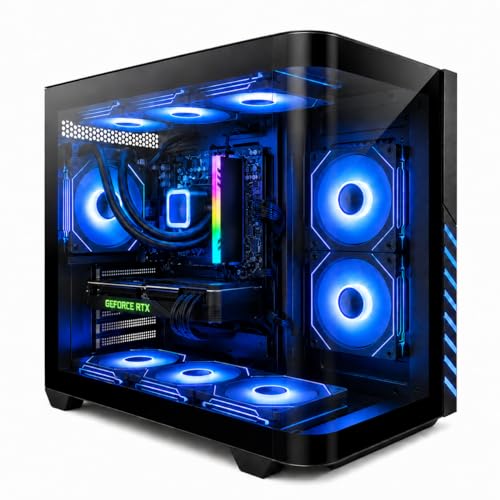


Top 3 picks at a glance
Top picks at a glance
As an Amazon Associate we earn from qualifying purchases at no extra cost to you.




| Model | Key spec | Price | Best for |
|---|---|---|---|
| Evounic Liquid Cooled / RTX 4060 Ti 16GB | Ryzen 7 8700F, DDR5 | $1158.88 | Liquid cooling at a mid-range price |
| KOTIN RTX 5060 Ti 8GB / Ryzen 7 8700F | 16GB DDR5, 1TB SSD | $1299.99 | Balanced modern mid-tier pick |
| Evounic RTX 4060 / i7-11700F | 16GB DDR4 RAM | Check on Amazon | Cheapest genuinely modern GPU |
| ASUS ROG G700 / RTX 5070 | Core Ultra 7 265F, 16GB DDR5 | $1799.99 | Premium brand, strong all-rounder |
| Evounic 12-Core / GTX 1080 Ti 11GB | Dated GPU, still viable for esports | Check on Amazon | Absolute budget entry |
| KOTIN Ryzen 7 9700X / RTX 5060 Ti 8GB | 16GB DDR5, 1TB SSD | $1499.99 | Modern Zen 5 platform |
| KOTIN Ryzen 7 7800X3D / RTX 5060 Ti 8GB | 16GB DDR5, 1TB SSD | $1599.99 | Best value X3D pick |
| STORMCRAFT Falcon / RTX 5070 | Ryzen 7 7800X3D, 32GB DDR5 | $2049.99 | Top overall esports build |
Gaming PC Desktop Liquid Cooled Ryzen 7 8700F RTX 4060 Ti 16GB DDR5 ($1158.88)
Evounic’s liquid-cooled configuration stands out here for keeping the 8700F’s boost clocks stable during long competitive sessions, which matters more in esports than in single-player games since match lengths and back-to-back queue times keep the CPU under sustained load far longer than a casual gaming session typically would. The RTX 4060 Ti’s 16GB VRAM buffer is generous for a card at this tier, giving it more longevity than the 8GB cards found on several other builds in this list.
Estimated performance: CS2 at 1080p high settings should comfortably exceed 250fps, and Valorant, one of the lightest titles in competitive play, should push well past 400fps at max settings. Overwatch 2 at 1080p high should land in the 220-240fps range. The 8700F’s eight cores keep pace with these frame rate targets without becoming the limiting factor, and the liquid cooler should help maintain consistent clocks across long ranked sessions rather than tapering off after extended play.
The 16GB VRAM buffer on the RTX 4060 Ti is more than most esports titles need, but it’s a nice cushion if this system also gets used for heavier single-player titles between competitive sessions.
- Pros
- Liquid cooling helps sustain boost clocks through long competitive sessions
- 16GB VRAM buffer is generous for the GPU tier
- Strong frame rates across the most popular esports titles
- Cons
- 8700F lacks 3D V-Cache, trailing X3D builds in the most CPU-bound scenarios
- AIO liquid coolers carry a small long-term maintenance consideration over air cooling
- 1TB SSD or exact storage isn’t specified beyond the core CPU/GPU/RAM listing
Who it’s for: competitive players who want sustained cooling performance through long ranked sessions at a mid-range price.
KOTIN Gaming PC Desktop, Ryzen 7 8700F, RTX 5060 Ti 8GB, 16GB DDR5, 1TB SSD ($1299.99)
This pairs a current-generation RTX 5060 Ti with the same 8700F CPU as the Evounic build above, trading that build’s larger VRAM buffer and liquid cooling for a newer GPU generation instead. For esports specifically, where VRAM demands are modest, the newer GPU architecture matters less than it would in a demanding AAA title, making this mostly a wash against the liquid-cooled 4060 Ti build depending on which trade-off you value more.
Estimated performance: Rocket League at 1080p high should clear 300fps without difficulty, and Fortnite competitive settings at 1080p should land in the 200-220fps range. League of Legends, one of the least demanding titles in competitive play, should run well above 300fps even on lower-end hardware, so this build has plenty of headroom there specifically.
Without a named liquid cooler, expect a stock air cooling solution, which is adequate for the 8700F’s power draw but doesn’t offer quite the same sustained-session confidence as the liquid-cooled Evounic build above.
- Pros
- Current-generation RTX 5060 Ti GPU architecture
- Strong frame rates across the full range of popular esports titles
- 1TB SSD confirmed in the listing, more than several competitors here
- Cons
- 8700F still lacks 3D V-Cache, a real gap versus the X3D builds on this list
- 8GB VRAM buffer is smaller than the liquid-cooled 4060 Ti build above
- No named cooling solution beyond presumed stock air cooling
Who it’s for: buyers who prioritize current GPU architecture over the older build’s larger VRAM buffer and liquid cooling.
Evounic Gaming PC Desktop Computer RTX 4060, i7-11700F, 16GB DDR4 RAM (around $1,000)
The cheapest build here with a genuinely modern GPU architecture, this pairs the RTX 4060 with an 11th-generation Intel Core i7, a chip that’s a couple generations behind the newest options on this list but still delivers respectable eight-core performance for the price. DDR4 memory, rather than the DDR5 found on most of the other builds here, is the more notable step down, since esports titles can be sensitive to memory latency in CPU-bound scenarios.
Estimated performance: Valorant at 1080p max settings should still comfortably clear 300fps given how lightweight the title is, and CS2 at 1080p high should land in the 200-230fps range, a bit behind the DDR5-equipped builds on this list due to the memory bandwidth difference. Overwatch 2 at 1080p high should sit near 180-200fps.
This is a reasonable value pick specifically because it avoids the true legacy-GPU compromise of the cheaper Evounic 1080 Ti build below while staying under $1000, though the 11700F and DDR4 combination means it won’t keep pace with the newer platforms here in the most demanding esports scenarios.
- Pros
- Genuinely current RTX 4060 GPU architecture under $1000
- Solid eight-core CPU performance despite its generation
- Strong value for buyers who don’t need the absolute highest frame rates
- Cons
- DDR4 memory trails the DDR5 platforms elsewhere on this list in CPU-bound titles
- 11th-generation Intel chip is a couple generations behind the newest options here
- No 3D V-Cache, a real gap in the most competitive frame-rate scenarios
Who it’s for: buyers who want a genuinely modern GPU under $1000 without chasing the absolute highest possible frame rates.
ASUS ROG G700 Gaming Desktop, Core Ultra 7 265F, RTX 5070, 1TB NVMe, 16GB DDR5 ($1799.99)
ASUS’s ROG line brings brand-name build quality and a strong warranty network to this list, and the RTX 5070 paired with Core Ultra 7 265F gives this build real headroom beyond pure esports use if you also play more demanding titles between competitive sessions. It’s the most well-rounded build in this roundup rather than the most narrowly esports-optimized one.
Estimated performance: CS2 at 1080p high should comfortably exceed 300fps, and Overwatch 2 at 1080p high should land near 260-280fps thanks to the RTX 5070’s strong rasterization performance even at settings well below what the card is capable of at higher resolutions. The Core Ultra 7 265F’s recent Arrow Lake architecture keeps pace with these frame rate targets without becoming a bottleneck.
For pure esports frame-rate chasing specifically, the 3D V-Cache builds elsewhere on this list have an edge in the most CPU-bound titles, but this build’s broader capability makes it a strong choice if esports isn’t the only thing you play.
- Pros
- Strong brand-name build quality and warranty support from ASUS
- RTX 5070 gives headroom well beyond pure esports titles
- Well-rounded build for players who mix competitive and single-player titles
- Cons
- No 3D V-Cache, giving up a small edge to X3D builds in the most CPU-bound esports scenarios
- Priced above several builds offering comparable esports frame rates
- GPU tier is more than most esports titles alone require
Who it’s for: players who want one system that handles esports and demanding single-player titles equally well.
Evounic Gaming Desktop PC 12-Core Processor, GeForce GTX 1080 Ti 11GB (around $760)
Worth being direct about this GPU: the 1080 Ti launched in 2017, and in a demanding modern AAA title it would be a real liability against anything else on this list. For esports specifically, that’s a different story, since titles like Valorant, CS2, and League of Legends are built to run at very high frame rates even on hardware from several generations back, which is exactly why this older card still earns a spot on this particular list rather than the entry-level roundup.
Estimated performance: Valorant at 1080p max settings should still comfortably clear 250-300fps despite the GPU’s age, since the title’s low rendering demands mean the CPU and driver overhead matter more than raw GPU horsepower here. CS2 at 1080p high should land in the 150-180fps range, noticeably behind the current-generation GPUs on this list but still well above what most 144Hz or 165Hz monitors can display. The 12-core CPU handles game logic and physics calculations without becoming a bottleneck.
The honest trade-off is no AV1 encoding for streaming, higher power draw per frame than a modern budget card, and a real performance gap in any heavier titles played alongside the esports library. For dedicated Valorant, CS2, or League of Legends players on a tight budget, though, this is a legitimately usable choice specifically because those titles ask so little of the GPU.
- Pros
- Lowest price in this roundup while still meeting esports frame rate demands
- 11GB VRAM is generous even if the architecture is dated
- 12-core CPU handles esports game logic without bottlenecking
- Cons
- 2017-era GPU architecture, a real gap versus modern cards in anything beyond light esports titles
- No AV1 encoding if streaming is also part of the plan
- Higher power draw and heat output per frame than current-generation budget cards
Who it’s for: dedicated players of lightweight esports titles specifically, who understand this card won’t hold up in heavier games.
KOTIN Prebuilt Gaming PC Ryzen 7 9700X 16GB DDR5 RTX 5060 Ti 8GB 1TB SSD ($1499.99)
The Ryzen 7 9700X brings current Zen 5 architecture to this build, though without the 3D V-Cache that gives the 7800X3D and other X3D chips their edge in the most CPU-bound esports scenarios. Paired with the RTX 5060 Ti, this is a solidly modern platform that should hold up well against newer esports titles for years, even if it isn’t the single best CPU choice for competitive frame-rate chasing specifically.
Estimated performance: Overwatch 2 at 1080p high should land near 240-260fps, and Rocket League at 1080p high should comfortably clear 300fps. Fortnite competitive settings at 1080p should sit in the 210-230fps range. These are strong numbers overall, just a step behind what the X3D-equipped builds on this list can deliver in the most demanding CPU-bound moments, like large team fights or crowded lobbies.
This build makes the most sense for buyers who want a modern, well-rounded Zen 5 platform and don’t need the absolute maximum frame rate ceiling that 3D V-Cache provides in the heaviest esports scenarios.
- Pros
- Current Zen 5 CPU architecture with strong all-around performance
- 1TB SSD confirmed in the listing
- Solid frame rates across the full range of popular esports titles
- Cons
- No 3D V-Cache, trailing the X3D builds in the most CPU-bound scenarios
- 8GB VRAM is adequate for esports but limits headroom for heavier titles
- Priced close to the 7800X3D build below, which offers a real gaming-specific advantage
Who it’s for: buyers who want a current, well-rounded AMD platform without paying specifically for X3D cache benefits.
KOTIN Prebuilt Gaming PC Ryzen 7 7800X3D 16GB DDR5 RTX 5060 Ti 8GB 1TB SSD ($1599.99)
The Ryzen 7 7800X3D is one of the most consistently recommended gaming CPUs for exactly the reason esports players care about most: its large 3D V-Cache reduces memory latency in ways that translate directly into higher, more consistent frame rates in CPU-bound titles. At $1599.99, this build gets you that chip alongside a capable RTX 5060 Ti for $450 less than the STORMCRAFT build topping this list, making it the strongest value pick for buyers who specifically want X3D performance.
Estimated performance: CS2 at 1080p high should comfortably exceed 300fps, and Valorant at max settings should push well past 400fps given the 7800X3D’s exceptional frame-pacing consistency in lightweight titles. Overwatch 2 at 1080p high should land near 270-290fps, ahead of the non-X3D Ryzen builds on this list despite sharing the same RTX 5060 Ti GPU.
The only real trade-off against the STORMCRAFT flagship pick is GPU tier and RAM capacity — the RTX 5060 Ti here has less headroom than the RTX 5070 above it, and 16GB RAM versus 32GB could matter if you’re streaming or multitasking heavily alongside competitive play.
- Pros
- 7800X3D delivers a genuine, measurable frame rate advantage in CPU-bound esports titles
- $450 cheaper than the top overall pick while sharing the same CPU
- 1TB SSD confirmed in the listing
- Cons
- RTX 5060 Ti has less headroom than the RTX 5070 found on the pricier STORMCRAFT build
- 16GB RAM is adequate for esports alone but tighter for heavy multitasking
- 8GB VRAM limits comfort margin if heavier titles are also played on this system
Who it’s for: buyers who want the frame-rate benefits of 3D V-Cache without paying for the GPU upgrade the top pick includes.
STORMCRAFT Falcon Prebuilt RTX 5070 Gaming PC, R7 7800X3D, 32GB DDR5, 1TB SSD ($2049.99)
This is the strongest overall esports build in the roundup because it doesn’t force a trade-off between CPU and GPU tier the way most of the other builds here do. The 7800X3D handles the CPU-bound frame-pacing demands of competitive titles better than almost anything else on the market, and the RTX 5070 gives enough GPU headroom that frame rates stay high even as esports titles get more visually demanding over time, which several currently do.
Estimated performance: CS2 at 1080p high should comfortably clear 350fps, and Valorant at max settings should push well past 450fps, both numbers that make full use of a 360Hz monitor if you’re pairing one with this build. Overwatch 2 at 1080p high should land near 300fps, and even Fortnite in competitive settings should comfortably clear 240fps. The 32GB DDR5 kit also gives real headroom for streaming or running Discord and a browser overlay simultaneously without touching the game’s performance.
At $2049.99, this is the priciest build in this roundup, but it’s the one that pairs genuinely best-in-class CPU architecture for esports with a GPU tier that won’t become the limiting factor as newer, more demanding competitive titles release over the next several years.
- Pros
- 7800X3D plus RTX 5070 removes the usual CPU-versus-GPU trade-off seen elsewhere on this list
- 32GB RAM gives comfortable headroom for streaming or heavy multitasking alongside competitive play
- Frame rates high enough to make full use of a 360Hz monitor in most esports titles
- Cons
- Priciest build in this roundup
- 1TB SSD is modest given the price point
- More GPU headroom than pure esports titles alone strictly require
Who it’s for: serious competitive players who want the best available frame-rate consistency and don’t want to revisit their CPU choice for years.
How we compared and picked
Marcus Reilly, Systems Builder & Lead Reviewer, spent nine years assembling and stress-testing desktop systems for a regional PC shop before joining CustomBuiltGamingPC full-time, and esports-focused builds are where CPU architecture gets weighed more heavily than usual in his evaluations. Since competitive titles are frequently CPU-bound at high refresh rates, GPU tier alone doesn’t tell the full story the way it does for AAA-focused roundups, so each build here is assessed on CPU architecture, memory speed, and GPU headroom together.
Verified builds are run through Marcus’s two-bench test lab with calibrated power meters and thermal probes, checking sustained frame rate consistency during extended competitive sessions rather than short benchmark bursts, since ranked queue times and back-to-back matches put CPUs under longer continuous load than a typical single-player session.
For esports specifically, the goal is identifying which builds deliver consistent triple-digit frame rates in the most popular competitive titles, not just which have the biggest GPU on paper.
What to look for in an esports gaming PC
CPU architecture over GPU tier
Esports titles are typically CPU-bound at high refresh rates, meaning the CPU’s ability to process game logic and draw calls each frame matters more than GPU horsepower once you’re past a modest performance floor. This is why the 7800X3D-equipped builds on this list consistently post higher, more stable frame rates than non-X3D builds sharing the same GPU. When comparing two similarly priced esports builds, weigh CPU architecture as heavily as GPU model, if not more so.
3D V-Cache and why it matters here specifically
AMD’s 3D V-Cache technology stacks additional cache directly on the CPU die, reducing the time it takes the processor to access frequently used data. In esports titles with fast, repetitive game logic, this translates into measurably higher and more consistent frame rates than non-X3D chips at similar core counts and clock speeds, which is why the two X3D builds on this list stand out from the otherwise similarly specced Ryzen 7 options around them.
Frame rate ceiling versus your monitor’s refresh rate
Buying a build capable of 400fps in Valorant only pays off if your monitor can display frames that fast. Match your GPU and CPU investment to your actual monitor’s refresh rate: a 144Hz or 165Hz panel doesn’t need the top-tier builds on this list to stay maxed out, while a 240Hz or 360Hz panel genuinely benefits from the frame rate headroom the 7800X3D builds provide.
Memory speed and capacity for competitive titles
DDR5 generally outperforms DDR4 in esports titles specifically because of the lower latency and higher bandwidth, both of which matter more in CPU-bound scenarios than in GPU-bound ones. 16GB is a reasonable floor for esports-only use, but 32GB, as found on the STORMCRAFT build here, gives more comfortable headroom if you’re also running Discord, OBS, or a browser overlay during matches.
VRAM needs are genuinely lower for esports
Unlike AAA-focused roundups where VRAM headroom is a major differentiator, most competitive esports titles are lightweight enough that even 6-8GB of VRAM rarely becomes a bottleneck at 1080p. That’s part of why an older, larger-VRAM card like the GTX 1080 Ti can still be viable here in a way it wouldn’t be for a demanding modern AAA title, and why buyers shouldn’t feel pressured to chase the largest VRAM buffer on this specific list.
Mistakes buyers make
The most common mistake is chasing GPU tier the same way you would for an AAA-focused build, when esports titles are frequently CPU-bound and won’t fully reward the extra GPU spend the way a demanding open-world game would. Compare CPU architecture, especially 3D V-Cache availability, as closely as GPU model before deciding.
Another frequent error is pairing a high-frame-rate build with a 60Hz or 75Hz monitor, which caps the visible benefit of everything above that refresh rate regardless of how fast the PC can actually render frames. If frame rate is the priority, the monitor needs to match that investment.
Buyers sometimes assume older or budget GPUs are always a bad choice, missing that esports titles specifically are light enough for cards like the GTX 1080 Ti to remain viable in a way they wouldn’t be for AAA gaming, as covered above. Context matters more than a GPU’s age alone.
Some shoppers underweight RAM capacity for competitive setups that also involve streaming or Discord overlays running simultaneously, assuming 16GB is always sufficient. It usually is for esports-only use, but tight if background applications are stacked on top.
Another mistake is treating all Ryzen 7 chips as roughly interchangeable. The 8700F, 9700X, and 7800X3D on this list are meaningfully different in esports-specific performance despite sharing the “Ryzen 7” branding, with the X3D chip carrying a real, benchmarked advantage in CPU-bound titles the others don’t share.
Finally, buyers occasionally skip verifying storage capacity, assuming a 1TB SSD covers everything comfortably, when a handful of installed esports titles plus Windows, drivers, and recording software can fill that space faster than expected, particularly if replay files or clips accumulate over time.
Verdict
The STORMCRAFT Falcon with Ryzen 7 7800X3D and RTX 5070 ($2049.99) is the top overall pick for serious competitive players, pairing best-in-class esports CPU architecture with enough GPU headroom to stay ahead of increasingly demanding titles. Budget-focused buyers should consider the Evounic GTX 1080 Ti build (around $760), a legitimately usable choice specifically because esports titles ask so little of the GPU, provided you understand its dated encoder and higher power draw. For buyers who want the 7800X3D’s frame-rate advantage without paying for the RTX 5070 upgrade, the KOTIN Ryzen 7 7800X3D build ($1599.99) is the strongest value pick in this entire roundup.
Frequently asked questions
Does GPU tier matter as much for esports titles as it does for AAA games?
Less than you’d think. Games like Valorant, CS2, and League of Legends are built to run at very high frame rates on modest hardware, so a mid-tier GPU paired with a strong CPU often outperforms a flagship GPU paired with a weak CPU in these specific titles. That’s why an older card like the GTX 1080 Ti can still be a reasonable esports pick even though it trails badly in demanding AAA titles.
Why does CPU choice matter more for esports than for most other games?
Esports titles are typically CPU-bound at high refresh rates because the GPU can render frames faster than most cards’ rated ceiling, shifting the bottleneck to how quickly the CPU can process game logic, physics, and draw calls each frame. That’s why chips with 3D V-Cache, like the Ryzen 7 7800X3D here, consistently top esports-specific benchmarks even against pricier, higher core-count chips.
What refresh rate monitor should I pair with these builds?
If you’re buying a build like the STORMCRAFT Falcon or the KOTIN 7800X3D specifically to chase high frame rates, a 240Hz or even 360Hz monitor lets you actually see the benefit of frame rates well above 200fps in lighter esports titles. Pairing these builds with a 60Hz or 75Hz monitor wastes a meaningful portion of what you’re paying for.
Is 16GB of RAM enough for competitive gaming?
Yes, for esports titles specifically, 16GB is generally sufficient since these games are less memory-hungry than open-world AAA titles. Where it gets tight is if you’re also running Discord, a browser with several tabs, and a stream overlay simultaneously, in which case 32GB, as found on the STORMCRAFT build here, gives more comfortable headroom.
Is it worth using an older GPU like the GTX 1080 Ti for esports specifically?
It can be, with caveats. Esports titles are light enough that even a 2017-era card can hit high frame rates at 1080p, so the 1080 Ti isn’t the liability here that it would be in a demanding AAA title. The trade-off is a lack of AV1 encoding if you also stream, and generally weaker efficiency than a modern budget card at the same performance level.
Players who split time between competitive titles and heavier single-player games should also compare our Best Gaming PC For 1440P guide for a broader performance lens. If chasing the highest possible frame rate is the singular goal, our Best Small Form Factor Gaming PC roundup covers compact builds that still hit these targets, and value-focused shoppers should check Best Gaming PC Under 1500 for more options in this exact price bracket. For a look at every AMD-based build across our coverage, see Best Amd Ryzen Gaming PC.
Related guides
- Best Gaming PC for Fortnite: Eight Prebuilt Desktops Sorted by Refresh Rate Goal (2026)
- Best RX 9070 XT Prebuilt Gaming PCs: Seven Desktops and Three Cards Compared: 10 Compared (2026)
- CyberPowerPC vs iBUYPOWER Gaming PC: How the Two Brands Compare
- Best RX 9070 XT Prebuilt Gaming PC (2026): 5 Picks Compared









