Designing a workspace that balances peak computing performance with refined home aesthetics is a delicate art. In modern home offices and minimalist living rooms, the bulky, dust-gathering tower PC is rapidly being replaced by Small Form Factor (SFF) builds. These compact machines deliver incredible power while maintaining a tiny desktop footprint, but curating one requires both a designer’s eye for spatial planning and an engineer’s precision.
The most critical constraint when assembling a mini-PC is physical compatibility. Because SFF cases pack high-end hardware into tight quarters, there is virtually zero margin for error. Understanding the standard graphics card clearance dimensions for sff cases is the difference between a seamless, high-performance workstation and a frustrating assembly process with parts that simply will not fit together.
As an Amazon Associate we earn from qualifying purchases at no extra cost to you.


Our Top Picks
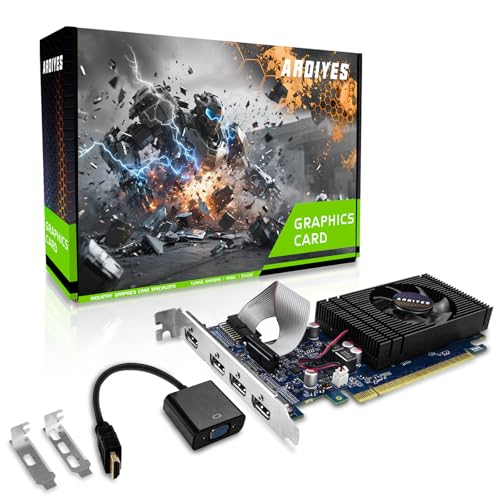


Top 3 picks at a glance
The Short Answer
Small Form Factor cases (typically defined as chassis with an internal volume under 20 liters) do not have a single universal clearance limit, but they generally conform to three distinct dimensional tiers. Low-profile setups require cards under 6.1 inches (155mm) in length and 2.7 inches (69mm) in height. True compact ITX cases accommodate cards up to 8.3 inches (211mm) long.
For high-performance configurations, modern “SFF-Ready” guidelines allow for graphics cards up to 12.0 inches (304mm) in length, 5.9 inches (151mm) in height, and up to 2.5 slots (50mm) in thickness. Always allow an extra 0.6 to 0.8 inches (15mm to 20mm) of vertical clearance above the card’s top edge to accommodate the stiff bend of power delivery cables.
Standard Sizes
To help you map out your desk space and internal chassis layout, the table below outlines the standard graphics card clearance dimensions for sff cases across the four primary hardware classifications. Measurements are provided in both imperial and metric standards to ensure precise planning.
| Card Classification | Max Length (Inches / cm) | Max Height (Inches / cm) | Max Width / Thickness | Ideal SFF Case Volume |
|---|---|---|---|---|
| Low-Profile (LP) | 5.9″ – 6.7″ / 15.0 – 17.0 cm | 2.7″ / 6.9 cm | 1 Slot (0.8″ / 2.0 cm) | Under 5 Liters |
| Mini-ITX Compact | 6.7″ – 8.3″ / 17.0 – 21.1 cm | 4.4″ / 11.1 cm | 2 Slots (1.6″ / 4.0 cm) | 5 – 8 Liters |
| SFF-Ready Standard | 11.0″ – 12.0″ / 28.0 – 30.4 cm | 5.9″ / 15.1 cm | 2.5 Slots (2.0″ / 5.0 cm) | 10 – 15 Liters |
| Max-Clearance Enthusiast | 12.8″ – 13.5″ / 32.5 – 34.3 cm | 6.3″ / 16.0 cm | 3.25 Slots (2.5″ / 6.3 cm) | 15 – 20 Liters |
How to Measure Your Space
Before purchasing a graphics card or a compact chassis, you must physically verify your spatial tolerances. Follow these steps to map out your build’s interior volume:
- Identify the Case Volume and GPU Clearance Specs: Check the manufacturer’s documentation for maximum GPU length, height, and slot width. SFF cases are highly sensitive to these three metrics.
- Measure the Physical Interior Length: Run a tape measure from the metal rear PCIe bracket expansion slots to the inside surface of the front panel. If you plan to install a front intake fan or a liquid-cooling radiator, subtract that component’s thickness (typically 25mm for a fan, or 52mm for a combined radiator and fan setup) from the total clearance.
- Determine Vertical Cable Clearance: Measure from the top of the PCIe slot on your motherboard to the side panel of the case. A standard graphics card PCB has a height of 111mm, but the power connector plugs into the top edge. Ensure you have at least 15mm to 20mm of extra space so the heavy-gauge power cables do not press hard against the tempered glass or mesh side panel.
- Verify the Slot Thickness (Width): Look at the back of your chassis to see how many expansion slot covers are available. A 2-slot card requires 40mm of width clearance, while a beefier 3-slot card requires 60mm. Make sure the case’s side panel or internal structural struts do not choke the fans of a wider card.
- Factor in Portability and Structural Support: If you plan to move your PC frequently, consider how the card is braced inside the chassis. Heavy cards can sag or bounce during transit, making internal braces or tight-fitting support brackets a spatial necessity.
By Room or Use Case
How you configure your SFF PC depends heavily on where it lives in your home and how you intend to use it. Different spaces require different trade-offs between thermal performance, noise output, and physical footprint.
The Minimalist Living Room Media Center
For home theater setups, the goal is to blend the PC seamlessly into an entertainment console or media cabinet. These spaces demand ultra-slim, silent operations. Low-profile cases (often under 5 liters in volume) are ideal here. You will want to target silent, low-profile graphics cards—such as entry-level multi-monitor cards priced between $70 and $90—which operate quietly without demanding massive power supplies. To ensure these cards fit into ultra-slim console cabinets, builders often use specialized metal low-profile bracket kits (usually retailing for $7 to $10) to convert standard-height output ports to a half-height form factor.
The Compact Home Office Desk
If you are designing a clean, productive home office desk, a medium-sized SFF case (7 to 11 liters) strikes the perfect balance. Placed on a warm oak or walnut desktop, a clean aluminum chassis looks sophisticated and keeps cable clutter to a minimum. For this use case, compact dual-slot graphics cards are the gold standard. They provide enough horsepower for video editing, casual gaming, and multi-monitor office multitasking while drawing a modest 150W to 200W of power, keeping your workspace quiet and cool.
The Dedicated Gaming & Creative Studio
For rendering, 3D modeling, or high-end gaming, you need maximum performance without sacrificing the compact aesthetic. This requires a premium SFF case (11 to 15 liters) designed with advanced ventilation. These builds utilize high-performance, “SFF-Ready” graphics cards—such as the latest mid-to-high-tier GPUs priced between $600 and $900. These cards feature advanced axial-tech cooling fans and require up to 2.5 slots of clearance. They run cool and quiet, ensuring your creative studio remains a peaceful environment even under heavy rendering workloads.
The Mobile Professional & Travel Station
If you are a hybrid professional, digital nomad, or competitive gamer who frequently transports your PC between home, office, and travel destinations, your spatial planning must extend outside the case. Your graphics card must be securely mounted inside a rigid chassis to prevent physical damage to the motherboard’s PCIe slot during transit. When packing up, many enthusiasts remove their high-end graphics cards entirely and secure them in padded, scratchproof hard protective travel bags (which cost around $12 to $18 and typically measure about 36x16x5 cm) to ensure safe travel in a backpack or carry-on luggage.
Common Sizing Mistakes
Even experienced PC builders can run into trouble when working with SFF cases. Avoid these common pitfalls to ensure a smooth, headache-free build:
- Ignoring the Power Connector Height: Many builders measure the physical height of the graphics card but forget that the power cable plugs into the top. Standard 8-pin or 12V-2×6 power connectors require a stiff cable bend that can add nearly an inch to the card’s effective height, preventing the case’s side panel from closing.
- Forgetting Front-Mounted Radiator Thickness: If your case specifications state a maximum GPU clearance of 320mm, this is almost always measured with an empty front panel. If you install a 240mm All-In-One (AIO) liquid CPU cooler at the front, the combined radiator and fan thickness will reduce your available GPU length clearance to roughly 268mm.
- Overlooking Motherboard Layout Offsets: Not all Mini-ITX motherboards position their primary PCIe slot in the exact same spot. A minor downward offset of just a few millimeters can cause a thick graphics card to collide with the bottom panel of an SFF case.
- Neglecting Riser Cable Tension: Many sandwich-style SFF cases use a flexible PCIe riser cable to mount the GPU behind the motherboard. If the riser cable is too stiff or poorly routed, it can push the graphics card outward, causing it to rub against the side panel or preventing the panel from latching securely.
FAQ
What does “SFF-Ready” mean for graphics cards?
As we look forward to the hardware landscape of 2026, the “SFF-Ready” guidelines represent an industry-wide initiative to simplify compact PC building. Created in partnership with major hardware manufacturers, this standard guarantees that any certified graphics card will fit seamlessly into any certified SFF case. To earn this designation, a graphics card must not exceed a maximum length of 304mm, a maximum height of 151mm (which includes the clearance needed for the power cable bend), and a maximum thickness of 50mm (equivalent to 2.5 slots).
How much clearance do I need for GPU power connectors in an SFF case?
You should generally allocate between 15mm and 20mm (approximately 0.6 to 0.8 inches) of vertical clearance above the top edge of your graphics card to accommodate standard power cables. If your case is incredibly narrow and does not offer this extra space, you can use specialized 90-degree right-angle power adapters or ultra-flexible custom silicone cables to safely route power without putting structural stress on the GPU’s power port.
Can I fit a triple-slot graphics card in a Mini-ITX case?
Yes, many modern Mini-ITX cases are specifically designed to accommodate thick triple-slot (and even 3.25-slot) graphics cards. However, doing so usually requires a “sandwich” style case layout, which uses a PCIe riser cable to mount the GPU on the opposite side of the motherboard. Keep in mind that installing a very thick card often limits your options for CPU cooler height or case fan placement on that side of the chassis.
Do low-profile brackets fit all slim PC cases?
Low-profile (or half-height) brackets are standardized to a height of 79mm (3.11 inches), compared to the 120mm (4.72 inches) height of standard brackets. While they will fit almost any slim, console-style, or small form factor home theater PC case, you must ensure that your card’s physical video ports align properly with the bracket’s cutouts. Many low-profile cards come with interchangeable metal brackets to accommodate both slim and standard-height configurations.