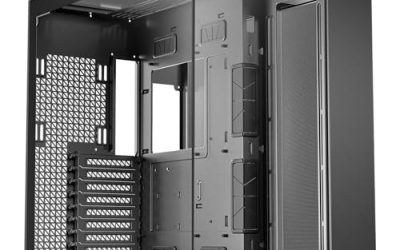
Building a NAS from a PC case is a different exercise than building a gaming rig. The questions are not about glass panels or RGB, they are about how many drives you can fit, how cool they stay, whether you can swap a failed disk without pulling the machine apart, and what size motherboard and power supply the chassis will accept. Pick a case with too few bays and you will be migrating data in two years; pick one with too many and you pay for volume you never fill. The keyword here points to a specific job: a storage-first enclosure for a home server, backup box, or media library.
This guide suits homelab builders, small-office users, and anyone retiring a pre-built NAS in favor of a custom machine. The eight cases below range from a Mini-ITX aluminum chassis with eight drive bays to full-size E-ATX towers with a dozen or more. Everything is judged from the listed titles, so notes cover bay counts, motherboard and power-supply formats, hot-swap support, and fan layout, but not noise, build quality, or thermals that no listing can prove. If you are planning a 2026 storage build, start with the drive count, then let the motherboard size decide the rest.
Our Top Picks


Top 3 picks at a glance
Quick Picks
As an Amazon Associate we earn from qualifying purchases at no extra cost to you.




| Product | Best for | Key spec from the title |
|---|---|---|
| Rosewill Helium NAS Duo | Mid-size NAS on a standard ATX board | 8 x 3.5 HDD, 4 x 140mm PWM fans |
| Rosewill Helium NAS Max | Larger drive arrays in a mid tower | 11 x 3.5 HDD, BTF motherboard compatible |
| JONSBO N5 | Maximum storage with E-ATX support | 12 HDD + 4 SSD bays, E-ATX board |
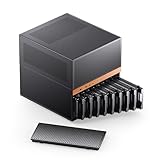
| JONSBO N6 | Compact hot-swap NAS | 9 HDD/SSD hot-swap bays, Micro ATX |
| Rosewill Thor NAS Pro | Server-style hot-swap chassis | 8 x 3.5 hot-swap, SATA/SAS, E-ATX |
| 8 Bay NAS Case (dual-chamber) | Hot-swap with SAS support | 8 x 3.5 hot-swap + 2 x 2.5 SSD |
| DARKROCK Classico Max | Storage plus water-cooling room | 10 x 3.5 HDD + 3 x 2.5 SSD, 360mm radiator |
| JONSBO N3 | Small footprint ITX NAS | Mini-ITX, 8 HDD + 1 SSD, aluminum |
How to Choose
Count drives first, then plan for growth
List how many 3.5-inch disks you need today, then add at least two spare bays. A four-disk array fits almost anywhere, but an eight-disk setup narrows the field to cases with eight or more bays, and a twelve-disk build points to the largest chassis here. Remember separate 2.5-inch bays for SSD cache or boot drives, because a case that lists 8 HDD plus 2 SSD saves you from mounting a boot drive loose. If you ever expect to expand, choose the bigger bay count now; swapping a chassis later means rebuilding the whole system.
Match the case to the motherboard and power supply
The listings cover Mini-ITX, Micro ATX, ATX, and E-ATX boards. The bigger the board, the more PCIe slots and SATA ports you get, which matters for adding an HBA card or a 10-gigabit network card. Power supply format matters too: some cases accept a standard ATX supply, while others list SFX. A mismatch costs you a return. Check the cable reach to the farthest drive, since a long drive cage can strain short power leads.
Look at hot-swap, backplanes, and drive types
Hot-swap bays let you pull a failed disk without opening the case, which is the feature that separates a serious NAS case from a PC case with extra cages. Several options here list hot-swap, and two mention SAS compatibility alongside SATA. If you only plan to use SATA disks, SAS support is a bonus, not a need. Ignore decorative panels and focus on how easily you can reach the drives, because a tool-free tray saves real time during a rebuild.
Check fans, airflow, and noise
Spinning disks run warm when packed together, so look at fan count and size. Titles here list four 140mm PWM fans, three built-in fans, four 120mm fans, and two 10cm fans. Larger fans move more air at lower speeds, which usually means less noise. PWM control lets the motherboard adjust speed with temperature. Budget cases tend to cut corners on fan quality and drive-tray hardware, so treat the fan count as a starting point and plan to monitor drive temperatures after the build.
A few things deserve less attention than the marketing suggests. Tempered glass, lighting, and radiator support do nothing for a storage server unless you are also running a hot CPU or a graphics card for transcoding. Instead, weigh how the drives mount, how the cables reach them, and whether you can service the box without emptying a shelf. If the machine will live in a closet or a bedroom, noise is the hidden cost, so favor larger, slower fans and plan for a quiet power supply. Finally, think about where the cables go: eight or more drives need a lot of SATA and power leads, and a case with a separate drive chamber makes that mess much easier to manage.
The 8 Best Options
Rosewill Helium NAS Duo
An ATX mid-tower with a mesh panel, four 140mm PWM fans, and support for eight 3.5-inch drives. It accepts ATX, Micro ATX, and Mini-ITX boards. It is for builders who want a conventional tower footprint with serious drive capacity.
- Strength: four 140mm PWM fans suggest strong airflow for a drive-heavy build.
- Strength: it supports three motherboard sizes, which keeps your hardware options open.
- Trade-off: eight bays is the lower end of this group, so heavy expansion needs another case.
Skip it if you want hot-swap trays or more than eight 3.5-inch drives.
Rosewill Helium NAS Max
The bigger sibling lists eleven 3.5-inch drive slots, four 140mm PWM fans, a mesh panel, BTF motherboard compatibility, and USB 3.2 connectivity. It fits those who want a mid-tower with a lot more storage room.
- Strength: eleven 3.5-inch bays give considerable growth space.
- Strength: BTF motherboard compatibility suits newer boards with rear-mounted connectors.
- Trade-off: the title does not mention hot-swap, so drive changes likely need tool work.
Skip it if you prefer a small footprint or need hot-swap access.
JONSBO N5
A NAS case that lists twelve HDD bays plus four SSD bays, E-ATX board support with a 330mm board width, three built-in fans, and eight PCIe slots. It is for big builds that mix many drives with expansion cards or GPUs.
- Strength: twelve HDD and four SSD bays make it the capacity leader here.
- Strength: E-ATX support and eight slots leave room for an HBA, a network card, and a graphics card.
- Trade-off: a chassis this large demands real floor or rack-shelf space.
Skip it if you want a small, quiet unit that sits on a bookshelf.
JONSBO N6
A Micro ATX case with nine HDD or SSD hot-swap bays, three power supply positions, ATX or SFX supply support, and two pre-installed fans. It suits builders who want hot-swap in a smaller box.
- Strength: hot-swap bays make drive replacement quick.
- Strength: flexible power supply positions help with cable routing and fit.
- Trade-off: Micro ATX limits slot count compared with the larger cases.
Skip it if you need an E-ATX board or several expansion cards.
Rosewill Thor NAS Pro
A full tower workstation and server chassis supporting eight hot-swap 3.5-inch SATA or SAS drives, two 2.5-inch SSDs, and E-ATX boards. It is built for a serious home server or small-office storage box.
- Strength: hot-swap bays with SATA and SAS compatibility offer real serviceability.
- Strength: E-ATX support means server-class boards fit.
- Trade-off: a full tower is bulky for a living-room media setup.
Skip it if you want a compact case or have no use for SAS or server boards.
8 Bay NAS Case, Dual-Chamber
A generic eight-bay case with hot-swap 3.5-inch bays, two 2.5-inch SSD slots, SATA and SAS compatibility, support for Micro ATX or ITX boards, an ATX supply, and room for four fans. The dual-chamber layout separates drives from the motherboard side.
- Strength: hot-swap bays and SAS compatibility at a modest board size.
- Strength: the dual-chamber design separates drive heat from the motherboard.
- Trade-off: the listing shows no brand name, so support and documentation are harder to judge.
Skip it if you need a recognized brand name or an ATX or E-ATX motherboard.
DARKROCK Classico Max
An E-ATX case listing four 120mm fans, ten 3.5-inch HDD bays, three 2.5-inch SSD bays, USB 3.0, and 360mm radiator support. It suits a storage server that doubles as a workstation or a more powerful host.
- Strength: ten HDD and three SSD bays offer wide storage options.
- Strength: 360mm radiator support allows liquid cooling for a hotter CPU.
- Trade-off: the title does not mention hot-swap bays.
Skip it if you want a simple, low-power NAS or a tool-free drive swap.
JONSBO N3
A Mini-ITX case listing eight HDD bays, one SSD slot, an aluminum and steel build, and two built-in 10cm fans. It is for small-footprint builds where space and looks matter as much as capacity.
- Strength: eight HDD bays in a compact Mini-ITX body.
- Strength: aluminum and steel construction gives a clean, solid look.
- Trade-off: Mini-ITX limits expansion to a single slot, so there is little room for add-on cards.
Skip it if you plan to add an HBA, a network card, and a graphics card.
Which One Fits Your Situation
You want the most drives possible
The JONSBO N5 with twelve HDD and four SSD bays leads, followed by the Rosewill Helium NAS Max with eleven bays and the DARKROCK Classico Max with ten.
You care about quick drive swaps
The Rosewill Thor NAS Pro and the JONSBO N6 both list hot-swap bays. Choose the Thor for a full tower with SAS support, or the N6 for a smaller Micro ATX build.
You live in a small space
The JONSBO N3 Mini-ITX case keeps the footprint small while fitting eight HDDs. Its single-slot limit is the price of the size, so pair it with a board that already includes the networking and SATA ports you need.
You want a standard ATX build with strong airflow
The Rosewill Helium NAS Duo, with four 140mm PWM fans and eight bays, is the simple pick. If you need more bays, step up to the Max.
Common Mistakes
- Buying a case with exactly the number of bays you need today and no room for growth.
- Overlooking the power supply format and ordering the wrong size.
- Assuming every drive bay is hot-swap when the listing says nothing about it.
- Putting a Mini-ITX board in a case and then needing an HBA or 10-gigabit card.
- Ignoring airflow and drive temperatures, then running warm disks around the clock.
Related guides
- How To Check Gpu Compatibility With Your Motherboard And Cpu
- High-Performance Gaming Desktop Specifications
- Desktop Computer For Working From Home
Frequently Asked Questions
Do I need hot-swap bays for a home NAS?
No, but they make replacing a failed drive faster and less risky. If you plan on a large array, they are well worth the extra cost.
Can a regular PC case work as a NAS?
Yes, if it has enough 3.5-inch mounts and airflow. A NAS case simply makes it easier by building in drive cages and fans.
What does SAS compatibility mean?
It means the backplane or bays can support SAS drives as well as SATA. If you only use SATA disks, you will not need it.
Which motherboard size is best for a NAS?
Micro ATX is a sweet spot for many builds, with enough slots for an HBA and network card. Mini-ITX saves space but limits expansion, and E-ATX suits server-class boards.