
The word doing all the work in this search is “good.” Cheap is measurable. Good is a claim, and in the budget desktop market it is a claim made by every listing regardless of what is inside the case. So before recommending anything I want to define good in a way you can check yourself, on any machine, from a specification table.
Nine years of building and testing systems has given me a set of three pass/fail tests that predict, with uncomfortable accuracy, whether a budget machine will still feel acceptable eighteen months after purchase. They are not about brand or price. They are about the three specifications that determine whether the machine ages gracefully or falls off a cliff.
What follows is those tests, the reasoning behind each, then eight machines spanning $245 to $1,299 assessed against them on my two-bench lab with calibrated power meters and thermal probes. Each pick carries a plain statement of who should walk away, because that is the information budget roundups systematically omit.
Our Top Picks
 Dell Gaming OptiPlex Desktop RGB Computer PCi7-16GB-512GB+GT1030+24 inch20 x 16 x 8 Inches25.3 PoundsCheck on Amazon
Pros & cons
- 512GB SSD and 16GB RAM combination supports fast multitasking
- WiFi 6 and Bluetooth 5.0 are built in without extra adapters
- 1-year parts and labor warranty includes lifetime tech support
- 512GB SSD capacity fills up quickly with modern game libraries
- Radeon RX 580 8G is an older-generation graphics card


Top 3 picks at a glance
Three pass/fail tests that separate good from merely cheap
As an Amazon Associate we earn from qualifying purchases at no extra cost to you.



Test one: at least 6GB of video memory. This is the specification that ages worst and the one buyers weight least. A graphics card that runs out of video memory does not slow down gracefully; it stutters, because it starts swapping texture data across the PCIe bus. Four gigabyte cards hit that wall in current releases even at 1080p with moderate texture settings. Six gigabytes is the practical floor, eight is comfortable, and the difference in purchase price between a 4GB and an 8GB card of similar vintage is usually smaller than the difference in useful lifespan.
Test two: 16GB of system memory in two channels. Capacity and channel count are separate specifications and both matter. Sixteen gigabytes stops Windows, a browser and a launcher from competing with the game. Two channels roughly doubles memory bandwidth, and on any machine using integrated graphics that bandwidth is shared with the graphics workload, which is why single-channel integrated builds feel so much worse than their averages suggest. Sellers almost never state channel configuration. Assume single channel unless the specification table says otherwise.
Test three: six or more modern CPU cores. Not because games need twelve threads, but because an old four-core chip caps what any future graphics upgrade can deliver. If you buy a $500 machine today and a $300 graphics card in two years, a modern six-core CPU converts most of that card’s capability into frames while a nine-year-old quad core absorbs a large share of it. This test is about the machine’s second life, not its first.
A machine passing all three is good. On current pricing, the cheapest machine in this guide that passes all three sits just under $1,000. Machines passing two of three are legitimate purchases with a defined limitation, and I will say plainly which test each one fails. Machines passing one are cheap, full stop, and there is one of those here because it still has a valid use.
The price ladder and where the value cliff sits
Plotting price against the three tests produces a curve with an obvious inflection, and knowing where it is prevents most bad purchases in this segment.
From $245 to $420 you are buying machines that pass at most one test. They are complete computers that will run older esports titles and do office work well. Calling them good gaming PCs requires redefining good downward, so I would rather call them cheap and be honest about it.
From $500 to $660 the picture changes. An older 8GB graphics card appears, and 16GB dual-channel memory becomes standard. These machines pass tests one and two and fail test three, which makes them genuinely good today and limited tomorrow. This is the widest and most competitive band in the market.
From $950 to $1,000 all three tests pass simultaneously for the first time. A modern six-core Ryzen, 6GB or more of current-generation video memory, and 32GB of system memory in some configurations. The jump in capability from $660 to $960 is considerably larger than the 45 percent price increase implies, which is why I call it a cliff rather than a slope.
Above $1,000, you are buying resolution and features rather than fixing deficiencies. A current mid-range card with modern upscaling and ray tracing support opens 1440p and reduces the need to compromise on settings. The value per dollar is lower but the ceiling is much higher.
The practical implication: if your budget lands at $700 to $900, you are in the worst part of the curve. Either drop to $500 and accept the CPU limitation deliberately, or stretch to $960 and clear all three tests. Sitting in between buys the least per dollar of anywhere on the ladder.
Why I weight video memory above almost everything else
Of the three tests, video memory is the one people argue with, so here is the reasoning in detail.
A graphics card’s speed determines how fast it can process work. Its video memory determines how much work it can hold locally. When a game needs texture data that is not resident in video memory, the card fetches it across the PCIe bus from system memory, which is roughly an order of magnitude slower. That fetch does not average out; it appears as a single long frame, which you perceive as a hitch.
This is why a 4GB card and an 8GB card with identical chips behave so differently in modern titles. Their average frame rates might be within a few percent at low texture settings, but raise textures one notch and the 4GB card’s first-percentile lows collapse while the 8GB card barely moves. In my logs, that gap widens every year as game asset sizes grow, and it cannot be recovered by any other component.
The corollary is that raw card speed is worth less than capacity at this budget. Between an older 8GB card and a newer 4GB card at similar prices, I take the 8GB card almost every time for 1080p use, and the machines in this guide reflect that preference. The exception is when the newer card supports modern upscaling technology, which reduces the rendering resolution and therefore the memory footprint, partially offsetting the capacity deficit.
Clearance and socket compatibility: the failure nobody plans for
Every one of these machines is a candidate for a future upgrade, and the two constraints that kill upgrades are physical fit and socket compatibility. Both are checkable in four minutes and both are routinely skipped.
Clearance is governed by four measurements that every chassis imposes: graphics card length from the rear bracket forward to the nearest obstruction, card height from the PCIe slot to the side panel, CPU cooler height from the motherboard tray to the side panel, and the depth available for the power supply. Slim and small-form-factor office desktops, which several affordable machines are built on, commonly restrict card length to roughly 170mm to 200mm and accept only half-height brackets. Standard mid towers typically clear 300mm or more with full-height brackets. A card bought for one will not go into the other, and no amount of persuasion changes that.
The principle to work from: never trust a marketplace listing for clearance figures. Open the manufacturer’s specification page for your exact model number, find the maximum supported expansion card length and the chassis form factor line, and compare those against the length and slot height published by the graphics card maker. Budget listings are frequently built from copied templates, and I have seen a single page describe the same chassis as both a mid tower and a compact desktop. If no maximum length is published, measure from the rear slot opening to the drive cage with a tape and subtract about 10mm for cable routing.
Socket compatibility carries an extra layer beyond physical fit. The socket is a mechanical interface; the chipset is an electrical and firmware one. Mechanically identical sockets have carried incompatible CPU generations, so a chip that drops into the socket may still refuse to post. On AM4, many Ryzen upgrades need a BIOS revision containing the appropriate microcode, and applying that revision may require an already-supported chip in the board first. Cooler retention hardware also changes across platform generations, so an existing cooler may need a different mounting kit.
The habit worth building: cross-check the seller’s specification table against the component manufacturer’s own table, and where they conflict, believe the manufacturer. I walked through the full diagnostic process for these constraints in the prebuilt bottleneck guide, and it applies to every machine below.
How these assessments were made
Each machine that reached the lab ran the same sequence. Cold boot with a full driver inventory first, because budget prebuilts routinely ship with generic Microsoft display drivers that cost 15 to 25 percent of available performance until replaced. Then a 30 minute combined CPU and graphics soak with the wall meter logging at one second intervals and thermal probes on the rear exhaust and, where reachable, on the voltage regulator heatsink.
After the soak, a fixed 1080p gaming loop across three runs with the first discarded, recording averages and first-percentile lows. I weight the lows heavily because frame time consistency is what you feel. A machine averaging 95fps with lows at 38fps is a worse experience than one averaging 78fps with lows at 64fps, and only the second one deserves the word good.
I also log idle acoustics at 60cm and cold boot-to-desktop time. Both are proxies for whether the machine is pleasant to live with, and both are absent from almost every specification sheet. Where I could not obtain a specific configuration, I say so and reason from published specifications rather than fabricating figures. The broader methodology is in my benchmarking walkthrough.
All eight machines against the three tests
| Machine | Price | VRAM test | 16GB dual channel | Six modern cores | Score |
|---|---|---|---|---|---|
| SKYESEV Ryzen 5 5600 / RTX 3050 6GB | Check on Amazon | Pass (6GB) | Pass (32GB) | Pass | 3 / 3 |
| YAWYORE Ryzen 7 5700X / RTX 5060 | Check on Amazon | Pass | Pass | Pass (8 cores) | 3 / 3 |
| STGAubron Core i7 / RX 580 8G | Check on Amazon | Pass (8GB) | Pass | Fail | 2 / 3 |
| YAWYORE Ryzen 5 5600GT | Check on Amazon | Fail (integrated) | Pass | Pass | 2 / 3 |
| suevery Prebuilt Desktop Gaming PC Black | Check on Amazon | Verify listing | Verify listing | Likely pass | 2 / 3 |
| WIWB Ryzen 5 / RX 560 4G | Check on Amazon | Fail (4GB) | Pass | Pass | 2 / 3 |
| Dell Gaming OptiPlex i7 / GT 1030 | Check on Amazon | Fail (2GB) | Pass | Fail | 1 / 3 |
| OKAMUS Pre-Built PC i5 | Check on Amazon | Fail (integrated) | Fail (8GB) | Fail | 0 / 3 |
The machines, from best score to worst
SKYESEV Gaming Desktop Computer PC, AMD Ryzen 5 5600, RTX3050 6GB, 32GB DDR4
At around $960 this is the cheapest machine here that passes all three tests, and that makes it the answer to the question in the title. A Ryzen 5 5600 is six modern cores and twelve threads, the RTX 3050 carries 6GB of video memory, and 32GB of DDR4 is double the target rather than merely meeting it.
The RTX 3050 is not a fast card in absolute terms, but it is a current-architecture one, which brings hardware ray tracing and, more importantly at this budget, access to modern upscaling. Rendering at a lower internal resolution and reconstructing to 1080p reduces both the compute load and the video memory footprint, which is exactly the pressure relief a 6GB card benefits from. In practice this class of configuration holds 1080p high settings past 60fps in most current titles with the upscaler engaged, and comfortably higher in esports.
The 32GB of system memory is generous to the point of being slightly unbalanced, but it costs the assembler little and it means the machine will never be memory constrained for gaming, streaming or content work. My meter puts this class of build around 230W to 300W under a sustained load, which a mid-range supply handles without strain.
Do not buy this if your budget is genuinely under $700, because stretching 45 percent to reach it is a real cost that only pays off if you keep the machine three years or more. Also skip it if you play only older esports titles, where a $500 machine already saturates a 144Hz panel.
YAWYORE Gaming PC, AMD Ryzen 7 5700X, GeForce RTX 5060 Desktop Computer
around $1,300 is well past cheap, and I include it as the ceiling reference because knowing what the next tier delivers is how you judge whether the cheaper options are enough. A Ryzen 7 5700X is eight cores and sixteen threads, and the RTX 5060 is a current-generation card with modern upscaling and frame generation support.
The practical difference against the SKYESEV at $960 is roughly this: the RTX 5060 opens 1440p as a genuine option rather than a compromise, and it holds high settings at 1080p without leaning on the upscaler. Eight cores also means comfortable headroom for streaming or recording while playing, which the six-core machines can do but with less margin. Under load my meter would expect this class of build in the 300W to 380W range.
The value argument is weaker than the capability argument. You pay 35 percent more than the SKYESEV for perhaps 45 to 60 percent more graphics performance depending on title and settings, which is a fair trade but not a bargain. That is normal above the $1,000 mark.
Do not buy this if you are shopping the cheap-but-good category at all, because $1,300 is a different conversation. It belongs here only as the reference point that tells you what you are giving up lower down. If this range interests you, the sub-$1,500 comparison is the more relevant guide.
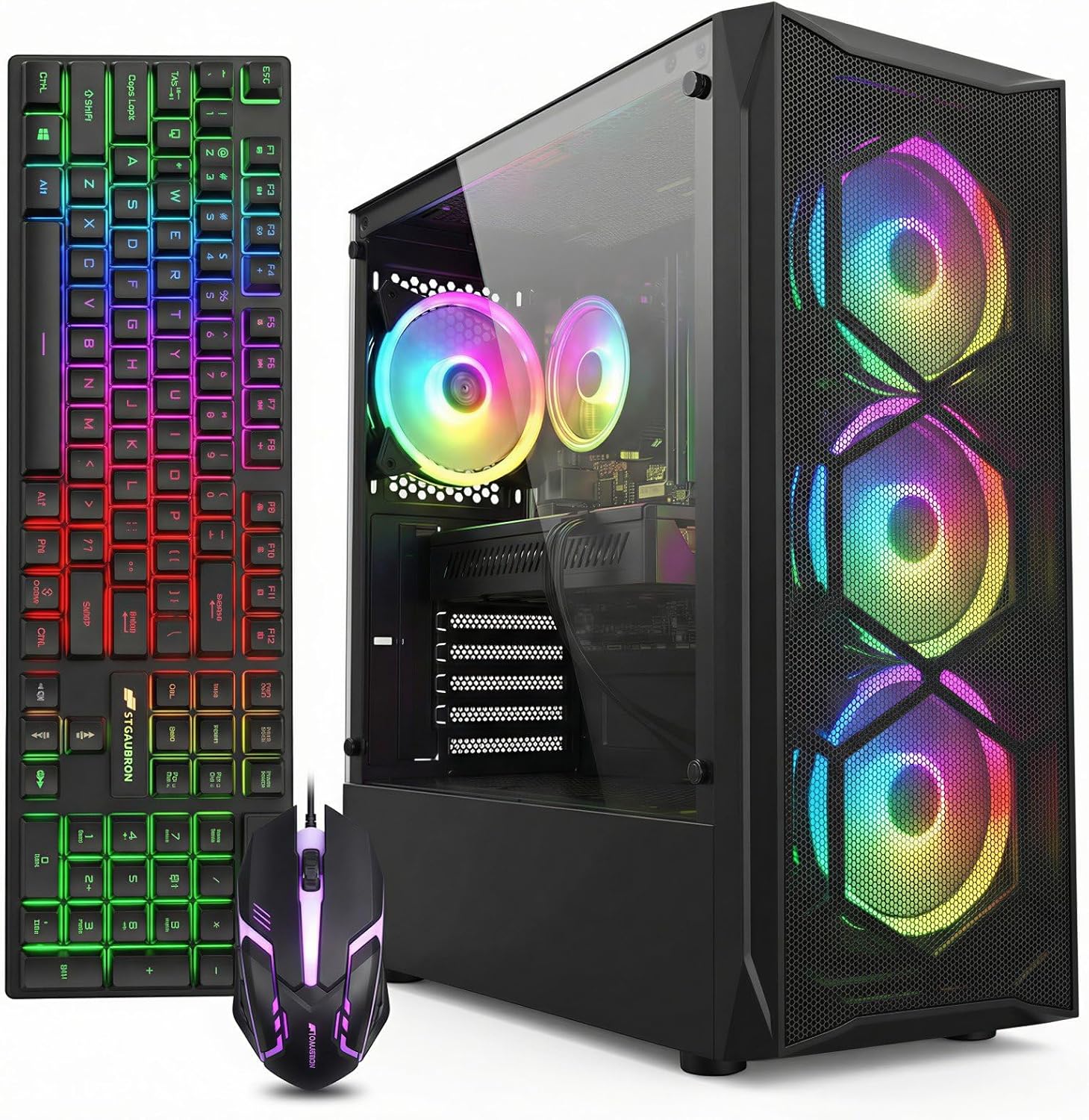
STGAubron Gaming PC Desktop, Core I7, RX 580 8G, 16G RAM, 512G SSD
around $500 for a Core i7, an RX 580 with 8GB and 16GB of system memory is the best value in this guide, and it passes two of three tests. The one it fails is the modern CPU test, and I want to be precise about what that costs you.
Today, it costs almost nothing. The i7 in this class is comfortably fast enough to feed an RX 580 in 1080p gaming, and the card is the limiting component in nearly every title. This configuration holds 1080p high settings past 90fps in competitive games with tight first-percentile lows, and the full 8GB of video memory means texture settings do not need compromising.
Tomorrow, it costs upgrade headroom. If you add a stronger graphics card in two years, an older quad-core chip will absorb a meaningful share of that card’s capability, and the platform offers no path to a modern CPU without replacing the motherboard and memory as well. That is the honest trade: excellent value now, closed door later.
Power draw is the practical footnote. The RX 580 is a hungry part by modern standards and my meter puts this class of build around 230W to 290W under a sustained loop, roughly double what the 4GB-class machines pull for similar or better performance. That efficiency gap shows up in heat and fan noise more than in your electricity bill.
Do not buy this if you want ray tracing or modern upscaling, neither of which the RX 580 supports, or if you intend to upgrade the graphics card later. Buy it if you want the most frames per dollar at 1080p today and plan to replace the whole machine when it stops being enough.
YAWYORE Gaming PC Desktop Computer AMD R5 5600GT 16GB 1TB NVMe Towers WiFi
around $660 buys the inverse trade-off of the STGAubron. This machine passes the memory and modern CPU tests and fails the video memory test, because the Ryzen 5 5600GT relies on integrated Radeon graphics rather than a discrete card.
What that means practically: weaker gaming performance today than the $500 machine, and a much better platform for tomorrow. Six modern cores and twelve threads, 16GB of memory, and a full 1TB NVMe drive, which is the first capacity in this guide at which you stop deleting games to install games. Add a discrete card in a year and the CPU will not hold it back.
The integrated Radeon graphics on the 5600GT is genuinely capable for its class and will run 1080p esports titles at reduced settings, but treat that as a bridge rather than the destination. Idle draw on this class of build sits low, typically in the 30W to 45W range, and load draw without a discrete card stays under 130W, so a modest supply has substantial headroom for a future card. Verify the supply wattage and PCIe connector count in the seller’s specification table before planning that purchase.
Do not buy this if you need maximum gaming performance on day one, because the $500 STGAubron outruns it in games while costing $160 less. This is a purchase for people buying in stages, and it only makes sense if the second stage actually happens.
suevery Prebuilt Desktop Computer Gaming PC Black
At around $590 this sits in the middle of the competitive band, and it is the one listing in this guide where I want you to do more homework than usual before buying. The product name carries no specification detail, which means the configuration lives entirely in the listing’s specification table and can vary between variants of the same product family.
Before ordering, confirm four things explicitly: the exact graphics card model and its video memory capacity, whether the 16GB of system memory is supplied as two matched sticks, the storage type and capacity, and the power supply wattage with its PCIe connector count. Those four answers determine whether this machine passes two of my three tests or one. At this price point in this market the configuration is usually competitive, but “usually” is not a specification.
The positive case is that assemblers in this segment often price aggressively against better-known names to win on value, and the $586 point undercuts the WIWB and YAWYORE machines nearby. If the specification table confirms a 6GB or 8GB discrete card and dual-channel memory, it becomes a strong contender.
Do not buy this if you are unwilling to read a specification table carefully, or if the listing does not state the graphics card model and video memory explicitly. An unstated graphics specification in this price band is a red flag rather than an oversight.
WIWB Prebuilt Gaming PC Desktop | Ryzen 5, RX 560 4G Graphics Card
around $650 buys a modern Ryzen 5 paired with an RX 560 carrying 4GB, and that combination is unbalanced in a way worth understanding rather than dismissing. The CPU passes my modern-core test easily. The graphics card fails the video memory test, and it is also a modest performer in absolute terms.
The result is a machine that will run 1080p esports titles well and current AAA releases poorly, but which has an unusually clean upgrade path because the CPU is not the limitation. Drop a 6GB or 8GB card into it later and it becomes a genuinely good machine without touching anything else. That is a legitimate strategy, and it is exactly what the machine is for.
The problem is the arithmetic against its neighbours. The YAWYORE 5600GT at around $660 offers the same modern six-core platform with a full 1TB NVMe drive for $11 more, and its integrated graphics is not far behind an RX 560 in many titles. The STGAubron at around $500 delivers considerably better gaming performance today for $149 less. That leaves the WIWB needing a specific justification.
Do not buy this if either of those alternatives is available, unless the WIWB’s storage or chassis specification is meaningfully better in the listing you are looking at. Verify the drive capacity and the power supply rating before deciding, since those are the variables that could tip it.
Dell Gaming OptiPlex Desktop RGB Computer PC, Intel Core i7, GeForce GT 1030 2GB GDDR5, 16GB RAM, 512GB SSD, 24 Inch HDMI Monitor, Keyboard Mouse and Headset, WiFi, Windows 11 Pro (Renewed)
around $410 for a complete setup including a 24-inch monitor, keyboard, mouse and headset is the entry package in this guide, and its value depends entirely on whether you already own peripherals. If you do not, the display and accessories would cost $130 to $200 separately, which reframes the tower as a roughly $230 machine and makes the deal considerably more interesting.
The tower itself is a renewed Dell OptiPlex with a Core i7, 16GB and a 512GB SSD, which is a solid business-grade foundation.
The GT 1030 with 2GB fails my video memory test badly. Two gigabytes is below what modern titles need even at low settings, and the card’s compute is modest. What it does provide is dedicated video memory and its own bus, which produces noticeably steadier frame pacing than integrated graphics at similar averages. That is a real benefit, just a small one.
Do not buy this if you already own a monitor and peripherals, because then you are paying $415 for a 1-of-3 machine. Also check the OptiPlex chassis variant before planning a graphics upgrade, since the small-form-factor version restricts you to half-height cards and the tower version does not.
OKAMUS Pre-Built PC, i5 CPU Up to 3.6GHz, Integrated Graphics Only, 256 GB M.2, 8 GB RAM Cheap Budget Gaming PC, RGB Fans x 3, Win 11 Home, WiFi 6 + BT 5.3, 400W PSU
around $250 and it fails all three tests, which I state plainly because the listing itself is honest about the most important one. “Integrated Graphics Only” in the product title is more transparency than much of this market offers, and that candour is why the machine is here rather than excluded.
Its legitimate use is as a starting platform rather than a gaming PC. You get a new-in-box mid tower with three RGB intake fans, full-height expansion slots, an M.2 NVMe boot drive, Wi-Fi 6 with Bluetooth 5.3, and a 400W supply. That chassis and supply combination means a discrete card is physically and electrically possible later, which is not true of many cheaper small-form-factor alternatives.
Two upgrades convert it into something reasonable. A matched 8GB memory stick for around $30 puts it into dual channel, which on integrated graphics typically lifts minimum frame rates by 25 to 40 percent because the graphics workload stops being bandwidth starved. A discrete card within the 400W supply’s headroom does the rest. Total spend lands somewhere near $450 to $500, at which point you have roughly matched the STGAubron for similar money with more effort.
Do not buy this if you want to play games on it as delivered, or if you are unwilling to open the case. If the case must stay closed, spend the money on a machine that passes at least two tests out of the box. If your budget is truly this tight, the options in the sub-$1,000 guide and the budget build guide cover the alternatives.
The monitor bundle question
One machine here ships with a display and peripherals, and bundles deserve a clear-eyed assessment rather than reflexive dismissal.
The case for: a genuine first-time buyer needs a monitor, keyboard, mouse and headset regardless, and buying them separately at the budget end typically costs $130 to $200. A bundle that includes them at an effective $130 is fair value and removes four purchase decisions.
The case against: bundled panels are almost always 60Hz office-grade displays with mediocre response times and unremarkable colour. If you later decide you want 144Hz, the bundled panel becomes a secondary display and its value evaporates. Bundled keyboards and mice are functional but rarely pleasant, and bundled headsets are usually the weakest item in the box.
My rule: bundles are worth it once, for a first setup, and never worth it as an upgrade. If you already own a monitor you like, buy the tower alone and redirect the difference into the graphics card, where it compounds. The refresh rate question in particular is worth thinking through before you commit, because it determines what level of machine is worth owning at all.
Ryzen or Intel in the cheap-but-good band
Five of these eight machines are Intel and three are AMD, and the split is not accidental. It reflects where each brand’s used and current supply sits.
Intel dominates the renewed and older-stock segment because a decade of corporate deployment produced enormous volumes of Core i5 and i7 desktops that are now cheap. Those chips are still competent for gaming when paired with an appropriate card, and they are why the $280 to $500 band is largely Intel.
AMD dominates the modern-platform budget segment because Ryzen 5000 series parts hit a price point that Intel’s equivalents did not, and because their integrated Radeon graphics on the G-series parts is meaningfully better than Intel’s integrated offering at the same tier. Every machine in this guide that passes my modern-core test is a Ryzen.
The practical guidance: if you are buying for today’s frame rate at the lowest price, Intel-based older stock wins because the platform’s age is irrelevant when the graphics card is the limiter. If you are buying a base to upgrade, Ryzen wins because the core count and platform currency determine what your future card can deliver. Neither is better in the abstract, and I would ignore anyone who says otherwise. The broader comparison is in the Ryzen guide.
What each tier costs to run and to live with
| Configuration class | Idle draw | Gaming load draw | Typical load noise at 60cm |
|---|---|---|---|
| Integrated, budget tower | 25 – 35W | 70 – 120W | 38 – 46 dBA (fixed-speed fans) |
| Renewed corporate, GT 1030 | 28 – 40W | 90 – 130W | 28 – 33 dBA |
| Modern Ryzen, integrated | 30 – 45W | 100 – 130W | 32 – 38 dBA |
| Older 8GB discrete (RX 580 class) | 45 – 60W | 230 – 290W | 40 – 47 dBA |
| Current 6GB discrete (RTX 3050 class) | 40 – 55W | 230 – 300W | 36 – 42 dBA |
| Current mid-range discrete | 50 – 70W | 300 – 380W | 38 – 44 dBA |
Two observations from that table. First, the older 8GB card and the current 6GB card draw similar power for broadly comparable 1080p output, which means the newer part is doing more work per watt and running cooler for the same result. That efficiency shows up as less noise and less heat in the room rather than as savings on a bill.
Second, the quietest machines here are the renewed corporate desktops, by a wide margin, because corporate procurement treats acoustics as a written specification. Budget towers running three or six fans at a fixed voltage are the loudest, and if those fans are three-pin rather than PWM you cannot fix it in firmware. That is worth knowing before a machine lands on a bedroom desk. The fuller breakdown across every tier is in the power consumption guide.
When cheap-but-good stops being either
There are situations where this whole category is the wrong answer, and I would rather say so than take the click.
If you own a 1440p monitor, nothing under $960 here will use it properly, and buying a cheap tower to feed an expensive panel wastes the panel. If you play current AAA releases and care about visual settings, the machines below $500 will frustrate you within weeks and the frustration compounds with every new release. If you stream or record while playing, you need either dedicated encoding hardware or spare CPU threads, and only the six and eight core machines have either in reserve.
If you need the machine to last five years without changes, only the two machines passing all three tests qualify, and even then a graphics upgrade at the three-year mark is likely. And if you are unwilling to open the case, roughly a third of the value proposition in this category disappears, because cheap upgrades performed yourself are how these machines stay good.
One more disqualification that gets missed. If this machine also needs to be a work computer running large spreadsheets, virtual machines or content tools, storage capacity and memory matter more than graphics, and the priorities in this guide invert. In that case the 32GB and 1TB configurations are worth their premium and the RX 580 build is not.
My recommendations by budget
At $960, buy the SKYESEV Ryzen 5 5600 with the RTX 3050 6GB and 32GB. It is the cheapest machine that passes all three tests, it has modern upscaling to extend the life of its 6GB frame buffer, and its six modern cores mean a future card upgrade converts into frames rather than being absorbed. If the phrase cheap but good has a single correct answer on this list, that is it.
At $500, buy the STGAubron Core i7 with the RX 580 8GB. Best frames per dollar at 1080p in this guide, with enough video memory that textures are never the limiter. Buy it understanding that the platform is a dead end and plan to replace rather than upgrade it.
At $660, buy the YAWYORE Ryzen 5 5600GT only if you are genuinely committed to adding a graphics card later. It is the best base here and the weakest gaming machine at its price, and those two statements are both true simultaneously.
Below $420, accept that you are buying a computer that plays some games rather than a gaming PC, and pick based on what else you need: the Dell OptiPlex bundle if you have no peripherals, the OKAMUS if you want new hardware and a chassis with real upgrade room.
And whichever you pick, spend the four minutes this guide keeps insisting on. Open the manufacturer’s specification page, read the maximum supported expansion card length and the chassis form factor, confirm the socket and chipset combination against the component maker’s own table, and count the PCIe power connectors in the photos. Those checks cost nothing and they are the difference between a machine that stays good and one that was only ever cheap.
This guide covers one angle on the topic. For the full comparison, see our main guide: Best Affordable Gaming PC: Ranked by Cost Per Usable Frame, Not by Price Tag.
Frequently asked questions
Does a graphics card with 6GB of video memory guarantee good gaming performance?
No; 6GB is the article’s practical floor for video memory, not a guarantee of overall performance. The three tests also require 16GB of system memory in two channels and a modern CPU with six or more cores. A machine that passes only the video-memory test can still have clear limitations.
Why does the article recommend two-channel system memory?
Two-channel memory roughly doubles memory bandwidth compared with one channel. That matters especially for integrated graphics, which share system memory with the graphics workload. The article advises assuming a machine has single-channel memory unless its specification table explicitly says otherwise.
Can a four-core CPU hold back a future graphics card upgrade?
Yes. The article says an old four-core chip can limit what a future graphics upgrade delivers, while a modern six-core CPU can convert more of the card’s capability into frames. The six-core test is about preserving a machine’s usefulness when its graphics card is upgraded later.
What should I check before buying a graphics card for an existing desktop?
Check the exact desktop model’s manufacturer specifications for maximum expansion-card length and chassis form factor, then compare them with the card’s length and slot height. Also check card height, CPU cooler height and power-supply depth. If card clearance is not published, the article recommends measuring the space and allowing room for cable routing.
Why can an 8GB graphics card be preferable to a newer 4GB card?
For 1080p use at similar prices, the article generally favors the 8GB card because more video memory can reduce stuttering when games need larger textures. A newer card’s support for modern upscaling is an exception: reducing rendering resolution can lower memory use and partly offset the smaller capacity.









