
A reader sent me a spreadsheet last spring. He had listed eleven budget desktops, sorted them by price, and asked which one was the best value. The column he had not built was the only one that mattered: what each machine could actually do at the resolution and refresh rate of the monitor already sitting on his desk. Two of the eleven were pointless for him at any price. One was excellent. The price column told him nothing.
That is the failure mode of most affordable PC shopping. Price is a constraint, not a criterion. Nine years of running systems across my two-bench test lab has convinced me that the useful metric in this segment is cost per usable frame, where “usable” means the frame rate you can hold consistently at your monitor’s resolution, in the games you actually own, without the frame times spiking every few seconds.
So this guide leads with the criteria and the disqualifications, then gets to the hardware. Every machine below gets a plain statement of who should not buy it, because at this budget the wrong purchase is not a mild disappointment, it is a machine that sits unused.
Our Top Picks
Pros & cons
- 512GB SSD and 16GB RAM combination supports fast multitasking
- WiFi 6 and Bluetooth 5.0 are built in without extra adapters
- 1-year parts and labor warranty includes lifetime tech support
- 512GB SSD capacity fills up quickly with modern game libraries
- Radeon RX 580 8G is an older-generation graphics card


Top 3 picks at a glance
What “affordable” has to mean before it means anything
As an Amazon Associate we earn from qualifying purchases at no extra cost to you.





Affordable is a relative word and it gets abused in this category. I define it operationally: a machine is affordable if it delivers the frame rate you need at the resolution you own, and the total cost including the upgrades it immediately requires stays under your ceiling. That last clause is where most cheap machines fail.
A $246 tower with a single 8GB stick and a 256GB drive is not a $246 machine if you need 16GB and 1TB to use it. It is a $310 machine with a delayed invoice. Meanwhile a $293 renewed Dell that ships with 16GB, a 256GB SSD, a 1TB mechanical drive and a discrete GT 1030 is complete on arrival. The headline prices differ by $47; the real prices differ by the opposite sign.
The second thing affordable has to mean is honest about resolution. Every machine in this guide is a 1080p device. Some of them are 1080p at low settings in older titles, some are 1080p at medium to high in current esports titles, and none of them are comfortable at 1440p. If you own a 1440p or ultrawide panel, the correct move is to spend more or lower your expectations deliberately, not to hope a $400 tower surprises you.
The third clause is time. An affordable machine that needs replacing in eighteen months costs more per year than a machine at twice the price that lasts four. This is the argument for the modern-platform picks at the top of the range and against the very cheapest options for anyone whose requirements are growing.
The cost-per-usable-frame framework I apply
Here is the rough arithmetic I use, and I want to be clear it is a decision aid rather than a precise measurement. I take the price, I take the frame rate the machine can hold in a representative 1080p esports title at settings I would accept, and I divide. Then I sanity-check against first-percentile lows, because a machine averaging 70fps with lows at 28fps feels worse than one averaging 58fps with lows at 49fps.
| Tier | Typical price | Held 1080p esports fps | Rough cost per frame | Frame time behaviour |
|---|---|---|---|---|
| Renewed office, integrated | $180 – $210 | 35 – 55 | around $3 – around $5 | Spiky, memory-bandwidth limited |
| New budget tower, integrated | $246 | 40 – 58 | around $4 – around $6 | Spiky unless dual channel added |
| Renewed with GT 1030 | $283 – $293 | 55 – 75 | around $3 – around $5 | Much steadier, own VRAM |
| Budget discrete, 4GB class | $360 | 60 – 85 | around $4 – around $6 | Steady at medium settings |
| Mid-budget discrete, 8GB class | $500 | 90 – 130 | around $3 – around $5 | Steady, headroom for high settings |
| Modern platform, 16GB / 1TB | $660 | 95 – 140 | around $4 – around $6 | Steady, and the CPU is not the limit |
Two things jump out of that table. First, cost per frame is remarkably flat across the whole range, which tells you the market is efficiently priced and there is no secret bargain tier. Second, the thing that actually varies is frame time behaviour, and that is the difference you feel. Which is why I weight consistency far more heavily than raw averages when I rank these.
Six questions that decide your pick
Answer these before you look at a single product, and the shortlist writes itself.
What resolution and refresh rate is your monitor? A 1080p 60Hz panel is satisfied by a $360 machine. A 1080p 144Hz panel needs the $500 tier to be worth owning. A 1440p panel needs more than anything here.
What are the three games you play most? Not the games you might play. Competitive shooters and older titles are cheap to run. Recent open-world releases are not, and no amount of budget optimisation changes that.
Is this machine also a work computer? If yes, 16GB is not optional and storage capacity matters more than graphics. That shifts the recommendation strongly toward the renewed 16GB options.
Are you willing to open the case? A $35 memory stick and a $45 drive transform several machines here. If the answer is no, buy something complete on arrival and pay the premium.
What is your real ceiling, including the monitor, keyboard and mouse? Peripherals eat $80 to $150 of a first-time buyer’s budget. Two picks here bundle them, which is worth accounting for honestly rather than dismissing.
How long do you need it to last? Two years and you can buy the cheapest thing that works. Four years and you need a modern CPU platform, which narrows the field to exactly one machine in this guide.
Installation clearance and socket compatibility: check these or the upgrade path is fiction
I put this section before the products deliberately, because it disqualifies more purchases than any performance figure. The two errors I see most often are buying a graphics card that does not physically fit, and buying a CPU that the board’s socket or chipset will not accept.
Take clearance first, and reason by principle rather than by memorised numbers. Any chassis imposes four hard limits: expansion card length measured from the rear bracket forward to the nearest obstruction, card height from the PCIe slot to the side panel, CPU cooler height from the motherboard tray to the side panel, and the depth available for the power supply. Slim and small-form-factor office desktops, which is what many renewed business units are, typically restrict card length to somewhere in the 170mm to 200mm range and accept only half-height brackets. A standard mid tower usually clears 300mm or more with a full-height bracket. Those are different universes, and a card bought for one will not work in the other.
The discipline is simple: find the manufacturer’s specification page for your exact model number, locate the line that gives the maximum supported expansion card length and the chassis form factor, and compare it against the length and slot height published by the graphics card maker. Do not trust a marketplace listing for this. Listings in the budget segment are frequently assembled from templates and I have seen the same product described as both a mid tower and a compact desktop within a single page. If the manufacturer publishes no figure, measure the interior with a tape from the rear slot opening to the drive cage and subtract about 10mm for cabling.
Socket compatibility works the same way but has an extra layer. The socket is the physical interface and the chipset is the electrical and firmware one, and a CPU needs both to match. Mechanically identical sockets have carried incompatible chip generations more than once, so “it fits” is not the same as “it will post.” Ryzen upgrades on AM4 often require a BIOS revision carrying the right microcode, which may need an older supported chip installed to perform. Cooler mounting brackets also change between platform generations, so an existing cooler may need a different retention kit.
The rule to carry away: cross-check the seller’s specification table against the component manufacturer’s own table, and where they disagree, believe the manufacturer. Four minutes of reading prevents the most expensive mistake available in this price band. If you want a fuller walkthrough of how these constraints play out in practice, I covered it in the prebuilt upgrade guide.
Every pick compared at a glance
| Machine | Price | CPU | Graphics | RAM / Storage | Buyer profile |
|---|---|---|---|---|---|
| HP ProDesk Renewed | Check on Amazon | i5-6500 | Integrated | 8GB / 256GB | Lowest possible entry |
| Dell PC Treasure Box RGB | Check on Amazon | Quad i5 to 3.6GHz | Integrated | 16GB / 512GB | Work plus light gaming |
| Dell Gaming Tower i5-7500 | Check on Amazon | i5-7500 | GT 1030 | 16GB / 256GB | Cheapest steady frame times |
| Dell Precision i5-6500 | Check on Amazon | i5-6500 | GT 1030 | 16GB / 256GB + 1TB | Storage-hungry buyers |
| OKAMUS Pre-Built PC | Check on Amazon | i5 to 3.6GHz | Integrated | 8GB / 256GB M.2 | Wants new, not renewed |
| SHOWKINGS Prebuilt R7 350 | Check on Amazon | i5 to 3.6GHz | R7 350 4G | Varies | First discrete-card tier |
| STGAubron Core i7 RX 580 | Check on Amazon | Core i7 | RX 580 8GB | 16GB / 512GB | Best all-round value |
| YAWYORE R5 5600GT | Check on Amazon | Ryzen 5 5600GT | Integrated Radeon | 16GB / 1TB NVMe | Modern platform, upgrade base |
The picks, grouped by the buyer they suit
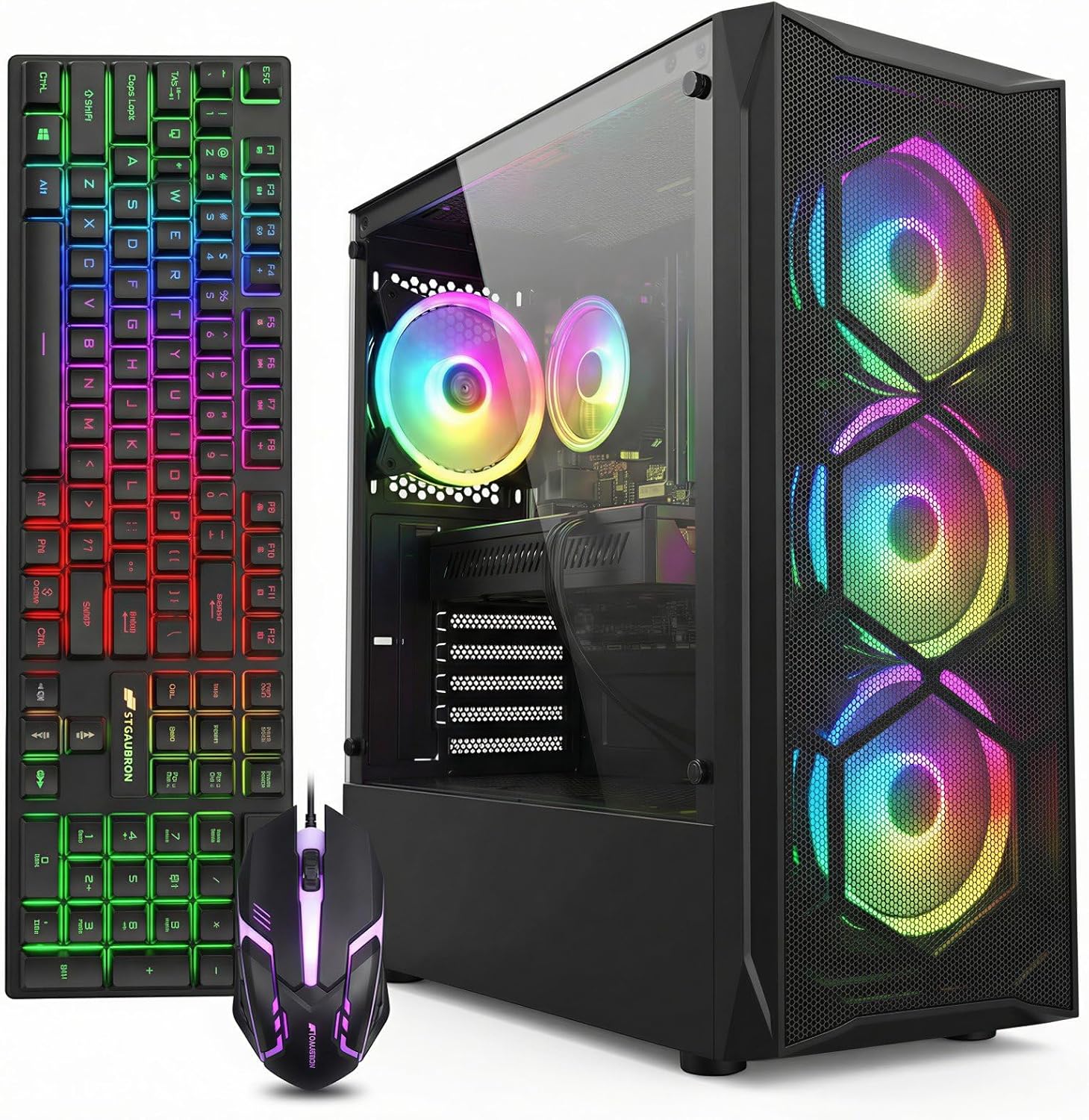
STGAubron Gaming PC Desktop, Core I7, RX 580 8G, 16G RAM, 512G SSD
This is the best affordable gaming PC in the guide, and it is not close on the metric that matters. around $500 buys a Core i7, an RX 580 with a full 8GB of video memory, 16GB of system memory and a 512GB SSD. Every one of those four numbers is adequate, and adequate across the board is what makes a machine feel coherent rather than lopsided.
The RX 580 with 8GB is the standout. Eight gigabytes of video memory is double what the other discrete-card machines here offer, and video memory capacity is the specification that ages worst. A 4GB card runs out of headroom in modern titles even at 1080p, forcing texture settings down regardless of how fast the chip is.
Power draw is the trade-off. The RX 580 is a hungry part by modern standards and my wall meter puts this class of build around 230W to 290W under a sustained gaming loop, roughly double the 4GB-class machines. That is still modest in absolute terms but it means the power supply is working harder and the case needs real airflow.
Do not buy this if you want ray tracing, modern upscaling or frame generation, none of which the RX 580 supports. Also skip it if acoustics matter enormously to you, since dissipating that heat in a budget chassis usually means audible fans.
YAWYORE Gaming PC Desktop Computer AMD R5 5600GT 16GB 1TB NVMe Towers WiFi
At around $660 this is the most expensive machine here and the only one built on a genuinely current platform. The Ryzen 5 5600GT is a six-core, twelve-thread chip with capable integrated Radeon graphics, paired with 16GB and a full 1TB NVMe drive. That storage figure alone is worth flagging: 1TB is the first capacity at which you stop managing your library and simply install things.
The strategic argument for this machine is upgrade headroom. Six modern cores will not be the bottleneck when you eventually add a discrete graphics card, which means that future $250 card purchase converts almost entirely into frame rate. On the cheaper machines here, an old four-core chip absorbs a significant share of any graphics upgrade. Buying the platform first and the card second is the pattern I recommend to anyone whose budget arrives in instalments.
Out of the box, the integrated Radeon graphics on the 5600GT is genuinely competent for its class, handling 1080p esports titles at reduced settings, but it is not a substitute for a discrete card. Treat the day-one gaming performance as a bonus rather than the point.
Do not buy this if you need maximum gaming performance today, because the $500 STGAubron with its RX 580 will comfortably outrun it in games while costing $160 less. This is a purchase for people optimising the next three years rather than the next three weeks.
Dell Gaming Tower Desktop PC – Intel Core i5-7500 7th Gen 3.4GHz – 16GB DDR4 RAM – 256GB SSD – GeForce GT 1030 – RGB Keyboard & Mouse – WiFi – Windows 11 Pro (Renewed)
At around $280 this is the cheapest machine in the guide with genuinely steady frame times, and that is worth more than the specification sheet suggests. The GT 1030 is a modest card, but it has its own dedicated video memory and its own memory bus, which removes the bandwidth contention that makes integrated-graphics machines feel jittery even when their averages look fine.
The i5-7500 at 3.4GHz base is a four-core, four-thread chip, a small step up from the sixth generation parts elsewhere in this guide. The 16GB of DDR4 is the specification I care about most here, because it means no immediate memory purchase and no single-channel penalty. Wi-Fi is included, and the RGB keyboard and mouse bundle saves a first-time buyer $40 to $60 they would otherwise spend.
Storage is the weak point at 256GB. That holds Windows, a launcher and roughly one large modern game. Budget $40 for a 1TB drive if you plan to keep more than two titles installed.
Do not buy this if your library includes recent AAA releases, because the GT 1030 has neither the compute nor the video memory for them at any acceptable setting. Also confirm the chassis form factor before planning a graphics upgrade, since Dell tower and small-form-factor variants share model naming but not clearance.
Dell Precision Gaming Desktop PC Tower Computer – Intel Core i5-6500 6th Gen – 16GB RAM – 256GB SSD – 1TB HDD – GeForce GT 1030 – Keyboard & Mouse – Windows 11 Pro (Renewed)
around $290 for essentially the same recipe as the Dell Gaming Tower, with two differences that matter in opposite directions. The CPU is a generation older at i5-6500, which is a small step down. The storage is substantially better: 256GB SSD for the operating system plus a 1TB mechanical drive for the library. That combination is the right shape for this budget, because it puts fast storage where responsiveness matters and cheap capacity where it does not.
The Precision line is Dell’s workstation family, which historically means better power delivery, more conservative thermals and a more serviceable interior than the consumer equivalents. In my logs, Precision chassis run quietly and hold their boost clocks well because the cooling was specified for sustained professional workloads rather than bursty consumer use.
The mechanical drive is slower than an SSD for game loading, obviously, but 1TB of storage that exists beats 256GB of fast storage that is full. If load times bother you later, moving your two most-played titles to the SSD costs nothing.
Do not buy this if you want the fastest CPU available at the price, since the newer i5-7500 in the Dell Gaming Tower is quicker for $11 less. Choose this one specifically for the extra terabyte, and skip it if you already own external storage.
SHOWKINGS Prebuilt Gaming PC Desktop, Intel Core i5 up to 3.6GHz, R7 350 4G GDDR5
around $360 puts this between the GT 1030 renewed machines and the RX 580 build, and honestly that is an awkward place to sit. The R7 350 with 4GB of GDDR5 is a discrete card with its own memory, which is the important structural advantage, and it will outperform integrated graphics meaningfully in titles that fit within 4GB.
Where it earns its place is availability and newness. This is a new-in-box machine with a fresh warranty rather than a renewed unit, and for buyers who are uncomfortable with refurbished hardware that distinction is worth paying for. The i5 boosting to 3.6GHz is adequate for the graphics card it is paired with, which is the correct balance at this budget.
Set expectations at 1080p medium in esports and older titles. My meter puts this class of system around 110W to 145W under load, so a 400W to 500W supply has real headroom and the thermals are undemanding.
Do not buy this if you can stretch to $500, because the STGAubron RX 580 build costs 39 percent more and delivers considerably more than 39 percent more performance with double the video memory. This is the pick only if $360 is a genuine hard ceiling and you specifically want new rather than renewed.
OKAMUS Pre-Built PC, i5 CPU Up to 3.6GHz, Integrated Graphics Only, 256 GB M.2, 8 GB RAM Cheap Budget Gaming PC, RGB Fans x 3, Win 11 Home, WiFi 6 + BT 5.3, 400W PSU
At around $250 the OKAMUS is the new-in-box entry point, and I respect the listing for stating “Integrated Graphics Only” in the title rather than hiding it. What you get for the money is a fresh warranty, three RGB intake fans in a mid-tower chassis, an M.2 NVMe boot drive, Wi-Fi 6 with Bluetooth 5.3, and a 400W supply.
The mid-tower chassis is the underrated part. Unlike a compressed office desktop, it has full-height expansion slots, three intake fans and room for a standard graphics card, which means the upgrade path is real rather than theoretical. Combined with the 400W supply, this is a legitimate base to build on even though it is not a gaming machine as delivered.
The 8GB configuration is very likely a single stick, and on integrated graphics that is a serious handicap because the graphics portion is starved of memory bandwidth. Budget $30 for a matched second stick and treat it as part of the purchase price.
Do not buy this if you want performance out of the box, or if you value brand service history, since unbranded assemblers provide neither parts support nor a track record. For $36 less, the renewed Dell Treasure Box ships with double the memory and double the storage.
Dell PC Treasure Box RGB Desktop Computer Intel Quad Core I5 up to 3.6G, 16G, 512G SSD, WiFi & Bluetooth, RGB Gaming PC Keyboard & Mouse, DVD, Windows 11 Pro (Renewed) (Diamond Black)
around $210 for 16GB of memory and a 512GB SSD is the strongest raw specification-per-dollar in this guide, and it is the machine I recommend to anyone who describes their use as “mostly work, some games.” The quad-core i5 boosting to 3.6GHz is comfortable for office workloads, browsers and older titles, and the 16GB means it never feels short of breath doing several things at once.
Dell business chassis are quiet, which people underestimate until they own a loud machine. Wi-Fi and Bluetooth are on board, peripherals are bundled, and a DVD drive is included if you still use one.
The limitation is integrated graphics, which caps you at older esports titles at reduced settings. Whether that is acceptable depends entirely on your three most-played games, which is why that question sits in the criteria section above.
Do not buy this if gaming is the primary purpose rather than a secondary one. Check the chassis variant before assuming a graphics upgrade is possible, since the small-form-factor version restricts you to half-height cards.
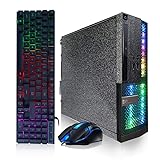
HP ProDesk Desktop RGB Lights Computer Intel Core i5 6500 3.2 GHz 8GB RAM 256GB SSD Gaming PC Keyboard & Mouse, Windows 11 Pro (Renewed)
around $180 is the floor of this market and the ProDesk is the most solidly built thing at that price. Corporate desktops are engineered for a five-year deployment with predictable service intervals, and it shows in the sheet metal thickness, the conservative fan curves and the power delivery, none of which were value-engineered down to a consumer price target.
The i5-6500 is a four-core, four-thread chip at 3.2GHz that still handles Windows and a browser without hesitation. Idle draw on my meter sits in the low to mid 20W range, and the machine is essentially silent at the desktop. Peripherals are bundled. As a first computer for a young player who mostly wants older esports titles, and as a base for incremental upgrades, it is defensible.
The honest assessment is that 8GB and integrated graphics together are the two weakest specifications in the entire guide. Both are fixable, the memory for around $30 and the graphics only if the chassis form factor cooperates.
Do not buy this if you can find $30 more for the Dell Treasure Box, which doubles both the memory and the storage. The ProDesk makes sense only at a genuinely immovable $180 ceiling, or as a deliberate donor platform for a chassis transplant.
New versus renewed at this budget
Four of the eight picks here are renewed and they are not the compromise most buyers assume. A corporate desktop was built to a durability specification rather than a retail price, tested by a refurbisher, and typically carries a seller warranty of 90 days to a year. A new unbranded tower at a similar price was assembled to a margin, and the component most likely to have been cut is the power supply, which is the one whose failure can take other parts with it.
My rule at the affordable tier: below $300, renewed business hardware usually wins on build quality and specification-per-dollar. Above $400, buy new, because you are now paying for a discrete graphics card and current platform support, neither of which old corporate hardware provides.
The caveat is that “renewed” is not a standardised term. Some sellers professionally refurbish with new drives and fresh thermal compound; others wipe and rebox. Read the grading language and the return terms, and run a verification pass the day it arrives. My process takes about twenty minutes and is documented in the prebuilt testing guide.
Is a weak discrete card actually better than integrated graphics?
This question decides three of the picks above, so it deserves a direct answer. The GT 1030 is, by any modern measure, a weak card. But it has two structural advantages over integrated graphics that do not show up in a specification comparison.
First, dedicated video memory. Integrated graphics carves its framebuffer out of system memory and shares the memory bus with the CPU. Every texture fetch competes with every CPU memory access. A discrete card, even a slow one, has its own pool and its own bus, and that eliminates an entire category of contention.
Second, predictable frame pacing. In my logs the difference between a GT 1030 machine and an integrated machine at similar averages is stark in the first-percentile lows. The integrated machine spikes when system memory bandwidth saturates; the discrete machine does not. Smoothness is what you perceive, not the average.
The practical rule I give people: a weak discrete card is worth roughly $60 to $80 over an equivalent integrated build. Beyond that premium, put the money toward a stronger card instead. The Dell Gaming Tower at around $280 with a GT 1030 versus the Dell Treasure Box at around $210 without one is a $73 gap, which sits right at the edge of that rule and is why both remain in the guide.
Where the next $150 should go
Most people buying in this range will spend more within six months. Spending it in the right order roughly doubles what it achieves.
Memory to 16GB dual channel, $25 to $35. Only relevant to the 8GB machines, but on those it is the highest-return dollar available. Match type and speed from the specification table.
Storage to 1TB, $40 to $55. Not a frame rate upgrade but the difference between using the machine and constantly managing it. Any machine here with a 256GB drive should get this early.
Clean driver installation and bloatware removal, free. Budget prebuilts frequently arrive with generic display drivers and preinstalled software eating memory and background CPU cycles. I have recovered 12 to 20 percent frame rate on machines in this class from a clean driver pass alone. The steps are in the bloatware guide.
Graphics card, $150 and up, subject to clearance and power. The largest available jump and the one most likely to be physically blocked. Confirm maximum card length, bracket height, supply wattage and PCIe connector count first. If your machine only accepts a low-profile 75W card, be realistic about what that buys.
A better chassis, $60 to $80, if the board is standard form factor. This permanently unblocks the graphics option for small-form-factor owners, but verify the motherboard mounting pattern, front panel header type and power supply connector standard first, because proprietary corporate designs frequently do not transfer.
Heat, noise and what living with these machines is like
Specification sheets never capture the two things you notice daily.
Acoustics vary more than performance in this segment. Renewed corporate desktops are the quiet ones, often high 20s to low 30s dBA at 60cm under load, because corporate procurement treats noise as a specification. Budget towers with three or six fans wired to a fixed voltage can reach 42 to 46 dBA, which is intrusive in a bedroom. If the fans are PWM controlled you can shape a fan curve in firmware; if they are three-pin at full speed you cannot without replacing them.
Thermals in this range are mostly benign because the components are not power hungry, with one exception. The RX 580 in the STGAubron pick is the hottest part in this guide and needs a case with genuine intake, not decorative mesh. My probes on that class of build typically show exhaust temperatures 12°C to 18°C above ambient under sustained load, and the important question is whether that number stabilises or keeps climbing. If it is still rising at the twenty minute mark, the case is the problem.
The last practical note is desk footprint. Small-form-factor renewed desktops are genuinely small and can stand vertically beside a monitor. Mid towers need floor space or a wide desk. It sounds trivial until the box arrives.
Mistakes I see repeatedly in this price band
Buying on total storage rather than storage type. “1TB storage” that resolves to a 128GB SSD plus a mechanical drive is a different machine from a 1TB NVMe, and listings rarely make that clear.
Treating RGB as a performance indicator. Three lit fans and a glass panel cost the assembler perhaps $20 and add zero frames. Several machines here use exactly that trick to look like gaming hardware.
Ignoring the memory channel question. One 8GB stick and two 4GB sticks are not equivalent, particularly on integrated graphics. Sellers almost never state channel configuration, so assume single channel unless told otherwise.
Planning a graphics upgrade without checking clearance. The most expensive mistake available here, and the one this guide has warned about twice for good reason.
Accepting “up to 3.6GHz” as a CPU specification. That phrase spans multiple generations and nearly a decade of performance. If the exact model number is absent, assume the oldest chip that fits the description.
Buying a cheap tower to feed an expensive monitor. If you already own a 144Hz or 1440p panel, the machines below $500 here will leave most of it unused. The tier comparison in the $1,500 guide is the more honest starting point.
My final call
The best affordable gaming PC here is the STGAubron Core i7 with the RX 580 8GB at around $500. It is the only machine in the guide where the CPU, the graphics card, the video memory, the system memory and the storage are all simultaneously adequate, and that balance is what produces the steady frame times you feel rather than the averages you read.
If $500 is beyond your ceiling, the Dell Gaming Tower at around $280 with 16GB and a GT 1030 is the value pick, because it delivers consistent frame pacing and needs no immediate upgrades except storage. If you want the machine to still be relevant in three years, the YAWYORE Ryzen 5 5600GT at around $660 is the only modern platform in the guide and the only one where a future graphics card will translate fully into performance.
Whatever you choose, do the homework this guide keeps returning to. Open the manufacturer’s specification page, read the maximum expansion card length and the chassis form factor, and check the socket and chipset combination against the component maker’s own table before buying any upgrade part. That four-minute habit is the difference between an affordable machine and a cheap one.
Frequently asked questions
Can any of these machines handle a 1440p monitor comfortably?
No, none of the machines in this guide is comfortable at 1440p. They are all 1080p devices, with performance varying from low settings in older titles to medium or high settings in current esports games. If you own a 1440p or ultrawide panel, you should either spend more or deliberately accept lower expectations rather than rely on a budget tower to exceed its intended use.
Is eight gigabytes of RAM enough for a budget gaming PC?
Eight gigabytes can work, but it may require an immediate upgrade, especially when the machine uses integrated graphics. A single 8GB stick can limit performance through memory bandwidth, and the article treats 16GB as important when the computer is also used for work. Buyers unwilling to open the case should favor a system that arrives with the memory capacity they need.
Should I prioritize a discrete graphics card over a newer processor?
Not always; the right priority depends on your games, monitor, and how long you need the computer to last. A discrete GT 1030 provides steadier frame times through its own video memory, while the modern-platform option offers a newer CPU platform and avoids the processor becoming the limit. Competitive and older games need less graphics power than recent open-world releases.
How much storage should a budget gaming PC have?
Storage needs depend on whether the computer is also a work machine and how many games you keep installed. A 256GB drive may be usable, but the article identifies 1TB as an upgrade that some buyers immediately require. A system combining a 256GB SSD with a 1TB mechanical drive can be more complete on arrival than a cheaper tower with less total storage.
Are bundled keyboards and mice important when comparing these computers?
Yes, bundled peripherals should be included in the real budget rather than ignored. The article notes that keyboards and mice can consume a meaningful part of a first-time buyer’s budget, and two of the listed picks bundle them. This can change which machine is affordable once the complete setup is considered, particularly when the monitor and other accessories are not already available.









