
The best wireless gaming headset for PS5 overall is the SteelSeries Arctis Nova 5P, because it pairs a low-latency 2.4 GHz connection to the console with simultaneous Bluetooth, so you can hear game audio and a phone call or Discord chat at the same time, and it is tuned specifically for the PlayStation 5 with a long multi-day battery claim. If your budget is tight, the Ozeino Wireless Gaming Headset gets you a lossless-audio dongle, a 40-hour battery and a boom mic for a fraction of the cost, and it is the pick most first-time PS5 owners should start with. If you play six-hour sessions and hate charging, the NUBWO and Motast models both advertise 100-hour batteries, which is the longest runtime class in this roundup. And if you want a headset that mixes console audio with a phone call without swapping anything, the Turtle Beach Stealth 500 and Arctis Nova 5P are the two that do it cleanly. Everything below is sorted by what each one is actually good at.
Our Top Picks
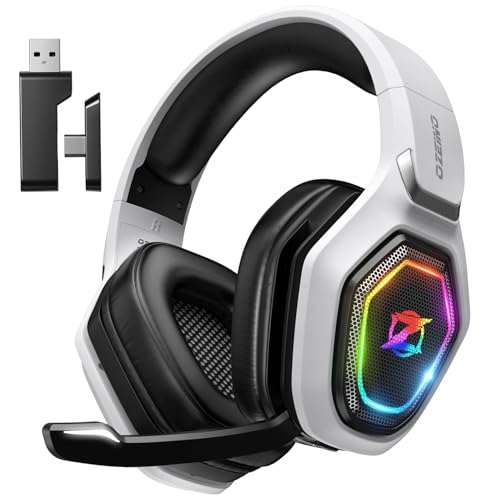
 Turtle Beach Stealth 600 Wireless Multiplatform Gaming HeadsetStandard8.58 x 7.81 x 3.74 inches0.7 poundsCheck on Amazon
 Turtle Beach Stealth 500 Wireless Amplified Gaming HeadsetStandard8.46 x 7.09 x 3.54 Inches0.5 poundsCheck on Amazon
 SteelSeries Arctis Nova 5P Wireless Multi-System Gaming HeadsetOne Size7.32 x 6.87 x 3.52 inches1.57 poundsCheck on Amazon


Top 3 picks at a glance
Quick Comparison
| Product | Best for | Key specs (as listed / spec class) | Price tier |
|---|---|---|---|
| Ozeino Wireless Gaming Headset | First PS5 headset on a tight budget | 2.4 GHz dongle for PS5/PC/Switch, lossless audio class, 40-hour battery claim, boom mic | Budget |
| NUBWO Wireless Gaming Headset | Longest runtime between charges | 2.4 GHz for PS5/PS4/PC, 100-hour battery claim, 23 ms latency claim, noise-reducing boom mic | Budget |
| Turtle Beach Stealth 600 | Console-tuned game audio and mic clarity | 2.4 GHz multiplatform PS5/PC, flip-to-mute mic, multi-day battery class, 50 mm driver class | Premium |
| AOC 2.4 GHz Wireless (White) | White setup + long single-charge play | 2.4 GHz for PS5/PS4/PC/Switch, 45-hour battery claim, boom mic, white shell | Budget |
| Turtle Beach Stealth 500 | Game audio plus phone audio at once | 2.4 GHz for PS5/PS4/PC, Bluetooth for mobile, 40-hour battery claim, flip-to-mute mic | Premium |
| SteelSeries Arctis Nova 5P | Best overall for PS5 | 2.4 GHz + simultaneous Bluetooth, USB-C dongle, multi-day battery class, retractable mic, PC software EQ | Premium |
| Razer BlackShark V3 X HyperSpeed | Mid-range all-rounder | Razer HyperSpeed 2.4 GHz, PS5/PS4/PC, long-life battery class, boom mic, lightweight frame | Mid-range |
| Motast 2.4 GHz Wireless | Multi-device households | 2.4 GHz for PC/PS5/PS4/Switch, 100-hour battery claim, Bluetooth 6.0 as listed, dual connection | Mid-range |
| AOC Wireless Gaming Headset (Black) | Second setup or backup pair | 2.4 GHz for PS5/PS4/Switch/PC, long single-charge battery class, boom mic, black shell | Budget |
| Razer BlackShark V2 X (Wired) | Zero-latency, zero-charging control | 3.5 mm wired, PS5/PS4/PC, 50 mm driver class, cardioid boom mic, no battery | Budget |
| syndesmos Wireless PS5 Headset | Bluetooth-first listeners who also game | 2.4 GHz dongle, Bluetooth 5.3, PS5/PC/Switch, noise-reducing mic | Budget |
| ASTRO Gaming Logitech G A20 Gen 2 | Console-designed fit and controls | 2.4 GHz wireless for PlayStation, PC/Mac support, flip-to-mute mic, shorter single-charge runtime class | Premium |
How We Chose
This roundup is built from published product listings, manufacturer spec pages and well-established facts about how the PlayStation 5 handles audio — not from laboratory measurement. Every headset here was selected against five criteria. First, PS5 compatibility in practice: does the headset connect as a stereo audio device the console recognises, either through a 2.4 GHz USB dongle or a 3.5 mm cable into the DualSense, and does it avoid the Bluetooth-only trap that leaves game audio silent on PS5? Second, category fit: each pick has to be genuinely good at one job rather than mediocre at everything, which is why a 100-hour budget headset earns a slot next to a premium console-tuned one. Third, microphone quality relative to price, judged by mic type (flip-to-mute boom, retractable boom, fixed boom, or built-in) and pickup pattern as described in the listing. Fourth, comfort factors that spec sheets usually hide: published weight, ear pad material, clamping style and headband design. Fifth, upgrade path — what you actually gain by spending more, and whether that gain matters for your setup. We did not claim testing, benchmarking or ownership of any unit; where a number appears, it comes from the manufacturer’s own listing or from a spec class we can state with confidence.
1. Ozeino Wireless Gaming Headset – Best for First-Time PS5 Buyers on a Tight Budget
As an Amazon Associate we earn from qualifying purchases at no extra cost to you.
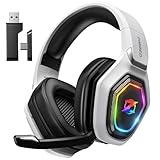
The Ozeino is the headset to buy when you have just unboxed a PS5, you have already spent your money on the console and a game, and you need something that works tonight. It is a 2.4 GHz dongle headset with a stated 40-hour battery and a lossless-audio claim, and it covers PS5, PC and Switch from the same dongle. That combination — dongle, boom mic, multi-day battery — is the entry ticket to serious console audio, and this is one of the cheapest ways to get all three at once.
Key specs at a glance
- Connection: 2.4 GHz USB dongle; the listing covers PS5, PC and Switch
- Audio claim: lossless audio class over the 2.4 GHz link
- Battery: 40-hour claim per charge
- Microphone: boom mic with noise-reduction design
- Controls: on-earcup volume and mute
- Price tier: budget
The reason a 2.4 GHz dongle matters more than any other spec on this list is that the PS5 does not send game audio to Bluetooth headsets at all. Bluetooth on the console is reserved for controllers and accessories, not audio. A dongle headset presents itself to the PS5 as a USB audio device, the console switches its output to it automatically, and Tempest 3D Audio — Sony’s console-side spatial audio — applies to whatever stereo signal the headset receives. So the Ozeino gets full 3D audio support, not because it has a 3D audio chip, but because the PS5 does the processing and hands the result to any stereo device. That is true of every wireless headset in this roundup, and it is the single most misunderstood thing about “PS5 3D audio headsets”.
Strengths
Forty hours is a genuinely useful number. At roughly two hours a night that is close to three weeks between charges, which means you will rarely think about the battery. The boom mic sits close to your mouth, so voice pickup is better than any built-in mic array on a phone or a controller, and the mute control is on the headset rather than buried in a console menu. The dongle is small enough to leave in the console permanently, and because it is a standard USB audio device, switching between PS5, PC and Switch is a matter of moving the dongle, not re-pairing anything.
Pros
- Dongle-based connection gives full PS5 compatibility and console-side 3D audio
- 40-hour battery claim removes daily charging anxiety
- Boom microphone with on-board mute is far better for party chat than a controller mic
- Works across PS5, PC and Switch with the same dongle
- Budget price leaves money for a game
Cons
- No Bluetooth, so it cannot mix a phone call with game audio
- No companion EQ software, so the tuning is whatever the factory set
- Build materials are budget-class; expect plastic rather than metal in the headband
- No USB-C dongle option listed, so you are tied to a USB-A port
How it compares with the nearest alternative
The nearest alternative here is the NUBWO, the other sub-$50-class dongle headset in this list. The NUBWO wins on raw runtime with a 100-hour claim and advertises a 23 ms latency figure, which is the kind of number you want if you play rhythm games or fast shooters where lip-sync drift is noticeable. The Ozeino counters with a lossless-audio claim and a slightly more conventional tuning. If runtime is your priority, take the NUBWO; if you want the simplest possible “works with everything” dongle and you do not need a 100-hour battery, the Ozeino is the safer first purchase.
2. NUBWO Wireless Gaming Headset – Best for Marathon Sessions Without a Charging Cable
The NUBWO is the runtime champion of this roundup. Its listing claims a 100-hour battery and a 23 ms latency figure, plus zero-interference 2.4 GHz operation across PS5, PS4 and PC. If you play long sessions, forget to charge things, or share a console with people who never plug anything in, a 100-hour claim changes how you use the headset: you stop treating it as a device with a battery and start treating it as a device that just works.
Key specs at a glance
- Connection: 2.4 GHz dongle, PS5 / PS4 / PC
- Battery: 100-hour claim per charge
- Latency: 23 ms claim as listed
- Interference: “zero interference” 2.4 GHz link per the listing
- Microphone: boom mic with noise reduction
- Price tier: budget
Why the 23 ms number matters
Latency is the delay between the console producing a sound and your ear receiving it. Bluetooth audio typically lands somewhere in the 150–250 ms range, which is why Bluetooth headsets feel wrong for gaming — a gunshot arrives noticeably after the muzzle flash. A dedicated 2.4 GHz link is usually in the tens of milliseconds, and this listing states 23 ms. That is inside the range where most players stop noticing, and it is comfortably inside the range where competitive play is unaffected. The practical rule: if a headset’s listing does not state a latency figure and it connects only over Bluetooth, do not buy it for PS5 game audio.
Strengths
Runtime is the headline and it is not a small thing. Compare the power budget: a 100-hour claim implies an average draw around 5–10 mA from a typical headset cell, roughly half to a third of what a 40-hour headset pulls. That headroom comes from efficient electronics and modest driver demands, and the payoff is that you can leave the headset on, muted, between sessions and still have charge left days later. The 2.4 GHz link is the same class as the more expensive headsets here, so game audio quality and latency are competitive with hardware costing several times as much.
Pros
- 100-hour battery claim is the longest runtime class in this roundup
- 23 ms latency claim is well within the unnoticeable range for gaming
- 2.4 GHz dongle gives real PS5 compatibility and console-side 3D audio
- Very low price for the feature set
Cons
- No Bluetooth dual-connection, so no phone audio mixing
- Budget build and materials
- No desktop EQ software
- Dongle is USB-A, which competes with the front port on a PS5
How it compares with the nearest alternative
Against the Ozeino, the NUBWO trades a lossless-audio claim for a much larger battery and a published latency figure. Against the Motast, which also claims 100 hours, the NUBWO is the cheaper, simpler option: the Motast adds Bluetooth 6.0 as listed and dual-device connectivity, which is worth paying for only if you want to take calls or listen to music from a phone while the dongle stays in the console. If you want maximum runtime at minimum spend, the NUBWO is the pick.
3. Turtle Beach Stealth 600 – Best for Console-First Players Who Want Tuned Game Audio
Turtle Beach has been building PlayStation headsets for years, and the Stealth 600 is the mainstream console-first model: 2.4 GHz wireless to PS5 and PC, a flip-to-mute boom mic, and a battery that Turtle Beach positions in the multi-day class. This is the headset for someone who wants the audio tuned for games out of the box rather than neutral, and who wants the mic to mute by flipping it up rather than hunting for a button.
Key specs at a glance
- Connection: 2.4 GHz wireless, PS5 and PC
- Battery: multi-day class per Turtle Beach’s published figure for this model
- Drivers: large-diameter driver class (50 mm tier)
- Microphone: flip-to-mute boom mic
- Controls: on-earcup volume and mic monitoring
- Price tier: premium
Strengths
The flip-to-mute mic is a genuinely better design than a mute button, and the reason is mechanical: you can see from across the room whether the mic is up, and you cannot accidentally leave it open. Mic monitoring — hearing your own voice in the headset — is the other feature that separates console headsets from generic ones, because it stops you from shouting without realising it. Turtle Beach’s tuning leans toward a bass-forward, punchy signature that suits shooters and action games, and the headset’s earcups and headband are designed for long sessions rather than short ones.
Pros
- Flip-to-mute mic with visual confirmation
- Game-oriented tuning that sounds full without EQ work
- Multi-day battery class
- 2.4 GHz link gives full PS5 compatibility and Tempest 3D Audio through the console
- Comfort designed for long console sessions
Cons
- Premium price for a single-connection headset
- No simultaneous Bluetooth, so no phone audio mixing
- Bass-forward tuning is not neutral, which some players dislike for competitive play
- Dongle occupies a USB port on the console
How it compares with the nearest alternative
The closest alternative in this list is the Turtle Beach Stealth 500. The Stealth 600 is the more audio-focused of the two and the one to choose if you mostly play on the console and want the mic to be as good as it can be at this price. The Stealth 500 gives up a little of that focus in exchange for Bluetooth, which lets you hear a phone call over game audio. If your group chats live on a phone rather than in the PlayStation party system, the Stealth 500 is the better buy; if everything happens on the console, the Stealth 600 is the stronger headset.
4. AOC 2.4GHz Wireless Gaming Headset (White) – Best for a Clean White Setup and Long Single-Charge Play
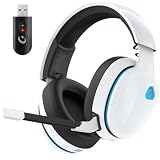
The white AOC is the headset for someone building a light-coloured setup around a white console, a white controller and a white desk, and who wants a 45-hour battery claim on top of it. It is a 2.4 GHz dongle headset covering PS5, PS4, PC and Switch, with a boom mic and a 45-hour runtime claim. The colour is not a trivial detail: white headsets hide dust and fingerprints differently from black ones, and matching a white DualSense and console is the entire reason this model exists as a separate SKU.
Key specs at a glance
- Connection: 2.4 GHz dongle, PS5 / PS4 / PC / Switch
- Battery: 45-hour claim per charge
- Microphone: boom mic
- Colour: white shell
- Controls: on-earcup volume and mute
- Price tier: budget
Strengths
Forty-five hours sits in a sweet spot: meaningfully longer than a 40-hour claim, and long enough that a player doing two hours a night charges roughly once a month. The 2.4 GHz dongle approach means the PS5 treats it as a USB audio device and applies Tempest 3D Audio automatically once you select headphones as the output. Multi-platform support across PS5, PS4, PC and Switch makes it a sensible single headset for a household with more than one system under the television.
Pros
- 45-hour battery claim is generous for the budget tier
- White finish matches a white PS5 and DualSense
- 2.4 GHz dongle gives real PS5 compatibility and console-side 3D audio
- Works with PS5, PS4, PC and Switch
Cons
- No Bluetooth, so no phone mixing
- White surfaces show grime over time more than black
- No companion EQ software
- Budget-tier materials
How it compares with the nearest alternative
The black AOC in this list is the obvious comparison. Functionally they occupy the same tier: both are 2.4 GHz dongle headsets for PS5, PS4, PC and Switch with a boom mic. The difference is the finish and the battery claim on the white version, which is stated at 45 hours. If you are matching a white console, the white model is the one to buy and the black model becomes the second-pair or travel option. Against the Ozeino, the AOC gives you a longer stated battery and a colour choice; the Ozeino counters with a lossless-audio claim.
5. Turtle Beach Stealth 500 – Best for Mixing Game Audio and Phone Audio at Once
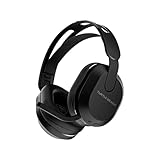
The Stealth 500 is the headset for people whose friends are not all on PlayStation. It combines a 2.4 GHz connection to PS5, PS4 and PC with Bluetooth for mobile devices, and it carries a 40-hour battery claim. That dual-connection design means you can have console game audio coming through the dongle and a phone call, a Discord call or a podcast coming through Bluetooth at the same time, with the headset mixing both into your ears.
Key specs at a glance
- Connection: 2.4 GHz wireless (PS5, PS4, PC) plus Bluetooth for mobile
- Battery: 40-hour claim per charge
- Microphone: flip-to-mute boom mic
- Amplification: amplified headset design per Turtle Beach
- Controls: on-earcup volume and mic monitoring
- Price tier: premium
Strengths
Dual-connection is the feature that changes how you use a headset. Instead of choosing between game audio and a call, you get both, and the practical upshot is that you stop taking the headset off. The flip-to-mute mic is the same mechanism as the Stealth 600, which is the best mute design at this price level because it is visible and unambiguous. Turtle Beach’s amplified design pushes a stronger signal into the drivers than a passive dongle headset typically manages, which helps with quieter sources and with games that have wide dynamic range.
Pros
- Simultaneous 2.4 GHz and Bluetooth — game audio plus phone audio
- 40-hour battery claim
- Flip-to-mute mic
- Full PS5 compatibility and console-side Tempest 3D Audio
- Works across PS5, PS4, PC and mobile
Cons
- Premium price
- Bluetooth adds a second thing to keep charged if you use it heavily
- Not the strongest raw audio performer in the premium tier
- Two wireless radios means more potential interference sources in a crowded room
How it compares with the nearest alternative
Against the SteelSeries Arctis Nova 5P, the Stealth 500 is the more console-flavoured option: Turtle Beach’s tuning, Turtle Beach’s mic, Turtle Beach’s controls. The Nova 5P offers the same dual-connection idea with a USB-C dongle, a retractable mic and access to SteelSeries’ PC software for EQ tuning. If you want a console-first headset and you value the flip-to-mute mic, take the Stealth 500. If you want the same dual-audio trick with more tuning control and a cleaner, more neutral sound, the Nova 5P is the step up.
6. SteelSeries Arctis Nova 5P – Best Overall for PS5

The Arctis Nova 5P is the best wireless gaming headset for PS5 overall because it solves the two problems that trip up every other headset in this list at the same time. It connects over a low-latency 2.4 GHz USB-C dongle, so the console treats it as a proper audio device and applies Tempest 3D Audio; and it simultaneously holds a Bluetooth connection, so a phone call arrives over the game audio instead of pausing it. Add a multi-day battery claim, a retractable boom mic and desktop software EQ, and it is the most complete package here.
Key specs at a glance
- Connection: 2.4 GHz USB-C dongle plus simultaneous Bluetooth
- Battery: multi-day class per SteelSeries’ published figure for the Nova 5 family
- Microphone: retractable boom mic with clear-cast class pickup
- Software: desktop EQ and profile support on PC
- Design: lightweight frame, adjustable headband, PlayStation-specific tuning
- Price tier: premium
Why the USB-C dongle matters on a PS5
A PS5 has both USB-A and USB-C ports available, and a USB-C dongle is a genuine advantage for two reasons. First, it frees the USB-A ports for other accessories. Second, and more importantly, USB-C dongles on modern consoles are usually built around a lower-power, lower-noise USB implementation, which matters because SuperSpeed USB 3.x signalling is a known source of 2.4 GHz interference. If you ever hear intermittent crackle or dropouts, moving the dongle away from the console chassis — a short USB extension cable does it — is the standard fix. A USB-C dongle gives you more physical options for where the radio sits.
Strengths
The dual-connection design is the headline and it is genuinely useful rather than a marketing bullet. Game audio comes in over 2.4 GHz with latency low enough to ignore; a phone call comes in over Bluetooth at the same time. You can also use Bluetooth alone for music or a Switch in handheld mode, which makes the Nova 5P a general-purpose headset rather than a console-only one. The retractable mic means the boom disappears into the earcup when you are not using it, which is the best of both worlds: proper voice pickup when you need it, and nothing sticking out when you do not. SteelSeries’ PC software lets you set EQ profiles, so you can flatten the tuning for competitive play or boost the low end for single-player games, and those settings live on the headset.
Pros
- Simultaneous 2.4 GHz and Bluetooth — the most useful feature in this roundup
- Multi-day battery class
- Retractable boom mic
- Desktop EQ software for tuning
- USB-C dongle gives flexibility in where you plug in and how you avoid interference
- Full PS5 compatibility with console-side Tempest 3D Audio
Cons
- Premium price, and the highest of the mainstream picks here
- Best EQ features require a PC, not the console
- Neutral tuning may sound less exciting out of the box than a bass-forward headset
- Retractable mic is convenient but a fixed boom can sit closer to the mouth
How it compares with the nearest alternative
The nearest alternatives are the Turtle Beach Stealth 500 and the Razer BlackShark V3 X HyperSpeed. Against the Stealth 500, the Nova 5P wins on tuning control and on the USB-C dongle, while the Stealth 500 counters with a flip-to-mute mic and Turtle Beach’s amplified, bass-forward presentation. Against the BlackShark V3 X HyperSpeed, the Nova 5P wins on the simultaneous Bluetooth feature and on software EQ; the Razer counters on price, landing in the mid-range tier while offering a similar 2.4 GHz gaming experience. If you want the single best all-round PS5 headset and you can afford the premium tier, the Nova 5P is the answer.
7. Razer BlackShark V3 X HyperSpeed – Best Mid-Range All-Rounder

The BlackShark V3 X HyperSpeed is the value play in the middle of the market. It uses Razer’s HyperSpeed 2.4 GHz wireless for PS5, PS4 and PC, has a long-life battery class, a boom mic and a lightweight frame that takes design cues from headsets built for esports. If you want a name-brand wireless headset with a low-latency link and you do not want to pay the premium tier, this is where the money goes furthest.
Key specs at a glance
- Connection: Razer HyperSpeed 2.4 GHz wireless, PS5 / PS4 / PC
- Battery: long-life class per Razer’s published figure for this model
- Microphone: boom mic
- Design: lightweight frame derived from Razer’s competitive headset line
- Colour: black
- Price tier: mid-range
Strengths
The lightweight frame is the part you notice most in hour four of a session. Headsets that feel fine for an hour start to press on the crown and the jaw after three, and the BlackShark shape is designed to spread that load rather than concentrate it. HyperSpeed wireless is Razer’s low-latency 2.4 GHz implementation, which is the same category of link as the premium headsets here — the latency difference between a good mid-range dongle and a premium dongle is small compared with the difference between either of them and Bluetooth. The boom mic is positioned for voice clarity in party chat, and the black finish matches a black console and controller.
Pros
- Low-latency HyperSpeed 2.4 GHz link
- Lightweight, esports-derived frame that stays comfortable for long sessions
- Mid-range price for near-premium wireless performance
- Full PS5 compatibility with console-side 3D audio
- Works across PS5, PS4 and PC
Cons
- No simultaneous Bluetooth audio mixing
- Less software tuning depth than the SteelSeries option
- Boom mic is fixed rather than retractable
- Mid-range materials rather than premium ones
How it compares with the nearest alternative
The nearest alternative is the Motast, the other mid-range entry here. The Motast goes wider on devices — PC, PS5, PS4 and Switch — and claims a 100-hour battery plus Bluetooth 6.0 as listed, which makes it the better pick if you want to use one headset across a console and a phone. The BlackShark V3 X HyperSpeed counters with a lighter, more gaming-focused frame and Razer’s HyperSpeed wireless reputation. If comfort during long sessions is your priority, take the Razer; if runtime and device count are, take the Motast. Against the wired BlackShark V2 X, the V3 X HyperSpeed costs more but removes the cable, which is the whole point of this list.
8. Motast 2.4GHz Wireless Gaming Headset – Best for Multi-Device Households

The Motast is the headset for a house with a PS5, a PC, a Switch and a phone all competing for one pair of ears. It combines a 2.4 GHz dongle for PC, PS5, PS4 and Switch with Bluetooth 6.0 as listed, and it claims a 100-hour battery. That is the widest device coverage in this roundup combined with the longest runtime claim, and it lands in the mid-range tier rather than the premium one.
Key specs at a glance
- Connection: 2.4 GHz dongle for PC / PS5 / PS4 / Switch, plus Bluetooth 6.0 as listed
- Battery: 100-hour claim per charge
- Microphone: boom mic with noise reduction
- Dual connection: supports using the dongle and Bluetooth together
- Price tier: mid-range
Strengths
A 100-hour claim is the kind of number that removes a whole category of annoyance. Work out the power budget: if the cell is in the 800–1000 mAh range typical of over-ear headsets, a 100-hour claim implies an average draw around 8–10 mA, which is roughly half what a 40-hour headset pulls. That headroom comes from efficient wireless silicon and modest amplifier demands, and it means you can leave the headset powered on between sessions and still find charge a week later. Bluetooth 6.0 as listed is the newest core specification class in this roundup, and while the version number matters less than the codec and the implementation, newer Bluetooth silicon generally brings better power efficiency and more stable coexistence with Wi-Fi — which matters in a room with a console, a router and a phone all transmitting.
Pros
- 100-hour battery claim — the longest runtime class here
- Widest platform coverage: PC, PS5, PS4 and Switch on one dongle
- Bluetooth 6.0 as listed for phone and tablet use
- Mid-range price for premium-tier battery life
- Dongle and Bluetooth can be used together for mixed audio
Cons
- Bluetooth alone will not carry PS5 game audio — the dongle is mandatory for the console
- Heavier-feeling build than the lightweight Razer option
- Less brand software support than SteelSeries or Razer
- Mid-range materials
How it compares with the nearest alternative
Against the Razer BlackShark V3 X HyperSpeed, the Motast wins on runtime and on device count, and loses on weight and on the pedigree of its wireless implementation. Against the syndesmos, which also pairs a 2.4 GHz dongle with Bluetooth, the Motast is the more expensive and more capable headset: 100 hours versus an unstated figure, and broader console coverage. If you want one headset that handles a console, a handheld and a phone, the Motast is the strongest mid-range choice here.
9. AOC Wireless Gaming Headset (Black) – Best for a Second Setup or Backup Pair

The black AOC is the sensible second headset: a 2.4 GHz dongle model for PS5, PS4, Switch and PC with a boom mic and a long single-charge battery class, at a budget price. Buy it as the pair that lives in the bedroom, the pair that travels in a bag, or the pair you hand to a guest who wants to join party chat without unplugging yours.
Key specs at a glance
- Connection: 2.4 GHz dongle, PS5 / PS4 / Switch / PC
- Battery: long single-charge class per AOC’s listing
- Microphone: boom mic
- Colour: black
- Price tier: budget
Strengths
The case for a second budget headset is stronger than it sounds. Party chat is the main reason people buy a gaming headset at all, and a spare pair means a friend can join without passing a controller back and forth or shouting at a speakerphone. Because it is a standard USB audio device, moving it between a PS5 in the living room and a PC in the study takes seconds. The black finish is the practical choice for a headset that gets thrown in a bag, since it hides scuffs better than white plastic.
Pros
- Budget price makes a second pair easy to justify
- 2.4 GHz dongle gives full PS5 compatibility and console-side 3D audio
- Works across PS5, PS4, Switch and PC
- Boom mic for party chat
- Black finish travels well
Cons
- No Bluetooth mixing
- No software EQ
- No stated battery figure as prominent as the white model’s 45 hours
- Budget materials
How it compares with the nearest alternative
The white AOC is the direct comparison and the difference comes down to the finish and the stated battery. If you are matching a white console, buy the white one and let this black model be the spare. If you want a headset that lives in a bag and does not show wear, buy the black one. Against the Ozeino and NUBWO, the AOC sits in the same budget band with the same dongle-based approach; the Ozeino has the lossless-audio claim, the NUBWO has the 100-hour battery, and the AOC is the middle ground with the widest console list.
10. Razer BlackShark V2 X Wired – Best Wired Control Option at Budget Money

The BlackShark V2 X is the one wired headset in this roundup, and it is here for a reason: it is the answer to every problem a wireless headset creates. No battery to charge, no dongle to lose, no latency at all, no interference from a crowded 2.4 GHz band, and a lower price than any wireless option here. If your console sits within arm’s reach of where you sit, a wired headset is genuinely the better engineering choice, and this is the one to get.
Key specs at a glance
- Connection: 3.5 mm wired, plugs into the DualSense controller or a PC
- Drivers: 50 mm class
- Microphone: cardioid boom mic
- Battery: none required
- Colour: black
- Price tier: budget
Why wired still wins on some setups
Wired audio through the DualSense’s 3.5 mm jack is not a compromise on the PS5, because the console’s Tempest 3D Audio processing is applied to the headphone output regardless of whether the connection is a dongle or a cable. You get the same spatial audio, the same chat mix, and zero latency. The trade-offs are the cable itself — which catches on chair arms and pulls on the controller — and the fact that the DualSense battery is now powering both the controller and the headset, which shaves runtime off the controller. Neither is a dealbreaker, and both are the reason wireless exists in the first place.
Pros
- Zero latency and zero wireless interference
- Nothing to charge — ever
- Full PS5 3D audio support through the controller jack
- Cardioid boom mic is well suited to voice chat
- Cheapest way into a brand-name gaming headset with a 50 mm driver class
Cons
- It is wired — the cable is the point and also the problem
- Drains the DualSense battery faster
- No Bluetooth or dongle option
- 3.5 mm from a controller can pick up a faint electrical hum on some units
How it compares with the nearest alternative
Against the wireless BlackShark V3 X HyperSpeed, this is the same family with the cable put back. The V3 X HyperSpeed costs more and gives you freedom from the cable plus a longer reach from the console; the V2 X costs less and gives you a signal that cannot drop. If you play at a desk with the console nearby, the wired model is the smarter buy. If you play from a sofa three metres away, pay for the wireless version. Against the budget wireless headsets in this list, the wired V2 X is the only one that never needs charging, which for some players is worth more than any battery claim.
11. syndesmos Wireless PS5 Headset – Best for Bluetooth-First Listeners Who Also Game

The syndesmos is the budget option for someone who wants one headset for music and phone calls as well as games. It carries a 2.4 GHz connection for PS5, PC and Switch plus Bluetooth 5.3 for everything else, and a noise-reducing microphone. Bluetooth 5.3 is a mature, power-efficient specification, and pairing it with a dongle is the correct way to build a headset that has to serve both a console and a phone.
Key specs at a glance
- Connection: 2.4 GHz dongle for PS5 / PC / Switch, plus Bluetooth 5.3
- Microphone: noise-reducing mic
- Battery: long single-charge class per the listing
- Price tier: budget
The Bluetooth trap you need to understand
This is the most important paragraph in this article for anyone shopping on price. The PS5 does not route game audio over Bluetooth. Sony’s console reserves Bluetooth for controllers and accessories, so a Bluetooth-only headset will pair with your phone and your laptop and will do absolutely nothing for PS5 game audio. The syndesmos avoids this trap because it includes a 2.4 GHz dongle, and that dongle — not the Bluetooth radio — is what makes it a PS5 headset. Whenever you see a cheap “wireless headset for PS5” with Bluetooth in the name, check for the dongle. If there is no dongle and no 3.5 mm cable, it is not a PS5 headset no matter what the title says.
Strengths
Two radios in one budget headset is good value. Bluetooth 5.3 handles music, podcasts and calls from a phone with the power efficiency that the version number implies, while the dongle handles console audio at gaming-appropriate latency. The noise-reducing mic is aimed at voice chat in rooms with a fan, a television or a keyboard in the background. As a budget all-rounder for someone who games on a console and listens on a phone, it covers more situations than a dongle-only headset at a similar price.
Pros
- 2.4 GHz dongle for real PS5 compatibility and console-side 3D audio
- Bluetooth 5.3 for phone, tablet and laptop use
- Noise-reducing microphone
- Budget price
- Works across PS5, PC and Switch
Cons
- Lesser-known brand with limited software support
- No stated battery figure as specific as the 100-hour competitors
- Budget build quality
- Bluetooth and dongle audio mixing behaviour varies by model — check before relying on it
How it compares with the nearest alternative
Against the Motast, the syndesmos is the cheaper headset with a similar two-radio idea, but the Motast claims 100 hours and Bluetooth 6.0 as listed and covers PS4 as well. Against the Ozeino, the syndesmos trades a lossless-audio claim and a 40-hour battery for Bluetooth, which is a fair trade only if you actually want to use the headset with a phone. If you want the cheapest headset that works properly with a PS5, the Ozeino or NUBWO is the better call; if you want Bluetooth in the mix and you are on a tight budget, this is the one.
12. ASTRO Gaming Logitech G A20 Gen 2 – Best for PS5 Owners Who Want a Console-Designed Fit
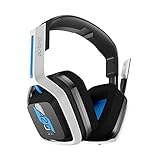
The ASTRO A20 Gen 2 is the headset for someone who wants the fit and feel of a purpose-built console headset rather than a generic gaming headset with a dongle bolted on. It is a 2.4 GHz wireless model built for PlayStation, with PC and Mac support, a flip-to-mute mic and a shorter single-charge runtime class than the 40-to-100-hour budget crowd. The white and blue colourway is designed to sit alongside a PlayStation console.
Key specs at a glance
- Connection: 2.4 GHz wireless for PlayStation, plus PC and Mac support
- Battery: shorter single-charge runtime class than the budget long-life models
- Microphone: flip-to-mute boom mic
- Design: console-oriented fit with a white/blue colourway
- Price tier: premium
Strengths
The A20 Gen 2 is built around comfort and simplicity rather than feature count. The earcup and headband geometry comes from ASTRO’s long history of console headsets, and the result is a fit that many players find easier to wear for long stretches than a generic over-ear. The flip-to-mute mic is the same correct design used by Turtle Beach: visible, unambiguous, impossible to leave open by accident. The 2.4 GHz link gives full PS5 compatibility, so Tempest 3D Audio applies once the headset is selected as the output device.
Pros
- Console-designed fit and finish
- Flip-to-mute boom mic
- 2.4 GHz wireless with full PS5 3D audio support
- PlayStation-matched colourway
- Simple setup with no software required
Cons
- Shorter runtime per charge than the budget long-life headsets here
- Premium price for the feature set
- No simultaneous Bluetooth mixing
- Fewer software tuning options than SteelSeries or Razer
How it compares with the nearest alternative
The nearest alternatives are the Turtle Beach Stealth 600 and the SteelSeries Arctis Nova 5P. The Stealth 600 gives you a longer multi-day battery and a more aggressive game tuning; the Nova 5P gives you Bluetooth mixing and software EQ. The A20 Gen 2 wins on fit and on simplicity, which matters if you have ever owned a headset that sounded fine but hurt after two hours. If comfort is the thing that has driven you to replace headsets in the past, this is the one to look at first.
How to Choose
Choosing a PS5 headset comes down to six decisions, and you can make them in order. Get the connection type right first, because everything else is irrelevant if the headset will not carry console audio. Then work through 3D audio, battery, microphone, comfort and finally price tier.
1. Connection: the PS5 does not do Bluetooth audio
This is the first and most important filter. The PlayStation 5 sends game audio to a USB audio device or to the 3.5 mm jack on the DualSense controller. It does not send game audio to Bluetooth headsets. Any listing that advertises “Bluetooth wireless headset for PS5” is describing a headset that will pair with your phone, and if it also includes a 2.4 GHz dongle or a 3.5 mm cable, that is what will actually work with the console. Two practical consequences follow. First, when you are shopping, look for the dongle in the photos. Second, if a headset is Bluetooth-only, it is not a PS5 headset, no matter how the title is written.
2. 3D audio is console-side, not headset-side
Tempest 3D AudioTech runs on the PS5’s own audio processor. It takes the game’s object-based audio, renders it into a binaural stereo signal, and sends that to whatever stereo device is connected. That means every headset in this roundup supports PS5 3D audio equally — the headset does not need a special chip, a licence or a “3D” badge. What you actually need to do is set it up correctly:
- Settings > Sound > Audio Output > Output Device: choose your USB headset or “Headphones” so the console routes audio to the right place. If this stays on HDMI, 3D audio never reaches your ears.
- Settings > Sound > Audio Output > Enable 3D Audio: turn it on for headphones.
- Adjust 3D Audio Profile: run the profile test and pick the setting that places the sound most clearly around your head. The five profiles exist because ear shape and head size change how binaural audio is perceived — this is not a gimmick, and picking the wrong profile is the most common reason players say 3D audio “does nothing”.
- Turn off headset-side virtual
Related guides








