
The best Corsair gaming headsets for PC are the Virtuoso Max Wireless for the fullest feature set, the HS80 Max Wireless for long battery life and a clear microphone, and the HS65 Surround when reliable wired audio matters more than wireless convenience.
As an Amazon Associate we earn from qualifying purchases at no extra cost to you.


Our Top Picks
 Corsair Void v2 Wireless Bluetooth PC PS5 SwitchOne Size4.13 x 6.71 x 7.6 inches0.7 PoundsCheck on Amazon


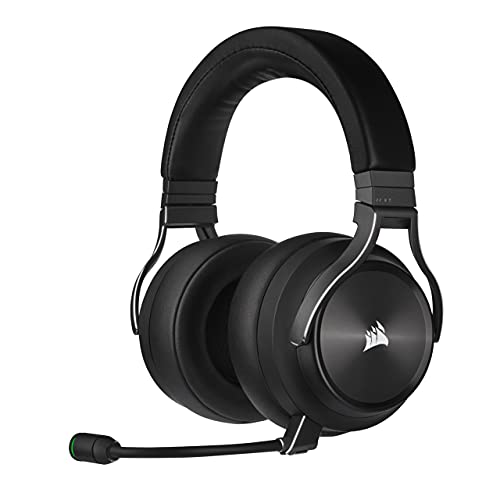
Top 3 picks at a glance
Best Corsair gaming headsets at a glance
| Model | Connection | Rated battery | Microphone | Best for |
|---|---|---|---|---|
| Corsair Virtuoso Max Wireless | 2.4GHz, Bluetooth, USB | Up to 50 hours, depending on features | Detachable broadcast-style boom | Competitive and immersive PC gaming |
| Corsair HS80 Max Wireless | 2.4GHz, Bluetooth, USB charging | Up to 65 hours on 2.4GHz | Broadcast-style flip-to-mute boom | Long sessions and voice chat |
| Corsair HS80 RGB Wireless | 2.4GHz, USB | Up to 20 hours | Broadcast-style flip-to-mute boom | Clear comms at a lower price |
| Corsair HS65 Surround | 3.5mm and USB | Not applicable | Detachable boom | Stable, low-latency wired audio |
| Corsair HS55 Stereo | 3.5mm analog | Not applicable | Flip-to-mute boom | Simple headset compatibility |
Battery figures are manufacturer-rated maximums. RGB lighting, high-volume listening, wireless mode, Bluetooth use and firmware behavior can reduce actual runtime.
1. Corsair Virtuoso Max Wireless: best overall
The Virtuoso Max Wireless is the strongest all-round choice if you want one Corsair headset for competitive shooters, single-player games, music and video calls. It combines a 2.4GHz wireless receiver with Bluetooth, active noise cancellation, a transparency mode and support for spatial audio through Dolby Atmos and Corsair software.
Its main advantage over simpler wireless models is flexibility. Use 2.4GHz for gaming, Bluetooth for a phone or laptop, or a wired USB connection when you want to avoid wireless interference and preserve a direct digital connection. The detachable boom microphone is also more practical than a permanently fixed microphone if you regularly use the headset outside gaming.
Microphone and positional audio
The boom microphone is designed for voice clarity rather than merely making you audible. That helps with Discord, in-game squad chat and streaming, although microphone quality still depends on placement. Keep the capsule close to the corner of your mouth rather than directly in front of it, and reduce microphone gain until normal speech peaks below clipping.
For positional audio, start with stereo in the game and enable Dolby Atmos or another spatial mode only once. Running a game’s own surround processing on top of headset spatial processing can make front-versus-back placement less precise. For competitive games, a useful starting point is 80–100% headset volume, moderate bass, and no additional virtual surround until you have compared it with stereo.
Limitations
The Virtuoso Max is heavier and more expensive than the HS80 range, and active noise cancellation is most useful for steady background noise rather than keyboard clicks or nearby speech. Its feature count also means more settings to manage in iCUE. Usually priced in the upper midrange to premium segment, it makes the most sense when you will actually use Bluetooth, ANC or dual-device flexibility.
2. Corsair HS80 Max Wireless: best for battery life and voice chat
The HS80 Max Wireless is the better value choice for many PC players. It keeps the HS80 family’s excellent boom-microphone design while adding Bluetooth and a substantially longer rated battery life of up to 65 hours over 2.4GHz.
Its microphone is one of the reasons to choose it over a generic wireless headset. The boom sits near the mouth, flips upward to mute and gives teammates a more natural voice than many small integrated wireless microphones. The headset also supports Dolby Atmos on compatible PC setups, with EQ and device management handled through Corsair iCUE.
Comfort and daily use
The HS80 Max uses a floating headband that spreads pressure across the top of the head. Its fabric-covered ear cushions are breathable and generally better suited to long sessions than tightly sealed synthetic leather, particularly in a warm room. Fit remains personal: players with a narrow head may need to adjust the band carefully to keep the earcups sealed.
Battery calculation
Suppose you play for three hours on weekdays and six hours on both weekend days. That is:
(3 × 5) + (6 × 2) = 27 hours per week.
At the advertised maximum of 65 hours, the HS80 Max could theoretically cover about 65 ÷ 27 = 2.4 weeks between charges. In practice, allowing for RGB lighting, high volume and battery aging, planning on roughly 1.5–2 weeks is more realistic. This is why the HS80 Max is a better fit than a 20-hour headset for people who dislike charging after every few sessions.
3. Corsair HS80 RGB Wireless: best microphone value
The HS80 RGB Wireless remains appealing if you find it at a clearly lower price than the HS80 Max. It provides 2.4GHz wireless PC audio, a broadcast-style flip-to-mute microphone, RGB lighting and Dolby Atmos support on compatible systems.
The trade-off is battery life: its rated maximum is about 20 hours, so it is better for users who routinely charge their devices than for anyone who wants to leave a headset unplugged for a week. It also lacks the HS80 Max’s Bluetooth flexibility.
For positional audio, the HS80 RGB Wireless is well suited to games where directional cues matter. The important factor is not simply the presence of a “7.1” label. Footstep placement depends on the game’s mix, the headset’s stereo tuning, your ear shape and whether multiple surround effects are enabled. Compare stereo and Dolby Atmos using the same map or training range instead of switching settings between different games.
4. Corsair HS65 Surround: best wired Corsair headset
The HS65 Surround is the sensible choice when connection stability and low latency matter more than wireless freedom. It connects through 3.5mm analog audio or USB, and its USB mode provides virtual 7.1 processing through Corsair software.
A wired connection removes battery management, radio congestion and the possibility of a receiver being blocked by the back of a desktop PC. It is also easier to use with a motherboard, laptop, controller or monitor that has a headphone output. USB is preferable on a desktop when you want software EQ and surround features; 3.5mm is preferable when you need broad, plug-and-play compatibility.
The detachable microphone is useful for voice chat, while the headset’s closed design provides some passive isolation. Choose this model over the wireless alternatives if your PC sits under a desk, uses several 2.4GHz devices, or you have previously experienced intermittent wireless dropouts.
5. Corsair HS55 Stereo: best for simple compatibility
The HS55 Stereo is the least complicated option. Its analog 3.5mm connection works with PCs, laptops, controllers and many handheld gaming devices without a wireless receiver or desktop software. It is a good match for a secondary computer or a player who wants sound and voice chat with minimal setup.
Its limitation is also its simplicity: there is no wireless connection, no battery, and no headset-level spatial processing. Any surround or spatial audio must come from Windows, the game or the platform. For competitive play, that is not automatically a disadvantage; clean stereo can be easier to judge than heavily processed virtual surround.
Wireless versus wired: which connection should you choose?
| Your situation | Best direction | Reason |
|---|---|---|
| You want one headset for PC, phone and travel | Virtuoso Max Wireless | 2.4GHz, Bluetooth, ANC and wired options |
| You play long sessions and hate frequent charging | HS80 Max Wireless | Up to 65 hours on 2.4GHz |
| You mainly use Discord or team voice chat | HS80 Max or HS80 RGB Wireless | Clear boom microphones and flip-to-mute operation |
| You need the most stable connection | HS65 Surround | No battery or radio link to interrupt audio |
| You switch between PC, console and handheld devices | HS65 Surround or HS55 Stereo | 3.5mm is widely compatible |
| You want ANC and transparency mode | Virtuoso Max Wireless | The only model in this group built around those features |
Connection stability and setup fixes
For 2.4GHz wireless models
- Connect the receiver to a front-panel USB port or use the supplied extension cable. This moves it away from metal cases and USB 3 devices that can create local radio interference.
- Keep the receiver within roughly two metres of the headset when possible. A wireless headset may work across a room, but distance and walls reduce margin for a clean signal.
- Update the headset and receiver firmware in iCUE, then pair them again if the software reports different versions.
- Turn off unused Bluetooth connections during troubleshooting. This helps identify whether the issue is radio competition, a Windows output change or a headset fault.
For microphone problems
- In Windows sound settings, select the Corsair microphone as the input and disable automatic input switching in communication apps.
- Set input gain so ordinary speech is strong but loud words do not distort. Excessive gain causes clipping that software cannot repair.
- Check the physical mute position: boom microphones commonly mute when raised, while some applications also have their own mute control.
Frequently asked questions
Can I use these Corsair headsets with a phone or laptop?
Yes, the Virtuoso Max Wireless and HS80 Max Wireless support Bluetooth for use with a phone or laptop. The Virtuoso Max also supports a wired USB connection, while the HS80 Max uses Bluetooth alongside its 2.4GHz wireless connection and USB charging. The HS80 RGB Wireless does not include Bluetooth, and the HS65 Surround and HS55 Stereo rely on wired connections.
Should I use stereo or virtual surround sound for gaming?
Start with stereo, then compare it with Dolby Atmos or another spatial mode using the same map or training range. Directional accuracy depends on the game’s mix, headset tuning, ear shape and processing settings. Avoid running a game’s own surround processing on top of headset spatial processing, because front-versus-back placement may become less precise.
How should I position the microphone for clearer voice chat?
Keep a boom microphone close to the corner of your mouth rather than directly in front of it. Reduce microphone gain until normal speech peaks below clipping. This guidance applies especially to the Virtuoso Max Wireless, HS80 Max Wireless and HS80 RGB Wireless, which use boom microphones designed for Discord, in-game squad chat or other voice communication.
Where should I place the wireless receiver on a desktop PC?
Place the receiver in a front-panel USB port or use the supplied extension cable, keeping it away from metal cases and USB 3 devices that can create local radio interference. When possible, keep the receiver within roughly two metres of the headset. Updating headset and receiver firmware in iCUE and pairing them can also help with setup.
Which Corsair headset is easiest to use without software or charging?
The HS55 Stereo is the simplest option because its analog 3.5mm connection needs neither a wireless receiver nor a battery. It works with PCs, laptops, controllers and many handheld gaming devices. The HS65 Surround is another wired choice, offering 3.5mm and USB connections, but USB software can provide EQ and virtual 7.1 processing through Corsair software.
Final recommendation
Choose the Virtuoso Max Wireless if you want the most complete feature set and can justify a premium price. Choose the HS80 Max Wireless for the best balance of microphone clarity, comfort, wireless freedom and battery life. Pick the HS65 Surround if you want dependable wired performance and broad compatibility, or the HS55 Stereo when a simple analog headset is all you need.








