
The best UPS for a custom gaming PC is sized to roughly 1.6x your system’s peak measured wattage, uses a pure sine wave inverter, and gives you at least 5-8 minutes of runtime at full load so you can save work and shut down safely. A 650W-draw RTX-class rig needs a different unit than a 350W mid-range build, and getting the sizing wrong is the single most common UPS mistake gamers make.
As an Amazon Associate we earn from qualifying purchases at no extra cost to you.


As an Amazon Associate we earn from qualifying purchases at no extra cost to you.
Our Top Picks
 CyberPower CP1500PFCLCD PFC Sinewave UPS Battery Backup and1500VA14 x 3.9 x 11 inches24.9 poundsCheck on Amazon
 CyberPower CP1500AVRLCD3 Intelligent LCD UPS Battery Backup1500VA13.78 x 3.94 x 10.2 inches23.8 PoundsCheck on Amazon
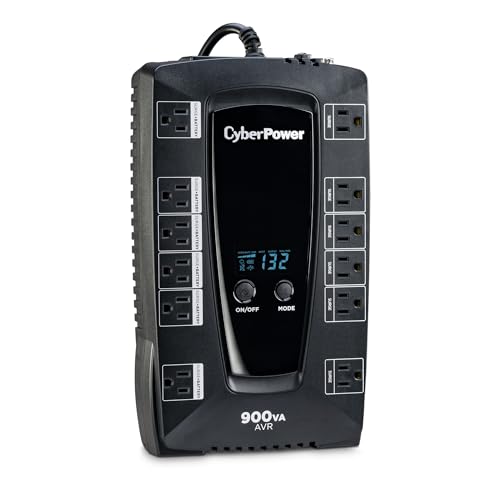 CyberPower AVRG900LCD Intelligent LCD UPS Battery Backup900VA LCD3.5 x 12.2 x 7 Inches14.2 poundsCheck on Amazon
 APC BX1500M UPS Battery Backup & Surge Protector1500VA15.04 x 3.94 x 9.84 inches24.25 poundsCheck on Amazon
 APC 1500VA/900W Back-UPS Pro UPS Battery Backup forBR1500G15 x 4.4 x 11.9 Inches21 poundsCheck on Amazon
Top 3 picks at a glance
Why Wattage Sizing Starts With VA, Not Watts
UPS units are rated in VA (volt-amps), but your PC’s power draw is measured in watts. These aren’t the same number. VA accounts for the apparent power the UPS can deliver, while watts measure real power consumed. The relationship depends on power factor, which for most consumer UPS units sits around 0.6-0.7.
The rough conversion: Watts = VA x Power Factor. So a UPS rated at 1000VA with a 0.6 power factor only delivers about 600W of real, usable power, not 1000W. This is where a lot of buyers get burned, they see “1000VA” on the box, assume it covers a 650W draw rig, and find out during the first brownout that it shuts down in 90 seconds.
To size correctly, work backward from your measured wattage, not the PSU’s rated capacity. A PSU labeled 850W rarely pulls more than 550-650W under real gaming load unless you’re running a flagship GPU at max power limit plus an overclocked CPU. Use a plug-in power meter or your motherboard’s software monitor during a demanding game session to get the real number, then size the UPS around that.
Worked Example: Two Builds, Two UPS Classes
Here’s the math for the two scenarios most readers are dealing with.
| Build type | Measured gaming load | Target UPS capacity | Recommended VA rating |
|---|---|---|---|
| RTX-class rig (RTX 4080/4090-tier GPU, 8-core CPU) | ~650W | 1000-1100W real output | 1500-1600VA, pure sine wave |
| Mid-range build (RTX 4060/4070-tier GPU, 6-core CPU) | ~350W | 550-600W real output | 900-1000VA, pure sine wave |
The headroom (1.6x) matters for two reasons: it accounts for inrush current when the PSU’s capacitors charge at power-on, and it keeps the UPS running efficiently rather than near its ceiling, which shortens battery life and runtime under load.
Pure Sine Wave vs Simulated Sine Wave: Why Your PSU Cares
This is the spec that actually matters more than brand name. Simulated (stepped approximation) sine wave UPS units are cheaper, but modern gaming PSUs with Active PFC (Power Factor Correction) circuitry, which is standard on virtually every 80 Plus certified PSU sold since the mid-2010s, can react badly to stepped waveforms.
- Pure sine wave: Smooth, continuous AC waveform that matches utility power. Active PFC circuits interpret this correctly and draw current normally.
- Simulated sine wave: A stepped square-wave approximation. Active PFC PSUs can misread the stepped transitions as noise, causing the PSU to trigger protection circuits, shut down abruptly, or in rare cases produce an audible buzz from the PSU or coil whine from the GPU during the switch to battery.
If your PSU box lists “Active PFC” (nearly all do now, including budget units from Corsair, EVGA, Seasonic, and MSI), buy a pure sine wave UPS. Paying less for simulated sine wave to save $30-40 risks a hard shutdown exactly when you needed protection most, during the power event itself.
Runtime-to-Shutdown: What the Numbers Actually Look Like
Manufacturer runtime charts are usually generated at a flat percentage of rated load, which doesn’t match how a gaming PC actually draws power (spiky, with GPU boost clocks pushing brief peaks well above average). Expect real-world runtime to land 15-20% below the datasheet number once you factor in a monitor plugged into the same unit.
| UPS capacity class | Load tested | Datasheet runtime | Realistic runtime (PC + 27″ monitor) |
|---|---|---|---|
| 1500VA / 900W pure sine | 650W (RTX-class rig) | ~6-7 min | ~4.5-5.5 min |
| 1000VA / 600W pure sine | 350W (mid-range build) | ~9-10 min | ~7-8 min |
| 1500VA / 900W pure sine | 350W (mid-range build) | ~15-16 min | ~12-13 min |
The last row is worth noting: oversizing a UPS for a lighter build buys you dramatically more runtime, not just safety margin. If you want time to actually finish a match or save a render job rather than just a clean shutdown window, size up a tier.
Replaceable Battery Cost Over 5 Years
Sealed lead-acid batteries inside consumer UPS units typically last 3-5 years depending on how often they cycle and ambient temperature near the desk (heat shortens battery life significantly, so don’t tuck the UPS into a closed cabinet). Budget for at least one battery swap over a 5-year ownership period.
- Replacement battery cartridges (user-swappable models): usually $25-$60 depending on VA class, available from the UPS manufacturer or third-party battery suppliers.
- Non-replaceable/sealed units: cheaper upfront, but the whole unit gets replaced at end of battery life, usually $80-$150 for the equivalent VA class.
Over 5 years, a $120-180 upfront UPS with a swappable battery and one $40 battery replacement runs cheaper than two full unit replacements of a sealed non-swappable model. If you’re buying for a long-term build, prioritize models that explicitly list “user-replaceable battery” in the spec sheet, brands like APC and CyberPower both sell swappable-battery lines in the relevant VA classes.
Desk and Floor Footprint: The Part Spec Sheets Skip
UPS units in the 1000-1600VA range are bulky, typically 15-18 inches deep and 5-7 inches tall, closer to a small shoebox than a power strip. This creates two practical problems people don’t think about until setup day.
- Floor vs desk placement: Most 1000VA+ units are too heavy and deep for a desk shelf. Plan for floor space near the PC, ideally with a few inches of clearance behind for cooling, since the internal transformer and battery generate heat.
- Outlet spacing on the back panel: A PSU’s power cable, plus a 27-32″ monitor’s power brick or figure-8 cable, both need clearance. Many UPS units space outlets tightly, and a wide PSU cable connector or a monitor’s bulky power adapter can block an adjacent outlet entirely. Count your actual plugs (PC, monitor, maybe a modem/router you want protected) and check the outlet layout diagram, not just the “6 outlets” headline number, before buying.
A good rule: if you’re running a 650W-draw rig plus a 32″ monitor, look for units that explicitly separate battery-backed outlets from surge-only outlets, and confirm at least 2 of the battery-backed outlets have straight, non-crowded spacing for bulky connectors.
Decision Matrix: Match Your Situation to a Pick
| Your situation | Recommended UPS class | Why |
|---|---|---|
| RTX-class rig, 650W measured load, want full shutdown time | 1500-1600VA pure sine wave, swappable battery | Covers 1.6x headroom, 4.5-5.5 min realistic runtime |
| Mid-range build, 350W measured load, budget-focused | 1000VA pure sine wave | Meets headroom without overpaying for unused capacity |
| Mid-range build, want extended runtime to finish tasks | 1500VA pure sine wave | Doubles realistic runtime at the same load |
| Any Active PFC PSU (check your PSU spec sheet) | Pure sine wave only, skip simulated sine wave entirely | Avoids PSU protection-circuit shutdowns during battery mode |
| Long-term build (5+ year ownership) | Any class with user-replaceable battery | Lower total cost than sealed-unit replacement |
Measure your actual gaming load with a power meter before shopping. It’s a five-minute check that prevents the most expensive mistake in UPS buying: undersizing based on PSU wattage rather than real draw.
Frequently asked questions
Can I size a UPS from my PC’s PSU wattage rating?
No; size it from the PC’s measured gaming load rather than the PSU’s labeled capacity. An 850W PSU may draw only 550-650W during real gaming unless paired with a flagship GPU at maximum power limit and an overclocked CPU. A plug-in power meter or motherboard software monitor can help determine the actual demand during a demanding game session.
Should my monitor be connected to the battery-backed outlets?
Yes, if you want the monitor to remain on during an outage and have time to save work or shut down safely. Include the monitor’s consumption when estimating runtime, because a monitor connected to the same UPS reduces the available runtime compared with the PC alone. Also count any modem or router you want protected when checking outlet capacity.
Where should I place a gaming PC UPS?
Place it on the floor near the PC rather than assuming it will fit on a desk shelf. UPS units in this capacity range are often deep, tall, heavy, and closer to a small shoebox than a power strip. Leave a few inches of clearance behind the unit for cooling, and avoid putting it inside a closed cabinet because heat shortens battery life.
How many UPS outlets do I actually need?
Count the plugs for the PC, monitor, and any modem or router you want protected, then check which outlets are battery-backed. The headline outlet count may not tell you whether bulky connectors will block neighboring sockets. For a high-draw rig and large monitor, look for at least two battery-backed outlets with straight, non-crowded spacing.
What happens if the UPS is too small for my computer?
An undersized UPS may shut down quickly during a power event instead of providing a useful shutdown window. A rating such as 1000VA does not automatically mean 1000W of usable output, because watts depend on power factor. Size the unit around measured wattage and allow roughly 1.6x headroom to accommodate inrush current and avoid operating near its ceiling.








