The best mini PC for local AI is the one with the most fast memory you can afford, not the one with the biggest TOPS number. Among these ten listings, the Ryzen AI Max+ 395 machines with 128GB of LPDDR5X, from GMKtec, BOSGAME and GEEKOM, are the ones built around large models, and the 64GB GMKtec EVO-X2 listings are the lower-cost route into the same chip. The Intel and 16GB Ryzen entries are fine for small models and everyday AI features, but they are not the answer to running a 70B model at home.
Our Top Picks
 GEEKOM A9 Max Top AI Mini PCRyzen AI 9 HX 470, 32GB+2TB5.32 x 5.2 x 1.8 Inches3.7 PoundsCheck on Amazon
Hardware comparison: local AI mini PCs

GMKtec X3 AI Mini PC AMD Ryzen Al Max+ 395 128GB LPDDR5X 2TB PCIe 4.0 SSD | OCuLink Gaming Mini Computer 16C/32T, Turbo 5.1GHz, 126 TOPS, 8000MHz Radeon 8060S 8K Display, WiFi 7 2.5G LAN, USB4 EVO-X3


As an Amazon Associate we earn from qualifying purchases. Product prices and availability are accurate as of the date/time indicated.

GMKtec EVO-X2 AI Mini PC AMD Ryzen Al Max+ 395 Up to 5.1GHz, 16C/32T | Mini Gaming Computers 64GB LPDDR5X 8000MHz (8GB*8) 1TB PCIe 4.0 SSD, Quad Screen 8K Display, WiFi 7, USB4, SD Card Reader 4.0


As an Amazon Associate we earn from qualifying purchases. Product prices and availability are accurate as of the date/time indicated.
GEEKOM A9 Max Top AI Mini PC,AMD Ryzen AI9 HX470(86 Tops)|32GB DDR5+2TB SSD | Copilot+ PC AI Workstation|Dual 2.5G LAN|WiFi 7|BT 5.4|USB4|HDMI 2.1|Mini Desktop PC for Game/8K Video Editing/3D Rendering


As an Amazon Associate we earn from qualifying purchases. Product prices and availability are accurate as of the date/time indicated.

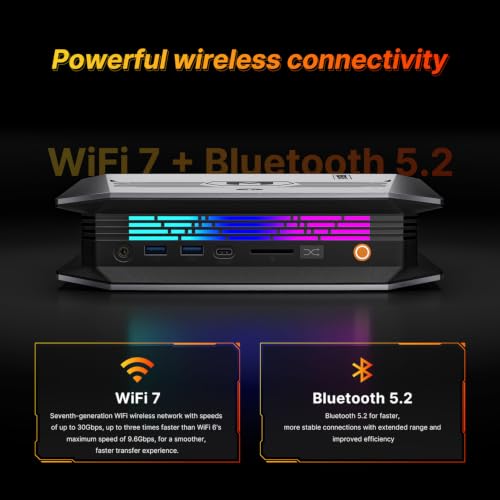
BOSGAME Mini PC M5, Ryzen AI Max+ 395, 128GB LPDDR5 RAM, 2TB NVMe SSD | 126 TOPS AI Workstation with Radeon 8060S, WiFi 7, Dual USB4, and 8K Quad-display Support AI Desktop PC




As an Amazon Associate we earn from qualifying purchases. Product prices and availability are accurate as of the date/time indicated.

GMKtec EVO-X3 AI Mini Pc Ryzen AI Max+ 395 128GB LPDDR5X 2TB PCIe 4.0 SSD | Mini Gaming Computers, 16C/32T, Up to 5.1GHz, 8000MHz, Radeon 8060S Graphics, OCuLink, 8K Display, WiFi 7, USB4, 2.5G LAN


As an Amazon Associate we earn from qualifying purchases. Product prices and availability are accurate as of the date/time indicated.
GMKtec AI Mini PC Ryzen Al Max+ 395 (up to 5.1GHz) | 64GB LPDDR5X 8000MHz (8GB*8) 2TB PCIe 4.0 SSD Quad Screen 8K Display/ WiFi 7/ USB4/ SD Card Reader 4.0 EVO-X2


As an Amazon Associate we earn from qualifying purchases. Product prices and availability are accurate as of the date/time indicated.

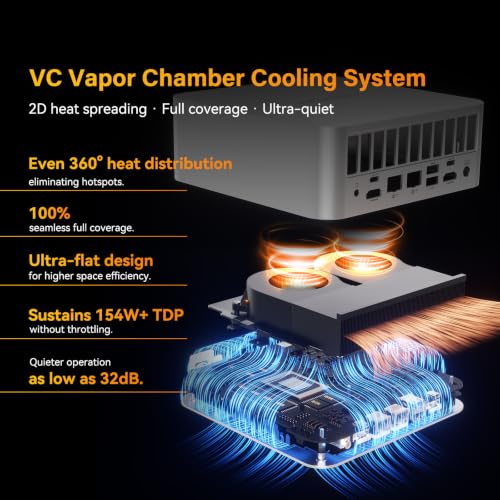
GEEKOM A9 Mega AI Workstation PC, Ryzen AI Max+ 395, 128GB RAM 2TB SSD | LPDDR5X 8000MHz, Radeon 8060S(96GB VRAM), 126 TOPS Local AI, 8K, USB4, WiFi 7, Dual 2.5GbE LAN, 128B Offline LLM Super PC




As an Amazon Associate we earn from qualifying purchases. Product prices and availability are accurate as of the date/time indicated.

GEEKOM GT13 MAX Professional AI Mini PC,Intel Ultra9 185H|16GB DDR5 1TB SSD | Mini Computer AI Agentic,IT Deployment,Game,8K Video Editing Workstation|Intel Arc GPU|Dual 2.5G LAN|WiFi 7|BT5.4|SD Slot


As an Amazon Associate we earn from qualifying purchases. Product prices and availability are accurate as of the date/time indicated.

Glorlin AI Mini PC AMD Ryzen 7 Pro 8845HS CPU (Max 5.1GHz, 8C/16T) Radeon 780M Graphics Compact Gaming PC 16GB DDR5 RAM 500GB SSD Small Desktop Computer Dual 2.5GLAN 4K HDMI DP WiFi 6 BT 5.3 Office


As an Amazon Associate we earn from qualifying purchases. Product prices and availability are accurate as of the date/time indicated.

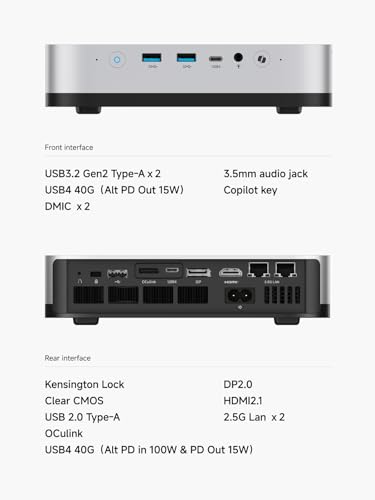
MINISFORUM AI X1 Pro-470 Mini PC, AMD Ryzen AI 9 HX470 (12C/24T, up to 5.2 GHz), Radeon 890M, 32 GB DDR5 RAM, 2 TB PCIe 4.0 SSD, 4K Quad-Display, Dual 2,5G LAN, Wi-Fi 7, Bluetooth 5.4, OCuLink


As an Amazon Associate we earn from qualifying purchases. Product prices and availability are accurate as of the date/time indicated.
| Model | Key point from the title | Price tier | Best for |
|---|---|---|---|
| GMKtec X3 AI Mini PC (EVO-X3) | Ryzen AI Max+ 395, 128GB LPDDR5X, 2TB, OCuLink | Premium | Largest models |
| GMKtec EVO-X3 | Same chip, 128GB LPDDR5X, 2TB, OCuLink | Premium (check against the X3 above) | Largest models |
| BOSGAME M5 | Ryzen AI Max+ 395, 128GB LPDDR5, 2TB, dual USB4 | Premium | Large models, alternative brand |
| GEEKOM A9 Mega | Ryzen AI Max+ 395, 128GB, 2TB, dual 10GbE | Premium | Large models with fast networking |
| GMKtec EVO-X2 (64GB, 1TB) | Ryzen AI Max+ 395, 64GB LPDDR5X, 1TB | Mid to premium | Mid-size models |
| GMKtec EVO-X2 (64GB, 2TB) | Same chip, 64GB, 2TB | Mid to premium | Mid-size models with more storage |
| GEEKOM A9 Max | Ryzen AI 9, 32GB DDR5, 2TB, Copilot+ PC | Mid | Small to mid models |
| MINISFORUM AI X1 Pro-470 | Ryzen AI 9, Radeon 890M, 32GB DDR5, 2TB, OCuLink | Mid | Small to mid models, eGPU option |
| GEEKOM GT13 MAX | Intel Core Ultra 9 185H, 16GB DDR5, 1TB | Mid | Everyday AI features |
| Glorlin AI Mini PC | Ryzen 7 Pro 8845HS, Radeon 780M, 16GB, 500GB | Budget to mid | Small models only |
Architectural requirements for local inference
Local language models are mostly limited by memory, in two ways. Capacity decides whether a model loads: the weights, plus a working cache that grows with the length of the conversation, must fit. Bandwidth decides how quickly it answers: generating each word means reading most of the model from memory, so faster memory raises the ceiling on speed. Processor core counts and NPU claims matter less than these two lines.
The Ryzen AI Max+ 395 listings stand out because they use a wide pool of fast LPDDR5X shared between CPU and graphics, which lets the integrated Radeon 8060S address a lot of memory. That design is why titles can talk about large allocations for models. Machines with socketed DDR5 and a smaller iGPU, such as the Radeon 780M and 890M systems, have less bandwidth and less capacity, which caps both model size and speed.
Software support is the third requirement. Local tools are available for AMD, Intel and Nvidia hardware, but the maturity of the support differs by chip and by operating system, and this changes quickly. Before you buy, search the specific processor name together with the tool you plan to use, and look at recent user reports. We are not offering measured speeds; the numbers in the worked example below are theoretical ceilings.
Cooling and power matter as well. Running a model keeps the memory and graphics busy for minutes at a time, which is a different load pattern from short office tasks. Expect fan noise under sustained generation, particularly on the higher-power chips, and leave space around the vents.
| Spec concept | What to look for | Why it matters for local AI |
|---|---|---|
| Memory capacity | 32GB minimum, 64 to 128GB for large models | Sets the largest model you can load |
| Memory type and speed | LPDDR5X-8000 on a wide bus beats ordinary DDR5 | Drives tokens per second |
| Graphics allocation | A setting to give the iGPU a large share | Lets the GPU address big model files |
| NPU or TOPS claim | Treat as a secondary figure | Helps built-in OS features more than custom models |
| Storage | 1TB at minimum, 2TB preferred | Model files run from several to tens of gigabytes each |
| Expansion | OCuLink or USB4 for external GPU or fast drives | Gives an upgrade path |
A simple way to use the table is to rank your options on memory first and then check the other rows. Two machines with the same capacity can feel very different if one has faster memory and the other has a narrow bus. Storage deserves a second look as well, because a model library grows fast: a handful of mid-size models can fill 200GB without much effort, and a 70B-class model alone takes tens of gigabytes. Treat these sizes as rough guidance, and check the file sizes listed by the model publisher before you commit to a drive size.
How these were picked
This is an editorial roundup based on published specifications, manufacturer documentation and buyer reviews of the ten mini PCs in the set. Nobody on the team used or measured these units. We do not publish tokens-per-second figures. Titles are seller claims, and several have typing errors, such as “Al” in place of “AI” and “128B Offline LLM”, which we call out below. We rank by memory first because it is the line that most reliably separates machines for local AI.
Top mini PCs for local AI, evaluated
GMKtec X3 AI Mini PC
The title lists a Ryzen Al Max+ 395, 128GB LPDDR5X, a 2TB PCIe 4.0 SSD, OCuLink, 16 cores and 32 threads with turbo up to 5.1GHz, 126 TOPS, a Radeon 8060S, Wi-Fi 7, 2.5G LAN and USB4. It carries “EVO-X3” in the name, which makes it a near-duplicate of the separate EVO-X3 listing in this set.
Specification-wise this is a top-tier configuration for large local models: the most memory in the group, fast storage, and OCuLink for an external GPU. The 126 TOPS figure is a combined claim.
A buyer who wants to load a 70B-class model with room left for a long chat history would put this at the top of a shortlist. The OCuLink port adds a route to an external graphics card later. Read the title carefully: the 8K and 126 TOPS claims are headline numbers, and the unusual naming means you should confirm that this and the EVO-X3 listing really are different products.
- Pros: 128GB of fast memory; 2TB NVMe; OCuLink; USB4.
- Cons: premium tier; sold alongside a near-identical listing at a different price; “Al” typo in the title.
Question to ask before buying: why does this listing differ in price from the EVO-X3?
GMKtec EVO-X3
This GMKtec title gives the same core: Ryzen AI Max+ 395, 128GB LPDDR5X, 2TB PCIe 4.0 SSD, 16C/32T up to 5.1GHz, 8000MHz memory, Radeon 8060S, OCuLink, Wi-Fi 7, USB4 and 2.5G LAN. The parts match the X3 listing above, yet the price tier in the data is much higher.
When two listings share the same parts, buy from whichever has the clearer warranty and the lower price, and ask the seller if there is any real difference. If it is the same hardware, the more expensive listing offers nothing extra.
The case for this listing is identical to the X3 above, so the decision comes down to price, seller and warranty. Because the data shows a higher price tier for the same parts, a careful shopper should check whether the listing includes anything extra, such as a longer warranty, or whether it is simply priced differently by another seller.
- Pros: 128GB LPDDR5X and 2TB; OCuLink; matches the strongest spec in the set.
- Cons: price gap against an apparent twin; premium tier.
Question to ask before buying: is there any hardware difference from the X3 listing?
BOSGAME Mini PC M5
BOSGAME lists the Ryzen AI Max+ 395, 128GB LPDDR5 (without the X in the title), a 2TB NVMe SSD, 126 TOPS, Radeon 8060S, Wi-Fi 7, dual USB4 and 8K quad-display support, and calls it an AI workstation. The note on the memory name is worth checking: LPDDR5 and LPDDR5X differ in speed, so confirm the exact type and rate on the listing.
It gives an alternative to the GMKtec machines for buyers who prefer another brand. The dual USB4 ports are handy for fast external storage or docks.
If you have already ruled out GMKtec for support reasons, this is the natural alternative with the same chip and capacity. The dual USB4 ports make it easy to attach fast external drives for model files. Look at the cooling description and any noise reports, because a workstation-class chip in a compact case will run its fans hard during long generation sessions.
- Pros: 128GB; 2TB; two USB4 ports; Wi-Fi 7.
- Cons: memory type wording is less specific; premium tier; no OCuLink in the title.
Question to ask before buying: what is the memory speed and is it soldered?
GEEKOM A9 Mega AI Workstation PC
GEEKOM lists the Ryzen AI Max+ 395, 128GB RAM, 2TB SSD, LPDDR5X 8000MHz, a Radeon 8060S described as “96GB VRAM”, 126 TOPS, 8K, USB4, Wi-Fi 7 and dual 10GbE. The 96GB figure is an allocation from the shared pool, not a dedicated card, and “128B Offline LLM Super PC” is confusing wording; it cannot be read as a guarantee that a 128-billion-parameter model will run well.
The standout feature is dual 10GbE, which suits a person who wants to serve models to other machines or move large files across a home network.
This is the one for a person who wants to run a model on the mini PC and use it from a laptop elsewhere in the house; the dual 10GbE ports make that practical if your network supports them. Most home routers and switches do not, so budget for a compatible switch or use the machine on a single link.
- Pros: 128GB LPDDR5X; dual 10GbE; USB4.
- Cons: premium tier; marketing-heavy wording; “VRAM” is shared memory.
Question to ask before buying: what model size does the seller actually support in documentation?
GMKtec EVO-X2 (64GB, 1TB)
The title names the Ryzen Al Max+ 395 up to 5.1GHz, 16C/32T, 64GB LPDDR5X 8000MHz as eight 8GB parts, a 1TB PCIe 4.0 SSD, quad-screen 8K display, Wi-Fi 7, USB4 and an SD 4.0 reader. Sixty-four gigabytes covers mid-size models comfortably, and it costs less than the 128GB versions.
This is the practical entry to the Max+ platform. The 1TB drive fills quickly once you download several models, so plan on external storage.
A buyer who works with models in the 14B to 32B range will find this enough, and keeps money in the pocket compared with the 128GB listings. The reduced memory also means a 70B model will not fit in practice. Check the seller’s wording on the memory layout, because the title mentions eight modules and not a single package.
- Pros: same chip as the flagships; 64GB; lower tier than the 128GB listings.
- Cons: 1TB storage; large models will not fit; Al typo.
Question to ask before buying: can the memory be upgraded later? The title lists it as eight 8GB parts, so check whether it is soldered.
GMKtec AI Mini PC EVO-X2 (64GB, 2TB)
This near-duplicate lists the same Ryzen Al Max+ 395 with 64GB LPDDR5X 8000MHz, but a 2TB PCIe 4.0 SSD, quad-screen 8K, Wi-Fi 7, USB4 and SD 4.0. It even shares a product image with the 1TB version, which suggests two storage options of one machine.
If you want a Max+ system without paying for 128GB, this is the one with room for a model library.
Its appeal is a longer shelf for a growing model collection: several mid-size models, plus datasets and project files, fit without an external drive. If you can live with 64GB, it is a balanced choice. Compare both EVO-X2 listings side by side and choose by storage need, since the compute side looks the same.
- Pros: 64GB; 2TB; same platform as the flagships.
- Cons: still 64GB; a higher tier than the 1TB option; “Al” typo.
Question to ask before buying: is the price difference from the 1TB model reasonable for a second terabyte?
GEEKOM A9 Max
GEEKOM lists a “Ryzen AI9 HX470 (86 Tops)”, 32GB DDR5 plus a 2TB SSD, Copilot+ PC, dual 2.5G LAN, Wi-Fi 7, Bluetooth 5.4, USB4 and HDMI 2.1. Both the processor name and the 86 TOPS number are seller claims to check against the maker’s pages.
Thirty-two gigabytes is a comfortable level for models up to roughly the mid-teens of billions of parameters at 4-bit, though bandwidth is lower than on the Max+ machines. The Copilot+ label indicates support for Windows AI features, which is different from running your own models.
A fit for someone who wants a capable everyday desktop with some local AI on top: coding assistants, document summaries and image tagging at modest model sizes. The Copilot+ badge covers Windows features, which run apart from your own models. Before paying, confirm the processor name on the maker’s page, since the title wording is unusual.
- Pros: 32GB DDR5; 2TB; dual 2.5G LAN; USB4.
- Cons: far less bandwidth than the Max+ platform; unverified TOPS claim.
Question to ask before buying: is the RAM socketed so you can expand it?
MINISFORUM AI X1 Pro-470
MINISFORUM lists a Ryzen AI 9 HX470 with 12 cores and 24 threads up to 5.2GHz, Radeon 890M, 32GB DDR5, 2TB PCIe 4.0 SSD, 4K quad display, dual 2.5G LAN, Wi-Fi 7, Bluetooth 5.4 and OCuLink. The OCuLink port is the useful extra: it lets you attach an external graphics card later for faster generation.
It overlaps with the GEEKOM A9 Max in memory and chip class. If you may want to add a discrete GPU, this one has the clearer path.
The profile here is a builder who wants to start with integrated graphics and later add a discrete card through OCuLink without replacing the whole computer. The four-display claim shows the I/O is generous. As with the GEEKOM A9 Max, confirm the processor naming on the maker’s page, because the title repeats the same unusual model number.
- Pros: OCuLink; 32GB DDR5; 2TB; named core counts.
- Cons: 32GB cap for larger models; integrated graphics only out of the box.
Question to ask before buying: does the seller name a compatible external GPU dock, and what does it cost?
GEEKOM GT13 MAX
This GEEKOM title lists an Intel Core Ultra 9 185H, 16GB DDR5, a 1TB SSD, Intel Arc graphics, dual 2.5G LAN, Wi-Fi 7, Bluetooth 5.4 and an SD slot, with the marketing line “AI Agentic, IT Deployment”. With only 16GB it is a weaker-class listing for local AI beyond small models.
It works for everyday AI-enabled apps and for 7B-class models, but anyone who wants to experiment with larger models will hit the memory limit quickly.
This suits a user who wants a quick, quiet desktop with AI-enabled apps and the occasional small model, not a workstation for large language models. It could also serve as a client machine for a model hosted on another computer. The IT deployment phrase in the title is marketing; look at the actual port list and warranty terms.
- Pros: capable Intel processor; Wi-Fi 7; dual 2.5G LAN.
- Cons: 16GB memory; mid tier for a small-model machine; marketing-heavy title.
Question to ask before buying: can the 16GB be doubled?
Glorlin AI Mini PC
Glorlin lists a Ryzen 7 Pro 8845HS, eight cores and 16 threads up to 5.1GHz, Radeon 780M, 16GB DDR5, a 500GB SSD, dual 2.5G LAN, Wi-Fi 6 and the words “Compact Gaming PC” and “Office”. The “AI” in the name is a label; the title does not give a TOPS number or mention an NPU.
It is the weakest fit for this keyword in the set: small memory, small storage and office-class marketing. It suits light AI features rather than local models.
A shopper who sees AI in the name should know it is not backed by a stated NPU figure or by large memory. For an office desk that needs a fast eight-core processor and two LAN ports, it could be reasonable. For a local model project, the other listings give much more room to grow.
- Pros: capable eight-core processor; dual 2.5G LAN; lower entry cost.
- Cons: 16GB RAM; 500GB storage; unclear AI hardware claims.
Question to ask before buying: what does “AI” mean on this listing, besides the name?
Selection logic: matching hardware to AI workloads
| Workload | Memory to aim for | Listings that fit |
|---|---|---|
| Small chat models, summaries, drafting (up to about 8B) | 16GB | GT13 MAX, Glorlin |
| Coding help and mid-size models (about 14B to 32B) | 32 to 64GB | A9 Max, AI X1 Pro-470, EVO-X2 |
| Large models (about 70B and above) | 96GB or more | X3, EVO-X3, M5, A9 Mega |
| Serving a model to other devices | 64GB or more plus fast networking | A9 Mega, EVO-X2 |
| Adding a discrete GPU later | Any, with OCuLink | X3, EVO-X3, AI X1 Pro-470 |
To compare with a full-size desktop, read the custom PC build for local AI and LLMs. If you are weighing platforms, Mac versus PC for local LLMs covers memory, speed and cost. For a broader view of machines sold under the AI label, see these AI PC picks for local AI and Copilot+.
Worked example: will the model fit, and how fast could it be?
These figures are estimates built from stated assumptions, not measurements. Assume 4-bit quantised weights at about 0.55 bytes per parameter including overhead, plus 4GB for the operating system and a few gigabytes for the conversation cache. The speed ceiling comes from dividing memory bandwidth by the model’s size. We assume about 256 GB/s for LPDDR5X-8000 on a 256-bit bus, which is how this chip family is commonly described but is not stated in the titles, and about 90 GB/s for ordinary dual-channel DDR5. Verify both on the manufacturer page.
| Model size | Approx. weights | Fits in 16GB? | Fits in 32GB? | Fits in 64GB? | Ceiling at 256 GB/s | Ceiling at 90 GB/s |
|---|---|---|---|---|---|---|
| 8B | about 4.5GB | Yes | Yes | Yes | about 55 tokens/s | about 20 tokens/s |
| 32B | about 18GB | No | Tight | Yes | about 14 tokens/s | about 5 tokens/s |
| 70B | about 39GB | No | No | Tight | about 6.5 tokens/s | about 2.3 tokens/s |
The table shows why capacity and bandwidth both matter. A 16GB machine is fine for an 8B model. A 32GB machine can load a 32B model but has little spare space, and its lower bandwidth makes responses slow. A 128GB machine can hold the 70B model with room for a long context, and the faster memory keeps responses readable. Real speeds will be lower than these ceilings, so treat the table as a way to compare listings, not as a promise.
Pre-deployment verification checklist
- Confirm the processor name on the maker’s product page, because several titles contain typos.
- Find out whether the memory is soldered; for the Max+ machines it generally is, so buy the size you need.
- Check how much memory can be allocated to the graphics processor and how that is set.
- Look up reports on the specific software you plan to run with this chip.
- Check the warranty, the return window and who services small-brand hardware.
- Confirm cooling and expected noise under a long generation run.
When you are still deciding whether a compact machine is the right shape for your plans, the comparison of mini PCs and custom desktop builds is a useful companion.
Mistakes buyers make
| Mistake | Why it hurts | Better habit |
|---|---|---|
| Chasing TOPS | The number is a marketing total and says little about language-model speed | Compare memory size and bandwidth |
| Treating shared memory as VRAM | Bandwidth is lower than a dedicated card | Read “VRAM” as an allocation |
| Buying 16GB for big models | The model will not load | Match memory to model size |
| Ignoring near-duplicate listings | You may pay more for the same parts | Compare titles line by line |
| Skipping software research | Support differs by chip | Search the chip with your tool name |
Verdict by use case
Largest models: the 128GB Max+ listings; pick by warranty and price. Best value into the same platform: the GMKtec EVO-X2 64GB listings. Best for adding a graphics card later: the MINISFORUM AI X1 Pro-470 or the OCuLink GMKtec machines. Everyday AI features and small models: the GEEKOM A9 Max, with the GT13 MAX and Glorlin as weaker, lower-cost options. Re-read each live listing, since specifications can change.
Frequently asked questions
How much memory does a mini PC need for local AI?
Memory capacity decides which models you can load at all. As a rough rule, a 4-bit model needs about half a gigabyte per billion parameters plus working space, so an 8B model fits easily in 16GB while a 70B model wants 48GB or more. Listings with 64GB or 128GB of unified memory open the door to larger models, while 16GB machines are limited to small ones.
What does the TOPS number in these titles mean?
TOPS counts trillions of operations per second for a neural processing unit or a combined system, and sellers use it as a headline. Titles here quote figures such as 126 and 86 TOPS. The number does not tell you how fast a given language model will respond, because memory bandwidth and software support often matter more. Treat TOPS as a marketing claim and check it against the maker’s documentation.
Is integrated graphics memory the same as VRAM?
No. On these mini PCs the graphics processor shares system memory with the CPU, and a portion can be allocated to it in the BIOS or driver. A title that claims 96GB of VRAM is describing an allocation from a larger pool, not a dedicated graphics card. It is useful for loading big models, but bandwidth is lower than on a high-end discrete GPU.
Can a 16GB mini PC run local AI?
Yes, but only small models. A 7B to 8B model at 4-bit quantisation fits in 16GB with room for the operating system, and it can handle summarising, drafting and simple coding help. Larger models will not fit or will slow to a crawl. If local AI is the main purpose, the 64GB and 128GB listings are a better match than the 16GB ones.
Should I buy a mini PC or build a desktop for local AI?
A mini PC wins on size, noise and power draw, and unified-memory models can load very large models for the price of a single high-end graphics card. A desktop with a discrete GPU usually generates tokens faster on models that fit in its video memory and can be upgraded part by part. The right pick depends on model size, speed expectations and desk space.
Can these mini PCs generate images as well?
Many can, since image models also run on integrated graphics, but speed varies a lot by chip and software support. If images matter more than text, see the custom PC build for Stable Diffusion and AI image generation to compare what a dedicated GPU offers.