Working from home changes what you ask of a laptop. A commuter machine gets opened a few times a day; a home-office machine sits on the same table for eight hours, drives a headset and sometimes a second monitor, and stays on a video call through back-to-back meetings. Lenovo’s budget lines, from IdeaPad Slim to Essential and V-series models, are popular for this role because they pair a 15.6-inch screen with a full-size keyboard at an approachable price tier. The catch is that the names are close and the differences hide in the spec line.
This guide is for remote workers, freelancers, and anyone setting up a spare-room desk who already leans toward Lenovo. Based on the listed specs, we narrowed the field to seven laptops and one clear theme: nearly all of them list 8GB of RAM, so the real separators are storage, panel quality, ports, and the processor family. We skip the accessory and near-duplicate listings that appear under the same brand. By the time you reach the scenarios at the end, you should know which model fits a 2026 home setup.
Our Top Picks
 Lenovo IdeaPad Slim 3 • 15.6" FHD Business8GB RAM | 256GB PCle SSD14.16 x 9.29 x 0.7 Inches3.7 PoundsCheck on Amazon
 Lenovo IdeaPad Slim 3i 15.6" FHD Laptop ComputerArctic Grey | 8GB+128GB14.14 x 9.31 x 0.78 inches4.6 PoundsCheck on Amazon



Top 3 picks at a glance
Quick Picks
As an Amazon Associate we earn from qualifying purchases at no extra cost to you.



| Product | Best for | Key spec taken from the product title |
|---|---|---|
| Lenovo 15.6 FHD Business Laptop | Entry-level email and documents | 8GB DDR5, 128GB storage, 1TB cloud, Office 365 |
| Lenovo IdeaPad Slim-3i (N150, SD card) | Wi-Fi 6 and USB-C on a budget | Quad-core N150, 8GB LPDDR5, 128GB UFS plus 256GB SD card |
| Lenovo IdeaPad Slim 3 (Ryzen 5) | Best processor tier of the group | Ryzen 5, 8GB DDR5, 256GB SSD |
| Lenovo IdeaPad Slim 3i (Arctic Grey) | Simple Microsoft 365 setup | N150, 8GB RAM, 128GB SSD |
| Lenovo Essential with 500GB external HDD | Backups and media storage | 8GB DDR5, 128GB storage, 500GB external drive |
| Lenovo V15 (256GB SSD) | More internal storage | 8GB DDR5, 256GB SSD, Wi-Fi 6 |
| Lenovo Essential (Bluetooth 5.2) | Wireless headset users | 8GB DDR5, 128GB, Wi-Fi 6, Bluetooth 5.2 |
How to Choose
Connectivity is a work-from-home spec
Dropped calls cost more than a slightly slower processor. Look for Wi-Fi 6 in the title, since it handles a crowded home network better than Wi-Fi 5. Bluetooth 5.2, where listed, helps with wireless headsets and earbuds. USB-C is useful for a dock or one-cable monitor, but not every listing names it, so check the port list on the product page. If your desk is far from the router, plan on an Ethernet adapter for the most stable video calls.
Storage: internal drive versus add-ons
Several of these Lenovos list 128GB of internal storage, which is tight once Windows updates, Teams or Zoom caches, and project files arrive. A 256GB SSD, as on the Ryzen 5 IdeaPad Slim 3 and the V15, is a much more comfortable base. Extras such as an SD card or an external hard drive add capacity, but they are slower or removable and should not hold your only copy of important work. Cloud storage is handy but depends on your internet and the terms of the bundle.
Screen and keyboard for eight-hour days
All seven listings use 15.6-inch screens, and most name Full HD. That resolution is the minimum for crisp spreadsheets and split-window work. An anti-glare finish, named on several titles, reduces reflections from windows and lamps. A full-size keyboard is a practical advantage of the 15.6-inch class, but the titles do not confirm a number pad or backlight, so verify both if you type all day. Ignore color names such as Arctic Grey when ranking.
Processor tier and what to ignore
The Intel N150 is a low-power chip suited to web apps, email, and chat. The Ryzen 5 in the IdeaPad Slim 3 sits a tier above for multitasking with a meeting, a browser, and a document open together. Ignore the Copilot AI tag as a speed claim; it describes a software feature. Budget laptops in this class cut corners on storage and CPU first, so those two lines should drive your decision.
A home office also adds small needs that spec sheets rarely mention. A second monitor means you want a video-out path, usually HDMI or USB-C, so look at the port list before checking out. A shared family space means a quiet machine and a sturdy lid matter more than a thin profile. And if you travel between a kitchen table and a desk, a 15.6-inch body is portable enough for a bag but not light enough to forget. Plan around these habits, and the differences among the seven laptops below become easier to weigh.
The 7 Best Options
Lenovo 15.6 FHD Business Laptop
This Lenovo lists a 15.6-inch FHD screen, an Intel processor, 8GB of DDR5 RAM, 128GB of storage, 1TB of cloud storage, Copilot AI, and Office 365, in a slim design aimed at students and light business use. For a spare-room desk that mostly handles messages, documents, and the occasional call, that is a sensible, low-fuss entry point.
- Strength: 8GB of DDR5 covers a browser, chat, and a document.
- Strength: bundled Office and cloud space cut first-day setup.
- Trade-off: only 128GB of local storage.
Skip it if you keep large project files on the laptop, or want a named CPU model on the title.
Lenovo IdeaPad Slim-3i (N150, SD card)
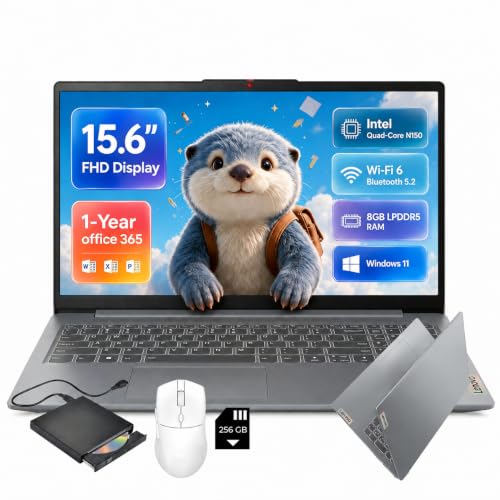
The Slim-3i lists a 15.6-inch FHD display, a quad-core Intel N150, 8GB of LPDDR5 RAM, 128GB of UFS storage, a 256GB SD card, Wi-Fi 6, USB-C, Windows 11, and a one-year Office 365 subscription. It is the model to look at if a docking cable or a wireless router upgrade is part of your home-office plan.
- Strength: Wi-Fi 6 and USB-C are useful for a home-office setup.
- Strength: the SD card adds room for backups and archives.
- Trade-off: UFS plus a card is not the same as a full internal SSD.
Skip it if you want fast internal storage or heavy multitasking.
Lenovo IdeaPad Slim 3 (Ryzen 5)
This IdeaPad lists a 15.6-inch FHD display, an AMD Ryzen 5, 8GB of DDR5 RAM, a 256GB SSD, and Windows 11, positioned as a business laptop. For workers who keep a video call running while editing a document, that combination is the most balanced on this list.
- Strength: the Ryzen 5 is the strongest processor tier among these seven.
- Strength: a 256GB SSD doubles the internal space of most rivals here.
- Trade-off: the title does not mention Office, Wi-Fi 6, or USB-C.
Skip it if you need a bundled Office subscription or want connectivity details on the title.
Lenovo IdeaPad Slim 3i (Arctic Grey)
The Slim 3i lists a 15.6-inch FHD screen, Microsoft 365, 8GB of RAM, a 128GB SSD, an Intel N150, and Windows 11 in Arctic Grey. It reads like a simple, ready-to-use machine for someone who wants Microsoft 365 without extra setup steps.
- Strength: a true SSD keeps boot and app launches responsive.
- Strength: Microsoft 365 is part of the package.
- Trade-off: it has the same 128GB limit as most siblings.
Skip it if your workflow involves many large files or a wide set of open programs.
Lenovo Essential with 500GB External HDD
This Essential lists a 15.6-inch FHD anti-glare screen, an Intel processor, 8GB of DDR5, 128GB of storage, a 500GB external hard drive, and long battery life, with Office included. The extra drive makes it appealing to anyone who has been burned by losing files.
- Strength: the external drive gives an easy place for backups.
- Strength: the anti-glare FHD screen suits bright rooms.
- Trade-off: the 128GB internal drive is the real working space.
Skip it if you prefer a single internal drive or never need extra storage.
Lenovo V15 (256GB SSD)
The V15 lists a 15.6-inch FHD screen, an Intel processor, 8GB of DDR5 RAM, a 256GB SSD, Copilot AI, Wi-Fi 6, and Office 365, with long battery life and a portable design. Buyers who want more working room on the drive itself should find this the easiest step up from the 128GB models.
- Strength: 256GB of SSD storage is generous for the group.
- Strength: Wi-Fi 6 and Office are both named on the title.
- Trade-off: the exact processor model is not stated.
Skip it if you want a named CPU, and check the listing for ports.
Lenovo Essential (Bluetooth 5.2)
This Essential lists a 15.6-inch FHD display, an Intel CPU, 8GB of DDR5, 128GB of storage, 1TB of cloud storage, Office 365, Copilot AI, Wi-Fi 6, and Bluetooth 5.2, with an anti-glare finish. It is a good fit for someone who spends the day on calls with a wireless headset.
- Strength: Bluetooth 5.2 helps with wireless headsets on calls.
- Strength: anti-glare and Wi-Fi 6 both suit home-office days.
- Trade-off: 128GB of storage again leans on the cloud.
Skip it if you want more local space or rely on offline files.
Keep in mind that every listing here is a budget-tier or mid-range configuration, so none of them replaces a premium business notebook. They are best seen as capable home-office tools: dependable for meetings and documents, with limits on storage and raw power that you can work around with cloud space or an external drive. If you find yourself wanting 16GB of memory or a 1TB drive, that is a sign to look at a higher tier rather than stretching one of these.
Which One Fits Your Situation
You live in meetings and spreadsheets
Pick the Lenovo IdeaPad Slim 3 with the Ryzen 5. The stronger processor and 256GB SSD are the best match for long, multi-window days.
You use a wireless headset and a wireless mouse
The Lenovo Essential with Bluetooth 5.2 is the one that names the standard, so pairing should be straightforward.
You back up your own files
The Lenovo Essential with the 500GB external HDD gives you a ready backup disk, which is rare at this tier.
You want the most storage without moving up a tier
The Lenovo V15 with a 256GB SSD, Wi-Fi 6, and Office 365 is the balanced option.
Common Mistakes
- Treating the SD card or cloud allowance as if it were fast internal storage.
- Ignoring Wi-Fi 6 and then blaming the laptop for choppy video calls.
- Buying 128GB of storage for a machine that will hold project files all year.
- Assuming the keyboard has a number pad or backlight when the title never says so.
- Choosing by color name instead of by processor, RAM, and storage.
Related guides
- How To Check Gpu Compatibility With Your Motherboard And Cpu
- High-Performance Gaming Desktop Specifications
- How To Plan An Upgradeable Mid Range Gaming Pc
Frequently Asked Questions
Is 8GB of RAM enough for working from home?
For email, chat, a browser, and video calls, yes. If you also run large spreadsheets or several heavy applications, consider a 16GB model from another line.
Do these Lenovo laptops include a good webcam?
The titles do not describe the camera or microphone. Many remote workers add a separate webcam or headset for call quality.
Is the N150 or the Ryzen 5 better for remote work?
The Ryzen 5 is the stronger multitasking processor, while the N150 is efficient for lighter tasks. Choose Ryzen 5 if your day involves many windows.
How long does the bundled Office subscription last?
Terms vary and some are one-year offers. Read the listing details before relying on it past the first year.