
The best Black Friday Razer deal for most gamers is the Razer DeathAdder V3 HyperSpeed — a 55 g ultralight wireless mouse with USB-C charging and up to 100 hours of rated battery life, which is a combination that normally sits a price tier or two higher. It suits FPS and competitive players who want low weight and modern charging without paying flagship money. If you want one machine that does everything, the Razer Blade 16 (2025) with an RTX 5080, 64 GB DDR5 and a 2 TB SSD is the pick. If you play on multiple devices or want RGB and Bluetooth, the Razer Cobra Pro is the better fit. Left-handed or ambidextrous players should look at the Viper Ultimate with Charging Dock, and the Viper V3 HyperSpeed remains the cheapest way into Razer’s HyperSpeed wireless ecosystem. Everything below is compared on switch type, sensor class, comfort and build durability so you can match the deal to your setup rather than to the biggest discount number.
Our Top Picks
 Razer DeathAdder V3 HyperSpeed Wireless Gaming Mouse: 55gStandard4.81 x 2.55 x 1.5 Inches0.1 PoundsCheck on Amazon
 Razer Cobra Pro Wireless Gaming MouseCobra Pro Mouse4.71 x 2.46 x 1.5 Inches0.17 poundsCheck on Amazon
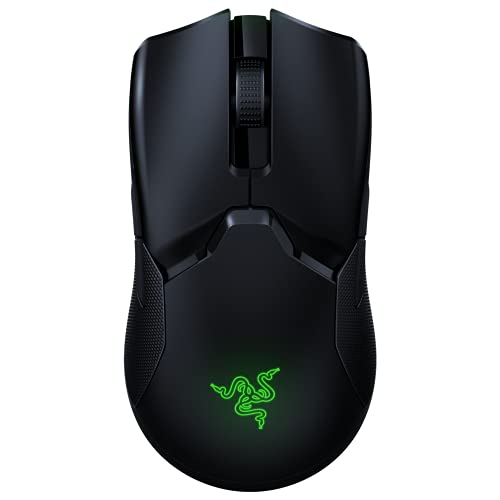 Razer Viper Ultimate Lightweight Wireless Gaming Mouse: FastestMouse2.61 x 4.98 x 1.49 inches0.17 PoundsCheck on Amazon


Top 3 picks at a glance

Quick Comparison
Price tiers below are relative bands — a “budget” tier mouse and a “premium” tier mouse are not competing for the same wallet, and listing prices move daily during sale events. Specs are drawn from the product listings and Razer’s published product information.
| Product | Best for | Key specs | Price tier |
|---|---|---|---|
| Razer Viper V3 HyperSpeed | Budget-first FPS players who want a light wireless Viper shape | 82 g, HyperSpeed 2.4 GHz wireless, AA battery power (hundreds of hours class at default polling), current-generation Razer optical sensor well above 20,000 DPI, six-button layout | Budget |
| Razer Blade 16 (2025) | One-machine buyers who game and work on the same device | 16-inch chassis, RTX 5080 laptop GPU with 16 GB GDDR7 class memory, 64 GB DDR5, 2 TB SSD, HX-class Intel CPU, high-refresh 16-inch panel | Premium |
| Razer DeathAdder V3 HyperSpeed | Ultralight value and ergonomic right-handed grip | 55 g, USB-C charging, up to 100 hours rated battery, HyperSpeed 2.4 GHz wireless, Focus-class optical sensor in the mid-20K DPI range, ergonomic DeathAdder shell | Budget |
| Razer Cobra Pro | Multi-device players who want features, RGB and battery headroom | 2.4 GHz HyperSpeed plus Bluetooth, up to 170 hours rated battery, ten programmable controls, RGB underglow, compact symmetrical shape | Mid-range |
| Razer Viper Ultimate | Ambidextrous esports shape at a mid-range price | 20K DPI optical sensor, Razer optical gaming switches, HyperSpeed wireless, symmetrical shell, cable charging rather than a dock | Mid-range |
| Razer Viper Ultimate with Charging Dock | Dock-and-go convenience plus true ambidextrous use | Same ambidextrous esports platform as the Viper Ultimate, bundled charging dock, HyperSpeed wireless, 20K DPI optical sensor class | Premium |
How We Chose
Selection started from the category criteria that actually change how a mouse feels in a match, not from headline DPI numbers. Switch type came first: optical switches remove the debounce delay that mechanical contacts need to confirm a click, which shows up as a slightly cleaner reset rather than a dramatic advantage. Sensor class came second — anything in the 20,000 DPI range or above is well past what a human hand can exploit, so sensor choice was judged on tracking consistency and lift-off behaviour rather than the maximum figure. Comfort was judged by shape family and weight class: sub-60 g ultralight, 60–80 g light, 80–100 g standard, plus the palm, claw and fingertip grips each shell accommodates. Build durability covered shell rigidity, PTFE feet, switch life ratings in the tens of millions of clicks, and whether the mouse charges over USB-C or needs a battery swap.
The list was then filtered by category fit and upgrade path. Every pick had to be a genuine step forward for somebody — a first wireless mouse, a second mouse for a laptop bag, a dock-charging daily driver, or a single machine that replaces a desktop and a laptop. Products were kept only where the spec sheet and the listed configuration lined up cleanly with one of those paths. Nothing here is claimed as tested: the analysis is based on published specifications, manufacturer figures and the well-documented behaviour of these product families over multiple generations.
1. Razer Viper V3 HyperSpeed – Best for Budget-First FPS Players
As an Amazon Associate we earn from qualifying purchases at no extra cost to you.
The Viper V3 HyperSpeed is the entry point into Razer’s HyperSpeed wireless ecosystem, and it is the pick for anyone who wants a wireless Viper shape without paying Viper V3 Pro money. At 82 g it sits in the “light” class rather than the ultralight class, and the low-profile symmetrical-profile shell is built for claw and fingertip grips. It is the mouse you buy when your priority is a reliable 2.4 GHz connection and a shape that disappears under your hand, and your budget is the binding constraint.
Key specs
- Weight: 82 g — light class, not ultralight
- Connection: Razer HyperSpeed Wireless (2.4 GHz) with a USB dongle
- Power: single AA battery; rated in the hundreds of hours at default polling with lighting off
- Sensor: current-generation Razer optical sensor with a maximum DPI rating well above 20,000
- Controls: six-button layout — two main clicks, two side buttons, scroll wheel click, DPI button
- Switches: Razer optical main switches
- Shape family: low-profile, symmetric Viper profile with side buttons on the left flank
Why it works
The AA battery is the defining trade-off, and it is the reason this mouse undercuts everything else in the list. A removable cell means no charging cable, no dock and no battery degradation curve — you swap a battery and you are back to full runtime in seconds. For a secondary machine, a LAN bag or a desk where the mouse is not the centre of attention, that is a genuinely better ownership model than USB-C. The cost is weight: a AA cell adds mass, and that is most of the gap between this mouse and the 55 g DeathAdder V3 HyperSpeed.
On the sensor and switch front, this is a modern Razer optical platform. Optical switches eliminate contact bounce, so double-click failure — historically the most common way a gaming mouse dies — is largely designed out. Razer rates its optical switches in the tens of millions of clicks. In practice, the difference you will notice is a crisp, immediate click with a short reset, which matters more for tap-firing and rapid semi-auto than for anything else. The shell is rigid and the PTFE feet glide consistently once they break in over the first week or two.
Pros
- Cheapest route into HyperSpeed 2.4 GHz wireless in this list
- AA battery means effectively unlimited runtime with spare cells
- Modern optical switches reduce the risk of double-click failure
- Low-profile Viper shape suits claw and fingertip grips well
- Sensor headroom is far beyond what any human aim can use
Cons
- 82 g is noticeably heavier than the 55 g DeathAdder V3 HyperSpeed
- No rechargeable battery, so you will buy cells eventually
- No RGB and no Bluetooth — one connection method only
- Left-side side buttons only, so it is not a true ambidextrous mouse
How it compares
The nearest alternative in this list is the DeathAdder V3 HyperSpeed. Both are budget-tier wireless mice with Razer optical switches, but they pull in opposite directions: the DeathAdder is 27 g lighter and charges over USB-C, while the Viper V3 HyperSpeed runs on AA cells and offers a flatter, more symmetrical-feeling shape. If you have medium-to-large hands and use a palm grip, the DeathAdder’s ergonomic hump will support your hand better. If you use a claw or fingertip grip and want a lower, flatter profile, the Viper V3 HyperSpeed is the more natural fit. Neither has RGB or Bluetooth, so if either of those matters, step up to the Cobra Pro instead.
2. Razer Blade 16 (2025) – Best for One-Machine Buyers

The Blade 16 (2025) is the only non-peripheral in this list, and it exists here because it is the answer to a specific question: what if you want one device for gaming, editing and everything else? With an RTX 5080 laptop GPU, 64 GB of DDR5 memory and a 2 TB SSD, this configuration is aimed at people who would otherwise buy a desktop and a thin-and-light laptop separately. It is the premium-tier pick, and it is the one that deserves a power and thermal reality check before you commit.
Key specs
- GPU: NVIDIA GeForce RTX 5080 laptop GPU with 16 GB GDDR7-class memory on a 256-bit bus
- CPU: Intel Core Ultra 9 HX-class processor
- Memory: 64 GB DDR5 — far beyond gaming needs, aimed at virtualisation, large timelines and heavy multitasking
- Storage: 2 TB SSD
- Display: 16-inch high-refresh panel in the QHD+ 240 Hz class (confirm the exact panel on the listing)
- Chassis: aluminium unibody, thin-and-light gaming form factor with vapour chamber cooling
- Power: large external power brick in the 250–330 W class
The power budget, worked out
A laptop GPU in this class typically runs a total graphics power budget in the ~150 W range once Dynamic Boost headroom is included. Add an HX-class CPU package at roughly 45–55 W under sustained load, plus 20–30 W for the panel, memory, storage and platform, and you land around 215–235 W of combined draw in a worst-case CPU-plus-GPU workload. That number matters because USB-C Power Delivery tops out at 100 W for standard PD and around 140 W for the higher EPR profiles. Plugging this laptop into a USB-C charger while gaming does not sustain it — the system draws from the battery to cover the shortfall, and battery percentage falls even while plugged in. Use the bundled brick for gaming and save USB-C for office work and travel.
VRAM headroom by resolution
Sixteen gigabytes of graphics memory is the sweet spot for a 2026 gaming laptop, but the headroom is not unlimited. Approximate working sets, which vary with texture pack, ray tracing, upscaling and patch:
| Target | Approx. VRAM in use | 16 GB verdict |
|---|---|---|
| 1080p, high preset | 6–8 GB | Large surplus |
| 1440p, ultra preset | 8–10 GB | Comfortable |
| 1440p, ultra + ray tracing | 10–12 GB | Comfortable |
| 4K, ultra preset | 11–14 GB | Tight but workable |
| 4K, ultra + ray tracing + high-res textures | 13–16 GB+ | At the ceiling; expect texture streaming compromises |
External display bandwidth
If you plan to drive an external 4K monitor, do the cable arithmetic before you buy. Uncompressed 4K at 240 Hz in 8-bit RGB needs roughly 3840 × 2160 × 240 × 24 bits, which is about 47.8 Gbps of raw payload. DisplayPort 1.4 carries about 25.9 Gbps of usable data, so it needs Display Stream Compression to hit 4K 240 Hz — visually lossless in practice, but it is compression. HDMI 2.1 at 48 Gbps fits it without DSC. If your monitor is 1440p at 240 Hz, DisplayPort 1.4 is comfortably enough with headroom to spare.
Pros
- Desktop-class RTX 5080 laptop GPU in a chassis you can carry
- 64 GB DDR5 removes memory as a bottleneck for editing, VMs and heavy browser workloads
- 2 TB of storage means no immediate upgrade tax
- High-refresh 16-inch panel suits both competitive and single-player play
- One device replaces a tower, a monitor-only setup and a travel laptop
Cons
- Premium tier — the most expensive item here by a wide margin
- Requires the bundled brick for full performance; USB-C cannot keep up under load
- Laptop GPUs are power- and thermal-limited relative to desktop cards of similar naming
- Not user-upgradable in the way a desktop is, beyond storage and memory in some configurations
How it compares
The nearest alternative in this list is not another mouse — it is the “tower plus gear” path. Spending the same budget on a desktop plus the Viper Ultimate with Charging Dock and a monitor gets you more sustained performance per pound and a genuine upgrade path for the next five years. The Blade 16 wins on portability, on having one power cable and one machine to manage, and on being able to game in a hotel room. If you never leave your desk, the desktop path is better value. If you move between locations weekly, the Blade 16 is the only option here that solves that problem.
3. Razer DeathAdder V3 HyperSpeed – Best for Ultralight Value

The DeathAdder V3 HyperSpeed is the best overall pick in this list, and the reason is a single number: 55 g. That is ultralight territory, and it is paired with USB-C charging and up to 100 hours of rated battery life. A few years ago that combination was a flagship specification. Here it sits in the budget tier, which is exactly the kind of mismatch a Black Friday sale is designed to create.
Key specs
- Weight: 55 g — ultralight class
- Charging: USB-C, so one cable covers your phone, laptop and mouse
- Battery: up to 100 hours rated, with the usual caveat that lighting and higher polling rates reduce it
- Connection: Razer HyperSpeed Wireless (2.4 GHz)
- Sensor: Focus-class optical sensor in the mid-20,000 DPI range
- Shape: ergonomic right-handed DeathAdder shell with a raised rear hump
- Switches: Razer optical main switches with a light actuation feel
Why it works
Weight is the single most consequential mouse specification for aim, because it determines how much force you need to start and stop the cursor. Dropping from 82 g to 55 g is a 33% reduction, and that changes how a flick feels at the end of the movement — less momentum to arrest, so stopping points tighten up. It also changes fatigue over a long session, because your forearm is accelerating and decelerating a lighter object several thousand times an hour. If you have never used a mouse under 60 g, this is the specification that will surprise you most.
The ergonomic DeathAdder shape is the other half of the argument. The raised rear hump fills the palm, which makes it the natural choice for palm and relaxed claw grips and for players with medium-to-large hands. Where the Viper V3 HyperSpeed is flat and encourages fingertip control, the DeathAdder supports the hand and lets you rest weight on the mouse instead of hovering over it. That is a comfort difference you notice in hour three of a session, not in the first ten minutes.
USB-C charging removes the battery-swap ritual entirely. Plug it in for twenty minutes during a break and you have hours of play. The 100-hour figure is measured at default settings; expect meaningfully less if you enable lighting or run an elevated polling rate.
Pros
- 55 g is genuinely ultralight, and it is the biggest single upgrade in this list
- USB-C charging means no disposable batteries
- Up to 100 hours of rated battery life at default settings
- Ergonomic DeathAdder hump supports palm and relaxed claw grips
- Optical switches reduce long-term double-click risk
Cons
- Right-handed shape only — no left-handed option
- No Bluetooth, so it is a single-device 2.4 GHz mouse
- No RGB, which matters to some buyers more than it should
- Non-replaceable internal battery will degrade over several years of heavy use
How it compares
Against the Viper V3 HyperSpeed, the DeathAdder wins on weight (55 g vs 82 g), charging (USB-C vs AA cells) and ergonomic support, and loses nothing on sensor class or switch type. The only reason to choose the Viper V3 HyperSpeed instead is shape preference: if you use a fingertip grip or have small hands, the lower, flatter Viper profile may suit you better than the DeathAdder’s pronounced hump. Against the Cobra Pro, the DeathAdder is lighter and cheaper but gives up Bluetooth, RGB and ten-button programmability. For pure FPS play, the DeathAdder is the better mouse. For a multi-device desk, the Cobra Pro is the better tool.
4. Razer Cobra Pro – Best for Multi-Device Feature Seekers
The Cobra Pro is the Swiss-army option. It runs Razer’s 2.4 GHz HyperSpeed wireless for gaming and Bluetooth for everything else, it is rated at up to 170 hours of battery life, it has ten programmable controls and it lights up. It is the mid-range pick for people who switch between a desktop, a laptop and a console-style setup, or who simply want one mouse to do everything without swapping dongles.
Key specs
- Connections: Razer HyperSpeed Wireless (2.4 GHz) plus Bluetooth
- Battery: up to 170 hours rated — the longest in this list
- Controls: ten programmable buttons, including a scroll wheel with side-tilt input
- Lighting: Razer Chroma RGB, including underglow
- Shape: compact symmetrical shell, smaller than a Viper or DeathAdder
- Switches: Razer optical main switches
- Sensor: current-generation Razer optical sensor with high-DPI headroom
Why it works
Bluetooth is the feature that earns this mouse its place. A 2.4 GHz dongle is the right connection for gaming, but it costs you a USB port and it is a second device to pair. Bluetooth lets the Cobra Pro attach to a laptop or tablet with no dongle at all, and you can toggle between the two. For anyone who carries a laptop and wants a real gaming mouse in the bag without leaving a dongle plugged in, this is the practical answer.
The ten programmable controls are the second differentiator. MOBA, MMO and strategy players can bind abilities, items or macros directly to the mouse and keep their left hand on the movement keys. Ten controls on a compact shell means some of them are small and require precise thumb placement, but the payoff for genre players is real. The 170-hour battery rating is also the most generous here, which matters more than usual on a mouse with RGB — lighting is the biggest battery drain on any wireless mouse, so a larger reserve is what keeps the RGB usable rather than ornamental.
The trade-off is weight and size. A compact shell with RGB, Bluetooth and ten buttons weighs more than a 55 g ultralight and fits smaller hands less comfortably than a full-size ergonomic shape. If your grip is palm and your hand is large, this mouse will feel like it is asking you to pinch it.
Pros
- Bluetooth plus 2.4 GHz covers laptop, desktop and travel use
- Up to 170 hours rated battery — the longest in this list
- Ten programmable controls suit MOBA, MMO and strategy play
- RGB lighting for people who want their desk to look like a desk
- Optical switches and a modern sensor keep it competitive for FPS
Cons
- Heavier than the 55 g DeathAdder V3 HyperSpeed
- Compact shell is a poor fit for large palm-grip hands
- RGB drains battery faster than the 170-hour headline suggests
- More expensive than the ultralight budget options without being faster in a match
How it compares
Against the DeathAdder V3 HyperSpeed, the Cobra Pro trades 27 g of weight advantage for Bluetooth, RGB, ten controls and 70 extra hours of rated battery. That is a fair trade if you use a laptop or play MOBA and MMO titles; it is a bad trade if your only game is a tactical shooter and your only machine is a desktop. Against the Viper Ultimate, the Cobra Pro is the more modern platform — newer switch generation, Bluetooth, longer battery — while the Viper Ultimate offers a larger symmetrical shell that many esports players still prefer for its shape rather than its spec sheet. Choose the Cobra Pro for features, the Viper Ultimate for shape.
5. Razer Viper Ultimate – Best for Ambidextrous Esports Value
The Viper Ultimate is the mouse that made lightweight wireless esports mice mainstream, and it remains in the lineup as the mid-range ambidextrous option. The listing calls out the 20K DPI optical sensor and Razer’s fastest gaming switches — optical switches, which is the important detail. This version charges over a cable rather than a dock, which is why it sits a tier below the dock bundle.
Key specs
- Sensor: 20,000 DPI optical sensor
- Switches: Razer optical gaming switches with no debounce delay
- Connection: Razer HyperSpeed Wireless (2.4 GHz)
- Charging: USB cable charging
- Shape: symmetrical, ambidextrous shell with side buttons on both flanks
- Weight class: light — heavier than the 55 g DeathAdder V3 HyperSpeed, lighter than a full-size ergonomic mouse
- Controls: eight programmable buttons across both sides and the wheel
Why it works
Ambidextrous shells are rarer than they should be. The Viper Ultimate puts side buttons on both flanks, which means left-handed players get a genuine left-handed configuration rather than a mirrored compromise, and right-handed players get a symmetrical shape that does not force a particular grip. A symmetrical shell lets your hand sit wherever it naturally lands, which is why so many esports players gravitate to them even when they are right-handed.
The 20,000 DPI sensor is worth putting in context. At 800 DPI with a sensitivity of 2.0 in a Counter-Strike-style game, your effective sensitivity is 1,600 eDPI, and the sensor is operating at 4% of its maximum resolution. The remaining 96% of that specification is headroom you will never touch. What actually matters is that the sensor tracks consistently at the DPI you do use, handles fast swipes without spin-out, and has a sensible lift-off distance. This sensor class does all three, and it has done so across a long production run.
Optical switches are the durability argument. Mechanical mouse switches rely on metal contacts that oxidise and wear, which is how double-click faults develop after a couple of years. Optical switches use a light beam, so there is no contact wear in the click path. Razer rates these switches in the tens of millions of clicks. The 20K DPI sensor and the ambidextrous shell will still be relevant long after a mechanical-switch mouse of the same age has started misfiring.
Pros
- True ambidextrous design with side buttons on both flanks
- Optical switches eliminate contact-wear double-click faults
- Symmetrical shape suits claw and fingertip grips and left-handed players
- 20K DPI sensor class is far beyond practical need, so it will not date quickly
- Mid-range tier — often the cheapest way to get an ambidextrous esports mouse
Cons
- Heavier than modern ultralight mice at 55 g or below
- Older platform than the Cobra Pro — no Bluetooth, shorter battery rating
- Cable charging only, so you cannot just drop it on a dock
- Symmetrical shells offer less palm support than an ergonomic hump
How it compares
The obvious comparison is with the Viper Ultimate with Charging Dock. They are the same mouse; the difference is the dock in the box and the price tier. If the price gap between the two during the sale is smaller than what a comparable charging dock costs on its own, buy the dock bundle — you get the same mouse plus a place to park it. If the gap is large, buy this version and charge over the cable. Against the DeathAdder V3 HyperSpeed, the Viper Ultimate gives up 30-plus grams and modern battery life in exchange for a symmetrical ambidextrous shell that the DeathAdder simply cannot offer. Choose based on whether your hand wants symmetry or a hump.
6. Razer Viper Ultimate with Charging Dock – Best for Dock-and-Go Convenience

This is the same ambidextrous esports platform as the Viper Ultimate, bundled with Razer’s charging dock. The listing describes it as an ambidextrous esports gaming mouse powered by HyperSpeed wireless technology, and the dock is the entire reason it occupies the premium tier within this list. It is the pick for anyone who has accepted that they will never remember to plug a mouse in.
Key specs
- Sensor: 20,000 DPI optical sensor
- Switches: Razer optical gaming switches
- Connection: Razer HyperSpeed Wireless (2.4 GHz)
- Charging: bundled charging dock, with cable charging as a fallback
- Shape: ambidextrous symmetrical shell with side buttons on both flanks
- Lighting: Razer Chroma RGB, including the dock
- Controls: eight programmable buttons
Why it works
The dock changes the ownership experience more than any specification on the sheet. With cable charging, the failure mode is predictable: you finish a session, forget to plug in, and start the next one at 30%. With a dock, the mouse returns to full charge every time you set it down, and the charging ritual disappears. Over a year of daily use, that is the difference between a mouse that occasionally dies mid-match and one that never does.
The dock also solves cable management in a way a cable cannot. The 2.4 GHz dongle lives in the dock rather than in a USB port on the front of your case, which puts the radio a few inches from the mouse instead of a metre away behind a metal panel. That matters: 2.4 GHz is a shared band, and the single biggest cause of wireless stutter is a dongle plugged into a rear I/O port next to USB 3.0 ports and a Wi-Fi antenna. Moving the receiver onto the desk is the cheapest latency fix available.
The underlying mouse is unchanged from the standard Viper Ultimate — 20K DPI optical sensor, optical switches, ambidextrous shell. That means the durability story is the same: no contact wear in the click path, and a sensor class with so much headroom that it will still be over-specified in five years. The premium tier here buys convenience, not performance.
Pros
- Dock charging removes the “forgot to plug it in” failure mode entirely
- Dongle sits in the dock, so the receiver is close to the mouse and away from rear-panel interference
- Ambidextrous shell with side buttons on both flanks
- Optical switches with no mechanical contact wear
- 20K DPI sensor class will not date
Cons
- Premium tier for the same core mouse as the non-dock version
- Dock takes up desk space and needs its own cable run
- Heavier than current ultralight mice
- No Bluetooth and an older battery rating than the Cobra Pro
How it compares
Against the Viper Ultimate without the dock, this is purely a price-gap decision: same mouse, same sensor, same switches, one extra accessory. Work out what a comparable dock costs separately and compare. Against the Cobra Pro, the dock version wins on shape for ambidextrous players and on charging convenience, while the Cobra Pro wins on Bluetooth, battery rating and button count. If you are left-handed, both Viper Ultimate versions are your best options here — the Cobra Pro’s compact shell and the DeathAdder’s right-handed shape both rule themselves out.
How to Choose
Work through these criteria in order. Each one narrows the field, and by the end you should have one or two candidates left rather than six.
Step 1: Measure your hand and identify your grip
Measure from the crease at the base of your palm to the tip of your middle finger. Under 17 cm is a small hand, 17–19 cm is medium, and over 19 cm is large. Then identify how you hold the mouse. A palm grip rests the whole hand on the shell and needs an ergonomic hump — that points at the DeathAdder V3 HyperSpeed. A claw grip arches the fingers and contacts the shell at the palm base and fingertips, which suits a mid-height symmetrical shape. A fingertip grip contacts almost nothing but the fingertips and needs a low, flat profile — that points at the Viper V3 HyperSpeed or the Viper Ultimate.
Grip matters more than any specification, and it is the one thing a sale price cannot fix. A 55 g mouse that forces you into an uncomfortable grip is worse than an 82 g mouse that fits your hand.
Step 2: Pick a weight class and stick to it
- Under 60 g (ultralight): DeathAdder V3 HyperSpeed at 55 g. Fastest to stop, best for low-sensitivity flick aiming, least fatiguing over long sessions.
- 60–80 g (light): Viper Ultimate, Viper Ultimate with Dock, and most of the Cobra Pro’s range. A reasonable middle ground for mixed play.
- 80–100 g (standard): Viper V3 HyperSpeed at 82 g. Stable and planted, and the AA battery is part of that weight.
If you have never used a sub-60 g mouse, the adjustment takes about a week. Drop your in-game sensitivity by roughly 10–15% when you switch, because the lighter mouse will overshoot your usual stopping point until your hand recalibrates.
Step 3: Do the sensitivity arithmetic before you buy on DPI
Maximum DPI is the most over-sold number in the category. What determines your aim is eDPI — your mouse DPI multiplied by your in-game sensitivity — and the resulting 360° turn distance. Using the standard Counter-Strike-style yaw constant of 0.022 degrees per count, the distance to complete a full turn is:
cm per 360° = 914.4 ÷ (eDPI × 0.022)
| eDPI | Example: DPI × in-game sens | cm per 360° | Typical use |
|---|---|---|---|
| 400 | 800 × 0.50 | ~104 cm | Very low — large mousepad required |
| 600 | 800 × 0.75 | ~69 cm | Low — precision tactical shooters |
| 800 | 800 × 1.00 | ~52 cm | Common tactical range |
| 1000 | 1000 × 1.00 | ~42 cm | Mid — flexible for most shooters |
| 1600 | 1600 × 1.00 | ~26 cm | High — fast turns, tighter desk space |
Notice that a 20,000 DPI sensor running at 800 DPI is using 4% of its range. Even a 1600 eDPI player is using 8%. Every mouse in this list clears that bar with enormous margin, so do not let the DPI figure decide anything. Decide on shape, weight and features instead.
Step 4: Understand what polling rate actually costs you
A mouse at 1,000 Hz sends one report every millisecond. At 4,000 Hz it sends one every 0.25 ms, and at 8,000 Hz one every 0.125 ms. On a 240 Hz monitor, each frame lasts about 4.17 ms, so a 1,000 Hz mouse delivers roughly four position updates per frame and an 8,000 Hz mouse delivers about 33. The benefit curve flattens hard: going from four updates per frame to eight is noticeable in careful tracking, going from 16 to 33 is not.
The bandwidth itself is trivial. A typical mouse report is around 8 bytes of payload; even budgeting 64 bytes on-air per report, 1,000 Hz needs roughly 0.5 Mbps, 4,000 Hz about 2 Mbps, and 8,000 Hz about 4 Mbps. A 2.4 GHz link can carry tens of megabits, so raw bandwidth is never the limit. The limit is airtime and interference — every report is a transmission that must not collide with your Wi-Fi. That is why a HyperSpeed dongle on a desk extension cable outperforms the same dongle in a rear USB port next to a Wi-Fi antenna.
Step 5: Budget battery life with real numbers
Rated battery life is quoted at default settings, usually 1,000 Hz with lighting off. If a mouse is rated at 100 hours and you raise polling to 4,000 Hz, the radio wakes four times as often — and if the radio dominates the power draw, expect roughly a quarter of the rated figure, in the region of 25 hours. At 8,000 Hz that becomes roughly an eighth, around 12 hours. RGB is the other multiplier; on a lit mouse, expect a 20–50% reduction depending on brightness.
Practical translation: if you use a dock or charge over USB-C every night, battery life is irrelevant and you can run high polling rates freely.








