A case that cools well is not the one with the most lights. It is the one that lets cold air reach the graphics card and processor without fighting a solid front panel, and lets hot air leave before it circles back. That is the real decision behind this search: how many fans come installed, how open the intake is, and how much radiator room you have if you later move to liquid cooling.
This guide is for builders putting a high-wattage graphics card and a boosting processor into an ATX board who care about thermals more than looks. Going into 2026, many airflow-focused cases ship with a nearly full fan set, so the comparison below leans on what the listed specs promise rather than on marketing adjectives, and it flags where a title leaves a gap you should verify before buying.
Our Top Picks
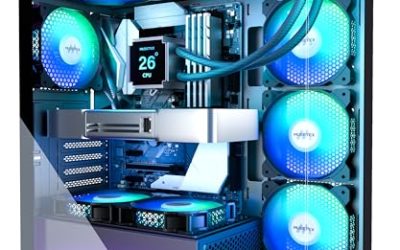
 MUSETEX ATX PC Case 7 PWM ARGB Fans16.73"D x 8.35"W x 18.5"H16.73 x 8.35 x 18.5 inches15 PoundsCheck on Amazon
 MUSETEX Y6 PC Case16.73"D x 10.83"W x 15.67"H16.73 x 10.83 x 15.67 Inches14.55 poundsCheck on Amazon
 MUSETEX ATX PC Case Pre-Install 6 PWM ARGB18.98" x 15.75" x 8.07"15.75 x 8.07 x 18.98 inches12.6 PoundsCheck on Amazon


Top 3 picks at a glance
Quick Picks
As an Amazon Associate we earn from qualifying purchases at no extra cost to you.




| Product | Best for | Key spec from the title |
|---|---|---|
| MUSETEX K2 | Full fan set, no extra buying | 7 PWM ARGB fans, Type-C, dual tempered glass |
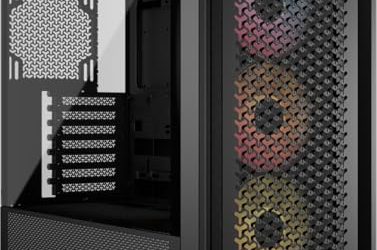
| MUSETEX Y6 | Showpiece builds | 7 infinity mirror PWM ARGB fans, 270-degree glass |
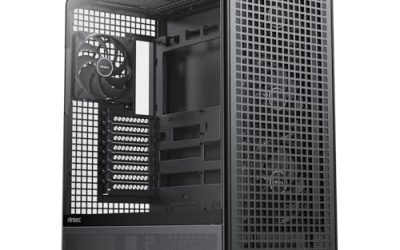
| MUSETEX Polygonal Mesh | Mesh-front airflow | 6 PWM ARGB fans, polygonal mesh, USB 3.0 x 2 |
| FOIFKIN F600 | Panoramic view with fans included | 7 PWM ARGB fans, 270-degree glass, Type-C |
| MSI MAG Forge 321R Airflow | Liquid cooling upgrade path | ARGB 120mm fans, radiator support up to 360mm |
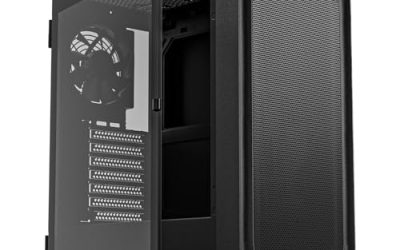
| MOROVOL 4-Fan Mesh | Tight budgets | 4 RGB fans, diamond-shaped mesh front |
| HYTE Y70 Touch Infinite | Feature-first premium builds | Integrated 2.5K LCD touchscreen, dual chamber |
| HYXN H1 | Heavy liquid cooling plans | 7 PWM ARGB fans, up to 3X 360mm radiators |
How to Choose
Count the fans that are already in the box
A case with seven fans installed saves the cost and hassle of buying a separate set. Look for PWM fans, because PWM lets the motherboard slow them at idle and ramp them under load. Cases that list only RGB fans without PWM may run at a fixed speed, which is louder and less efficient. Also ask whether the fans use a single splitter or hub, because a tidy fan controller makes tuning far simpler than juggling many separate connectors. Four fans is a workable floor for a mid-range build; six or seven gives real headroom for a hot graphics card, and the extra fans let you run each one slower and quieter.
Judge the front panel, not the side glass
Tempered glass on the side looks great but does nothing for airflow. The intake is what matters: mesh or perforated fronts breathe, while solid glass fronts choke fans. Cases described with polygonal or diamond mesh are built to pull air straight in. Panoramic designs with a glass corner usually rely on side or bottom intake instead, so confirm where fans actually sit before assuming the front does the work. A good rule of thumb is that more intake area at the front than you have exhaust at the back keeps air moving in one direction and keeps dust from collecting in odd corners.
Check radiator support before you need it
If you may move to a liquid cooler, look for stated radiator sizes. A 360mm radiator is the usual ceiling for strong processor cooling, and cases that list support for it give you room to grow. Dual-chamber layouts separate the power supply and cables from the main compartment, which helps thermals but demands careful cable planning in a smaller back area.
Ignore the lighting count, check the front I/O
RGB effects do not cool anything. Verify the front connectors you actually use instead: a Type-C port is increasingly standard, and USB 3.0 ports cover most headsets and drives. Also confirm the board size is ATX, since budget cases sometimes trim tool-free mounting and cable routing space to fund the fan bundle, and those savings show up later during assembly. Budget cases also tend to cut corners on dust filters, thumbscrews, and cable cutouts, so scan the feature list for those practical details rather than only the fan and glass headlines.
The 8 Best Options
MUSETEX K2
This ATX mid-tower is aimed at buyers who want fans handled out of the box and a clean glass-heavy look, without a separate shopping trip for cooling parts.
- Seven PWM ARGB fans come pre-installed, so airflow is covered from the first boot.
- Full-view dual tempered glass and a Type-C port suit a modern build.
- Trade-off: the title says nothing about radiator support, so liquid cooling plans need extra checking.
Skip it if you plan a large custom loop and need confirmed radiator sizes before you commit to a chassis.
MUSETEX Y6
The Y6 pushes the display angle, with a 270-degree full-view glass design for builders who want components visible from the front corner and a lively fan effect on top.
- Seven infinity mirror PWM ARGB fans give a high fan count with a decorative effect.
- ATX mid-tower format with Type-C on the front panel.
- Trade-off: wide glass areas can limit where intake mesh sits, so airflow purists should confirm the intake path.
Skip it if you prefer a plain, mesh-first look and want the intake obvious at a glance.
MUSETEX Polygonal Mesh Case
This model pairs six PWM ARGB fans with a polygonal mesh front, which is the layout airflow-minded builders usually look for first when thermals are the priority.
- The mesh front panel lets fans draw air directly into the case.
- An opening tempered glass side panel and two USB 3.0 ports are practical for frequent tinkering.
- Trade-off: the listed front ports are USB 3.0 only, with no Type-C mentioned.
Skip it if a Type-C front port is a must-have for your newer drives or phone cables.
FOIFKIN F600
The F600 is another seven-fan ATX mid-tower, with a 270-degree panoramic glass design and a Type-C port, aimed at buyers who want a showcase build without paying for extra fans.
- Seven PWM ARGB fans are pre-installed, matching the largest bundles in this group.
- Panoramic glass shows off the build without a center pillar blocking the view.
- Trade-off: the brand has less name recognition than established case makers, so read the warranty terms closely.
Skip it if you want a manufacturer with a long track record in cases.
MSI MAG Forge 321R Airflow
The only established motherboard-brand case here, and the name states the priority plainly. It suits builders who want a proven brand and a clear path to a liquid cooler.
- ARGB 120mm fans come with a mid-tower layout and a tempered glass side panel.
- Liquid cooling support up to a 360mm radiator gives a defined upgrade path.
- Trade-off: the title lists no seven-fan bundle like some rivals, so you may add fans later.
Skip it if you want the biggest included fan count for the least spending.
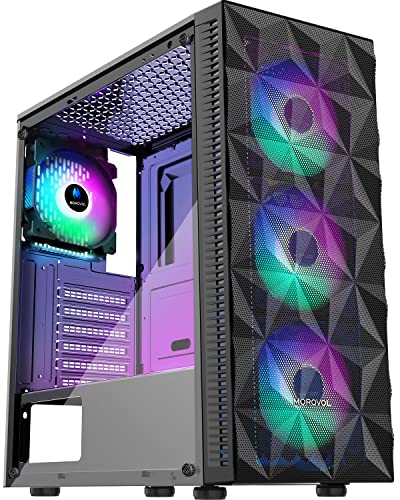
MOROVOL 4-Fan Mesh Case
A budget-minded ATX case with a diamond-shaped mesh front and four RGB fans, suited to first builds where the goal is decent airflow at an entry-level tier.
- The diamond mesh front is built for intake rather than looks alone.
- Tempered glass side panel and USB 3.0 front ports keep the basics covered.
- Trade-off: four RGB fans is the lowest count in this group, and PWM control is not listed.
Skip it if you are pairing it with a very hot graphics card and want a larger fan set from the start.
HYTE Y70 Touch Infinite
A premium dual-chamber ATX chassis with an integrated 2.5K LCD touchscreen, built for buyers who want something distinctive on the desk and are willing to pay for it.
- The dual-chamber design separates cabling and the power supply from the main compartment.
- The built-in touchscreen adds a display for monitoring system stats.
- Trade-off: it sits in the premium tier, and the screen is a feature rather than a cooling advantage.
Skip it if you want every bit of your budget going toward airflow rather than extras.
HYXN H1
This dual-cavity mid-tower pairs seven PWM ARGB fans with room for serious liquid cooling, so it fits builders who expect to grow into a larger loop.
- It can hold up to 3X 360mm radiators, the most generous radiator listing here.
- Type-C front connectivity plus a full pre-installed fan set.
- Trade-off: dual-cavity layouts take patience with cable routing.
Skip it if you only need a simple air-cooled build and prefer a conventional single-chamber layout.
Which One Fits Your Situation
You want strong airflow without extra shopping
The MUSETEX K2 or FOIFKIN F600 each include seven PWM ARGB fans, so you can assemble and fine-tune fan curves straight away without buying anything else for cooling.
You are planning a liquid cooler soon
The HYXN H1 lists room for three 360mm radiators, and the MSI MAG Forge 321R Airflow lists support up to 360mm, so either gives a clear upgrade path. Pick the HYXN H1 for the larger loop ambitions.
You are building on a tight budget
The MOROVOL 4-Fan Mesh case keeps the mesh front and glass panel while limiting the fan count. Add a fan or two later if temperatures climb under long gaming sessions.
You want a display piece
The HYTE Y70 Touch Infinite and MUSETEX Y6 are the most visual designs here, one with a touchscreen and one with infinity mirror fans, and both reward a tidy cable job. Expect to spend more time planning the build than with a plain airflow tower.
Common Mistakes
- Choosing a solid glass front because it looks clean, then wondering why temperatures climb under load.
- Counting fans without checking whether they are PWM, which controls noise and idle behavior.
- Forgetting that a 360mm radiator needs matching clearance at the top or front of the case.
- Assuming more RGB means better cooling, when lighting has no effect on temperatures.
- Skipping the front-port check and buying a case without Type-C when the motherboard header supports it.
Related guides
- How To Check Gpu Compatibility With Your Motherboard And Cpu
- High-Performance Gaming Desktop Specifications
- Desktop Computer For Working From Home
Frequently Asked Questions
Does a mesh front really cool better than glass?
Generally yes, because fans can pull air through the openings instead of around a solid panel. Cases with a mesh or perforated front are designed around that intake path, which is why they appear in most airflow-focused lists. The trade-off is that mesh lets more dust in, so plan on cleaning filters every few months and keeping the case off thick carpet. Glass-fronted cases can still work when side or bottom intake fans are installed, but they leave less margin for error.
How many case fans do I need?
A balanced setup usually has front or bottom intake and rear or top exhaust. Four fans is a workable minimum, while six or seven suits a high-wattage graphics card and lets each fan spin slower.
Is a 360mm radiator worth planning for?
If you run a high-core-count processor that boosts hard, a larger radiator gives more cooling surface and lower noise at a given temperature. Cases that state 360mm support give you the option without a rebuild.
Are included fans good enough?
Pre-installed PWM fans are fine for most builds. You can swap them later if you want quieter or higher-pressure models, and standard sizes make that an easy upgrade. Noise-conscious buyers often replace only the rear exhaust fan first.