The best RX 9070 XT prebuilt gaming PC in this set depends on how much you want to spend on the processor, memory and storage that surround the same graphics card. Seven complete desktops are listed, from a Ryzen 7 7700 build with 16GB of memory up to Ryzen 7 9800X3D and 9850X3D machines with 2TB of storage. Three standalone cards are included for readers weighing a build-it-yourself route. On paper, the Skytech King 95 is the balanced pick: a 7800X3D, a 360mm liquid cooler and an 850W Gold supply. The Azure 3 and ROG GM700 are the high-spend options. Everything below comes from listing titles, so confirm each spec on the page.
Our Top Picks

Top 3 picks at a glance
Quick comparison of all ten listings
As an Amazon Associate we earn from qualifying purchases at no extra cost to you.


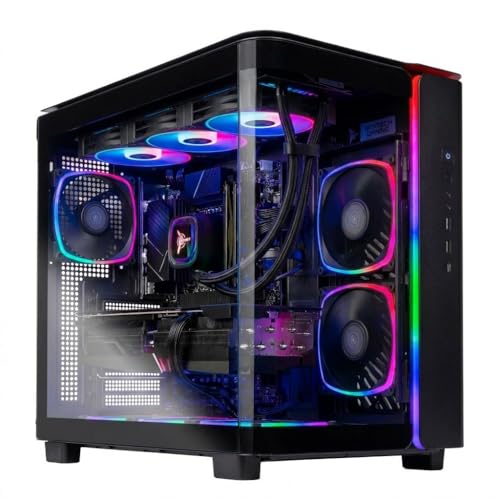


| Model | Key point from title | Price tier | Best for |
|---|---|---|---|
| Skytech Rampage | Ryzen 7 7700, 16GB DDR5, 1TB | Budget | Lowest entry into the set |
| Skytech Aqua | Intel Ultra 7 265K, 32GB, 360 AIO | Mid-range | Intel fans wanting 32GB |
| KOTIN Gaming PC | Ryzen 7 9700X, 32GB, Wi-Fi 7, smart display | Mid-range | Showy builds with a status screen |
| Skytech King 95 | Ryzen 7 7800X3D, 24GB, 360 AIO | Mid-range | Balanced gaming focus |
| Skytech Azure 3 | Ryzen 7 9850X3D, 32GB, 2TB | Premium | Maximum CPU and storage |
| Acer Nitro 85 | Ryzen 9 9900X, 16GB, Wi-Fi 7 | Budget | Brand-name support seekers |
| ASUS ROG GM700 | Ryzen 7 9800X3D, 32GB, 2TB | Premium | Top-end branded system |
| ASUS PRIME card | RX 9070 XT 16GB, 2.5-slot | Budget (card only) | DIY upgraders |
| XFX Swift card | Triple fan, RDNA 4, 3xDP | Budget (card only) | DIY upgraders |
| PowerColor Reaper card | RX 9070 XT 16GB GDDR6 | Budget (card only) | DIY upgraders |
The seven complete desktops
Skytech Gaming Rampage (Ryzen 7 7700)
The Rampage pairs a Ryzen 7 7700 with the RX 9070 XT, 16GB of DDR5-5200, a 1TB NVMe drive and an 850W Gold ATX 3 supply. Wi-Fi 5 is the older wireless standard. The title does not name a cooler, so check the listing for what is fitted, and whether the case has room for a later upgrade. Of the seven desktops it has the lowest memory and the oldest wireless standard, which is what the budget tier buys.
- Pros: Gold-rated 850W supply and a current-generation GPU at the cheapest tier in the set.
- Cons: 16GB memory and Wi-Fi 5 are the weakest specs here for the money.
Who it’s for: buyers who want the card above all and plan to add memory later.
Skytech Gaming Aqua (Intel Core Ultra 7 265K)
This is the Intel option: a 265K with 32GB of DDR5-6000, a 1TB NVMe SSD, a 360 ARGB liquid cooler and Wi-Fi 6. The title is cluttered and repeats specs, with a stray double pipe, so read the listing carefully for the exact motherboard and case details. Intel and AMD platforms differ in upgrade paths, so think about which socket you would rather live with.
- Pros: 32GB of fast memory and a 360mm cooler at a middling tier.
- Cons: only 1TB of storage, and the cluttered title raises questions about accuracy.
Who it’s for: people who prefer Intel and want memory headroom from day one.
KOTIN Gaming PC (Ryzen 7 9700X)
KOTIN combines a 9700X, RX 9070 XT 16GB, 32GB DDR5, a 1TB SSD, a 360mm cooler, Wi-Fi 7 and an 11.3-inch smart display. The “1440p 4K” wording is a seller claim, not a promise for every game. KOTIN is a less familiar name than Acer or ASUS, so check warranty, return terms and who handles repairs. The display is a cosmetic extra; the money here is better judged on the CPU, cooler and memory.
- Pros: Wi-Fi 7, 32GB and a 360mm cooler in one package.
- Cons: the display adds style, not frames, and brand support is less established.
Who it’s for: buyers who like a showpiece build and accept an unfamiliar brand.
Skytech Gaming King 95 (Ryzen 7 7800X3D)
The King 95 uses a 7800X3D, 24GB of DDR5-6000, a 1TB Gen4 NVMe drive, a 360 ARGB cooler and an 850W Gold supply. X3D processors are generally aimed at gaming. The 24GB figure is unusual; verify the module layout and whether slots stay free. Of the Skytech machines, this is the one that pairs gaming focus with a cooler and PSU that look sized for sustained loads.
- Pros: gaming-focused CPU, 360mm cooler and 850W Gold supply near the middle of the price range.
- Cons: Wi-Fi 5, and 24GB may limit cheap upgrades.
Who it’s for: players who care about gaming frame rates over everything else.
Skytech Gaming Azure 3 (Ryzen 7 9850X3D)
The Azure 3 lists a Ryzen 7 9850X3D, 32GB of DDR5-5600, a 2TB Gen4 SSD, a 360 ARGB cooler and an 850W Gold supply. Memory runs at 5600 here, slower than the 6000 on sister models. Wi-Fi 5 is dated for the Premium tier, though a wired connection removes that concern. Check how many drive bays and M.2 slots remain before filling the second terabyte.
- Pros: 2TB of storage and a top-tier gaming CPU.
- Cons: premium pricing, DDR5-5600 and Wi-Fi 5.
Who it’s for: buyers who want to avoid upgrading storage or the CPU for years.
Acer Nitro 85 (Ryzen 9 9900X, N85-100-UR37)
Acer fits a Ryzen 9 9900X, the RX 9070 XT, 16GB DDR5, a 1TB Gen 4 SSD and Wi-Fi 7. The title states no PSU wattage or cooler type, so open the listing to confirm. A 12-core processor is generous for gaming alone, but the 16GB memory pulls the value back. Because it carries an Acer model code, you can look up support pages and parts lists, which helps with later repairs.
- Pros: brand-name support, Wi-Fi 7 and a 12-core processor at the low end of the set’s prices.
- Cons: 16GB, and key power and cooling details are missing from the title.
Who it’s for: shoppers who prefer a large brand and may do light creator work.
ASUS ROG GM700 (Ryzen 7 9800X3D)
The ROG GM700 lists a 9800X3D, an RX 9070 XT Prime OC, 2TB of PCIe 4 storage and 32GB DDR5. The title says “(2025)” and includes a model code, GM700TZ-MS777. Cooling and PSU details are not stated, so check them, and note that the model code helps you find the maker’s support pages. Treat the premium as paying for brand backing and storage, not extra GPU performance.
- Pros: strong gaming CPU, 2TB drive and a major brand name.
- Cons: premium price and missing PSU and cooler information.
Who it’s for: those paying for brand backing and storage in a premium tier.
Three standalone cards (not prebuilts)
These are graphics cards only. They do not include a case, CPU or power supply, so they are runner-ups for readers building a PC.
ASUS PRIME Radeon RX 9070 XT 16GB OC
PCIe 5.0, HDMI/DP 2.1, a 2.5-slot cooler, dual BIOS and ASUS GPU Guard. Check case clearance, power connector type and your PSU wattage before ordering, because the card draws the most power in any build.
- Pros: dual BIOS and a factory OC edition.
- Cons: a 2.5-slot design needs room.
Who it’s for: upgraders with an existing PC.
XFX Swift Radeon RX 9070XT Triple Fan
A triple-fan model with 16GB GDDR6, HDMI, three DisplayPort outputs and RDNA 4 named in the title. Measure the card length against your case and confirm the power connectors in the listing.
- Pros: three DisplayPort outputs for multi-monitor setups.
- Cons: the title gives little cooler detail.
Who it’s for: multi-monitor users upgrading an existing desktop.
PowerColor Reaper Radeon RX 9070 XT 16GB
The shortest title in the set: the Reaper is a 16GB GDDR6 card and nothing else is stated. Read the listing for length, power connectors and ports, and compare it with the other two cards before choosing on name alone.
- Pros: a simple, no-frills RX 9070 XT.
- Cons: details are sparse in the title.
Who it’s for: builders who want a card and will research the rest.
How we picked these
We looked at listing titles from a Creator Connections gaming campaign and kept those that name an RX 9070 XT, then split them into complete desktops and loose cards. Specs come from published listings and manufacturer documentation, supplemented by buyer reviews. Nobody on the team used or measured these units. The Editorial team cannot confirm stock, final pricing or revisions to a listing. Price tiers are relative within this set, and spec claims such as the 4K wording or “Gold” PSU labels are seller statements to confirm.
What to look for in an RX 9070 XT prebuilt
Power supply headroom: a quick estimate
Try this sum. Assume roughly 300W for the graphics card under load and 120W to 170W for the processor, which is an estimate; check the maker’s figure for your exact card. Add about 50W for the board, drives and fans. That lands around 470W to 520W, so an 850W unit has comfortable headroom for transient spikes. Where the PSU is unlisted, ask the seller.
Cooling and case airflow
A 360mm liquid cooler is the most capable option listed. It also adds a pump that can fail, so look at the warranty length and mounting orientation. An air-cooled build with good case fans may be quieter and simpler. Check the front panel for mesh intake, since a glass front limits airflow, and leave space for the exhaust.
1440p or 4K target
This GPU class is generally aimed at 1440p, with 4K possible depending on settings. Match your monitor first. Paying for a 9850X3D matters less when the monitor and frame goals limit the build. A 1440p high-refresh display is the easiest pairing, while 4K screens at 120Hz push every part harder. For a longer view on lifespan, see how long prebuilt gaming PCs last.
Memory, storage and upgrade slots
32GB is a better starting point than 16GB. A 1TB drive fills quickly with large installs, so look for a free M.2 slot. Check whether memory slots are filled, because a 24GB or 16GB build with all slots used may mean replacing modules rather than adding to them. Gen4 SSDs are fast enough for games, and a second drive is often cheaper than paying for a bigger one up front.
Prebuilt versus custom
A custom build lets you pick each part, but you carry the compatibility risk. A prebuilt gives one warranty contact. Weigh that against proprietary parts that limit later swaps. If you are torn between GPU brands, the comparison in RTX 5070 vs RX 9070 explains the trade-offs, and RTX 5070 prebuilts near $1,500 show a lower-cost path.
Mistakes buyers make
First, they treat the GPU name as the whole story and skip the rest of the title. Two builds here share the same card but differ by 16GB of memory or 1TB of storage. Second, they ignore the PSU: if a title does not state wattage, confirm it. Third, they pay for a flashy display or lighting. Fourth, they assume “4K” in a title means 4K at high settings in every game. Fifth, they skip the return policy on a lesser-known brand. Sixth, they overlook the memory and storage numbers: 16GB and 1TB are common at this price, yet they can feel tight within a year. Finally, they buy a standalone card without checking case clearance, connectors and PSU size.
Verdict
For most readers, the Skytech King 95 is the balanced choice, with its gaming-focused CPU, cooler and PSU. The Rampage is the lowest-cost route if you can live with 16GB. For maximum spec, the Azure 3 or ROG GM700 bring 2TB drives and top-tier CPUs. Choose a standalone card only if the rest of your PC can handle it. Whichever you choose, open the listing, confirm PSU wattage, cooler type and warranty, and compare memory and storage before paying for brand or lighting.
Related guides
- How To Check Gpu Compatibility With Your Motherboard And Cpu
- High-Performance Gaming Desktop Specifications
- Desktop Computer For Working From Home
Frequently asked questions
Is an RX 9070 XT prebuilt good for 4K gaming?
The card is generally positioned for 1440p at high refresh rates, with 4K possible in many games if you lower some settings or use upscaling. One listing here mentions 4K in its title, but that is a seller claim. Decide your target monitor first, then check frame-rate data for the games you play.
Is 16GB of RAM enough in an RX 9070 XT prebuilt?
It runs most games today, but a PC at this price level deserves more headroom. Two listings here have 16GB and one has an unusual 24GB. If you stream, edit video or keep browsers open while gaming, 32GB is the safer starting point. Check whether the memory slots are free for a later upgrade.
What PSU wattage does an RX 9070 XT build need?
Four of the seven desktops list an 850W Gold ATX 3 supply, which is a comfortable size for a high-end card and a modern CPU. The Acer and ASUS listings do not state a wattage in the title, so open the listing and confirm it before buying. Maker guidance for your exact card is the final word.
Should I buy a standalone RX 9070 XT card instead?
Only if you already own a compatible case, power supply and CPU, and you are comfortable installing a card. A standalone card does not include any other parts. If you are starting from nothing, a complete system avoids compatibility guesswork and usually comes with one warranty to deal with.
Do prebuilt gaming PCs have upgradeable parts?
Many do, but some use custom cases, proprietary connectors or non-standard motherboards. Standard ATX parts are easiest to swap. Before buying, check the listing for the case type, free M.2 slots, spare memory slots and the PSU form factor, and look for any note on warranty terms when you open the case.