The best gaming desktop for most buyers is the MSI Codex Z2 with Ryzen 7 8700F, GeForce RTX 5070, 32GB of DDR5, and a 2TB SSD: it has the strongest balance of high-refresh 1440p performance, useful memory capacity, storage, and a sensible upgrade path without reaching premium-system pricing. For a tighter budget, the CyberPowerPC with a Core i5-14400F and RTX 5060 is the best gaming PC for the money when the target is 1080p or entry-level 1440p. At the high end, the Skytech system with a Ryzen 7 9850X3D and Radeon RX 9070 XT is the most compelling choice for demanding 1440p, ultrawide, and 4K gaming.
This guide compares the best gaming desktops by more than a processor and graphics-card label. Approximate FPS ranges are based on the performance class of each configuration and can change substantially with resolution, ray tracing, upscaling mode, game patches, and memory configuration. The useful questions are whether a system delivers the frame rate your monitor needs, whether its case fits your desk, how much heat and noise it produces, and whether you can replace its graphics card, power supply, memory, or storage later.
Our Top Picks
Pros & cons
- 10-core i5-14400F pairs with an 8GB RTX 5060 GPU
- 1TB NVMe SSD offers fast load times and storage
- Backed by 1 year of parts and labor warranty
- Only 2 USB-A 3.2 ports limit fast peripheral connections
- RGB lighting customization options aren't detailed in the listing


Top 3 picks at a glance

Quick Comparison
| Product | Best for | Key stated configuration | Typical price range |
|---|---|---|---|
| CyberPowerPC Core i5-14400F / RTX 5060 | 1080p value | Core i5-14400F, RTX 5060 8GB | Usually $1,150–$1,350 |
| MSI Codex Z2 | 1440p all-round gaming | Ryzen 7 8700F, RTX 5070, 32GB DDR5, 2TB SSD | Usually $1,950–$2,250 |
| Alienware Aurora RTX 5070 | Distinctive compact gaming system | RTX 5070, Core Ultra 7 265F | Usually $2,050–$2,350 |
| CyberPowerPC Ryzen 7 / RTX 5060 Ti | Faster 1080p and entry 1440p | Ryzen 7 8700F, RTX 5060 Ti 8GB | Usually $1,400–$1,650 |
| BYTE DEPOT Gamer Master | Basic 1080p gaming | Core i7 class CPU, 32GB RAM, 1TB SSD, RTX 3050 6GB | Usually $800–$1,000 |
| HP OMEN 45L | Large liquid-cooled desktop | Core i7 class CPU, RTX 5070-class listing, 32GB RAM, 1TB SSD | Usually $1,250–$1,500 |
| iBUYPOWER Ryzen 9 / RTX 5070 | CPU-heavy work and gaming | Ryzen 9 7900X, RTX 5070 12GB, 32GB DDR | Usually $2,150–$2,450 |
| YAWYORE Ryzen 7 / RTX 5060 | Mainstream 1080p gaming | Ryzen 7 5700X, RTX 5060 | Usually $1,200–$1,500 |
| Skytech Ryzen 7 / RX 9070 XT | High-end 1440p and 4K | Ryzen 7 9850X3D, RX 9070 XT, 32GB RAM, 2TB SSD | Usually $2,700–$3,100 |
| Alienware RTX 5060 Ti | Brand-name 1080p system | RTX 5060 Ti, Intel Ultra 7 265F, Windows 11 Home | Usually $1,550–$1,850 |
| Olialia Gaming PC | Lower-cost older-platform gaming | RTX 3060 Ti, Ryzen 5 5500, 16GB RAM | Usually $800–$1,000 |
| The Horizon Autherium Dragon RGB | Lots of memory and storage | Core i9 class CPU, RTX 507 class listing, 64GB RAM, 5TB storage | Usually $2,700–$3,100 |
1. CyberPowerPC Core i5-14400F – Best for affordable 1080p gaming
As an Amazon Associate we earn from qualifying purchases at no extra cost to you.
This CyberPowerPC configuration is the most balanced low-cost option in the group for a buyer whose monitor is 1080p. The Core i5-14400F is a modern mainstream processor with enough performance for esports games, simulation titles, browser use, voice chat, and background applications, while the GeForce RTX 5060 8GB occupies a sensible entry-to-midrange graphics class.
- Processor: Intel Core i5-14400F
- Graphics: GeForce RTX 5060 with 8GB graphics memory
- Target display: 1080p at high refresh; entry-level 1440p
- Typical system draw: roughly 300–450 watts while gaming, depending on the installed parts
- Typical price: around $1,150–$1,350
At 1080p, competitive games can commonly reach approximately 120–240 FPS with sensible settings, although CPU limits become more important at the upper end. Demanding single-player games are more likely to fall in the approximately 70–120 FPS range at high settings, with upscaling potentially lifting the result. Ray tracing is possible, but this is not the configuration to buy primarily for maximum ray-traced 4K.
The 8GB VRAM capacity is appropriate for the target resolution, but it narrows the margin for very high texture packs and future 1440p games. Keeping textures at high rather than ultra can prevent sudden stutter when a game approaches the card’s memory limit. The F-series processor does not include integrated graphics, so the monitor must be connected to the graphics card.
Pros
- Good CPU and GPU balance for 1080p.
- Modern platform and widely available replacement components.
- Strong esports performance for a mainstream prebuilt.
- Usually lower power use and heat than RTX 5070 systems.
Cons
- 8GB VRAM is less comfortable for long-term 1440p use.
- Exact case, power-supply, and motherboard details can vary by configuration.
- Not the best choice for demanding 4K gaming.
Compared with the BYTE DEPOT RTX 3050 system, this CyberPowerPC is substantially better suited to new games and high-refresh play. Compared with the CyberPowerPC RTX 5060 Ti model, it costs less but gives up graphics headroom. Choose this one when the budget matters more than a 1440p upgrade plan.
2. MSI Codex Z2 – Best for balanced 1440p gaming

The MSI Codex Z2 is the strongest all-purpose recommendation in this roundup. Its Ryzen 7 8700F, RTX 5070, 32GB of DDR5, and 2TB SSD create a configuration that is fast enough for high-refresh 1440p without requiring the price or power budget of the premium systems.
- Processor: AMD Ryzen 7 8700F
- Graphics: GeForce RTX 5070
- Memory: 32GB DDR5
- Storage: 2TB SSD
- Target display: 1440p high refresh; playable 4K with upscaling
- Typical price: around $1,950–$2,250
Depending on the game and settings, this class of system commonly delivers approximately 100–180 FPS at 1440p in well-optimized or competitive titles and about 70–130 FPS in demanding games at high settings. At 4K, the practical target is often 60–100 FPS with a suitable upscaling mode rather than native ultra settings in every new release.
Thirty-two gigabytes of memory is an important advantage over 16GB systems. It does not directly double FPS, but it leaves room for a browser, Discord, recording software, mods, and large game worlds without the operating system constantly moving data to storage. The 2TB SSD is also more useful than a 1TB drive for a modern library: three or four large games can consume a substantial portion of 1TB.
Before buying, check the specific Codex Z2 configuration for the included power supply, motherboard expansion, and cooler. A replacement graphics card needs both physical clearance and suitable power connectors. MSI’s mainstream gaming cases generally provide a more conventional upgrade experience than tightly proprietary compact designs, but the exact model revision remains important.
Pros
- Excellent 1440p performance balance.
- 32GB DDR5 and 2TB storage reduce immediate upgrade pressure.
- RTX features and upscaling support are useful in demanding games.
- More practical for streaming and multitasking than budget systems.
Cons
- Higher purchase price than an RTX 5060 desktop.
- More heat, noise, and electricity use under gaming load.
- Exact cooling and expansion details depend on the listing revision.
Against the Alienware Aurora RTX 5070, the MSI is the better value when the prices are close and you prefer standard-looking components and abundant storage. Against the iBUYPOWER RTX 5070 system, the MSI has a less workstation-oriented CPU but is generally easier to justify for gaming alone. It is the best gaming PC for the money in the upper-midrange portion of this list.
3. Alienware Aurora RTX 5070 – Best for a distinctive compact design
The Alienware Aurora configuration combines a GeForce RTX 5070 with an Intel Core Ultra 7 265F. It is aimed at buyers who care about a recognizable design, integrated lighting, and a ready-to-use branded system as much as they care about raw component value.
- Processor: Intel Core Ultra 7 265F
- Graphics: GeForce RTX 5070
- Target display: 1440p high refresh and 4K with upscaling
- Typical system class: upper-midrange gaming desktop
- Typical price: around $2,050–$2,350
Its graphics performance should be broadly in the RTX 5070 class: approximately 100–180 FPS at 1440p in lighter competitive games and roughly 70–130 FPS in demanding high-setting games, with wide variation between titles. A 4K monitor is realistic when the game supports a good upscaling or frame-generation mode.
The main trade-off is not the GPU but the enclosure and serviceability. Alienware Aurora designs prioritize appearance and a compact branded footprint, so buyers should verify internal clearance, power-supply format, fan layout, and available drive bays before planning a major future rebuild. A standard tower with a mesh front can be easier to cool and upgrade than a more distinctive enclosure.
Noise depends heavily on the exact Aurora generation and fan profile. A compact case can move enough air, but it has less room to spread heat than a large tower. Keep several inches of clearance around the intake and exhaust areas, avoid placing it inside a closed cabinet, and clean dust filters periodically.
Pros
- Powerful RTX 5070 graphics class.
- Distinctive design and brand ecosystem.
- Strong 1440p performance without moving to flagship pricing.
- Core Ultra processor is capable for gaming and everyday productivity.
Cons
- May offer less conventional upgrade freedom than a standard tower.
- Price premium can be significant over similarly specified systems.
- Case airflow and proprietary components deserve closer inspection.
The MSI Codex Z2 is usually the better value-oriented pick for a buyer focused on components, 32GB memory, and 2TB storage. The Aurora makes more sense when its design, support, and compact branded presentation are priorities and the price difference is acceptable.
4. CyberPowerPC Ryzen 7 8700F – Best for stronger 1080p and entry 1440p
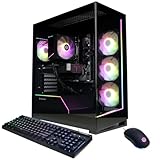
This CyberPowerPC pairs the Ryzen 7 8700F with a GeForce RTX 5060 Ti 8GB. It sits between the first CyberPowerPC and the RTX 5070 systems: a good fit for someone who owns a 1080p 144Hz monitor but wants more graphics margin, or someone moving to 1440p without demanding maximum ultra settings.
- Processor: AMD Ryzen 7 8700F
- Graphics: GeForce RTX 5060 Ti with 8GB graphics memory
- Target display: 1080p high refresh or moderate 1440p
- Typical price: around $1,400–$1,650
Typical performance for this class is approximately 130–240 FPS in competitive 1080p games and about 75–125 FPS in demanding games at 1080p high settings. At 1440p, expect the result to depend more on texture quality, ray tracing, and upscaling; many games should remain comfortable around 60–100 FPS, but future titles may make the 8GB memory limit more noticeable.
The Ryzen 7 gives this desktop useful multitasking capacity, but more cores do not automatically make it faster in every game than a newer or more cache-rich processor. The graphics card remains the main determinant of performance at 1440p. If the listing includes only 16GB of system memory, upgrading to 32GB is worthwhile for heavily modded games and background applications.
Pros
- More graphics performance than an RTX 5060 system.
- Good fit for 1080p high-refresh monitors.
- Ryzen 7 platform provides useful everyday multitasking capacity.
- Usually less expensive and less power-hungry than an RTX 5070 build.
Cons
- 8GB VRAM limits long-term 1440p flexibility.
- Pricing can approach RTX 5070 territory during promotions.
- Exact RAM, cooler, and power-supply details should be confirmed.
Choose it over the $1,200-class RTX 5060 system if the price gap is modest and you want more headroom today. Choose the MSI Codex Z2 instead if the budget reaches about $2,000, because the RTX 5070 and 32GB/2TB configuration offer a much larger 1440p upgrade.
5. BYTE DEPOT Gamer Master – Best for basic 1080p gaming

The BYTE DEPOT Gamer Master is a low-cost entry point built around a Core i7-class processor, 32GB of RAM, a 1TB SSD, and a GeForce RTX 3050 6GB. The unusually large system-memory allocation is useful for general multitasking, but the RTX 3050 is the limiting component for modern games.
- Processor: Core i7 class CPU as stated by the listing
- Graphics: GeForce RTX 3050 6GB
- Memory: 32GB RAM
- Storage: 1TB SSD
- Target display: 1080p medium to high settings
- Typical price: around $800–$1,000
Expect approximately 60–120 FPS in many competitive games at 1080p and roughly 45–80 FPS in demanding new titles, depending on settings and game engine. The sensible approach is to use high textures only when performance remains stable, reduce shadows and volumetric effects first, and use an upscaling mode when available.
The 6GB VRAM capacity is the reason this system should be treated as a 1080p desktop. It can run modern games, but ultra textures, ray tracing, and high-resolution texture packs can cause stutter or require reduced settings. Thirty-two gigabytes of system memory prevents RAM from being the immediate bottleneck, but it cannot compensate for a modest graphics processor.
Check the exact CPU model and power supply before planning an upgrade. A future GPU replacement may require a better power supply, and an inexpensive prebuilt may use a motherboard with limited expansion. If the eventual goal is 1440p, spending more on an RTX 5060 or RTX 5060 Ti system is often more economical than replacing the GPU soon after purchase.
Pros
- Lowest-priced option with 32GB system memory.
- SSD storage makes everyday use responsive.
- Suitable for esports and older games at 1080p.
- Can be a reasonable family or secondary gaming computer.
Cons
- RTX 3050 6GB is the weakest graphics option here.
- Limited appeal for 1440p and demanding future games.
- Listing-level details about motherboard and power supply matter for upgrades.
Compared with the Olialia RTX 3060 Ti desktop, the BYTE DEPOT has more system memory but a weaker graphics class. Compared with the CyberPowerPC RTX 5060, it gives up substantial gaming performance. Buy it when the initial price is the priority and 1080p medium or high settings are acceptable.
6. HP OMEN 45L – Best for a large liquid-cooled tower

The HP OMEN 45L is a large-format gaming desktop with 32GB of RAM, a 1TB SSD, a Core i7-class processor, liquid cooling, and a configuration listed with RTX 5070-class graphics. Its defining feature is the substantial 45L-style chassis rather than compactness.
- Processor: Core i7 class CPU
- Graphics: RTX 5070-class configuration as listed
- Memory: 32GB RAM
- Storage: 1TB SSD
- Cooling: liquid cooled
- Typical price: around $1,250–$1,500
Because the exact graphics configuration and revision should be checked before purchase, performance estimates are best treated as a class rather than a guarantee. An RTX 5070-class system is generally appropriate for 1440p high refresh and 4K with upscaling. The large case can help maintain temperatures, but liquid cooling does not automatically make a computer silent: pump noise, radiator fans, and graphics-card fans still contribute.
The 1TB SSD is the clearest limitation. Current PC games can occupy 100GB or more, so the drive may hold only a handful of large installs after Windows and applications are included. The chassis should provide more physical room for additional storage than a compact desktop, but confirm the available M.2 slots and drive brackets.
A large case is an advantage only if there is somewhere to put it. Measure height, width, depth, and front-to-back cable clearance, not merely the desk opening. Keep the radiator and intake areas unobstructed, and periodically inspect the liquid-cooling radiator for dust.
Pros
- Large chassis offers room for cooling and expansion.
- 32GB memory is appropriate for current gaming.
- Liquid cooling can support sustained CPU workloads.
- Strong value if the listed graphics configuration is priced near $1,350.
Cons
- Large footprint will not suit a shallow desk.
- 1TB storage can fill quickly.
- Liquid cooling adds a pump and radiator that require inspection over time.
- Exact GPU and component details need confirmation for each listing.
The MSI Codex Z2 is the safer recommendation when you want clearly stated 2TB storage and an RTX 5070 configuration. The OMEN 45L is more attractive when you value a roomy chassis, liquid cooling, and potential storage expansion.
7. iBUYPOWER Ryzen 9 7900X – Best for CPU-heavy work alongside gaming

This iBUYPOWER desktop combines a Ryzen 9 7900X, GeForce RTX 5070 12GB, and 32GB of DDR memory. It is unusual among the recommendations because its processor is especially appealing for rendering, compiling, encoding, virtual machines, and other multi-core workloads in addition to gaming.
- Processor: AMD Ryzen 9 7900X
- Graphics: GeForce RTX 5070 with 12GB graphics memory
- Memory: 32GB DDR
- Target display: 1440p high refresh and 4K with upscaling
- Typical price: around $2,150–$2,450
In games, the RTX 5070 is the main performance driver at 1440p and 4K. Expect approximately 100–180 FPS in lighter 1440p games and roughly 70–130 FPS in demanding titles, with the usual variation from settings and patches. The 12GB graphics-memory capacity provides more comfort than an 8GB card for high-resolution textures.
The Ryzen 9 7900X can use considerable power under sustained all-core workloads and benefits from capable cooling. In a gaming-only workload, the extra cores may not produce a proportional FPS increase over a less expensive Ryzen 7. For someone who edits video, runs development tools, or renders while gaming, however, the additional CPU capacity can justify the price.
At around $2,300, compare it carefully with the MSI Codex Z2. The MSI is generally the more efficient gaming purchase if both have an RTX 5070, while the iBUYPOWER earns its premium through the Ryzen 9 processor and 12GB graphics configuration. Check the included cooler and power supply because high sustained CPU loads expose weak cooling more quickly than ordinary gaming.
Pros
- Strong multi-core CPU for productivity.
- RTX 5070 graphics class suits 1440p and upscaled 4K.
- 12GB VRAM is useful for demanding texture settings.
- 32GB memory is a good starting point for work and games.
Cons
- More expensive than similarly gaming-capable alternatives.
- Higher CPU power and heat under rendering workloads.
- May be unnecessary for a gaming-only buyer.
Choose this over the MSI when you will actually use the Ryzen 9’s multi-core performance. Choose the Skytech if maximum gaming performance, rather than CPU productivity, is the priority and the budget extends to its higher graphics class.
8. YAWYORE Ryzen 7 5700X – Best for straightforward mainstream gaming

The YAWYORE desktop uses a Ryzen 7 5700X and a GeForce RTX 5060. It is a straightforward 1080p-oriented configuration for shoppers who want a Ryzen 7 label and a current entry-to-midrange graphics card, but it is built on an older AM4 memory platform rather than DDR5.
- Processor: AMD Ryzen 7 5700X
- Graphics: GeForce RTX 5060
- Target display: 1080p high refresh; moderate 1440p
- Platform consideration: Ryzen 5000 systems generally use DDR4 and AM4 components
- Typical price: around $1,200–$1,500
The RTX 5060 class can commonly produce about 100–200 FPS in competitive 1080p games and approximately 60–110 FPS in demanding games at high settings. The Ryzen 7 5700X is capable, but the platform has less forward upgrade flexibility than a newer DDR5 desktop. The graphics card, rather than the CPU, will usually determine performance at 1440p.
This desktop makes the most sense when its actual sale price is clearly below newer alternatives. At a price close to the CyberPowerPC Core i5-14400F system, the Intel configuration may offer a newer platform. At a price close to the RTX 5060 Ti CyberPowerPC, the Ti model offers more graphics headroom.
As with any less familiar prebuilt brand, verify the exact power supply, memory arrangement, wireless networking, and case ventilation. Two sticks of RAM are preferable to one for dual-channel operation. A single 16GB module can reduce CPU-limited game performance and should be corrected before evaluating the system.
Pros
- Capable Ryzen 7 processor for everyday gaming.
- RTX 5060 is well matched to 1080p.
- AM4 parts can be inexpensive to replace.
- Potentially attractive if discounted below newer-platform systems.
Cons
- Older AM4 and DDR4 platform limits future upgrades.
- Value depends heavily on the exact sale price.
- Case and power-supply details deserve careful checking.
The CyberPowerPC i5-14400F system is a stronger platform choice at similar pricing. The YAWYORE becomes interesting when it is substantially cheaper or when its included memory and storage are better. It is not the best choice for a buyer who plans a major CPU upgrade later.
9. Skytech Ryzen 7 9850X3D – Best for high-end 1440p and 4K

The Skytech system is the enthusiast gaming pick, pairing a Ryzen 7 9850X3D with a Radeon RX 9070 XT, 32GB of RAM, and a 2TB SSD. Its combination is designed for high frame rates rather than merely acceptable play, especially at 1440p, ultrawide resolutions, and 4K with sensible settings.
- Processor: AMD Ryzen 7 9850X3D
- Graphics: Radeon RX 9070 XT
- Memory: 32GB RAM
- Storage: 2TB SSD
- Target display: 1440p 165Hz or higher, ultrawide, and 4K
- Typical price: around $2,700–$3,100
Performance can commonly land around 140–240 FPS in competitive 1440p games and approximately 90–170 FPS in demanding rasterized games, while 4K results often fall around 60–120 FPS depending on the title and settings. These are broad class estimates, not guaranteed results. Ray tracing and the chosen upscaling technology can change the comparison with GeForce systems.
The X3D processor is especially attractive in CPU-limited games such as competitive shooters, large simulations, strategy games, and titles with heavy world streaming. The RX 9070 XT provides the graphics headroom to make a high-refresh monitor worthwhile. Two terabytes of storage is a practical minimum for a premium gaming library, though frequent installs may still justify a second drive.
Power use is materially higher than the RTX 5060 systems. A useful budgeting calculation is this: if a gaming system averages 450 watts and is used for three hours a day, annual gaming energy is 0.45kW × 3 × 365 = 492.75kWh. At around $0 per kWh, that is about $89 per year before idle and monitor power. A budget 300-watt system used identically would consume about $59, making the premium system roughly $30 more per year under those assumptions.
Pros
- Excellent high-refresh gaming potential.
- Strong fit for 1440p ultrawide and 4K.
- 32GB memory and 2TB storage suit a premium build.
- Gaming-focused X3D processor can reduce CPU limitations.
Cons
- Highest price in the roundup.
- More heat, power use, and likely fan noise.
- Radeon features may not suit buyers who prioritize particular ray-tracing or creator software workflows.
Compared with the iBUYPOWER RTX 5070 system, the Skytech is the better gaming-first purchase but costs more. Compared with the MSI, it is a substantial step up for high-refresh and 4K use, not a necessary purchase for a 1080p monitor. Buy it when the display and games can actually use its performance.
10. Alienware RTX 5060 Ti – Best for a branded 1080p desktop

This Alienware configuration combines an RTX 5060 Ti with an Intel Ultra 7 265F and Windows 11 Home. It is positioned as a branded mainstream gaming desktop for buyers who prefer Alienware’s visual design and support ecosystem over the maximum specifications per dollar.
- Processor: Intel Ultra 7 265F
- Graphics: GeForce RTX 5060 Ti
- Operating system: Windows 11 Home
- Target display: 1080p high refresh and moderate 1440p
- Typical price: around $1,550–$1,850
The RTX 5060 Ti class is commonly capable of approximately 120–220 FPS in competitive 1080p games and around 70–120 FPS in demanding games at high settings. At 1440p, expect to adjust ray tracing, shadows, or textures in heavier releases. Confirm whether the specific graphics variant has 8GB or another memory capacity, because that affects long-term high-resolution flexibility.
The Ultra 7 processor should be more than sufficient for ordinary gaming, streaming, and productivity. The question is value: a branded compact system may cost more than a conventional tower with the same GPU. That premium can be worthwhile if service, design, warranty handling, and a finished out-of-box experience matter to you.
Inspect the case before planning upgrades. Alienware models can use nonstandard layouts or power supplies depending on the generation. The safest future improvements are usually additional storage or memory when supported; a graphics-card replacement requires checking physical dimensions, connectors, cooling, and available power.
Pros
- Recognizable branded design.
- Capable RTX 5060 Ti graphics class.
- Modern Intel Ultra 7 processor.
- Ready-to-use Windows installation.
Cons
- Often costs more than standard-tower alternatives.
- Upgrade compatibility may be less predictable.
- Graphics-memory capacity should be confirmed for the exact listing.
The CyberPowerPC RTX 5060 Ti system is usually the better specification-per-dollar choice. The Alienware is preferable when the enclosure, brand support, and presentation justify paying more. If the price approaches the MSI Codex Z2, the MSI provides a much stronger 1440p configuration.
11. Olialia Gaming PC – Best for inexpensive older-platform gaming

The Olialia Gaming PC combines an RTX 3060 Ti, Ryzen 5 5500, and 16GB of RAM. It is an older but still recognizable 1080p gaming combination, suitable for buyers who find it at a genuinely low price and do not need the newest platform features.
- Processor: AMD Ryzen 5 5500
- Graphics: GeForce RTX 3060 Ti
- Memory: 16GB RAM
- Target display: 1080p high settings; entry-level 1440p
- Typical price: around $800–$1,000
Typical performance is approximately 90–170 FPS in competitive 1080p games and about 55–100 FPS in demanding titles, depending on settings and patches. The RTX 3060 Ti remains capable, but its 8GB VRAM and the Ryzen 5 5500 platform make it less attractive for a long ownership period than newer alternatives.
The first practical upgrade is usually memory. Sixteen gigabytes can still run games, but 32GB is more comfortable when using mods, a browser, voice chat, recording, or large open-world titles. Install two matching modules if possible and confirm the motherboard’s memory layout before buying replacements.
Do not judge this desktop by its processor name alone. The Ryzen 5 5500 is adequate for most games, but its platform and cache configuration are less forward-looking than newer systems. If an RTX 5060 desktop costs only a little more, the newer graphics generation and platform may be worth the difference.
Pros
- Potentially inexpensive way to enter PC gaming.
- RTX 3060 Ti remains competent at 1080p.
- Common AM4 ecosystem can make replacement parts affordable.
- Suitable for older games and esports.
Cons
- Only 16GB RAM as listed.
- Older CPU and graphics platform.
- 8GB VRAM limits ambitious 1440p settings.
- Value is highly dependent on discount level.
Against the BYTE DEPOT, the Olialia likely offers stronger graphics performance but less system memory. Against the CyberPowerPC RTX 5060, it is difficult to recommend unless the Olialia is meaningfully cheaper. Treat it as a budget opportunity, not a premium future-proof purchase.
12. The Horizon Autherium Dragon RGB – Best for maximum listed memory and storage
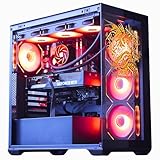
The Horizon Autherium Dragon RGB lists a Core i9-class processor reaching up to 5.4GHz, 64GB of RAM, 5TB of storage, and an RTX 507-class graphics configuration. It is aimed at buyers attracted to unusually generous memory and storage rather than shoppers who want the cleanest, most precisely documented component balance.
- Processor: Core i9 class CPU, listed up to 5.4GHz
- Graphics: RTX 507-class listing
- Memory: 64GB RAM
- Storage: 5TB total storage as listed
- Target display: 1440p high refresh and 4K with upscaling, depending on the exact GPU
- Typical price: around $2,700–$3,100
The listing’s memory and storage are its obvious differentiators. Sixty-four gigabytes is more than most games need, but it is useful for virtual machines, content creation, large mod collections, development tools, and multitasking. Five terabytes also reduces the need to uninstall games, although buyers should confirm how much is SSD storage and how much uses another drive type.
Do not assume that a Core i9 label or a 5.4GHz maximum automatically means higher gaming FPS than a gaming-focused X3D processor. At 1440p and 4K, the graphics card usually matters more; at very high 1080p frame rates, cache and game-engine behavior can matter as much as peak boost frequency. The RTX 507 designation should be verified for exact VRAM, power requirements, and model variant before purchase.
This is also the system where the power supply deserves particular attention. A high-end CPU and graphics card can create a sizable transient load. Confirm the rated wattage, efficiency class, required connectors, CPU cooler, and case airflow. More RGB does not improve cooling, so prioritize fan placement and unobstructed intake over lighting.
Pros
- Most system memory in the roundup.
- Most listed storage capacity.
- High-end CPU class suits demanding productivity workloads.
- RGB presentation appeals to showcase builds.
Cons
- Exact graphics-card and storage breakdown should be confirmed.
- 64GB RAM may add cost without increasing game FPS.
- Potentially high power use and heat.
- May offer poor gaming value beside a more clearly specified system.
The Skytech is the more transparent gaming recommendation because its Ryzen 7 9850X3D and RX 9070 XT pairing clearly targets high-end gaming. The Horizon is better when 64GB memory and 5TB storage have real value for your work. If games are the only workload, spend the difference on the graphics configuration rather than excess RAM.
How to Choose
Start with the monitor, not the desktop
The monitor determines whether a system’s extra performance is useful. For 1080p at 60Hz, even the least powerful desktops here can be adequate with sensible settings. For 1080p at 144Hz or 240Hz, CPU consistency and graphics settings both matter. For 1440p at 144Hz or 165Hz, the MSI Codex Z2, Alienware RTX 5070, and higher systems make more sense. For 4K, prioritize the graphics card, VRAM capacity, upscaling support, and cooling.
Use the following practical mapping:
| Your situation | Suitable choice | Why |
|---|---|---|
| 1080p, 60–100Hz, limited budget | BYTE DEPOT or Olialia | Enough for mainstream settings if priced low |
| 1080p, 144–240Hz | CyberPowerPC RTX 5060 or RTX 5060 Ti | Better frame-rate headroom and modern features |
| 1440p, 100–165Hz | MSI Codex Z2 | Strong GPU, 32GB RAM, and 2TB SSD |
| 1440p ultrawide or 4K | Skytech RX 9070 XT | More graphics capacity for high pixel counts |
| Gaming plus rendering or compiling | iBUYPOWER Ryzen 9 or Horizon | More CPU cores and memory capacity |
| Branded design and support | Alienware Aurora | Distinctive enclosure and ecosystem |
Understand the resolution calculation
Moving from 1080p to 1440p increases the number of pixels from 2,073,600 to 3,686,400. That is 3,686,400 ÷ 2,073,600 = 1.78 times as many pixels. Moving from 1440p to 4K increases pixels from 3,686,400 to 8,294,400, or 2.25 times as many. The graphics card therefore does substantially more work even when the game, settings, and frame rate target stay the same.
A 4K 144Hz monitor represents 8,294,400 × 144 = 1,194,393,600 pixel updates per second. That does not mean the GPU must render a billion independent operations, but it explains why a card that is excellent at 1080p may not sustain 144 FPS at native 4K. Upscaling renders internally at a lower resolution and reconstructs the output, reducing the workload while retaining a 4K display signal.
Choose VRAM for the resolution and texture plan
VRAM stores textures, frame buffers, geometry data, and other graphics resources. An 8GB card can be entirely satisfactory at 1080p, particularly with high rather than ultra textures. At 1440p, 12GB or more offers a more comfortable margin for new games, high-resolution texture packs, and ray tracing. At 4K, more VRAM is helpful, but the GPU’s shader performance and memory bandwidth still matter.
When a game exceeds available VRAM, the symptom is not always a lower average FPS. You may see texture pop-in, hitching when turning the camera, long pauses entering new areas, or unstable one-percent lows. Lower texture quality first; textures often have a smaller visual impact than shadows, volumetrics, or resolution. Ray tracing can be reduced next if the game remains GPU-limited.
Do not equate CPU core count with gaming speed
Most games benefit from a fast primary thread and several supporting threads. A modern six- or eight-core processor is enough for many gaming systems, while more cores become valuable for recording, compiling, rendering, streaming, and virtual machines. The Ryzen 9 7900X and Core i9-class Horizon configuration are productivity-oriented choices, not automatic FPS winners.
At 1080p with a powerful graphics card, CPU differences are easier to see because the GPU finishes each frame quickly. At 1440p and 4K, the graphics card usually becomes the limiting component. This is why a buyer with a 4K monitor should generally choose the stronger GPU before paying for an extravagant CPU.
Check system memory configuration
Sixteen gigabytes remains workable for many games, but 32GB is the more comfortable 2026 starting point. It leaves room for Windows, a browser, chat, a launcher, recording software, and mods. Sixty-four gigabytes is worthwhile for professional applications or unusually heavy multitasking, but it rarely increases FPS in a clean gaming workload.
Two matching memory modules usually enable dual-channel operation. If a desktop arrives with one module, adding a matching module can improve minimum frame rates in CPU-limited games. Check the installed speed, capacity, motherboard slots, and supported memory type before ordering an upgrade. DDR4 and DDR5 modules are not interchangeable.
Budget for storage realistically
A 1TB SSD does not provide 1TB of free game space. Windows, recovery partitions, launchers, applications, and free-space requirements consume a portion of the drive. If a modern game averages 100GB after updates, a 1TB system drive may hold roughly seven or eight large installations comfortably rather than ten.
The MSI and Skytech systems are better prepared with 2TB drives. The HP OMEN, Alienware RTX 5060 Ti, and other 1TB systems can still be perfectly usable, but plan for an additional SSD if your library is large. Confirm whether the desktop has an open M.2 slot, a 2.5-inch mounting location, and the necessary screws or cables.
Use power draw to estimate running cost
Graphics-card labels do not tell the whole power story. A practical estimate is:
Annual cost = average gaming watts ÷ 1,000 × gaming hours per day × 365 × electricity price.
For example, assume a 350-watt system is used for four hours each day and electricity costs around $0 per kWh. The calculation is 0.35 × 4 × 365 × around $0 = around $100 per year for gaming operation. A 500-watt premium system under the same conditions costs 0.50 × 4 × 365 × around $0 = $146, a difference of about $44 annually. Actual idle use, sleep behavior, monitor power, and regional rates will change the result.
Power-supply capacity must also include short transient spikes. A high-end graphics card should not be paired with a barely adequate supply. Look for sufficient wattage, appropriate modern connectors, reputable protections, and an efficiency rating. Efficiency does not create extra gaming FPS, but it reduces waste heat and can lower electricity use.
Think about noise as a heat-management problem
Noise rises when fans must move more air or spin faster. A powerful system in a ventilated mesh tower can be quieter than a weaker system trapped in a restricted compact case. Liquid cooling can move heat away from the CPU efficiently, but it adds pump noise and does not eliminate graphics-card fan noise.
Place the desktop with at least several inches of clearance around intake and exhaust areas. Do not put a tower on thick carpet if it draws air from below. Use a balanced fan curve: a small temperature increase can be preferable to rapid fan-speed changes. Clean dust filters before temperatures rise, because clogged filters make every fan louder.
Measure the case and the route to the desk
Case size affects much more than appearance. Measure the space under the desk, the width of the doorway, the depth behind the monitor, and room for power and display cables. A 45L tower may fit on paper but leave no room for airflow or access to rear connectors. Compact Alienware systems can save floor space but may have less room for standard upgrades.
Also check graphics-card length and thickness. A future card may occupy three or more expansion slots and block adjacent slots. A larger air cooler may collide with tall memory modules or a side panel. These are physical constraints, not problems solved by software.
Evaluate upgradeability before assuming it
Ask six questions: Is the motherboard using standard dimensions? Is the power supply standard or proprietary? Are the memory slots accessible? Is there an open M.2 slot? Can the graphics card be removed without special brackets? Does the case have adequate intake and exhaust positions?
Standard-tower prebuilts such as many CyberPowerPC, MSI, HP, and iBUYPOWER configurations may offer a more familiar upgrade process, but the exact listing still controls. Branded compact systems can be excellent out of the box while being less convenient to rebuild. If you expect to replace the graphics card within two years, prioritize a conventional case and a known power-supply format.
Account for the total purchase rather than the headline price
A desktop is not the entire gaming setup. Add the monitor’s resolution and refresh rate, keyboard, mouse, headset, operating-system licensing where relevant, and possibly an additional SSD. A $900 tower connected to a 4K 144Hz monitor may produce a disappointing experience, while a $1,400 tower with a suitable 1080p or 1440p display can feel much better.
The best gaming desktop is therefore not the one with the largest processor number. It is the system whose graphics card matches the monitor, whose memory and storage match the library, whose case fits the room, and whose cooling and power budget fit your tolerance for heat and noise.
Frequently Asked Questions
What is the best prebuilt gaming PC in this roundup?
The MSI Codex Z2 is the best prebuilt gaming PC for most people because its RTX 5070, 32GB of DDR5, and 2TB SSD align well with 1440p gaming. The CyberPowerPC RTX 5060 is better if your budget and monitor are centered on 1080p.
Which desktop is the best gaming PC for the money?
The CyberPowerPC Core i5-14400F and RTX 5060 is the best gaming PC for the money when purchased near its usual $1,200 range and used for 1080p gaming. If you can spend close to $2,000, the MSI Codex Z2 delivers a much larger 1440p performance increase and better included storage.
Is 8GB of VRAM enough for gaming in 2026?
Eight gigabytes is generally adequate for 1080p with high settings, but it is less comfortable for 1440p ultra textures, ray tracing, and future releases. Lowering texture quality is often the most effective fix for VRAM-related stutter.
How much RAM should a gaming desktop have?
Thirty-two gigabytes is the most practical starting point for a new gaming desktop because it accommodates games, browsers, chat, mods, and recording software. Sixteen gigabytes is still usable, while 64GB is primarily valuable for professional workloads or unusually heavy multitasking.
Will a gaming desktop use a lot of electricity?
A mainstream gaming desktop may average roughly 250–400 watts during a game, while a high-end system can average 400–600 watts depending on the components and frame rate. Multiply average kilowatts by hours of use and your local electricity price to estimate cost.
Are liquid-cooled gaming desktops quieter?
Not automatically. Liquid cooling can reduce CPU temperature, but the pump, radiator fans, and graphics-card fans still create noise. Case airflow, dust, fan curves, and the graphics card often matter more to gaming noise than the presence of a radiator.
Can these desktops run games at 4K?
The RTX 5070, RX 9070 XT, and similar high-end configurations are the best choices for 4K, usually with an upscaling mode and adjusted ray-tracing settings. The RTX 5060, RTX 3050, and RTX 3060 Ti systems are more naturally suited to 1080p or moderate 1440p.
Should I upgrade a budget desktop or buy a more powerful one?
Upgrade when the case, power supply, motherboard, and processor provide a clear path and the graphics card is the only weakness. If the system has an older platform, limited power supply, restricted airflow, and a small graphics card, the cost of several upgrades can approach the price of a better prebuilt.
Choose the CyberPowerPC RTX 5060 for affordable 1080p gaming, the RTX 5060 Ti models for additional mainstream headroom, and the MSI Codex Z2 for the best overall 1440p balance. Pick the Skytech for high-refresh 1440p or 4K, the iBUYPOWER or Horizon for serious CPU-heavy work, and an Alienware or OMEN system when its design, cooling, or brand ecosystem matters more than maximum specification-per-dollar.
Related guides
- Best Gaming PC for Fortnite: Eight Prebuilt Desktops Sorted by Refresh Rate Goal (2026)
- Best RX 9070 XT Prebuilt Gaming PCs: Seven Desktops and Three Cards Compared: 10 Compared (2026)
- CyberPowerPC vs iBUYPOWER Gaming PC: How the Two Brands Compare
- Best RX 9070 XT Prebuilt Gaming PC (2026): 5 Picks Compared