The best gaming PC under $500 in 2026 is the STGAubron Core i7 tower with a Radeon RX 580 8GB, 16GB of RAM and a 512GB SSD. It usually sells for roughly $450–$500, and in this price range nothing else on our list matches its mix of a real 8GB graphics card and enough memory and storage to start gaming right away. Under $500 your realistic choices are a tower with an older discrete GPU (RX 550, RX 580 or RX 590) or a modern mini PC that games on a Radeon 780M integrated GPU. This guide compares five systems from about $380 to $500, explains what each GPU class can actually run at 1080p, and covers the weak points that sellers rarely mention.
Our Top Picks
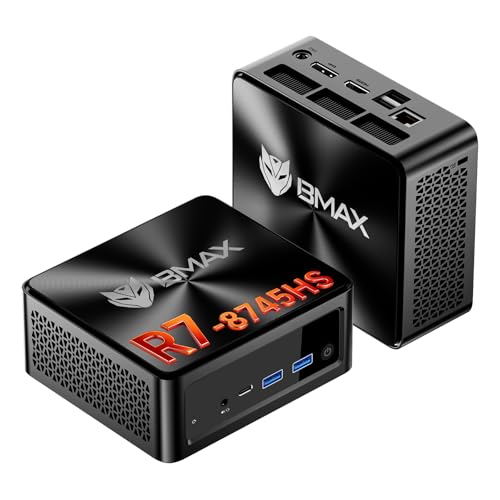 Gaming Mini PC with AMD Ryzen 7 8745HSB8A Pro 16GB/512GB/R7 8745HS4.96 x 4.41 x 2.05 inchesCheck on Amazon
Top 3 Picks
- Best overall: STGAubron Core i7 + RX 580 8GB (about $450–$500). The best balance of GPU power, 16GB RAM and a 512GB SSD for 1080p esports and lighter AAA games.
- Best value: Bmax Ryzen 7 8745HS Mini PC (about $420–$450). A modern 8-core Zen 4 CPU, Radeon 780M graphics, 16GB RAM and 512GB NVMe in a tiny box that also works as an excellent everyday computer.
- Best for small desks: ACEMAGICIAN S3A with Ryzen 7 H 255 (about $480–$500). Same Radeon 780M class of graphics as the Bmax, with a PCIe 4.0 SSD, aimed at buyers who want a quiet, compact machine for light gaming and work.
Quick Comparison: Gaming PCs Under $500
| Model | CPU | GPU | RAM | Storage | Approx. price | Best for |
|---|---|---|---|---|---|---|
| STGAubron Core i7 + RX 580 | Intel Core i7 (generation not stated) | Radeon RX 580 8GB | 16GB | 512GB SSD | $450–$500 | Overall 1080p gaming |
| Tisukisu Core i7 + RX 590 | Intel Core i7 (generation not stated) | Radeon RX 590 8GB | Check the listing | Check the listing | $460–$500 | Most GPU power for the money |
| Bmax Ryzen 7 8745HS Mini PC | Ryzen 7 8745HS, 8C/16T | Radeon 780M (integrated) | 16GB (upgradable) | 512GB NVMe | $420–$450 | Value, work plus light gaming |
| ACEMAGICIAN S3A | Ryzen 7 H 255, 8C/16T | Radeon 780M (integrated) | 16GB | 512GB PCIe 4.0 SSD | $480–$500 | Small desks, quiet setups |
| STGAubron Core i5 + RX 550 | Intel Core i5 (generation not stated) | Radeon RX 550 4GB | 16GB | 512GB SSD | $360–$400 | Entry-level esports only |
1. STGAubron Core i7 + RX 580 8GB – Best Overall Under $500
Specs from the listing: Intel Core i7 processor, Radeon RX 580 8GB graphics, 16GB RAM, 512GB SSD. Roughly $450–$500.
The RX 580 8GB is an old card, first released in 2017, but it is still a capable 1080p GPU. Published benchmarks place it roughly level with the RX 6500 XT and a little behind newer budget cards such as the RTX 3050 6GB, which means it handles esports titles at high frame rates and most AAA games at 1080p low to medium. The 8GB of video memory matters more than the age suggests: newer games that choke 4GB cards still load properly here. Pair that with 16GB of system RAM and a 512GB SSD, and this tower is ready to play out of the box without an immediate upgrade.
The trade-offs are real. The listing title does not state which generation of Core i7 is inside, and towers at this price often use older Intel chips, so check the listing for the exact model. The RX 580 also draws around 185W under load and has moved to AMD’s legacy driver branch, which means bug fixes continue but new game optimizations and features are unlikely.
Who should buy it?
Buy it if you want the most complete “plug in and play” gaming tower under $500 and mainly play Fortnite, Valorant, Counter-Strike 2, Apex Legends, Rocket League, Minecraft or GTA V. It is also a reasonable platform for a first upgrade later, since a full-size tower usually has room for a bigger graphics card.
What games can it run at 1080p?
Expect roughly 120–200+ FPS in Valorant, CS2 and League of Legends at low to medium settings, about 70–110 FPS in Fortnite on performance-focused settings, and around 40–60 FPS in heavier AAA games such as Cyberpunk 2077 or Red Dead Redemption 2 at low settings. The newest releases that require ray tracing hardware or mesh shaders may not run at all, because the RX 580 lacks those features.
2. Tisukisu Core i7 + RX 590 8GB – Most GPU Power Under $500
Specs from the listing: Intel Core i7 tower, Radeon RX 590 8GB graphics, Windows 11. RAM and storage are not in the title, so check the listing. Roughly $460–$500.
The RX 590 is a factory-overclocked version of the same Polaris design as the RX 580, and it is usually around 10% faster. In aggregate benchmarks it sits close to the RTX 3050 6GB, which makes it the strongest graphics card in this price bracket. If raw frame rate per dollar is your top priority, this is the system to look at first.
The catch is that the title gives less detail than the STGAubron listing. You need to confirm the amount of RAM, the SSD size and the Core i7 generation before you buy. The RX 590 is also power hungry, at around 175–225W depending on the model, so the quality of the included power supply matters. Like the RX 580, it is on AMD’s legacy driver track.
Who should buy it?
Choose it if you care most about GPU performance and you are comfortable checking spec details yourself. If the listing confirms 16GB of RAM and at least a 500GB SSD, it is a slightly faster alternative to our top pick.
Who should skip it?
Skip it if the listing shows 8GB of RAM or a small SSD and you do not want to upgrade right away, or if you want a machine with current driver support and lower power draw. In that case, the RX 580 tower or one of the mini PCs below is a safer bet.
3. Bmax Ryzen 7 8745HS Mini PC – Best Value Under $450
Specs from the listing: AMD Ryzen 7 8745HS, 8 cores / 16 threads up to 4.9GHz, 16GB RAM (upgradable), 512GB M.2 NVMe SSD, 2.5GbE networking, triple display support. Roughly $420–$450.
Gaming Mini PC with AMD Ryzen 7 8745HS (Upgraded 7840HS/7735HS) Up to 4.9GHz 8C/16T,16GB RAM (Upgradable to 256GB) & 512GB M.2 NVMe SSD Desktop Mini Computers Office Home,2.5GbE,Triple 8K Display Bmax


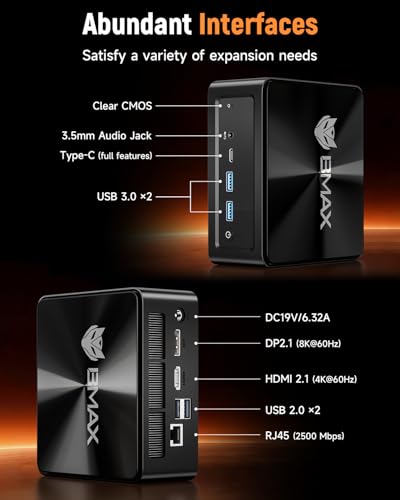


As an Amazon Associate we earn from qualifying purchases. Product prices and availability are accurate as of the date/time indicated.
This is the most modern platform in the group for the lowest price. The Ryzen 7 8745HS is a Zen 4 chip with eight cores, so it is far faster than the older Core i5 and Core i7 chips commonly found in budget towers. Its integrated Radeon 780M is one of the strongest integrated GPUs available, roughly in GTX 1650 territory in many games, though results vary with the PC’s power limits and RAM speed. It will not beat the RX 580 or RX 590 in demanding games, but it handles esports titles well and runs many older or lighter AAA games at 1080p low, especially with FSR upscaling turned on.
The bigger advantage is everything outside gaming. It is small, quiet, efficient and fast for browsing, office work, coding, streaming video and photo editing. The downside is that you cannot add a desktop graphics card, so your gaming ceiling is fixed unless you buy an external GPU setup, which is rarely worth it at this budget.
Who should buy it?
Buy it if your PC is mainly for work, school and media, and gaming is a second priority. It suits players of Valorant, League of Legends, Rocket League, Minecraft, Fortnite on performance mode, and indie games, as well as anyone with limited desk space.
What games can it run at 1080p?
Expect roughly 80–150 FPS in esports titles at low settings, about 60–90 FPS in Fortnite on performance-focused settings, and around 30–50 FPS in demanding AAA games at 1080p low with upscaling. Some recent AAA releases will need 720p or aggressive upscaling to stay smooth.
4. ACEMAGICIAN S3A (Ryzen 7 H 255) – Best Compact Gaming Mini PC Under $500
Specs from the listing: AMD Ryzen 7 H 255, 8 cores / 16 threads up to 4.9GHz, Radeon 780M graphics, 16GB RAM, 512GB PCIe 4.0 SSD. Roughly $480–$500.

ACEMAGICIAN S3A Gaming Mini PC, Ryzen 7 H 255 (Up to 4.9GHz, 8C/16T), Radeon 780M Graphics, 16GB RAM, 512GB PCIe4.0 SSD, Mini Desktop Computer for Content Creation, Programming, Gaming & Home Office


As an Amazon Associate we earn from qualifying purchases. Product prices and availability are accurate as of the date/time indicated.
The Ryzen 7 H 255 belongs to AMD’s Ryzen 200 series, and hardware databases treat it as essentially the same Hawk Point silicon as the Ryzen 7 8745H/8745HS. That means CPU and gaming performance should be very close to the Bmax above, with the same Radeon 780M graphics. The differences come down to price, cooling design, power limits, ports and RAM configuration. If the two systems are close in price, compare the details on each listing, especially memory speed, because the 780M performs noticeably better with fast dual-channel RAM.
Because it usually costs a little more than the Bmax for similar gaming results, it ranks behind it on value. It is still a strong choice for a compact setup with a modern CPU and fast storage.
Who should buy it?
Buy it if you want a small desktop for content creation, programming and home office tasks that can also handle esports and lighter games, and if you prefer this model’s design or configuration over the Bmax.
Who should skip it?
Skip it if AAA gaming at 1080p medium or higher is your main goal. Any integrated GPU will struggle there, and an RX 580 or RX 590 tower gives you more frame rate for similar money.
5. STGAubron Core i5 + RX 550 4GB – Best Budget Option Under $400
Specs from the listing: Intel Core i5 processor, Radeon RX 550 4GB graphics, 16GB RAM, 512GB SSD. Roughly $360–$400.

STGAubron Gaming PC Desktop,Core I5,RX 550 4G,16G RAM,512G SSD | Gaming Computer Tower for Streaming,Video Editing,Home,School,I5 up to 3.6G,ARGB Fan,WiFi 6,BT 5.0,4K DP,HDMI,Win11 Home

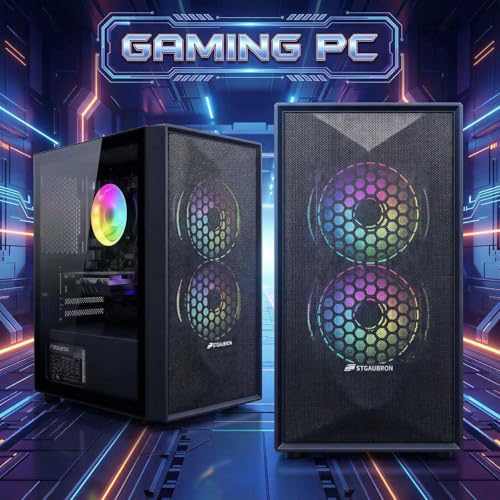


As an Amazon Associate we earn from qualifying purchases. Product prices and availability are accurate as of the date/time indicated.
This is the cheapest way into a desktop tower with a dedicated graphics card on our list, but be clear about what the RX 550 is: an entry-level card meant for esports and older games. It is noticeably slower than the Radeon 780M in many titles and far behind the RX 580. Its 4GB of video memory and modest memory bandwidth limit it in any modern AAA game.
What saves it is the rest of the configuration. Sixteen gigabytes of RAM and a 512GB SSD are a decent foundation, and a tower case means you can install a better graphics card later, provided the power supply can handle it. As with the other towers, the Core i5 generation is not listed in the title, so check the listing.
Who should buy it?
Buy it if your budget stops around $400, you mostly play Valorant, League of Legends, CS2, Rocket League, Minecraft or older titles, and you plan to upgrade the GPU in the future.
Who should skip it?
Skip it if you want to play recent AAA games. For only about $80–$120 more, the RX 580 tower delivers roughly double the graphics performance and double the video memory.
What to Expect From a Gaming PC Under $500 in 2026
A $500 gaming PC in 2026 is a 1080p machine. With the right settings it can deliver smooth, high-refresh esports gameplay, and it can run most AAA games at low to medium settings, often at 40–60 FPS. It is not a 1440p machine for modern AAA games, and it will not run ray tracing well. Setting those expectations up front helps you choose the right system and tune your games properly.
Performance in this price range depends mostly on the graphics processor. Here is how the GPUs in these systems typically compare at 1080p, based on published benchmarks. Treat the numbers as ranges, since results vary by game, CPU, RAM and driver version.
| GPU | Typical 1080p settings | Esports FPS (Valorant, CS2, Fortnite performance mode) | AAA FPS (e.g. Cyberpunk 2077, RDR2) |
|---|---|---|---|
| Radeon RX 550 4GB | Low | 60–120 | 20–35, many recent games unplayable |
| Radeon 780M (integrated) | Low, FSR upscaling | 80–150 | 30–50 |
| Radeon RX 580 8GB | Low to medium | 120–200+ | 40–60 |
| Radeon RX 590 8GB | Low to medium | 130–220+ | 45–65 |
RAM and storage baseline
In 2026, 16GB of RAM is the practical minimum for gaming. Eight gigabytes still boots games, but modern titles plus Discord and a browser will push it into stutter. Most systems here list 16GB, which is right. For storage, a 512GB SSD is the baseline. A single large AAA game can take 100–150GB, so plan on adding a second drive within a year if you play big titles. An NVMe SSD is preferable to a SATA SSD for faster boot and load times, though both are far better than a hard drive.
Upgrade paths
- Power supply: Budget towers often ship with modest, unbranded power supplies. Before buying a stronger GPU, check the PSU wattage and connectors. A card like the RX 6600 or RTX 3060 generally calls for a quality 500–550W unit with the right PCIe power cables.
- RAM slots: Check whether the 16GB is installed as two sticks (dual channel) or one. Two sticks are faster, especially for integrated graphics like the Radeon 780M. Mini PCs usually have two SO-DIMM slots; the Bmax listing says it supports up to 256GB.
- GPU swap: Towers can take a newer graphics card if the case, PSU and motherboard allow it. Older Intel platforms may use PCIe 3.0, which is fine for most x16 cards but can hurt cards with narrow x4 connections such as the RX 6500 XT. Mini PCs cannot take a desktop GPU.
- Storage: Most towers have spare SATA ports, and many mini PCs have a second M.2 slot. Check the listing before you buy extra drives.
Buying Guide
GPU first
For gaming, the graphics card decides most of your experience. Under $500, the ranking is roughly RX 590, then RX 580, then the Radeon 780M, then the RX 550. Look for at least 8GB of video memory if you play modern AAA games, since 4GB cards hit limits quickly. Also note driver status: the RX 580 and RX 590 are now on AMD’s legacy driver branch, which still gets critical fixes but little new-game optimization, while the 780M uses the current RDNA 3 driver track.
CPU
Budget towers frequently list “Core i5” or “Core i7” without naming the generation. That matters: a Core i7 from several generations ago can be slower than a modern six-core chip. Check the listing for the exact model number and look it up. The Ryzen 7 8745HS and Ryzen 7 H 255 in the mini PCs are both modern eight-core Zen 4 processors, which is a real strength for multitasking and future games that lean on the CPU.
RAM and storage
Aim for 16GB of RAM, ideally in dual-channel, and at least a 512GB SSD. If a listing does not state these in the title, confirm them in the full specs. Adding RAM to a tower is cheap and easy; adding storage is just as simple.
PSU quality
The power supply is the most common corner cut in budget prebuilts. A weak or low-quality unit can cause crashes under load and limits your upgrade options. If the listing names the PSU brand and wattage, look for a known brand and an 80 Plus rating. If it does not, assume you may need to replace the PSU before installing a more powerful GPU.
Windows activation
Confirm that the system ships with genuine, activated Windows 11. After setup, open Settings, then System, then Activation to verify it. An unactivated copy still runs but shows a watermark and limits personalization, and buying a legitimate license adds cost.
Used and renewed caveats
Some budget gaming PCs are built with older or reused components, and renewed systems are common at this price. That is not automatically bad, but check the warranty length, the return policy and whether the GPU and CPU models match the description. Run a quick stress test and a GPU benchmark during the return window to catch problems early.
Prebuilt vs building yourself
Building your own PC can give you newer parts for the money, but at $500 the gap is smaller than many people expect once you include Windows and a case. Here is a rough parts-cost comparison for a new DIY build in late 2026. Memory and GPU prices have been volatile, so treat these as broad ranges.
| Component | Example | Approx. cost |
|---|---|---|
| CPU | Ryzen 5 5500 or similar six-core | $75–$110 |
| Motherboard | Budget AM4 board | $65–$100 |
| RAM | 16GB DDR4 (2x8GB) | $40–$80 |
| Storage | 512GB–1TB NVMe SSD | $40–$70 |
| GPU | Budget card such as RX 6500 XT or used RX 6600 | $140–$220 |
| PSU | Quality 500–550W | $45–$65 |
| Case | Budget airflow case | $40–$60 |
| Windows 11 | Retail license | $100–$140 |
| Total | $545–$845 |
A DIY build with a fully supported GPU and a modern CPU usually lands above $500 once Windows is included, although buying used parts can bring it down. Prebuilts in this range trade older components for convenience, a single warranty and a ready-to-play system. If you enjoy building and can reuse a Windows license, DIY is worth considering. If you want something that works on day one, a prebuilt from this list is the simpler route.
Frequently Asked Questions
Can a $500 gaming PC run modern games?
Yes, at 1080p and mostly low to medium settings. Systems with an RX 580 or RX 590 typically run AAA games at around 40–65 FPS on low settings, and esports titles at well over 100 FPS. The newest games that require ray tracing hardware may not run on older Polaris GPUs at all.
Is the RX 580 still good in 2026?
It is still a usable 1080p card thanks to its 8GB of video memory, and it remains a good value inside a cheap prebuilt. Its weaknesses are high power draw, no hardware ray tracing and legacy driver status, so it is best for esports and older or lighter AAA games.
Is a mini PC with Radeon 780M good for gaming?
For light gaming, yes. The 780M handles esports titles comfortably and runs many AAA games at 1080p low with upscaling. It is slower than an RX 580 in demanding games and cannot be upgraded with a desktop graphics card, so choose it if you value size, efficiency and a modern CPU more than maximum frame rate.
Is the RX 550 enough for Fortnite and Valorant?
Valorant runs well on an RX 550 at 1080p low, often above 100 FPS. Fortnite is playable on performance-focused settings at roughly 60–90 FPS, with drops in busy fights. For anything heavier, the RX 550 is not enough.
Should I buy a $500 prebuilt or wait and save for $700–$800?
If you mainly play esports titles, a $500 system is enough. If you want to play new AAA releases at 1080p medium or high, saving for a $700–$800 system with an RTX 3050, RTX 2060 Super or RTX 3060 class GPU gives you a big jump in performance and current driver support.
Can I upgrade a budget gaming PC later?
Towers can usually take more RAM, extra storage and a new graphics card, but you may need a better power supply first. Mini PCs can usually take more RAM and storage, but not a desktop graphics card.
Related guides
- Best Gaming PC for Fortnite: Eight Prebuilt Desktops Sorted by Refresh Rate Goal (2026)
- Best RX 9070 XT Prebuilt Gaming PCs: Seven Desktops and Three Cards Compared: 10 Compared (2026)
- CyberPowerPC vs iBUYPOWER Gaming PC: How the Two Brands Compare
- Best RX 9070 XT Prebuilt Gaming PC (2026): 5 Picks Compared