The right desktop depends on the job, and the seven listings below split cleanly into three groups. Three renewed Dell small-form-factor office machines suit browsing, schoolwork and document-heavy days. Two assembled gaming towers, one built around a Ryzen 7 5700X with an RTX 5060 and one around a Core i7 with an RX 580, suit games and creative software. Two mini PCs, a Celeron N5095 model and a Ryzen 7640HS model, suit tidy desks and multi-monitor setups. Every spec below comes from the listing title only, so treat it as a seller claim and verify the details on the product page before ordering.
Our Top Picks

Top 3 picks at a glance
Quick picks by need
As an Amazon Associate we earn from qualifying purchases at no extra cost to you.


- YAWYORE Gaming PC (Ryzen 7 5700X, RTX 5060) – best for current games and creative work in a full-size tower
- GMKtec M6 Ultra Mini PC (Ryzen 7640HS, 32GB DDR5) – best for a compact, multi-display desk setup
- Dell OptiPlex 7050 SFF (i7-7700, 32GB, 1TB SSD, renewed) – best for roomy storage and memory on a tight budget
- STGAubron Gaming PC (Core i7, RX 580 8G) – best for older or lighter games at modest settings
- Dell OptiPlex 5050 SFF (i7-7700, 16GB, 512GB NVMe, renewed) – best for a no-frills home or school computer
- KAMRUI AK1PLUS Mini PC (Celeron N5095) – best for light office work and a second computer
- Dell OptiPlex 3040 SFF (Core i3-6100, 8GB, 256GB SSD, renewed) – best for the lowest-cost basic machine, with caveats
All seven desktops side by side
| Model | Type | Key specs as stated in the title | Best for | Price tier |
|---|---|---|---|---|
| YAWYORE Gaming PC | Gaming tower | Ryzen 7 5700X, GeForce RTX 5060, 32GB DDR4, 1TB M.2 NVMe SSD, WiFi + Bluetooth | Current games, streaming, creative work | Premium |
| GMKtec M6 Ultra | Mini PC | Ryzen 7640HS, 32GB DDR5, 1TB SSD, 2.5GbE dual LAN, WiFi 6, USB4, triple 4K display support | Compact multi-monitor desks | Mid |
| STGAubron Gaming PC | Gaming tower | Core i7 (up to 3.9GHz), RX 580 8G, 16GB RAM, 1TB SSD, WiFi 6, Windows 11 Home | Lighter games, streaming, home use | Mid |
| Dell OptiPlex 7050 SFF | Renewed office desktop | Core i7-7700, 32GB DDR4, 1TB SSD, WiFi, Bluetooth, HDMI, Windows 11 Pro | Memory-hungry office use on a budget | Budget |
| Dell OptiPlex 5050 SFF | Renewed office desktop | Core i7-7700 quad-core, 16GB DDR4, 512GB NVMe SSD, Windows 11 Pro | Everyday home and school work | Budget |
| KAMRUI AK1PLUS | Mini PC | Celeron N5095, 16GB RAM, 256GB SSD, dual 4K output, 2.5-inch SSD expansion | Light office tasks, second computer | Budget |
| Dell OptiPlex 3040 SFF | Renewed office desktop | Core i3-6100, 8GB RAM, 256GB SSD, HDMI, RJ45, Windows 11 Pro | Basic browsing and documents | Budget |
The seven desktops, one at a time
1. YAWYORE Gaming PC – Ryzen 7 5700X and RTX 5060
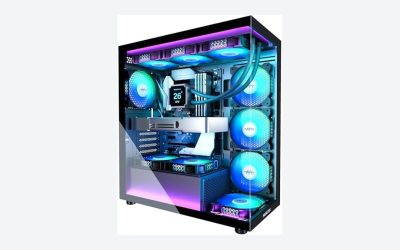
This is the only listing here pairing a mainstream Ryzen desktop processor with a current-generation discrete graphics card, per the title: a Ryzen 7 5700X, a GeForce RTX 5060, 32GB of DDR4, a 1TB M.2 NVMe SSD, ARGB fans and WiFi plus Bluetooth. It is also the listing that most deserves a careful read, because the title never names the power supply, motherboard, case or operating system. Those parts decide how long the machine lasts and whether you can upgrade it. If you play story-heavy games, our guides on a custom gaming PC build for Baldur’s Gate 3 show which components matter for that kind of title.
- Pros: a discrete current-generation GPU named in the title; 32GB of RAM and a 1TB NVMe SSD already installed
- Pros: a socketed desktop processor platform that is normally upgradeable, though you should confirm the board
- Cons: the brand is unfamiliar, and the title leaves out the power supply, motherboard and Windows licence
- Cons: DDR4 memory means an older platform, so check what the listing says about upgrade paths
Who it’s for: buyers who want a ready-made tower for current games and are willing to confirm the support terms first. Who should skip it: anyone who needs a named power supply or a recognised warranty network before spending this much.
2. GMKtec M6 Ultra Gaming Mini PC – Ryzen 7640HS
The M6 Ultra is a small box built for dense desks. The title lists a Ryzen 7640HS (it omits the model tier, so check the listing for the full name), 32GB of DDR5, a 1TB SSD, dual 2.5GbE network ports, triple 4K display support, WiFi 6, USB4, Bluetooth 5.2, DisplayPort and HDMI 2.0. The word “Gaming” is the seller’s, and the title does not name a discrete graphics card, so confirm which graphics the machine uses before expecting tower-class results.
- Pros: DDR5 memory and a large 32GB / 1TB configuration out of the box
- Pros: USB4, two network ports and triple-display support suit multi-screen workflows
- Cons: no discrete graphics card is named, so gaming claims need checking
- Cons: compact chassis, so future upgrades are likely narrower than in a tower
Who it’s for: people who want a small, quiet-looking desktop with several monitors and fast networking. Who should skip it: buyers planning to install a full-size graphics card later.
3. STGAubron Gaming PC – Core i7 and RX 580 8G
The title packs in a lot: Core i7 “up to 3.9GHz”, an RX 580 with 8GB of video memory, 16GB RAM, a 1TB SSD, a tower case with ARGB fans, WiFi 6, Bluetooth 5.0, 4K HDMI and Windows 11 Home. Two things need checking. First, “Core i7” with a ceiling clock speed is not a specific model, so the processor generation is unknown, and that affects both speed and long-term Windows support. Second, the RX 580 is an older graphics card class, so expect it to suit esports titles and older games better than the newest releases at high settings.
- Pros: a dedicated GPU, 16GB RAM and a 1TB SSD in a tower that ships with Windows 11 Home
- Cons: the exact Core i7 model and generation are not stated
- Cons: an older GPU class will struggle with demanding current games
Who it’s for: casual gamers and students who want one machine for light games, streaming and schoolwork. Who should skip it: anyone chasing high frame rates in newer releases, or who needs the processor generation stated before buying.
4. Dell OptiPlex 7050 SFF – renewed, i7-7700, 32GB
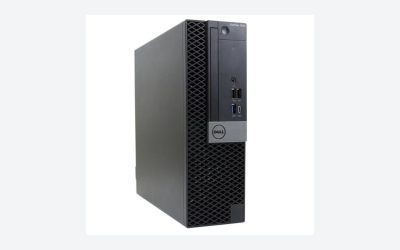
This is a renewed small-form-factor Dell business desktop. The title lists an Intel i7-7700 (four cores, 3.60GHz), 32GB DDR4, a 1TB SSD, WiFi, Bluetooth, HDMI, dual-monitor support (spelled “Duel” in the listing, a typo worth noting) and Windows 11 Pro in “Excellent Condition (Renewed)”. A third-party refurbisher, not Dell, graded and sold the unit, so coverage depends on the renewed-program terms shown on the listing. The i7-7700 belongs to Intel’s 7th-generation Core family, which Microsoft’s published Windows 11 CPU list generally excludes, so ask the seller how Windows 11 is licensed and how future feature updates are expected to work. It shares its processor with listing 5 below, with more memory and storage here.
- Pros: a lot of memory and SSD space for a low-priced office machine
- Pros: compact case that fits on a small desk and supports two monitors per the title
- Cons: older processor generation, with a possible Windows 11 update question
- Cons: renewed unit; condition and warranty depend on the refurbisher
Who it’s for: budget buyers who value RAM and storage for office multitasking. Who should skip it: anyone who needs current-generation CPU support, gaming graphics or a manufacturer warranty.
5. Dell OptiPlex 5050 SFF – renewed, i7-7700, 16GB
The 5050 listing is a near-duplicate of the 7050 in everything except memory and storage: a quad-core i7-7700 at 3.6GHz, 16GB DDR4, a 512GB NVMe SSD and Windows 11 Pro, sold as a renewed small-form-factor business desktop. Treat the two Dell i7-7700 listings as variants of the same basic platform rather than as two different machines. Sixteen gigabytes is plenty for browsing, video calls and office documents. If you do not keep dozens of tabs and big files open, the 5050 is the more proportionate choice than the 7050. The same renewed-unit and Windows 11 cautions apply.
- Pros: adequate memory and a fast NVMe SSD for everyday work
- Pros: small-form-factor case saves desk space
- Cons: same older CPU generation and renewed-unit caveats as the 7050
- Cons: no discrete GPU and no listed monitor output beyond the standard ports, so check the page
Who it’s for: a home or school computer that mostly runs a browser and office apps. Who should skip it: gamers, video editors and anyone who wants the newest platform.
6. KAMRUI AK1PLUS Mini PC – Celeron N5095
A low-power mini PC: Intel Celeron N5095 (up to 2.9GHz), 16GB RAM, a 256GB SSD, dual 4K display output, 2.5-inch SSD expansion, WiFi, Bluetooth and Ethernet, positioned for business and home office. The title’s mention of 2.5-inch expansion is useful, since it tells you extra storage is a supported upgrade. The Celeron class is built for efficiency, so think of this as a machine for web apps, email, spreadsheets, video playback and a second desk, not for games or heavy editing. The title does not state the operating system, so confirm whether Windows or Linux is installed and whether a licence is included. Also check how the 16GB is arranged and whether it can be upgraded, since mini PCs vary.
- Pros: small, low-power form factor with 16GB of RAM and a spare 2.5-inch expansion option per the title
- Pros: dual 4K output suits a two-screen office desk
- Cons: entry-level Celeron processor limits multitasking and creative work
- Cons: the title does not name the operating system
Who it’s for: a spare desktop for light office tasks, a kiosk, or a living-room browsing box. Who should skip it: students running design tools, or anyone planning to game.
7. Dell OptiPlex 3040 SFF – renewed, Core i3-6100
The least capable listing here by its title: a renewed small-form-factor Dell with a Core i3-6100 at 3.7GHz, 8GB RAM, a 256GB solid state drive, HDMI, an RJ45 network port and Windows 11 Pro 64-bit. It is an entry-level office machine for web pages, email and documents. The Core i3-6100 is a 6th-generation part, and Microsoft’s published Windows 11 CPU list generally starts later, so this listing carries the clearest compatibility question in the group. A shipped Windows 11 Pro does not guarantee smooth updates in the future. With 8GB of RAM you will also feel pressure if you keep many browser tabs open, though a RAM upgrade may be possible on a machine like this; check the listing and the manufacturer documentation.
- Pros: the lowest-cost route to a working Windows desktop in this group
- Pros: small footprint with HDMI and a wired network port
- Cons: the oldest processor generation here, with the clearest Windows 11 update question
- Cons: 8GB of RAM and 256GB of storage leave little headroom
Who it’s for: a basic machine for a kid’s homework desk, a point-of-sale back office, or a backup computer. Who should skip it: anyone who wants to keep it for years, run modern apps or play games.
How we picked these
We started from the listings on this page and grouped them by what the product actually is: renewed office desktop, assembled gaming tower or mini PC. Each entry is described using only what the title states about the processor, graphics, memory, storage, ports and operating system. Where a title is vague, we say so and point you to the listing instead of filling in details from memory. We flagged renewed units, unfamiliar brands, typos in the title and mixed or ambiguous specs, because those are the places buyers most often get surprised. Nobody on the team used or measured these units. Our basis is published specifications, manufacturer documentation and buyer reviews, and that is also why we avoid performance numbers.
What to look for in a desktop PC
Choose the shape before the specs
Desktop PCs come in three practical shapes. A full-size tower has room for a graphics card, extra drives and a bigger power supply. A small-form-factor business desktop, like the three Dell listings, is a shallow box that trades expansion for desk space. A mini PC is the smallest and usually the quietest, with the fewest upgrade options. Pick the shape according to whether you will want to upgrade later; a tower with an empty slot or two will outlast a sealed mini PC. Think about noise and heat as well: small cases pack hot parts closer together, and a business desktop in a tidy office behaves differently from a gaming tower under a desk. Finally, look at the power supply. Towers draw more power under load, and a vague “power supply” on the listing is a reason to ask which one it is.
CPU class and core count
Four cores handle office work, video calls and general browsing. Six to eight cores add headroom for streaming while gaming, photo batches and light video editing. A processor labelled only “Core i7” with a ceiling speed, as in the STGAubron title, does not tell you the generation, and generation matters more than the i3, i5 or i7 badge. When a title omits it, ask the seller or find the exact model on the listing. Core count is only half the story, since clock speed, cache and generation all shift real-world speed. A newer four-core chip can beat an older six-core one in everyday tasks, so compare generations before you compare counts. For a desktop you will keep several years, favour the newest generation your budget allows.
RAM, storage and what can be upgraded
Sixteen gigabytes is the practical floor for a machine you want to keep. Thirty-two gigabytes is for heavy multitasking or creative work. Look at storage type as well as size: an NVMe SSD is faster than a SATA SSD, and either beats a hard drive for boot and load times. Also check whether memory is soldered, how many slots exist and how many drive bays are free.
Graphics: integrated or discrete
Integrated graphics are fine for office work, video playback and several monitors. A discrete graphics card is what lets a machine run games at decent settings or accelerate rendering. Of the seven listings, only the two gaming towers name a discrete GPU in the title. A mini PC sold as a “gaming” machine without a named card deserves a closer look. Video memory matters less than the card itself: eight gigabytes on an older card does not make it a current one.
Windows 11, renewed units and warranty
Microsoft’s published Windows 11 requirements include a compatible processor, 4GB of RAM, 64GB of storage, UEFI with Secure Boot and TPM 2.0. A renewed machine with older processors can ship with Windows 11 yet still sit outside the officially supported list. For renewed units, read who graded the machine, the return window and the warranty length. For unfamiliar brands, confirm who provides support.
A quick spec-by-workload guide
| If you mostly… | Aim for at least | Fits among these listings |
|---|---|---|
| Browse, email, write documents | 4 cores, 8-16GB RAM, SSD | Dell 3040, Dell 5050, KAMRUI |
| Run many apps and tabs at once | 16-32GB RAM, SSD of 512GB or more | Dell 7050, GMKtec, YAWYORE |
| Use several monitors | Enough video outputs, plus a cable plan | GMKtec, KAMRUI, Dell 7050 |
| Play esports and older games | Discrete GPU, 16GB RAM | STGAubron |
| Play recent games, stream or create | Current discrete GPU, 6+ cores, 16-32GB RAM | YAWYORE |
A five-minute listing audit
Before buying any desktop, scroll the page for these items: the exact processor name, the power supply wattage and maker (for towers), the number of free memory slots and drive bays, which operating system is actually installed, the video outputs, the warranty length and who honours it, and the return window. If three or more are missing, ask the seller or choose another listing.
Mistakes buyers make
Buying on the RAM figure alone. Thirty-two gigabytes on an older processor will still feel slow for some tasks, because the CPU and storage set the pace.
Treating “Windows 11 included” as long-term support. On older processors, the preinstalled operating system and the supported-hardware list can be two different questions.
Believing “gaming” on a title. The word is a label, not a specification. Look for a named graphics card, a named power supply and enough cooling.
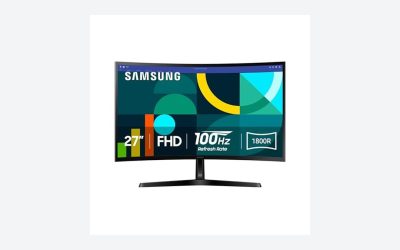
Forgetting the peripherals. None of the titles here mention a monitor, keyboard or mouse. Budget for them separately unless the listing says otherwise.
Ignoring the seller. Renewed and assembled systems depend on the seller or refurbisher for support, so read the terms before you read the specs.
Overbuying the tower and underbuying the monitor. A good display, cables that match the ports and a surge protector make the machine more pleasant day to day than a marginal CPU upgrade.
Verdict
For one machine that handles current games and creative work, the YAWYORE tower is the strongest configuration on paper, provided the seller confirms the power supply, motherboard and warranty. For a compact desk with several screens, the GMKtec M6 Ultra is the better fit. For low-cost office work, the Dell 5050 is the proportionate renewed choice and the 7050 adds memory and storage for heavier multitasking. Treat the Dell 3040 and the Celeron mini PC as basic, short-horizon machines. If you plan to build around a specific game, our custom gaming PC build for No Man’s Sky and Dragon’s Dogma 2 build pages show what to prioritise.
Related guides
- How To Check Gpu Compatibility With Your Motherboard And Cpu
- High-Performance Gaming Desktop Specifications
- Desktop Computer For Working From Home
Frequently asked questions
Is a renewed Dell OptiPlex a good desktop PC for everyday use?
For browsing, email, documents and video calls, a renewed small-form-factor Dell with an SSD can be a sensible low-cost machine. The trade-offs are older processor generations, a refurbisher rather than Dell standing behind it, and uncertain Windows 11 update eligibility. Read the renewed-program terms on the listing, confirm the return window, and check how many months of coverage you get before treating it as a long-term computer.
Can a mini PC replace a full-size desktop tower?
For office work, streaming, light photo editing and multi-monitor desks, a modern mini PC often can, and it takes a fraction of the desk space. What you give up is upgrade room: many mini PCs have soldered or limited memory slots, one or two drive bays and no space for a full-size graphics card. If you plan to add a discrete GPU later, a tower is the safer shape.
How much RAM does a desktop PC need?
Sixteen gigabytes covers most office, school and casual gaming use today. Thirty-two gigabytes makes sense for heavy multitasking, many browser tabs plus creative software, or keeping a machine for several years. Eight gigabytes still runs Windows 11, but it leaves little headroom once a browser and a few apps are open. Also check whether the slots are free, since extra RAM later is cheaper than overpaying now.
Do these desktops come with a monitor, keyboard and mouse?
The listing titles here describe the computer itself and do not mention a monitor, keyboard or mouse, so assume none are included unless the listing explicitly says so. Several titles mention HDMI or multiple-display support, which tells you the outputs exist, not that a screen ships in the box. Budget for peripherals separately if your desk is empty, and look for any listed accessories before ordering.
Is it safe to buy a gaming PC from a brand with no track record?
It is not automatically unsafe, but the risk is higher because support, warranty handling and part quality are harder to judge. Check who sells and ships the unit, how long the warranty runs and who honours it, what power supply and motherboard are inside, and what the return window is. If the listing never names the power supply or motherboard, treat that gap as a reason to ask before buying.
Related guides
- How to Choose the Best Laptops for Solidworks (October 2026)
- Google AI Pro vs ChatGPT Plus: Which AI Subscription Fits a PC Builder or Gamer?
- Best Mini PCs for Gaming: Eleven Compact Desktops Sorted by Graphics Class: 10 Compared (2026)
- Best Budget Gaming PCs: Six Entry-Level Prebuilts Compared: 6 Compared (2026)