Our Top Picks
Pros & cons
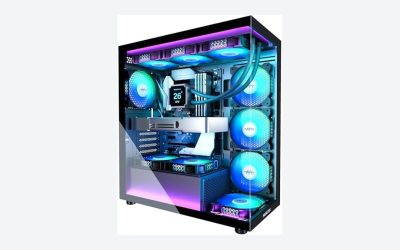
- Built-in 11.3 inch smart display shows live temps and usage
- 850W 80+ Gold PSU leaves headroom for upgrades
- Arrives fully assembled with Windows 11 Home installed
- Monitor must connect to the graphics card, not motherboard ports
- 360mm liquid cooler takes up significant case space
 iBUYPOWER Element Gaming PC Desktop Computer AMD Ryzen20 x 9.1 x 17.4 inches36 poundsCheck on Amazon


Top 3 picks at a glance
Currency Check
As of October 2026, the PC parts market is unusually unstable. Vendor and press coverage, including MSI’s own blog, describes a memory supply squeeze tied to AI data-center demand, and trade analysts cited in the press report that DRAM and NAND contract prices were still rising in the third quarter, though more slowly than the quarter before. The same coverage reports higher street prices for many graphics cards. Specific numbers differ between outlets and change weekly, so this guide gives no figures. Reports of future GPU refreshes and release timing are rumor; nothing here assumes an unreleased product.
For most buyers who want a working RTX 5070-class gaming PC now and do not plan major upgrades, a well-specified prebuilt is a reasonable choice in 2026, mainly because memory and storage are the parts whose retail cost has moved the most and system builders buy them in bulk. A custom build still wins on part quality, upgrade freedom and transparency. This guide compares both routes on cost, quality and upgrade path, shows what to verify on any prebuilt listing, and matches three RTX 5070 systems to the situations where each makes sense.
As an Amazon Associate we earn from qualifying purchases at no extra cost to you.
Quick Verdict
| Your situation | Our verdict |
|---|---|
| First gaming PC, no wish to troubleshoot or assemble | Prebuilt, provided the listing names the power supply, motherboard chipset and memory configuration. |
| You already own a case, power supply, storage or memory | Custom build; reusing parts removes the price pressure from the most affected components. |
| You plan to swap in a bigger GPU within two or three years | Custom, or a prebuilt with a standard ATX board and a power supply with real headroom. |
| You want one warranty contact and a ready-to-play machine | Prebuilt; check the labor and parts coverage terms on the seller’s page. |
| You want to choose every part (case airflow, quiet fans, specific board) | Custom build. |
What Changes in 2026
Memory and storage dominate the price gap
In previous years the argument was simple: building yourself saved money because you avoided the assembly margin. Press and retailer editorial coverage in 2026 describes the opposite pattern at lower and middle budgets, because system builders contract for memory and SSDs in volume while individual buyers pay current retail. Some outlets also report that certain builders now sell systems without RAM, or let customers supply their own. The gap narrows again at higher budgets, where the premium for assembly is a smaller share of the total, and wherever a DIY builder can reuse existing parts. Check the current price of the exact parts, not a year-old rule of thumb.
Part quality: where prebuilts differ most
Two prebuilts with the same CPU and GPU can differ in the parts nobody advertises. The items that vary most are the power supply (wattage, efficiency tier and brand), the motherboard (full-size ATX or a smaller board with fewer slots and ports), the memory (two matched modules or one, and speed), the SSD (DRAM cache or not, PCIe generation) and the CPU cooler. Press coverage notes that some brands have held prices by downgrading these parts. The practical approach is to treat the listing as incomplete until it names each of them, and to avoid listings that only name the CPU and GPU.
Proprietary parts and upgrade paths
Large OEM brands sometimes use non-standard motherboards, power supply shapes or case layouts that limit later swaps. Many smaller system builders use standard ATX parts. If you expect to change the GPU or add storage, ask whether the power supply connector, the motherboard and the case fan layout are standard. A 12 GB RTX 5070 is specified by NVIDIA at 250 W total graphics power with a 650 W minimum system power supply recommendation, so a prebuilt with a smaller power supply will limit a later GPU upgrade even if it runs the 5070 itself.
Warranty and support
A prebuilt usually has one warranty for the whole machine, which makes support simpler. The terms vary: some builders publish multi-year labor coverage, while others offer a shorter standard period. Individual parts bought for a custom build often carry long warranties, such as multi-year GPU coverage or a decade on some power supplies, but you handle claims with each maker separately. Read the seller’s warranty page for how labor, shipping and parts are handled.
Specification comparison: the CPUs in the three example systems
| CPU | Cores / threads | Socket and generation | Power rating |
|---|---|---|---|
| Ryzen 7 8700F | 8 / 16 | AM5, Zen 4 (Phoenix-based, no integrated graphics) | 65 W TDP |
| Ryzen 7 9700X | 8 / 16 | AM5, Zen 5 | 65 W TDP default, optional 105 W mode |
| Ryzen 9 7900X | 12 / 24 | AM5, Zen 4 | 170 W TDP |
These are manufacturer-style specification figures. Press sources disagree on the PCIe generation of the 8700F; it is based on the Phoenix design and is most likely PCIe 4.0, so confirm on the listing if PCIe 5.0 storage or graphics matters to you. All three pair with the same RTX 5070, so the CPU choice mostly shapes multitasking, streaming and upgrade headroom rather than a 1080p or 1440p gaming ceiling.
Software, drivers and setup time
A prebuilt usually arrives with the operating system installed and the drivers in place, although it is still worth running Windows Update and downloading the latest graphics driver from the GPU maker on day one. Some builders add trial software or custom control panels; most can be removed. A custom build means you install the operating system and every driver yourself and update the motherboard firmware if a new processor needs it. None of this is difficult, but it adds hours that a prebuilt skips, and it is the part first-time builders most often underestimate.
How to Decide
- Set a total budget and a target resolution. An RTX 5070-class system fits 1440p gaming comfortably as a general rule; it is a mid-high tier card, not a 4K-at-maximum-settings part.
- List what you can reuse. A case, power supply, SSD or memory kit that you already own changes the custom-build math sharply, since those parts account for much of the recent price movement.
- Demand a full parts list. On a prebuilt, look for the power supply wattage and certification, motherboard model or chipset, memory capacity and configuration (for example, 2 x 16 GB), SSD size and type, and cooler type.
- Check power headroom. A rule of thumb is a power supply that is at least 100-150 W above the CPU plus GPU power at load. For an RTX 5070 (250 W graphics power) with a 65 W CPU that supports NVIDIA’s 650 W minimum; a 170 W CPU like the 7900X justifies more headroom.
- Check the upgrade path. Look for open M.2 slots, extra memory slots, a standard ATX power supply and a case that fits a larger GPU.
- Price the time. A first custom build can take an afternoon plus troubleshooting; a prebuilt should be ready to boot once you update Windows and drivers.
- Read the warranty. Confirm who handles parts, labor and shipping, and for how long.
Worked example: you want a 1440p system and own nothing to reuse. Compare the prebuilt’s listed CPU, GPU, 32 GB of memory and 1 TB of storage against the current retail cost of equivalent parts, adding a case, power supply, board and cooler. If the prebuilt is close to or below the parts total, it wins on cost and warranty simplicity. If you already own a case and power supply, the answer can flip.
Products That Fit
The systems below are examples that fit the situations above, not a ranking. All three list an RTX 5070 and 32 GB of DDR5; the differences are in the CPU, storage and what the listing tells you.
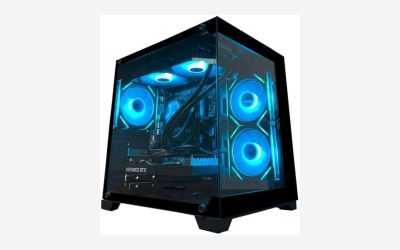
KOTIN Prebuilt Gaming PC – for buyers who want a Zen 5 CPU in a ready-made 1440p system
As an Amazon Associate we earn from qualifying purchases at no extra cost to you.

This listing pairs a Ryzen 7 9700X with an RTX 5070, 32 GB of DDR5 and a 1 TB SSD, which makes it a fit for 1440p gaming where the newest AM5 generation matters to you. The 9700X’s default 65 W rating keeps cooling and power demands modest, and the AM5 socket leaves a path to later CPU upgrades. It is also the listing where the parts-list check matters most, since the title does not name the power supply, motherboard or cooler.
- CPU: Ryzen 7 9700X, 8 cores and 16 threads.
- GPU: RTX 5070 with 12 GB of GDDR7.
- Memory and storage: 32 GB DDR5 and 1 TB SSD, per the listing name.
- Power supply, motherboard, cooler and case: confirm on listing.
Caveat: the title lists only the CPU, GPU, memory and SSD, so read the seller’s warranty terms and confirm that the listing shows a named power supply before treating it as equal to a machine with a full parts list.
msi Codex Z2 Gaming Desktop – for a compact, branded machine with more storage

This system pairs a Ryzen 7 8700F with an RTX 5070 and the largest storage of the three, 2 TB. It suits a buyer who values a recognized motherboard-and-GPU brand and a single support channel, and who mostly plays games at 1440p. The 8700F is an AM5 chip with 8 cores and no integrated graphics, which is fine with the included discrete GPU.
- CPU: Ryzen 7 8700F, 8 cores and 16 threads, boost up to 5.0 GHz per the listing.
- GPU: RTX 5070 (Blackwell architecture); 32 GB DDR5 and 2 TB SSD.
- Cooling: ARGB air cooler plus four case fans, three front and one rear, per the listing.
- Dimensions and weight: 16 x 8.38 x 19 inches, 21.3 pounds, per the listing.
Caveat: the listing text refers to a “Codex R2” in one bullet and to “Codex Z2” in the title, so confirm the exact model and power supply wattage before you buy.
iBUYPOWER Element Gaming PC – for streaming or multitasking on a stronger CPU

This system uses a 12-core Ryzen 9 7900X with the same RTX 5070, so it suits a buyer who streams, records or runs heavy background tasks alongside games. It also ships with a keyboard and mouse, which matters if you are starting from nothing. The extra cores raise the power and cooling requirements, so the power supply and cooler are the first things to confirm.
- CPU: Ryzen 9 7900X, 12 cores and 24 threads, with a 170 W TDP.
- GPU and memory: RTX 5070 12 GB, 32 GB DDR5 listed at 4800 MHz in a 16 GB x 2 layout.
- Storage and connectivity: 1 TB NVMe SSD, Wi-Fi, six USB ports and gigabit Ethernet, per the listing.
- Case: tempered glass, white, RGB lighting; 36 pounds.
Caveat: the listed memory speed is modest for this platform and the power supply and cooler are not named in the title, so verify both on the listing before comparing it with the other two systems.
Common Mistakes
- Comparing prebuilts by CPU and GPU alone and ignoring the power supply, memory layout and SSD.
- Assuming a custom build is always cheaper without pricing memory and storage today.
- Buying a prebuilt with single-channel memory without checking the module layout.
- Forgetting that a small power supply limits future GPU upgrades.
- Ignoring the case: airflow, GPU length and fan placement matter as much as the parts inside.
- Counting a free keyboard and mouse as a deciding factor over core parts.
Buy Now or Wait?
- Buy now if your current PC no longer meets your needs and a prebuilt with a fully named parts list fits your budget; price pressure on memory has been reported to persist.
- Wait if you can reuse memory, storage and a case, since a staged build lets you buy the missing parts as prices move.
- Do not wait for rumored GPU refreshes unless you are comfortable with an uncertain date; reports of timing are unconfirmed.
- If you are unsure, pick the option with the stronger return policy and warranty.
Questions
Is a prebuilt gaming PC cheaper than building one in 2026?
At lower and middle budgets, many 2026 press and retailer comparisons say yes, because builders buy memory and storage in bulk. The gap shrinks at higher budgets and when you can reuse parts, so price the exact parts on the day you buy.
Are prebuilt PCs lower quality?
Quality varies by builder and by model. The parts most likely to be cut are the power supply, memory configuration and SSD, so a listing that names each of them is a good sign.
Can I upgrade a prebuilt later?
Often, yes, if it uses a standard ATX board, a standard power supply and a case with room for a larger GPU. Some large OEM systems use proprietary parts that limit upgrades, so ask before you buy.
How much power supply do I need for an RTX 5070?
NVIDIA lists 250 W total graphics power and a 650 W minimum system power supply. Use more headroom for a high-power CPU like the 7900X or for future upgrades.
Does building my own void any warranty?
No. Each part carries its own warranty, but you manage claims with each maker. The system as a whole has no single warranty provider.
Which is better for a first-time PC gamer?
A prebuilt with a named parts list and clear warranty terms is the lower-risk path. A custom build is a good project if you want to learn, but expect time spent on assembly and updates.
Update History
- October 14, 2026 – Initial publication.
- Check the product page for current specifications and availability before buying.
Sources and Methodology
Platform and component facts came from manufacturer specification pages and retailer listing fields. Market context was gathered from vendor blogs and press coverage in 2026, and where outlets disagreed or numbers moved quickly, the article describes the direction without quoting figures. Rumored product timing is labeled as rumor.
- NVIDIA GeForce RTX 5070 specifications and quick start guide (power figures, outputs)
- AMD product pages and press specification summaries for Ryzen 7 8700F, Ryzen 7 9700X and Ryzen 9 7900X
- MSI blog on the 2025-2026 memory shortage
- Press and retailer editorial comparisons of prebuilt and DIY gaming PCs in 2026, including coverage that cites TrendForce memory pricing
- Retailer listing fields for the three prebuilt systems
Related guides
- How to Choose the Best Laptops for Solidworks (October 2026)
- Google AI Pro vs ChatGPT Plus: Which AI Subscription Fits a PC Builder or Gamer?
- Best Mini PCs for Gaming: Eleven Compact Desktops Sorted by Graphics Class: 10 Compared (2026)
- Best Budget Gaming PCs: Six Entry-Level Prebuilts Compared: 6 Compared (2026)