For gaming, the MINISFORUM G1 Pro is the only mini PC in this group with a dedicated RTX 5060, while the Ryzen 7 8745HS and 7735HS machines with Radeon 780M or 680M graphics are the sensible picks for 1080p esports and older titles. The rest are office-leaning boxes that happen to mention light gaming. We sorted eleven listings by graphics class, then by memory and storage, and we call out the weaker ones plainly so that nobody pays for a ‘gaming’ label that the chip does not back up. All specs come from listing titles, so they are seller claims to confirm before you order.
Our Top Picks
Top 3 picks at a glance
Compact desktops compared in one table
As an Amazon Associate we earn from qualifying purchases at no extra cost to you.

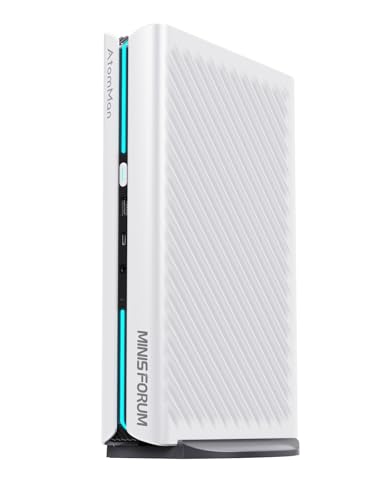


| Model | Key point from title | Price tier | Best for |
|---|---|---|---|
| Glorlin Ryzen 7 8745HS | Radeon 780M, 16GB DDR5, 1TB, USB4, dual 2.5G LAN | Mid-range | Balanced 1080p play |
| MINISFORUM G1 Pro | Ryzen 9 8945HX, RTX 5060, 32GB DDR5, 1TB PCIe 4.0 | Premium | Dedicated-GPU gaming |
| Beelink SER5 MAX (24GB) | Ryzen 7 7735U, 24GB LPDDR5, 500GB SSD | Mid-range | Quiet everyday PC |
| ACEMAGICIAN K1 (7730U) | Ryzen 7 7730U, 16GB, 512GB, 1G LAN | Budget | Light gaming only |
| GMKtec M5 Ultra | Ryzen 7 7730U, 15W TDP claim, 16GB DDR4, upgradeable RAM | Budget | Upgrade-friendly office use |
| Glorlin Ryzen 7 6800H (512GB) | 6800H, 16GB LPDDR5 6400MHz, 512GB, dual 1G LAN | Budget | Entry gaming, no GPU named |
| Glorlin Ryzen 7 6800H (680M) | 6800H, Radeon 680M, 16GB LPDDR5, 512GB NVMe | Budget | Entry gaming |
| Beelink SER5 MAX (16GB) | Ryzen 7 7735U, 16GB LPDDR5, 500GB M.2, 2.5G LAN | Budget | Lower-cost twin |
| ACEMAGIC K1 Gaming | Ryzen 7 7735HS, 24GB, 512GB, 6 USB ports | Mid-range | Memory headroom |
| ACEMAGIC M1 | Ryzen 7 7735HS, 24GB LPDDR5, 1TB NVMe | Mid-range | Storage and memory |
| ACEMAGIC 7735HS (Radeon 680M) | 7735HS, 24GB, 512GB, Radeon 680M, 2.5G LAN | Mid-range | Wired network users |
Price tiers are relative within this set; no prices are quoted because they move often.
Every mini PC explained
Glorlin Ryzen 7 8745HS Mini PC
The title lists a Ryzen 7 8745HS with Radeon 780M graphics, 16GB of DDR5, a 1TB SSD, USB4, dual 2.5G LAN and Wi-Fi 6. The 780M is among the stronger integrated GPUs here, and the 1TB drive gives room for a few games. ‘Home Server’ appears in the title, so it is a general-purpose box rather than a gaming-first design. Check the listing for a second M.2 slot.
Pros
- 780M graphics and USB4
- 1TB SSD and dual 2.5G LAN
Cons
- 16GB is shared with the GPU
- Gaming is not its main design goal
Who it’s for: Players who want a compact 1080p machine with fast ports and storage.
MINISFORUM G1 Pro
This is the standout. The title lists a Ryzen 9 8945HX, 32GB of DDR5, a 1TB PCIe 4.0 SSD and an RTX 5060 graphics chip, with two HDMI, two DisplayPort 2.1 outputs and Wi-Fi 7. ‘5G LAN’ is ambiguous, so confirm the Ethernet speed. A dedicated GPU in a small case means heat and fan noise, so read buyer feedback about thermals.
Pros
- Dedicated RTX 5060 graphics
- 32GB DDR5 and Wi-Fi 7
Cons
- Premium price tier
- Noise and heat in a compact case
Who it’s for: Gamers who want 1080p or 1440p performance in the smallest box possible.
Beelink SER5 MAX Mini PC (24GB)
The listing names a Ryzen 7 7735U with 24GB of LPDDR5, a 500GB SSD and triple-display 4K support, running Windows 11 Pro. LPDDR5 is usually soldered, so the extra memory is a fixed purchase and not an upgrade path. Graphics are integrated and the title mentions HTPC use, so treat it as a quiet everyday PC with modest gaming ability. The title lists Wi-Fi 6 and Bluetooth 5.2.
Pros
- 24GB of memory
- Quiet-computing and HTPC focus
Cons
- Soldered memory likely cannot be upgraded
- 500GB fills quickly
Who it’s for: Casual players who also want a living-room or desk PC.
ACEMAGICIAN K1 (Ryzen 7 7730U)
This model pairs a Ryzen 7 7730U with 16GB of RAM and a 512GB SSD, and the title describes it as for ‘light gaming’. It lists triple 4K display support, 1.0G LAN and Wi-Fi 6. The 7730U is a power-efficient office chip, so expect emulators, indie and esports games rather than recent AAA titles. Frame rates will depend on settings and game.
Pros
- Low price tier
- Compact and portable
Cons
- Office-class chip for gaming
- Only 1G Ethernet
Who it’s for: Budget buyers who want a small desktop that can handle lighter games.
GMKtec M5 Ultra
The title stresses ‘Business Efficiency (15W TDP)’, which signals a low-power chip tuned for office work, even with a Ryzen 7 7730U. It lists 16GB of DDR4, a 512GB SSD, dual 2.5G LAN and Wi-Fi 6E. The upgradeable-RAM claim is useful, since DDR4 sticks can be swapped, but it is the weakest gaming fit here. The triple 8K display claim in the title suits office work more than games.
Pros
- Upgradeable RAM claimed
- Dual 2.5G LAN
Cons
- Business-oriented 15W design
- DDR4 and 16GB hold back gaming
Who it’s for: Buyers who care more about upgrades and networking than frame rate.
Glorlin Ryzen 7 6800H Mini PC (512GB)
This listing names a Ryzen 7 6800H with 16GB of LPDDR5 at 6400MHz and a 512GB SSD, plus 4K HDMI and DisplayPort and dual 1000Mbps LAN. The title does not name the graphics, though the 6800H normally comes with Radeon 680M, so verify it. It targets gaming, office and home use, and its dual gigabit ports suit a router-and-switch setup.
Pros
- Fast LPDDR5 memory listed
- Dual gigabit LAN
Cons
- Graphics are not stated
- 512GB is modest
Who it’s for: Entry-level gaming on a tight budget.
Glorlin Ryzen 7 6800H Mini PC (Radeon 680M)
Almost the same machine as the previous one, but this title names Radeon 680M graphics, 16GB LPDDR5 and a 512GB NVMe SSD, with triple 4K output and dual LAN. It is a near-duplicate, so the decision comes down to which listing states the details you need. Ask the seller to confirm that both use the same board.
Pros
- 680M graphics named
- Triple 4K display outputs
Cons
- Near-duplicate of the other 6800H
- Shared 16GB memory
Who it’s for: Players who want a 680M machine at a low price tier.
Beelink SER5 MAX Mini PC (16GB)
The 16GB sibling of the 24GB listing, again built on a Ryzen 7 7735U with 500GB of M.2 storage and a 12-core 2200MHz graphics description. It lists Wi-Fi 6, Bluetooth 5.4, 2.5G LAN and triple-screen support. Because the chip is identical, the extra 8GB is the main reason to pick the other version. Either way, check storage expansion.
Pros
- Lower cost than the 24GB version
- 2.5G LAN
Cons
- Only 16GB, likely soldered
- 500GB storage
Who it’s for: Casual gamers who want the Beelink design for less.
ACEMAGIC K1 Gaming Mini PC (7735HS)
The ‘Gaming’ version moves up to a Ryzen 7 7735HS with 24GB of RAM and a 512GB SSD, with six USB ports and Windows 11 Pro. The claim that it ‘Beats 7730U’ is a seller statement, though the HS chip is designed for higher power. Quiet cooling is advertised, so check noise remarks from buyers. Windows 11 Pro is included per the title.
Pros
- 24GB RAM
- Six USB ports
Cons
- 512GB storage
- Performance claims are the seller’s
Who it’s for: Players who want more speed than a 7730U without moving to a dedicated GPU.
ACEMAGIC M1 Mini PC
This listing offers a Ryzen 7 7735HS with 24GB of LPDDR5 and a 1TB NVMe SSD, 4K triple display, Wi-Fi 6 and USB-C. As with other LPDDR5 designs, the memory is probably fixed. It is the most storage in the 7735HS group, which keeps game installs manageable. The title lists USB-C, so confirm whether it supports video output or charging.
Pros
- 1TB NVMe SSD
- 24GB LPDDR5
Cons
- Likely soldered memory
- Integrated graphics only
Who it’s for: Buyers who want the most storage among the 7735HS machines.
ACEMAGIC Mini PC (7735HS, Radeon 680M)
The title names a Ryzen 7 7735HS with Radeon 680M graphics, 24GB of RAM, a 512GB SSD, 2.5Gbps LAN and triple 4K display support. It is a close match to the K1 Gaming but explicitly lists 2.5G wired networking, which suits online play. It describes itself as office and light gaming, so keep expectations modest and settings low.
Pros
- 2.5Gbps LAN
- Radeon 680M named
Cons
- 512GB storage
- Described as light gaming
Who it’s for: Players who want wired low-latency networking and 24GB.
How we picked these
We compared the eleven listings using published specifications, manufacturer documentation and buyer reviews, ranking by graphics class, memory and storage as written in each title. Nobody on the team used or measured these units. Where a title is vague, such as the unnamed graphics on one Glorlin or the ‘5G LAN’ on the MINISFORUM, we say so. Several listings are close siblings, so we note what actually changes between them, such as RAM, storage or the graphics named in the title. Confirm everything on the listing before you buy.
What to look for in a gaming mini PC
Graphics: integrated or discrete
Most picks rely on Radeon 780M or 680M integrated graphics. As a rough guide, these handle esports and older titles at 1080p with reduced settings, while recent AAA games need heavy compromises. Only the G1 Pro lists a dedicated RTX 5060, which is a different performance class, but it also adds heat and noise. A practical rule: if the games you play list a discrete graphics card in their minimum requirements, buy the dedicated-GPU model; if they are esports, strategy or older releases, integrated graphics are usually enough. Also remember that integrated GPUs depend on fast dual-channel memory, so check whether the listing says single or dual stick.
RAM type and a quick memory budget
LPDDR5 is generally soldered, DDR5 and DDR4 sticks can often be swapped. Integrated graphics take a slice of system memory. As an illustrative estimate, if 4GB is reserved for graphics, a 16GB machine leaves about 12GB for Windows and games, while a 24GB one leaves about 20GB. Verify BIOS allocation options on the listing. The assumption here is a 4GB reservation; many systems let you choose, and a smaller reservation leaves more memory for Windows but can reduce graphics performance.
SSD size and extra M.2 slots
A 500GB or 512GB drive is tight once a few large games are installed. Many mini PCs offer a spare M.2 slot, but the titles rarely say, so check the listing. Treat a single 500GB drive as roughly four to six large modern installs plus Windows, an estimate that depends on the games you play. If you plan to expand, our guide to 4TB NVMe SSDs covers high-capacity drives.
Ports and networking
USB4 and 2.5G LAN help with docks, fast external drives and online play. Multiple display outputs are great for desks, but check which ports are HDMI and DisplayPort. Wi-Fi 6E and Wi-Fi 7 are welcome, but wired networking still wins for latency. Count the ports you need for a keyboard, mouse, headset, controller and external drive, because small cases sometimes offer fewer USB ports than the photos suggest.
Cooling, noise and size
Compact cases limit cooling. Higher-power chips and a dedicated GPU will run louder under load, and thin cases can throttle if the vents are blocked. Leave several centimeters of clearance and keep the unit off carpet. If you are comparing sizes, our small form factor PC guide covers larger compact builds with more upgrade room.
Mistakes buyers make
- Assuming ‘gaming’ in a title means a gaming-class chip; several of these are office designs.
- Buying 16GB with integrated graphics, then discovering about a quarter is reserved for video.
- Ignoring storage; a 512GB drive fills quickly with modern games.
- Expecting RAM upgrades on LPDDR5 models; many cannot be changed.
- Trusting performance claims such as ‘Beats 7730U’ without checking the specifications.
- Forgetting the operating system and licence: several titles mention Windows 11 Pro, others do not, so confirm what is included.
- Overlooking cooling space: a mini PC placed in a closed cabinet can throttle and get louder, so give it airflow.
- Skipping a return-policy check, which matters if fan noise or heat turns out to bother you at a desk.
Which mini PC should you buy?
For real gaming, the MINISFORUM G1 Pro stands alone thanks to its dedicated RTX 5060, though it sits in the premium tier. If integrated graphics are enough, the Glorlin 8745HS with Radeon 780M, 1TB and USB4 is the most balanced pick, and the ACEMAGIC M1 offers 24GB and 1TB with a 7735HS. The ACEMAGICIAN K1 and GMKtec M5 Ultra are best treated as light-duty office PCs. Use the table to shortlist, then confirm specs, noise remarks and return policies on the listing before ordering.
Related guides
- How To Check Gpu Compatibility With Your Motherboard And Cpu
- High-Performance Gaming Desktop Specifications
- Desktop Computer For Working From Home
Frequently asked questions
Can a mini PC really play games?
Yes, within limits, and mostly for lighter games. Models with Radeon 780M or 680M graphics handle esports and older games at 1080p on lower settings. Only the MINISFORUM G1 Pro lists a dedicated RTX 5060 for heavier titles, which is why we class it separately. Check cooling and noise for any compact case, since small enclosures run louder when pushed.
Is 16GB enough for a gaming mini PC?
It works for light gaming such as esports titles, but integrated graphics reserve some of that memory for video. As an estimate, 4GB reserved leaves about 12GB for everything else. If you can choose, 24GB or 32GB gives more headroom for multitasking, streaming and modern games.
Can I upgrade RAM and storage?
It depends on the model and listing. LPDDR5 memory is usually soldered, while DDR4 or DDR5 sticks can often be swapped. Storage is usually a replaceable M.2 drive, and some units add a second slot. Titles rarely say, so check the listing or ask the seller before relying on an upgrade.
Is Ryzen 7 7735HS better than 7730U for gaming?
On paper, the HS chip is designed for higher power and typically performs better, while the U chip prioritizes efficiency. The seller’s ‘beats 7730U’ claim is unverified, so compare graphics, cooling and memory across listings instead of relying on one line of marketing copy, and expect only modest real-world differences between two chips of the same generation.
Do I need 2.5G LAN for gaming?
Not strictly. Game traffic uses little bandwidth, so gigabit is fine for nearly everyone. 2.5G helps with fast home networks, large downloads and network storage. For latency, a wired connection of any speed is better than Wi-Fi, so make sure your router or switch has a free port and a cable long enough to reach.