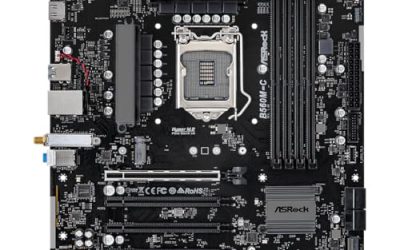
The MSI MAG B650 Tomahawk WiFi is the best B650 motherboard in this group for a budget gaming build that should last through several upgrades: it pairs a robust power design with three M.2 slots, Wi-Fi 6E and 2.5G Ethernet. Builders trying to spend as little as possible on the board can look at the MSI B650 Gaming Plus WiFi or the GIGABYTE B650 Gaming X AX instead. B650 is AMD’s mainstream chipset for the AM5 socket, which means DDR5 memory, PCIe 4.0 on the chipset side and support for Ryzen 7000, 8000 and 9000 processors.
Our Top Picks
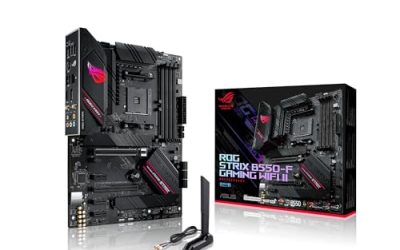
 ASUS ROG Strix B650-A Gaming WiFi AMD B650ATX 3x M.2 WiFi6E (Pack of 1)13.4 x 10.8 x 2.9 inches4.25 poundsCheck on Amazon


Top 3 picks at a glance
Quick List
- MSI B650 Gaming Plus WiFi – best for a simple, affordable-class AM5 starter build
- MSI MAG B650 Tomahawk WiFi – best all-round board with three M.2 slots and a strong power design
- ASUS ROG Strix B650-A Gaming WiFi – best for builders who want premium features and a PCIe 5.0 M.2 slot
- ASUS B650E MAX Gaming WiFi W – best for white-themed builds with a PCIe 5.0-ready graphics slot
- INLAND Ryzen 7 7700X with GIGABYTE B650 Gaming X AX V2 – best for buyers who want the processor and board together
- GIGABYTE B650 Gaming X AX – best for a plain, well-equipped board with three M.2 slots
Which One Is Right for You?
| If you… | Choose |
|---|---|
| want one bundle that covers CPU and board | INLAND Ryzen 7 7700X with GIGABYTE B650 Gaming X AX V2 |
| plan to run a high-end CPU and keep the board for years | MSI MAG B650 Tomahawk WiFi |
| want a fast PCIe 5.0 drive slot and a polished feature set | ASUS ROG Strix B650-A Gaming WiFi |
| are building a white or light-themed PC | ASUS B650E MAX Gaming WiFi W |
| need only two M.2 drives and want the simplest option | MSI B650 Gaming Plus WiFi |
| want three M.2 slots on a straightforward board | GIGABYTE B650 Gaming X AX |
For a true budget build, the practical dividing lines are the number of M.2 slots, how heavy a processor you intend to run, and whether you need a white color scheme. All six boards here include Wi-Fi, which saves buying an adapter later, and all use DDR5 only, so there is no mixing with older memory.
All 6 Picks in Detail
1. MSI B650 Gaming Plus WiFi – Best for a Simple AM5 Starter Build
As an Amazon Associate we earn from qualifying purchases at no extra cost to you.

The MSI B650 Gaming Plus WiFi is the entry point of this list. The listing describes an AM5 gaming motherboard with DDR5, PCIe 4.0, M.2, SATA 6Gb/s and USB 3.2 Gen 2×2, supporting Ryzen 9000, 8000 and 7000 processors. Retailer specifications describe two PCIe 4.0 x4 M.2 slots, four SATA ports, Wi-Fi 6E, Bluetooth 5.3, a 2.5G LAN controller, HDMI and DisplayPort outputs, and a 20Gbps USB-C port.
Sources disagree on the exact power-phase count, listing figures from 12+1+1 to 14+2, so treat the power design as a point to confirm. That uncertainty matters little with a mainstream six-core or eight-core processor, but it is a reason to prefer a better-cooled board if you plan to run a high-power chip. With only two M.2 slots, you would need SATA drives for extra storage.
- AM5 socket, ATX, DDR5
- Two PCIe 4.0 x4 M.2 slots per retailer specifications
- Wi-Fi 6E and 2.5G LAN
- USB 3.2 Gen 2×2 Type-C (20Gbps)
- Power-phase count: confirm on listing
Pros:
- Wi-Fi 6E and 2.5G LAN included
- Simple layout for a first AM5 build
Cons:
- Only two M.2 slots
- Power design is less certain than the Tomahawk’s
This board suits a first-time AM5 builder pairing a mainstream processor with a mid-range graphics card, where the priority is getting DDR5, Wi-Fi and fast storage working without extras. Its rear panel includes a 20Gbps USB-C port, which is a practical bonus for external SSDs. Compared with the MAG B650 Tomahawk WiFi, it gives up an M.2 slot and some power-delivery confidence to keep things simple.
2. MSI MAG B650 Tomahawk WiFi – Best All-Round B650 Board

The Tomahawk is the pick for buyers who want a B650 board that does not feel like a compromise. The listing describes an AM5 gaming motherboard with DDR5, PCIe 4.0, M.2, SATA 6Gb/s and USB 3.2 Gen 2×2 support for Ryzen 9000, 8000 and 7000 processors. Manufacturer data cited by retailers describes three PCIe 4.0 x4 M.2 slots, two of them with heatsinks, six SATA ports, Wi-Fi 6E, 2.5G LAN and an 80A rated power design with 14 Duet Rail phases.
The second graphics-length slot runs from the chipset at reduced bandwidth, and the third M.2 slot shares lanes with it, so using both at once drops each to a lower link width. For most gaming builds that is irrelevant, because the primary slot runs at full x16 from the processor. Memory capacity is listed at 128GB on most retailer pages, with some manufacturer data citing more with larger modules.
- Three M.2 slots, all PCIe 4.0 x4 per manufacturer data
- Six SATA ports, Wi-Fi 6E and 2.5G LAN
- USB 3.2 Gen 2×2 Type-C (20Gbps)
- Four DDR5 slots with AMD EXPO profiles
- Heatsinks on two M.2 slots
Pros:
- Strong power delivery for higher-end processors
- Three M.2 slots and six SATA ports for storage growth
Cons:
- Less budget-friendly than the starter boards
- One M.2 slot shares bandwidth with the second long slot
The Tomahawk’s rear I/O includes a 20Gbps USB-C port, and its larger VRM heatsinks help keep temperatures in check during long gaming sessions or video exports. It is a sound foundation if you start with a mid-range processor and expect to move up later. Next to the ROG Strix B650-A, it offers similar storage capacity but no PCIe 5.0 M.2 slot.
3. ASUS ROG Strix B650-A Gaming WiFi – Best for a Premium Feature Set

The ROG Strix B650-A is the most upmarket board in the group, so it sits at the top end of what counts as budget. The listing highlights 12+2 power stages, DDR5, three M.2 slots and PCIe support, with Ryzen 9000, 8000 and 7000 compatibility. Manufacturer information describes 60A power stages, an 8+4 pin processor power connector, Wi-Fi 6E, 2.5Gb Ethernet and heatsinks on all three M.2 slots, with the first M.2 slot running at PCIe 5.0 x4.
The graphics slot itself is PCIe 4.0, so the PCIe 5.0 benefit applies only to the first drive slot. That is still useful for anyone planning a very fast boot drive. Note that the third M.2 slot is disabled when the second long slot is in use, and that some retailers state that newer processors may need a BIOS update before first boot.
- 12+2 power stages, 60A each per manufacturer data
- Three M.2 slots, the first at PCIe 5.0 x4
- PCIe 4.0 x16 graphics slot
- Wi-Fi 6E and 2.5Gb Ethernet
- Four SATA ports
Pros:
- Robust power design and heatsinks on every M.2 slot
- PCIe 5.0 drive slot for future storage
Cons:
- Sits at the high end of a budget guide
- Graphics slot is not PCIe 5.0
Because the PCIe 5.0 benefit applies to storage only, think of this board as a premium mainstream option: you are paying for build quality, cooling on every drive slot and a heavier power section, which are worth having if you intend to keep the board for many years or to run a high-core-count processor. Compared with the ASUS B650E MAX, it has the stronger power design but lacks the PCIe 5.0-ready graphics slot.
4. ASUS B650E MAX Gaming WiFi W – Best for White-Themed Builds

This board is the white-PCB variant of the B650E MAX. The listing describes an AM5 ATX board with DDR5, PCIe 5.0, three M.2 slots, Wi-Fi 6E, 2.5Gb LAN and a 10Gbps USB Type-C port. Retailer data describes one PCIe 5.0 x16 slot for the graphics card, one PCIe 5.0 x4 M.2 slot, an 8+2+1 power design and DDR5 support up to 8,000 MT/s, though you should confirm those figures on the product page.
The E in the name signals a chipset tier that requires PCIe 5.0 for both graphics and storage, so this board is the choice for anyone who wants that headroom with a modern graphics card. Even if no current mainstream card saturates PCIe 4.0, a PCIe 5.0 slot adds future flexibility. The white PCB suits light-themed cases with white memory and fans.
- PCIe 5.0 graphics slot and PCIe 5.0 M.2 slot per retailer data
- Three M.2 slots
- Wi-Fi 6E and 2.5Gb LAN
- USB 10Gbps Type-C
- White PCB
Pros:
- PCIe 5.0 graphics and storage support
- Distinct white appearance
Cons:
- Lighter power design than the ROG Strix
- Features beyond your needs add little for a basic build
Pair it with a mainstream six-core or eight-core processor and a white case, and the whole interior can match without extra paint or sleeving. Since the listing title leaves out heatsink and power-stage details, read the specification section of the product page for the VRM design before assuming it will cope with the hottest processors. It is the natural alternative to the ROG Strix B650-A when white styling and PCIe 5.0 graphics matter more than a heavier power design.
5. INLAND Ryzen 7 7700X With GIGABYTE B650 Gaming X AX V2 – Best Processor and Board Bundle

This listing is a bundle rather than a bare board: an INLAND-branded Ryzen 7 7700X processor combined with the GIGABYTE B650 Gaming X AX V2. The 7700X is an 8-core, 16-thread AM5 processor with a 105W thermal design power and integrated graphics, but AMD does not include a cooler with this model, so budget for one. The board portion is an ATX AM5 motherboard with DDR5, a USB 3.2 Gen 2×2 Type-C port and Wi-Fi 6E.
The V2 board is documented as having an 8+2+2 phase power design, three M.2 sockets with one at PCIe 5.0 x4 and two at PCIe 4.0 x4, and Wi-Fi hardware that varies by PCB revision. Because bundled stock can include different revisions, check the product page for the revision and exact M.2 layout before buying.
- Ryzen 7 7700X, 8 cores and 16 threads, no cooler included
- GIGABYTE B650 Gaming X AX V2, ATX, DDR5
- Three M.2 sockets per maker data; confirm revision
- USB 3.2 Gen 2×2 Type-C and Wi-Fi 6E
- Sold as one combined listing
Pros:
- Processor and board compatibility settled in one purchase
- V2 board adds power phases over the original
Cons:
- You cannot choose a different processor
- Cooler must be bought separately
The 7700X is a capable gaming processor, and the board is mid-tier in power delivery, so the pairing is balanced rather than overbuilt. Plan for a tower cooler rated for at least a 105W part, and make sure your case and memory choice fit an ATX board. Compared with the plain GIGABYTE B650 Gaming X AX, it adds a processor and an updated board revision.
6. GIGABYTE B650 Gaming X AX – Best for a Plain, Well-Equipped Board

The GIGABYTE B650 Gaming X AX is a no-frills ATX board that supports Ryzen 9000, 8000 and 7000 processors with DDR5 memory. The listing names an 8+2+1 power phase design, three M.2 slots, PCIe 4.0 and a USB-C 3.2 Gen 2 port. Maker information for the family lists four DDR5 slots with EXPO and XMP profile support and a Q-Flash Plus feature for updating the BIOS without a processor installed.
That BIOS-update feature is valuable if the board arrives with an older firmware version and you buy a newer processor. Three M.2 slots give room for a boot drive and two game libraries, which is generous at this level. The power design is modest, so it is best paired with a six-core or eight-core processor, not the highest-power chips.
- 8+2+1 power phase design per the listing
- Three M.2 slots, PCIe 4.0
- USB-C 3.2 Gen 2
- DDR5 with EXPO profile support per maker data
- Wi-Fi included (AX in the name); confirm version
Pros:
- Three M.2 slots on a straightforward board
- BIOS update feature without a processor
Cons:
- Modest power design for heavy processors
- Older revision than the V2 board
Choose it over the Gaming Plus WiFi when a third M.2 slot matters.
Specs Compared
| Model | Chipset / socket | M.2 slots | Wireless / LAN | Power design | Graphics slot |
|---|---|---|---|---|---|
| MSI B650 Gaming Plus WiFi | B650 / AM5 | 2 (PCIe 4.0 x4) | Wi-Fi 6E, 2.5G LAN | Confirm on listing | PCIe 4.0 x16 |
| MSI MAG B650 Tomahawk WiFi | B650 / AM5 | 3 (PCIe 4.0 x4) | Wi-Fi 6E, 2.5G LAN | 14 Duet Rail, 80A per maker | PCIe 4.0 x16 |
| ASUS ROG Strix B650-A Gaming WiFi | B650 / AM5 | 3 (one PCIe 5.0) | Wi-Fi 6E, 2.5Gb LAN | 12+2 stages, 60A | PCIe 4.0 x16 |
| ASUS B650E MAX Gaming WiFi W | B650E / AM5 | 3 (one PCIe 5.0) | Wi-Fi 6E, 2.5Gb LAN | 8+2+1 per retailer | PCIe 5.0 x16 |
| INLAND Ryzen 7 7700X + GIGABYTE B650 Gaming X AX V2 | B650 / AM5 | 3 (one PCIe 5.0 per maker) | Wi-Fi 6E, 2.5GbE | 8+2+2 per maker | Confirm on listing |
| GIGABYTE B650 Gaming X AX | B650 / AM5 | 3 (PCIe 4.0) | Wi-Fi (AX), confirm | 8+2+1 | PCIe 4.0 x16 |
How We Chose These
This guide is based on desk research of specifications. We started from the products in current catalog listings and compared chipset, socket, M.2 count, wireless and network hardware, power design and graphics slot generation using listing titles and manufacturer-style specification pages. Because retailer figures sometimes conflict, particularly on power-phase counts, memory capacity and Wi-Fi hardware by revision, we flagged those items for confirmation instead of picking a number. We favored boards that include Wi-Fi, support the full current Ryzen range and give a sensible storage upgrade path.
What to Look For
B650 versus B650E and what PCIe 5.0 really adds
AM5 processors provide a block of PCIe 5.0 lanes straight from the chip. B650 boards generally require PCIe 5.0 for at least one M.2 drive slot and make PCIe 5.0 graphics optional, while B650E boards require PCIe 5.0 for both the graphics slot and storage. In day-to-day gaming, current mainstream graphics cards run well on PCIe 4.0, so the E tier is a future-proofing choice, not a performance need.
Put your money where it matters: a good power design, enough M.2 slots and a sensible memory configuration come before PCIe 5.0 graphics.
Power delivery and processor choice
A processor like the Ryzen 7 7700X has a 105W rating and can draw more under load, so the board’s voltage regulator must be able to supply that current continuously. Boards with more phases and heatsinks spread the load and run cooler. A six-core or eight-core chip is comfortable on any board in this list, while a 12-core or 16-core part benefits from the stronger Tomahawk or ROG Strix designs.
Rule of thumb: match the board tier to the processor tier. A mid-range gaming chip does not need a premium power design.
M.2 slots, lanes and storage planning
Count how many NVMe drives you expect over the board’s life. One boot drive plus one or two game drives is common, which makes three M.2 slots comfortable. Check which slots come from the processor and which from the chipset, and whether using a slot disables SATA ports or reduces the second long slot’s width. The manual lists these trade-offs, and they are easy to miss in marketing copy.
DDR5 memory, EXPO and capacity
AM5 boards accept DDR5 only. Two modules in the slots recommended by the manual give dual-channel operation, and AMD EXPO profiles let compatible memory run at its rated speed after a one-click setting in the BIOS. Four modules on AM5 often run slower than two, so for gaming, two larger modules are usually better than four smaller ones. Capacity limits listed by retailers range from 128GB to more, depending on module size, so check the manual if you plan a very large kit.
A worked example: matching a board to a budget build
Say you are planning a gaming PC around a six-core Ryzen 5 and a mid-range graphics card, with a 1TB boot drive today and a second drive in a year. That plan needs two M.2 slots, a basic but competent power design, and Wi-Fi so you can skip an adapter. Any board in this guide works, and the MSI B650 Gaming Plus WiFi is the lean fit.
Now change the plan: an eight-core Ryzen 7 with a 105W rating, three drives over time and a desire to keep the board through a second processor upgrade. The Tomahawk or the GIGABYTE V2 bundle now makes more sense because of the extra M.2 slot and stronger power delivery. The rule of thumb is to buy the board for the build you expect in three years, not the one you are assembling this weekend, but not to pay for features you cannot name a use for.
Reading the model name
Board names pack in useful clues. WiFi or AX usually marks a built-in wireless card, E after the chipset number signals PCIe 5.0 graphics support, and a V2 suffix usually means a revised board with minor changes. Revisions can swap the Wi-Fi module or the M.2 layout, so a listing that shows only a family name may ship a slightly different board than the one described in older articles. When in doubt, compare the revision printed on the product page with the manual.
BIOS support for newer processors
Boards on shelves may carry older firmware, and a newer processor can fail to boot until the BIOS is updated. Look for a BIOS flashback or similar feature that works without a processor installed, and read the board’s compatibility list before pairing a Ryzen 9000 chip with older stock.
Questions
Is B650 good enough for gaming?
Yes. B650 offers DDR5, PCIe 4.0 graphics and fast M.2 storage, and gaming performance depends mostly on the processor and graphics card. Higher-tier chipsets rarely change game results.
Do these boards work with Ryzen 9000 processors?
The listings state support for Ryzen 9000, 8000 and 7000, but stock with older firmware may need a BIOS update first. Check the manufacturer’s compatibility list and look for a flashback button if you are buying a new-generation processor.
Do I need Wi-Fi on the board?
Not if you use a wired connection, but all six boards include it, so it is a built-in convenience. It is handy for moving the PC later or for a quick Bluetooth peripheral.
How many M.2 slots do I need?
Two are enough for a boot drive and one game drive. Three give room to grow without adding SATA drives. Always check the manual for lane-sharing rules.
Should I buy the processor and board bundle?
A bundle simplifies compatibility, but you give up choice of processor and need a separate cooler. It makes sense when the included processor already matches your plans.
Is PCIe 5.0 worth paying for on a budget build?
For most buyers it is not essential. It matters more if you intend to keep the board across several graphics generations or add a very fast boot drive.
Update History
- October 20, 2026 – Initial publication; product set drawn from current catalog listings.
- Check the product page for current specifications and availability before buying.
Sources
- Manufacturer product and specification pages for MSI, ASUS and GIGABYTE
- Retailer listing titles and specification fields