
Our Top Picks
 Sennheiser HD 599 Open-Back Wired Audiophile HeadphonesNormal8.1 x 3.95 x 10.25 Inches1.6 poundsCheck on Amazon


Top 3 picks at a glance


Best Open-Back Headphones for Gaming and Music
The best open-back headphones for gaming and music are the Sennheiser HD 560S for most people: they combine accurate imaging, a spacious presentation, low weight, and easy-to-manage power requirements at a typically midrange price. Choose the Audio-Technica ATH-R70x if comfort and a natural, expansive sound matter more and you have enough amplification; choose the Beyerdynamic DT 900 PRO X if you want a more robust build and a punchier presentation.
Open-back headphones vent sound through perforated earcups rather than sealing it inside. That can make music and game environments feel less confined, but it also means people nearby may hear your audio, and outside noise can reach you. They are best for a quiet room—not commuting, voice chat in a shared space, or late-night gaming beside someone who is sleeping.
As an Amazon Associate we earn from qualifying purchases at no extra cost to you.

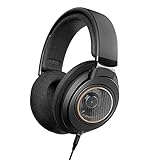
Choose by your setup, not by “gaming” branding
| Your situation | Good starting choice | Why it fits | What to check |
|---|---|---|---|
| One pair for PC gaming and music | Sennheiser HD 560S | Clear, fairly neutral sound and precise left-right placement | Its leaner bass may not suit bass-heavy music |
| Long sessions and a lighter fit | Audio-Technica ATH-R70x | Very light construction and a spacious, natural presentation | At 470 ohms, it benefits from a capable headphone output |
| Durable wired use with more weight in the sound | Beyerdynamic DT 900 PRO X | Low 48-ohm impedance and a replaceable cable | Its treble can sound prominent to treble-sensitive listeners |
| You need isolation or don’t want sound leaking out | Choose a closed-back model instead | Open backs cannot prevent meaningful sound leakage | There is no equalizer setting that makes an open back private |
These are wired headphones, not headsets: most do not include a microphone. Add a USB microphone, use a compatible inline mic solution where available, or choose a headset if a single cable and built-in mic are priorities. Confirm connector and cable compatibility before buying an adapter.
What matters for gaming and music
Soundstage is space; imaging is placement
Soundstage describes the perceived size and openness of the sound. Imaging is how clearly you can locate a sound within that space. A wide presentation can make a game world feel expansive, but it does not automatically make footsteps easier to pinpoint. For competitive play, consistent imaging and clear separation often matter more than maximum width.
Headphones also cannot reproduce true surround sound by themselves: they have two drivers, one for each ear. Games and spatial-audio software simulate direction through those two channels. Start with the game’s own headphone or binaural mode, and avoid stacking multiple surround-processing effects. Combining a game’s spatial mix with several virtual-surround layers can smear positional cues rather than improve them.
Comfort depends on fit, not just weight
For long sessions, consider weight, clamping force, pad depth, heat, and whether your ears touch the driver or grille. A lighter headphone can still feel uncomfortable if its headband concentrates pressure; a firm clamp may become tiring even when the pads are soft. If possible, buy from a seller with a clear return policy, since head shape and glasses make fit difficult to predict from specifications.
Leakage is part of the design
Open-back headphones let air move through the earcups. That can reduce the “sealed” sensation and help keep ears cooler, but audio escapes both ways. Keep volume moderate around other people, and do not rely on open backs to block a fan, keyboard, household noise, or nearby conversation. If you need privacy, quiet surroundings, or strong bass at low volume without disturbing others, choose closed-back headphones.
Impedance and amplification: a practical power check
Impedance, measured in ohms, is only one part of amplification demand. Sensitivity matters too: it tells you how loud a headphone gets for a given input. A high-impedance model can work from a computer, but the result depends on the output’s voltage capability, the headphone’s sensitivity, and your preferred listening level. A dedicated DAC/amp is not automatically necessary, and a DAC cannot compensate for an output that lacks enough power.
Here is a simplified estimate for the ATH-R70x. Its published specifications list 470-ohm impedance and 99 dB sensitivity per milliwatt. Reaching an estimated 110 dB peak requires about 12.6 mW: 10 raised to ((110 − 99) ÷ 10). At 470 ohms, that is approximately 2.4 volts RMS, using the relationship voltage = square root of (power × resistance). This is a theoretical peak estimate, not a recommended listening level; continuous listening at very high volumes can damage hearing.
| Model | Impedance | Published sensitivity | Amplification takeaway |
|---|---|---|---|
| Sennheiser HD 560S | 120 ohms | 110 dB SPL/V | Often manageable from a decent PC or controller output; check for low maximum volume or distortion |
| Audio-Technica ATH-R70x | 470 ohms | 99 dB SPL/mW | More likely to benefit from an output with strong voltage capability |
| Beyerdynamic DT 900 PRO X | 48 ohms | 100 dB SPL/mW | Designed to be easier to drive from a broad range of devices |
Do not compare dB/V and dB/mW figures as if they use the same reference. In practice, plug the headphone into your intended device and check whether it reaches your normal listening level cleanly, with some volume headroom. If it remains too quiet or sounds strained, try a suitable headphone amp. Avoid using maximum volume as a routine workaround.
A simple setup for clear positional audio
- Connect directly first. Test the PC, console controller, or interface you plan to use. This reveals whether you actually need an amp.
- Select one spatial-audio path. Use the game’s headphone mix or one operating-system spatial mode, rather than enabling several at once.
- Set a comfortable baseline. Start with system and game volume low, then raise them gradually. Leave headroom for sudden effects rather than running every control at maximum.
- Check channels and fit. Confirm left and right are correct, seat the pads evenly, and use a familiar stereo clip or game sound to check that the center image is stable.
- Adjust EQ only for a reason. If explosions mask dialogue or footsteps, try a small reduction in the bass rather than a large boost to treble. Make one change at a time so you can tell what helped.
Which one should you buy?
For a balanced first open-back headphone, start with the HD 560S. It is a sensible choice when you want music to sound clear and game cues to remain easy to place without committing to a more demanding high-impedance model. Pick the ATH-R70x if its lightweight fit appeals and your audio output can provide enough voltage. Pick the DT 900 PRO X if you prefer a low-impedance design and a sturdier, service-friendly build.
Before choosing, answer three questions: Is your room quiet enough for an open design? Does your device drive the headphone to a clean, comfortable level? And do you need a microphone built in? If the room is shared, amplification is uncertain, or voice chat needs to be integrated, those practical constraints may matter more than soundstage alone.
Frequently asked questions
Do these headphones include a microphone for voice chat?
Most of these headphones do not include a microphone because they are wired headphones rather than headsets. You can add a USB microphone, use a compatible inline microphone solution where available, or choose a headset if you want a built-in microphone and a single cable. Before using an adapter, confirm that the connector and cable are compatible.
Can I use open-back headphones in a shared room?
You can, but open-back headphones are best in a quiet room and may be unsuitable in a shared space. Sound escapes through the earcups, while nearby voices and household noise can reach you. People nearby may hear your audio, so choose a closed-back model if you need privacy or do not want to disturb others.
Will a gaming console controller drive these headphones properly?
A console controller may drive some of these headphones, but the result depends on the headphone’s impedance, sensitivity, and the controller’s output. The HD 560S is often manageable from a decent controller output, while the ATH-R70x is more likely to benefit from stronger voltage capability. Plug the headphone in and check for clean volume with some headroom.
Should I enable game audio, operating-system, and virtual surround at the same time?
No; use one spatial-audio path rather than stacking several surround-processing effects. Start with the game’s headphone or binaural mode, or use one operating-system spatial mode. Combining multiple layers can smear positional cues instead of improving them. Since headphones use two drivers, games and spatial-audio software simulate direction through those two channels.
What should I do if the headphones sound too quiet?
First, check that the headphone reaches your normal listening level cleanly on the intended device and has some volume headroom. If it remains too quiet or sounds strained, try a suitable headphone amplifier. Impedance alone does not determine amplification demand, and a DAC cannot compensate for an output that lacks enough power. Avoid using maximum volume routinely.








