
When designing a home office or a dedicated creative workspace, we spend weeks obsessing over the perfect ergonomic desk, the wood grain of the tabletop, and the refresh rate of our monitors. Yet, when it comes to the actual engine under the hood, many builders treat the power supply unit (PSU) as an afterthought. It is incredibly common to see someone buy a high-end graphics card only to pair it with a bargain-bin power supply that screams like a jet engine under load and clutters a clean, minimalist workspace with a chaotic nest of colorful cables.
Learning how to choose power supply for custom build setups isn’t just about matching numbers on a spec sheet. It is about balancing acoustic comfort, spatial design inside your chassis, thermal efficiency, and long-term reliability. A poorly chosen power supply can lead to annoying coil whine, system instability, or worse—a catastrophic electrical failure that ruins your entire investment. Let’s dive into what actually matters when selecting the heart of your custom rig.
Our Top Picks


Top 3 picks at a glance
Decide These 3 Things First
Before you start comparing individual brands or looking at aesthetics, you must pin down three fundamental parameters of your build. These decisions act as a filter, instantly narrowing down your options to a manageable selection.
- Your True Wattage Needs: Calculate your system’s estimated power draw by adding the TDP (Thermal Design Power) of your CPU and GPU, then add a 150-watt to 200-watt buffer. If your estimated draw is 500W, target a 750W or 850W unit to keep the PSU running in its peak efficiency curve, which typically sits around 50% load.
- Your Case’s Form Factor: Standard mid-tower and full-tower home office cases require ATX power supplies. If you are building an ultra-compact, space-saving mini-ITX system to sit elegantly on your desktop, you will need a small form factor (SFX) PSU.
- Cable Management Style: Decide if you want a fully modular power supply (where every single cable detaches), semi-modular, or non-modular. For a clean, dust-free interior that complements a modern home office, fully modular is highly recommended.
Size and Form Factor Dimensions
The physical footprint of your power supply dictates how much breathing room you have inside your chassis. Standard ATX power supplies typically measure 150mm wide, 86mm tall, and anywhere from 140mm to 180mm deep. A deeper ATX unit, like a high-capacity 1000W model, can choke cable routing space in smaller mid-tower cases, leaving you struggling to slide your shroud covers shut or cramming wires against your hard drive bays.
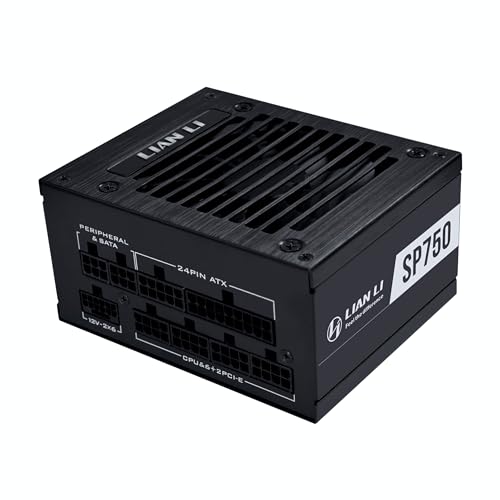
On the other hand, Small Form Factor (SFX) units are incredibly compact, measuring just 125mm wide, 63.5mm tall, and 100mm deep. These are engineered specifically for minimalist, space-conscious desk setups. For example, a premium SFX option like the LIAN LI SP750 V2 750W (around $120) packs massive power into a tiny metal brick, leaving plenty of room for airflow in tight chassis designs. Before purchasing, always check your case specifications for the maximum supported PSU depth.
Component Quality and Materials
A power supply is a heavy piece of hardware, and that weight comes from copper coils, aluminum heatsinks, and solid steel casings. Cheap units feel light and hollow; premium units feel dense and substantial, often weighing between 3 and 5 pounds.
Look for units built with 100% Japanese primary capacitors rated at 105°C (221°F). These capacitors resist heat degradation far better than cheaper alternatives, ensuring stable voltage delivery even during long-term rendering tasks or heavy creative workloads. The outer chassis should feature a durable, powder-coated steel finish to resist scratches during installation, and internal solder joints should be clean and robust to prevent electrical interference or premature failure.
Cabling and Construction Types
The way your PSU connects to your components directly affects your desk’s visual aesthetic and the ease of your build process.
- Fully Modular: These units allow you to plug in only the cables you absolutely need. This eliminates excess clutter, improves airflow, and makes cleaning dust out of your PC incredibly easy. Models like the CORSAIR RM850e ATX 3.1 (around $120) or the higher-capacity CORSAIR RM1000e ATX 3.1 (around $140) feature fully modular interfaces, allowing for clean cable runs.
- Semi-Modular: The essential cables (the 24-pin motherboard and 8-pin CPU power) are permanently attached, while peripheral cables (SATA, PCIe) are modular. This is a great middle-ground for budget-conscious builders who still want a relatively clean interior.
- Non-Modular: Every single cable is permanently soldered to the internal circuit board. You must find a place to hide the unused, bulky cables inside your case shroud, which can restrict airflow and look messy in cases with glass side panels. Budget options like the Thermaltake Smart 700W (around $54) use this design to keep costs low.
Acoustic Comfort and Thermal Performance
A noisy PC is the enemy of focus in a quiet home office or creative studio. Power supplies generate heat as they convert AC power from your wall to DC power for your components, requiring a fan to cool them down.
To keep your workspace peaceful, look for power supplies featuring a “Zero-RPM” or “Eco” fan mode. At low to medium workloads (usually under 40% load), the 120mm or 140mm fan shuts off entirely, operating in complete silence. When the fan does spin up, high-quality fluid dynamic bearing (FDB) fans are significantly quieter and last longer than cheap sleeve-bearing fans. Efficiency ratings also play a major role here: an 80 Plus Gold certified unit wastes less power as heat than an 80 Plus White certified unit, meaning the fan doesn’t have to work nearly as hard to keep things cool.
Price Tiers and What You Get
When learning how to choose power supply for custom build projects, setting a realistic budget prevents you from overspending on unnecessary wattage or underbuying on safety features.
- Budget ($45 – $75): These are typically 80 Plus White or Bronze certified, non-modular units. A solid entry-point like the Thermaltake Smart 700W (around $54) provides reliable, continuous power for mid-range systems but lacks modular cables and quiet-fan modes.
- Mid-Range ($80 – $130): This is the sweet spot for most home builders. You get 80 Plus Gold efficiency, fully modular flat black cables, and silent fan profiles. Options like the CORSAIR RM850e ATX 3.1 (around $120) offer excellent power delivery and modern standards to handle sudden power spikes.
- Premium ($140 – $250+): In this bracket, you find high-capacity units (1000W to 1600W) with 80 Plus Platinum or Titanium ratings, premium braided cables, and extensive warranties. Examples include high-tier models like the CORSAIR RM1000e ATX 3.1 (around $140), designed for heavy-duty workstation PCs that will transition smoothly into the hardware demands of 2026 and beyond.
Warranty and Long-Term Reliability
A manufacturer’s warranty is the ultimate indicator of a power supply’s build quality. Because a failing PSU can potentially damage other expensive components like your motherboard or graphics card, a long warranty offers invaluable peace of mind.
Budget power supplies usually offer a 2-year to 5-year warranty. Mid-range and premium options from reputable brands almost always offer a 7-year to 10-year warranty. If a manufacturer is willing to back their hardware for a decade, it is a clear sign that they used high-grade internal components designed to survive multiple hardware upgrades over the years.
Unboxing, Delivery, and Installation Ease
The physical experience of installing your PSU can make or break your build day. High-quality power supplies arrive packaged in protective foam with organized travel pouches for unused modular cables.
During installation, cable flexibility is key. Stiff, plastic-shielded cables are incredibly difficult to bend around tight corners behind the motherboard tray. Look for ribbon-style flat cables or individually sleeved cables that route smoothly. Additionally, pay attention to the accessories included in the box: premium units often include velcro cable straps, zip ties, and even SFX-to-ATX mounting brackets (as seen with the LIAN LI SP750 V2) so you can mount a tiny power supply inside a standard-sized chassis without buying extra hardware.
Spec Checklist
| Spec Feature | Budget Tier | Mid-Range Tier | Premium Tier | |
|---|---|---|---|---|
| Wattage Range | 500W – 700W | 650W – 850W | 850W – 1200W+ | 850W – 1200W+ |
| Efficiency Rating | 80 Plus White / Bronze | 80 Plus Gold | 80 Plus Platinum / Titanium | |
| Cabling Style | Non-Modular | Semi-Modular / Fully Modular | Fully Modular (ATX 3.1 Ready) | |
| Fan Type & Mode | Sleeve Bearing (Always On) | Fluid Dynamic Bearing (Zero-RPM Mode) | Magnetic Levitation / FDB (Zero-RPM Mode) | |
| Warranty Length | 3 to 5 Years | 7 to 10 Years | 10 to 12 Years | |
| Average Price Range | $45 – $75 | $80 – $130 | $140 – $250+ |
Red Flags to Avoid
When shopping for a PSU, keep an eye out for these warning signs that indicate a potentially dangerous or unreliable unit:
- No Safety Protections Listed: A reputable power supply must feature OVP (Over Voltage Protection), UVP (Under Voltage Protection), OPP (Over Power Protection), and SCP (Short Circuit Protection). If these are missing from the spec sheet, do not buy it.
- Unbelievably Light Weight: If a high-wattage power supply feels like an empty tin can, it lacks the necessary copper windings and heavy aluminum heatsinks required to dissipate heat safely.
- Non-Standard or Uncertified Ratings: Watch out for fake efficiency badges that look like official “80 Plus” logos but say things like “90 Plus” or “Gold Certified” without actual third-party verification from Cybenetics or 80 Plus.
- Extremely Short Cables: Cheap units designed for tiny office pre-builts often have cables too short to route behind the motherboard of a standard mid-tower case, forcing you to stretch cords directly across your components.
FAQ
Can I use an SFX power supply in a standard ATX case?
Yes, you can use an SFX power supply in a standard ATX case, but you will need an SFX-to-ATX mounting bracket. Many premium small form factor power supplies, like the LIAN LI SP750 V2, include this bracket in the box. Keep in mind that SFX cables are shorter than ATX cables, so you may need cable extensions to route them cleanly in a larger case.
What is the difference between ATX 3.1 and older power supplies?
ATX 3.1 is the latest design standard engineered to handle the massive power spikes (transient loads) generated by modern high-end graphics cards. It introduces the updated 12V-2×6 power connector, which delivers up to 600W of power through a single cable while offering a more secure, reliable connection than older PCIe power configurations.
As an Amazon Associate we earn from qualifying purchases at no extra cost to you.


Is an 80 Plus Gold rating absolutely necessary?
While not strictly mandatory, an 80 Plus Gold rating is highly recommended for any daily-use home office or gaming PC. It guarantees at least 90% energy efficiency at a 50% system load. This reduces the amount of wasted power converted into excess heat, resulting in a cooler, quieter system and lower electricity bills over time.
What happens if my power supply wattage is too low?
If your power supply cannot deliver enough wattage to meet your components’ demands, your system will experience instability. This typically manifests as random blue screens, sudden shutdowns under heavy workloads (like rendering or gaming), or a failure to boot up entirely. A high-quality PSU with modern safety protections will simply shut down safely, but a cheap unit could overheat and fail permanently.









