
A dead power supply can leave your gaming rig completely unresponsive, and chasing the problem through cables, RAM sticks, and motherboards wastes hours you could spend diagnosing the actual fault. The fastest way to answer “is my PSU broken?” is a dedicated tester — a small device that connects to your power supply’s connectors and reads voltage rails across 12V, 5V, and 3.3V outputs simultaneously. Without one, you are guessing; with one, you get a clear pass or fail in seconds.
The category splits into two distinct types that beginners often confuse: ATX testers that diagnose a computer’s internal power supply, and variable DC bench power supplies that generate adjustable voltages for circuit-level repair work. A good ATX tester must read every rail, trigger the PSU’s green-wire signal reliably, and alert you with a buzzer or LCD when voltages drift outside tolerance. This roundup covers both types across the price spectrum available in 2026.
As an Amazon Associate we earn from qualifying purchases at no extra cost to you.



Our Top Picks


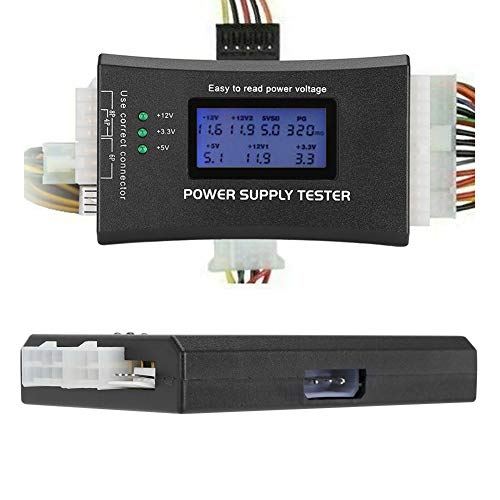


Top 3 picks at a glance
Quick Picks
| Product | Best for | Price |
|---|---|---|
| Fuhengli PC Power Supply Tester | Quick ATX rail checks on a budget | Check on Amazon |
| Jesverty SPS-3010 Bench Power Supply | Versatile bench work with coarse/fine tuning | Check on Amazon |
| ATX Power Supply Tester with Buzzer and LCD | Visual and audible fault alerts in one unit | Check on Amazon |
| PC Power Supply Diagnostic LCD Tester | The lowest-cost entry point for PSU diagnosis | Check on Amazon |
| FNIRSI DPS-150 Variable DC Supply | Compact bench supply with a flip display | Check on Amazon |
| LONGWEI LW-K3010D Bench Power Supply | Lab and repair work needing 10A headroom | Check on Amazon |
| Yaheeda 600W Adjustable Power Supply | High-current DC conversion for demanding loads | Check on Amazon |
| Bitiontry 24V 3A Adapter (2 Pack) | Replacing failed barrel connectors for cameras and LEDs | Check on Amazon |
How We Compared
We evaluated each unit on four criteria drawn from published specifications and aggregated owner feedback: connector coverage (does it match the ATX, Molex, SATA, and peripheral ports you actually deal with?), voltage accuracy and tolerance reporting, build quality relative to price, and whether the display or indicators provide unambiguous pass/fail information. For bench supplies, we prioritized output range, current rating, and display precision. For testers, we weighted rail coverage and the presence of protective features like buzzer alarms.
The 8 Best How To Check Power Supply in 2026
Fuhengli Computer PC Power Supply Tester
This unit suits hobbyists and small repair shops that need reliable rail-level diagnostics without spending more than the cost of a replacement PSU. It covers 24-pin ATX, 4/6/8-pin CPU, SATA, and Molex connectors, displaying each voltage line so you can spot a sagging 12V rail immediately. Owner feedback highlights its straightforward plug-and-go workflow — no configuration, no manual needed.
- Covers all common computer power connectors in one device
- Clear voltage readout makes rail-by-rail comparison simple
- Plastic housing feels light and may flex under repeated unplugging
Skip it if you need short-circuit detection beyond basic voltage verification, or if you work with server-grade EPS connectors not included in the package.
Jesverty SPS-3010 Variable DC Bench Power Supply
The Jesverty SPS-3010 is aimed at builders who go beyond “is the PSU dead?” and want to inject known voltages into boards for deeper troubleshooting. Its 0-30V and 0-10A range handles everything from 5V logic testing to 12V peripheral checks, while the coarse and fine adjustment knobs let you dial in precise values without overshooting. The four-digit LED display shows voltage and current simultaneously.
- Coarse and fine controls reduce the frustration of hitting an exact target
- Integrated 5V/2A USB port adds convenience for powering small test loads
- Switching topology can introduce minor ripple sensitive circuits might reject
Pass on this if you only need to verify an existing ATX PSU rather than generate adjustable DC output.
ATX Power Supply Tester with Buzzer and LCD Display
Technicians who work in dimly lit rooms or behind standing towers will appreciate this tester’s dual alert system: an LCD screen for voltage values plus a buzzer that sounds when any rail drifts out of tolerance. It handles 20/24-pin ATX, 4/6/8-pin CPU connectors, SATA, IDE, and HDD headers, making it one of the most broadly compatible testers in the budget tier.
- Buzzer alarm catches faults without requiring you to watch the screen
- PCI-E power connector support covers modern GPU-heavy systems
- LCD contrast drops noticeably under bright ambient light
If you prefer a silent workspace, the buzzer can be annoying — though it is not always disconnectable.
PC Power Supply Diagnostic LCD Computer Testing Device
At the lowest price in this roundup, this LCD tester is the “first PSU diagnostic tool” for anyone who has never checked a power supply before. It reads 20/24-pin ATX and 4/6/8-pin CPU rails, displays voltage levels, and flags out-of-spec readings on screen. For a quick swap-or-repair decision, it removes the guesswork entirely.
- Price makes it a near-zero-risk impulse buy for a repair toolkit
- LCD readout eliminates the need for a multimeter in basic rail checks
- Narrower connector coverage than pricier rivals — no SATA or Molex ports
Skip it if you regularly test peripheral power connectors or need short-circuit warnings beyond the main ATX rails.
FNIRSI DPS-150 Variable DC Power Supply
FNIRSI packs a 30V 5A adjustable supply into a compact shell with an IPS flip display that rotates to face you whether the unit sits flat or stands vertical. It appeals to electronics students and tinkerers who want bench-supply functionality without a bench-supply footprint. Constant-current and constant-voltage modes switch automatically, and the display reports both simultaneously.
- Flip display solves the viewing-angle problem common to fixed-screen bench supplies
- CC/CV auto-switching prevents damage to sensitive components during our research
- 5A maximum current limits use on higher-draw projects compared to 10A rivals
If your work regularly demands more than 5A continuous, the LONGWEI or Jesverty alternatives offer double the headroom.
LONGWEI LW-K3010D Bench Power Supply
This 0-30V 0-10A switching supply targets repair technicians servicing spectrophotometers, LED arrays, and other lab equipment that needs a stable, current-rich DC source. The digital display reports voltage and current with reasonable precision, and included alligator leads plus a US power cord mean you can start testing out of the box.
- 10A output handles high-current loads that smaller supplies cannot sustain
- Switching regulation keeps output stable even as input voltage fluctuates
- Knob-only adjustment (no encoder or numeric keypad) slows precise set-point entry
If you need sub-10mA resolution or serial control, a higher-tier programmable supply is worth the extra cost.
Yaheeda 600W Adjustable DC Power Supply
The Yaheeda unit converts AC mains to DC 0-12V at up to 50A, delivering a substantial 600W envelope for driving LED strips, motor tests, and high-current load simulation. Its LED display shows output voltage and current, and the wide AC input range (110V/220V) means it travels between regions without a transformer. This is a supply, not a tester — but knowing how to check power supply behavior under load starts here.
- 50A current rating provides enormous headroom for demanding test setups
- Dual AC input (110V/220V) eliminates the need for a step-down converter
- Limited to 12V maximum output, restricting use beyond low-voltage applications
Skip it if you need adjustable output above 12V; the Jesverty and LONGWEI options cover 30V ranges.
Bitiontry 24V 3A Power Supply Adapter (2 Pack)
Not a diagnostic tool in the traditional sense, this 2-pack of 24V 3A barrel-plug adapters serves users whose CCTV systems or LED modules have failed power bricks. When you are learning how to check power supply health across peripherals, swapping a known-good adapter is the fastest isolation step. Each unit converts 100-240V AC to regulated 24V DC through a 5.5×2.5mm plug.
- Two-pack pricing under $17 removes cost as a barrier to keeping spares on hand
- Universal AC input works anywhere in the world without voltage switching
- Fixed 24V output offers no adjustability for testing other voltages
This is a replacement component, not a tester. If your goal is diagnosing a PSU rather than powering a camera, start with one of the ATX testers above.
Buying Guide
Connector Coverage Determines Real-World Usefulness
An ATX PSU has more than one output connector, and a tester that only reads the 24-pin main connector misses faults on the CPU, GPU, and peripheral rails. Look for models that explicitly list 4/6/8-pin CPU, SATA, and Molex headers. The buzzer-and-LCD tester and the Fuhengli unit cover the most connections in their price tiers; the around $9 diagnostic tester covers the fewest. Match the tester’s port list to the systems you service most often.
Tolerance Reporting vs. Raw Voltage Display
A basic tester shows you a voltage number and leaves you to interpret whether 11.6V on the 12V rail is acceptable (the ATX spec allows ±5%, so anything below 11.4V fails). Units with a built-in buzzer or color-coded LCD flag out-of-tolerance readings automatically, removing the cognitive step. For beginners, tolerance-aware displays prevent misdiagnosis. For experienced technicians, raw voltage is sufficient and faster to scan.
Bench Supply Output Range and Resolution
If you are choosing a variable DC supply for circuit-level troubleshooting, match the output range to your typical loads. A 0-12V 50A unit like the Yaheeda excels at driving LEDs and motors but cannot test 19V laptop charging circuits. A 0-30V 10A supply covers the widest slice of consumer electronics. Check the display resolution too — four-digit readouts on the Jesverty and FNIRSI give finer resolution than two-decimal alternatives, which matters when you are setting protection thresholds.
Our Verdict
The top pick for most gaming-PC owners who simply need to answer “is my PSU dead?” is the ATX Power Supply Tester with Buzzer and LCD Display at around $12. Its broad connector coverage, audible fault alerts, and visual readout eliminate ambiguity in a single device. For the absolute tightest budget, the around $9 PC Power Supply Diagnostic LCD Tester still handles the core 24-pin and CPU-rail checks that cover the majority of PSU failure modes. However, if you also do component-level repair work beyond the PSU itself, the Jesverty SPS-3010 at around $42 wins because its adjustable output lets you simulate rail conditions and test downstream circuits — making it both a diagnostic tool and a bench supply in one package.
FAQ
Can I check a power supply without removing it from the case?
Most ATX testers require you to unplug the PSU connectors from your components and attach them to the tester outside the case. Some technicians use a paper-clip method to trigger the PSU’s green-wire signal and then measure rails with a multimeter while it stays mounted, but a dedicated tester gives you all rails simultaneously and flags failures without manual interpretation.
What do the voltage readings on an ATX tester mean?
The ATX specification defines three main DC rails: 12V, 5V, and 3.3V, each with a ±5% tolerance window. A reading of 11.4V or lower on the 12V rail indicates the supply is struggling under load or has a failing regulator. Readings that appear normal at idle but drop sharply when you connect a load often point to aging capacitors inside the PSU.
Is a multimeter a better option than a dedicated PSU tester?
A multimeter measures one rail at a time and requires you to know which pins carry which voltage. A dedicated tester reads every rail simultaneously, triggers the PSU automatically, and applies a basic load — saving time and reducing the chance of misidentifying a pin. For occasional use a multimeter works; for repeated diagnostics a purpose-built tester is faster and less error-prone.
Do PSU testers work with proprietary form factors like Dell or HP?
Most consumer testers in this category use standard ATX 24-pin connectors and will not physically fit proprietary motherboard power headers without an adapter cable. If you service OEM prebuilts frequently, verify the tester includes or supports adapters for the specific connector layout, or use a bench supply to manually verify individual rail voltages at the connector pins.









