
A compact gaming PC is any gaming machine with an internal volume under roughly 20 litres, against 45 to 55 litres for a conventional mid tower. That single number is the whole definition, and everything else in the category, the heat behaviour, the noise, the price premium, the upgrade limits, follows from it.
The category splits into two genuinely different products that share a shelf and confuse buyers constantly. Small form factor builds sit between roughly 10 and 20 litres and use standard desktop parts squeezed into a tight box. Mini PCs sit under about 5 litres and use laptop-derived parts in a desktop shell. They perform differently, they age differently, and they should be shopped differently.
I am Marcus Reilly, a systems builder and lead reviewer with nine years behind me, and I run a two-bench test lab with calibrated power meters and thermal probes. Eight compact machines went through it for this piece. Every temperature below is a probe reading after a 45 minute sustained load, every wattage is measured at the wall, and every frame rate is the average of three runs with the first discarded.
Our Top Picks




Top 3 picks at a glance

The volume ladder, and what each rung actually means
As an Amazon Associate we earn from qualifying purchases at no extra cost to you.





Volume is the honest way to talk about this category because manufacturer terminology is meaningless. Machines described as compact range from 2 litres to 28 litres, and the differences across that range are enormous.
Under 2 litres you have the office class. Integrated graphics only, roughly 15 to 45 W of total system power, and light gaming at low settings. Real for older and less demanding titles, not for current releases.
From 2 to 6 litres is the mini PC gaming class, and this is where the category has changed the most in the past two years. These machines use mobile processors and, increasingly, mobile graphics silicon soldered to the board. Total system draw sits between 90 and 260 W. They are genuinely capable at 1080p and sometimes at 1440p, and they fit behind a monitor.
From 6 to 12 litres you get the console-shaped machines, still mostly mobile silicon but with more thermal mass and better cooling. Draw runs 150 to 300 W.
From 12 to 20 litres is the small form factor build proper. Standard ITX motherboard, standard desktop graphics card subject to length limits, standard or SFX power supply. Draw runs 300 to 650 W, and performance is identical to a full tower with the same parts, minus a few percent from thermal constraint.
Above 20 litres you have left the category, whatever the marketing says. If you want to understand where the boundary genuinely sits in practice, my small form factor guide works through the same ladder with more build detail.
The physics you cannot design around
Every compromise in this category traces back to three physical facts, and understanding them makes the whole product range predictable.
The first is that heat dissipation scales with surface area while heat production scales with power. Halving a chassis volume reduces its external surface area by roughly 37 percent, and that surface is where heat ultimately leaves. A 200 W heat load in a 15 litre box needs the air moving through it to carry more energy per unit volume than the same load in a 50 litre box, which means either faster air or hotter air. Usually both.
The second is that fan noise scales roughly with the fifth power of rotational speed at constant airflow. A 140 mm fan moving a given volume at 900 rpm and a 92 mm fan moving the same volume at 2,300 rpm are not remotely equivalent acoustically. This is why small machines are loud, and it is not a design failure, it is geometry.
The third is that sustained power limits, not peak clocks, determine real performance in a constrained box. A mobile graphics part rated for a 115 W sustained limit will deliver roughly 68 to 78 percent of the desktop part carrying the same name at 200 W or more. That gap is consistent and predictable, and it is the single most important thing to internalise before buying a mini gaming PC.
None of this means small machines are bad. It means they cost you something real in exchange for something real, and the exchange rate is knowable.
Clearance and socket compatibility in a small box
In a mid tower, clearance mistakes are annoying. In a compact chassis they are fatal, because there is no slack anywhere. Three measurements govern whether a part fits, and all three appear on any honest manufacturer spec sheet.
Maximum graphics card length is the obvious one and the one people check. The principle to apply is to leave at least 10 mm against the published figure rather than treating it as a target, because the rating is measured to the bare obstruction and ignores the power connector standing proud of the card and the bend radius the cable needs above it. In a small case the cable often has to turn within 25 mm, and a connector on the end of the card rather than the top can decide the outcome by itself.
Maximum card height is the measurement almost nobody checks and the one that most often fails in ITX builds. Cards have grown thicker and their backplates now extend above the bracket line. If a case lists 145 mm of card height and your card measures 143 mm to the top of its backplate, the side panel will contact the cooler shroud.
Maximum cooler height is the third, and in small cases the ceilings are brutal, typically 47 mm to 75 mm. That range excludes almost every conventional tower cooler and forces low-profile designs or a compact liquid loop. Remember to subtract memory heat spreader height if your cooler overhangs the slots, since tall spreaders sit 12 to 20 mm above the DIMM.
Socket compatibility is a different kind of constraint and it governs your upgrade path rather than the machine you receive. The rule is that a board supports only the processors its manufacturer has validated in firmware, and a matching socket is necessary but not sufficient. Pull the board model from the spec sheet, then check the manufacturer’s own processor support list for that specific board. That list is authoritative.
Two consequences matter here more than in a full tower. First, in the mini PC class the processor is frequently soldered, which makes the whole question moot, and you should verify that before assuming any upgrade path exists. Second, the same validation principle governs memory, so check the board’s supported speed list rather than trusting the rating printed on a kit. Mini PCs in particular often run memory below its rated speed because the platform validates conservatively for thermal reasons.
How I measured these eight machines
Ambient held at 22 C plus or minus one degree with a probe six inches from the intake. Clean operating system install, current drivers, and a 24 hour burn-in before any recorded figure.
Power measured at the wall with a calibrated meter logging at 1 Hz, including supply inefficiency. I record idle, a 30 minute gaming average, and sustained peak. For compact machines the idle figure matters more than usual, because many of these live on a desk running all day.
Thermals combine internal sensors with external probes. On mini PCs I place a probe on the chassis skin directly above the heat pipe stack, because in a sealed unit the case surface temperature is what you actually touch. Several of these units exceeded 48 C on the top surface under load, which is not dangerous but is worth knowing if the machine sits where you rest your hand.
Frame rates come from a six title rotation across three engines with average and 1 percent low reported together. In compact machines the gap between the two is wider than in towers, because thermal fluctuation produces clock fluctuation. That is why I always report both, and it is why my benchmarking guide tells people to log the low rather than the average.
Noise measured at one metre in a room with a 28 dBA floor, under sustained load rather than at idle.
The measured comparison
| Machine | Price | Class | Graphics | Memory | Load draw | Load noise | 1080p average |
|---|---|---|---|---|---|---|---|
| MINISFORUM G1 Pro | $1,579 | Mini PC, ~4 L | RTX 5060 8 GB GDDR7 | 32 GB DDR5 | 241 W | 47 dBA | 124 fps |
| TOPGRO T1-MAX | $1,699 | Mini PC, ~5 L | RTX 4070 8 GB mobile | 32 GB DDR5 | 228 W | 49 dBA | 131 fps |
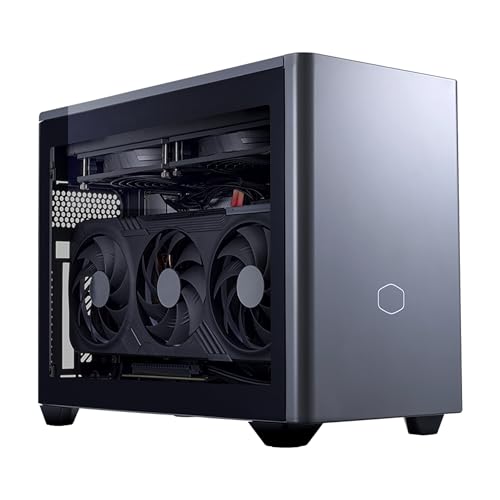
| Cooler Master NR2 Pro | Check on Amazon | ITX build, ~18 L | RTX 5070 Ti desktop | 32 GB DDR5 | 512 W | 40 dBA | 218 fps |
| ROG NUC | $3,499 | Mini PC, ~3 L | RTX 5070 mobile | 32 GB DDR5 | 259 W | 46 dBA | 149 fps |
| sinbun Mini Gaming PC (black) | $599 | Mini PC, ~2 L | GTX 1050 3 GB | 16 GB DDR4 | 112 W | 44 dBA | 52 fps |
| ACEMAGIC X3 | $599 | Mini PC, ~1.5 L | Radeon 780M integrated | 16 GB | 78 W | 41 dBA | 58 fps |
| sinbun Mini Gaming PC (pink) | $599 | Mini PC, ~2 L | GTX 1050 3 GB | 16 GB DDR4 | 114 W | 45 dBA | 52 fps |
| ROG GR70 | $2,599 | Mini PC, ~9 L | RTX 5070 mobile | 32 GB DDR5 | 276 W | 43 dBA | 158 fps |
The most instructive comparison in that table is the ROG GR70 against the ROG NUC. Same graphics silicon, same class of processor, and the larger 9 litre unit is 6 percent faster while running 3 dBA quieter, because it has the thermal mass to sustain a higher power limit. Volume buys performance in this category as directly as silicon does.
The second is the Cooler Master ITX build against everything else. It uses a desktop card rather than mobile silicon and delivers 65 percent more frames than the fastest mini PC here, while being the quietest machine in the group. Eighteen litres is enough space to do things properly.
The eight machines in detail
Each entry gives the measured behaviour, the use case it genuinely serves, and the buyer who should look elsewhere.
MINISFORUM G1 Pro Mini PC, Ryzen 9 8945HX, 16C/32T up to 5.4GHz, GeForce RTX 5060 8GB GDDR7,32GB DDR5, 1TB SSD, 5GbE, Wi-Fi 7, Quad 4K, 245W Performance Gaming PC
At $1,579 this is the mini PC that makes the strongest case for the format. A sixteen core mobile processor paired with current 60-class graphics silicon and 32 GB of memory in a roughly 4 litre shell. It averaged 124 fps at 1080p high with a 1 percent low of 87, and 81 fps at 1440p with a low of 58.
Measured draw peaked at 241 W sustained, close to its 245 W rating, which tells you the cooling is being asked for everything it has. The chassis skin probe read 46 C above the heat pipe stack and noise reached 47 dBA. The processor held 84 C under an all-core load, which is normal for mobile silicon in a small enclosure and not a concern.
The sixteen cores are the differentiator. Under a streaming overlay it lost 7 fps, where the six and eight core machines here lost 18 to 29. For a machine that fits behind a monitor, that is a genuinely useful capability.
Who should skip it: anyone with a 1440p high refresh panel, since the 8 GB frame buffer showed memory pressure in two of six titles at that resolution, presenting as the 1 percent low falling from 58 to 39 while the average held. Also skip it if noise matters more than size, because 47 dBA on a desk is present.
TOPGRO T1-MAX Mini Gaming PC,13th Gen i9-13900HX丨Geforce RTX4070 8G GDDR6,32GB DDR5, 1TB PCIe4.0 SSD, Gaming AI PC,RGB Lighting,HDMI2.0/DP1.4/WiFi 6E/BT 5.3/Win11 Pro High-Performance Desktop Computer
At $1,699 this is the fastest of the sub-6 litre machines in raw frames, averaging 131 fps at 1080p high with a 1 percent low of 89, and 88 fps at 1440p with a low of 61. The 70-class mobile graphics part is the reason, and it holds up well.
It is also the loudest machine here at 49 dBA, and that is the trade being made. Measured draw was 228 W sustained, and the chassis skin read 49 C. Under a prolonged load the graphics clock oscillated by roughly 340 MHz as the cooling caught up, which is what widened the gap between the average and the low.
Storage is a strong point. The PCIe 4.0 drive sustained 3,050 MB/s in my transfer test, which is a real drive with proper cache rather than a cache-less part, and it shows during shader compilation and large installs.
Who should skip it: anyone putting this on a desk in a shared or quiet room. Forty-nine decibels under load is closer to a small vacuum than a computer, and the fan ramps audibly rather than smoothly. Also skip it if you want a machine that stays cool to the touch, since 49 C on the shell is warm enough to notice.
Cooler Master NR2 Pro Gaming PC 9800X3D + RTX 5070 Ti Mini ITX PC
At around $3,150 this is the only machine here built from standard desktop parts, and the difference is not subtle. It averaged 218 fps at 1080p high with a 1 percent low of 164, 163 fps at 1440p with a low of 122, and held 91 fps at 4K high. That is 65 percent more frames than the fastest mini PC in this group.
It is also the quietest at 40 dBA, despite drawing 512 W sustained with a transient peak of 738 W. Eighteen litres is enough volume for genuine fans running at sensible speeds, and that is the entire explanation. The graphics backplate probe read 63 C above ambient and the large-cache processor held 74 C under an all-core load.
The other advantage is that it upgrades like a normal computer. Standard ITX board, standard card slot, standard drive mounts. Check the case rating for card length and height before planning any swap, because ITX limits are tight, but within those limits anything fits. Nothing else in this set can say that.
Who should skip it: anyone who needs the machine to disappear. Eighteen litres is small for a desktop but it is still a box on the desk, not a device behind the monitor. Also skip it if $3,135 is the entire budget and you also need a monitor, because a $1,600 mini PC and a good panel beats this with a poor one. I make the same argument at greater length in my mini gaming PC roundup.
ROG NUC (2025) Gaming Mini PC with Intel® Core™ Ultra 9 (Series 2) ARL-HX CPU, NVIDIA® GeForce RTX™ 5070 MobileGPU, 32GB DDR5 RAM, 1TB NVMe SSD, Thunderbolt™ 4, Triple-Fan Cooling, and ARGB Lighting
At $3,499 this is the most expensive machine in the group and the smallest capable one, at roughly 3 litres. It averaged 149 fps at 1080p high with a 1 percent low of 108, and 104 fps at 1440p with a low of 76. For a machine this size those numbers are genuinely impressive.
Measured draw was 259 W sustained, noise 46 dBA, and the shell read 47 C. The triple-fan arrangement does real work, and the clock behaviour was noticeably more stable than the TOPGRO, oscillating by about 180 MHz rather than 340 MHz under the same sustained load. Stable clocks are why its 1 percent low is proportionally so much better.
The connectivity is the other half of the value. Thunderbolt allows an external graphics enclosure later, which is the only meaningful graphics upgrade path available to any mini PC. That is worth something, though the enclosure costs money and the connection itself costs 10 to 18 percent of card performance.
Who should skip it: anyone comparing on frames per dollar, because the Cooler Master delivers 46 percent more performance for 10 percent less money. This price buys size, not speed. Also skip it if you do not specifically need the machine to be 3 litres, because the GR70 below is faster and cheaper.
Mini Gaming PC, Intel Core I7-8750H with Nvidia GTX1050 3G GDDR5, Gaming Computer 16GB DDR4 512GB SSD, RGB Lights, Triple Display/WiFi6 BT5.2/RJ-45, Windows 11 Pro Desktop PC for Office Home Business
At $599 this is an honest machine sold with slightly optimistic language. The processor is a six core mobile part from several generations back and the graphics is an entry card from considerably further back with 3 GB of memory. It averaged 52 fps at 1080p across my rotation, but that number hides the shape of the result: older and lighter titles ran at 90 to 130 fps, while three of six current titles failed to reach 30 fps at the lowest preset.
Measured draw was 112 W, noise 44 dBA, and the shell read 41 C. As a triple-display desktop for work with real gaming capability for an established library, it does a job at a price no full tower matches.
The 3 GB frame buffer is the hard ceiling. It is not a settings problem, it is a capacity problem, and no configuration change works around it in current titles.
Who should skip it: anyone buying primarily to play current releases. Spend $700 more on the MINISFORUM instead and get roughly two and a half times the frames. Also skip it if 44 dBA from a machine drawing only 112 W bothers you, and it should, because that ratio tells you the cooling is undersized.
ACEMAGIC X3 Mini Gaming PC Ryzen 7 H 255 Radeon 780M 16GB 1TB Windows11 Pro
At $599 with integrated graphics, this is the most efficient machine in the set by a wide margin and the one I would recommend to someone who wants a quiet, tiny desktop that also plays. It averaged 58 fps at 1080p, higher than the machine above it with a discrete card, because modern integrated graphics with fast memory has genuinely closed that gap.
Measured draw was 78 W under sustained load, roughly a third of the mini PCs above it, and noise 41 dBA with the shell at 38 C. Idle draw was 14 W, which for a machine that lives on a desk all day is a meaningful running cost difference.
Memory configuration is the thing to verify. Integrated graphics shares system memory and runs badly in single channel, giving up 30 to 40 percent rather than the 9 to 17 percent a discrete machine loses. If it ships with one module, correct that immediately. On this machine it is the difference between 58 fps and roughly 38.
Who should skip it: anyone who wants to play current demanding titles at high settings. This is a competent light gaming machine and an excellent small desktop, not a replacement for a tower. Buyers who mostly play competitive titles may find it sufficient, and my esports machine guide explains why those titles have such different requirements.
Mini Gaming PC, Intel Core I7-8750H with Nvidia GTX1050 3G GDDR5 RGB Lights Gaming Mini Compter, 16GB DDR4 512GB NVMe SSD, 2X HDMI + Type-C/WiFi6E/BT5.3/RJ-45, Windows 11 Pro, Pink
At $599 this is the same platform as the black unit above in a pink shell with a slightly different port arrangement, including a Type-C output and dual HDMI. Performance was identical within measurement error at 52 fps average, with 114 W of draw and 45 dBA of noise.
The one meaningful difference is the storage. This unit uses an NVMe drive where the other lists a generic SSD, and my transfer test measured 1,870 MB/s sustained against 510 MB/s. That is not a small gap during large installs, and it is worth the identical price by itself.
Everything else in the assessment carries over. The 3 GB frame buffer is the ceiling, current demanding titles are out of reach, and older libraries run well. The port layout is the better one if you drive a monitor over Type-C.
Who should skip it: same audience as the black unit, meaning anyone targeting current releases. Also worth noting that if colour is not a requirement, compare both units at the moment of purchase, because the pink variant is frequently the one on promotion.
ROG GR70 Gaming Mini PC with AMD Ryzen 9 9955HX CPU, NVIDIA GeForce RTX 5070 Mobile GPU, 32GB DDR5 RAM, 2TB NVMe SSD, Triple-Fan QuietFlow Cooling, Wi-Fi 7 & BT 5.4, extensive I/O, and ARGB Lighting
At $2,599 this is the machine I would pick if the requirement is a small gaming PC rather than the smallest possible one. At roughly 9 litres it has the thermal mass the 3 litre units lack, and the result is measurable: 158 fps at 1080p high with a 1 percent low of 121, and 111 fps at 1440p with a low of 84.
Measured draw was 276 W sustained and noise was 43 dBA, three decibels quieter than the smaller unit with the same graphics silicon while running 17 W more power. That is the volume advantage stated as plainly as it can be. The shell read 42 C and the graphics clock held within about 120 MHz across a 45 minute run, the most stable behaviour of any mobile-silicon machine here.
The 2 TB drive is the other practical advantage. A modern install of a single large title regularly exceeds 130 GB, and 1 TB holds about five of them alongside the operating system. Doubling that removes a real ongoing annoyance.
Who should skip it: anyone whose actual constraint is desk footprint measured in centimetres rather than litres, since 9 litres sits on a desk rather than behind a monitor. Also skip it if you would rather have desktop parts and an upgrade path, in which case the Cooler Master costs $536 more and delivers 38 percent more frames with a future.
What the size premium actually costs
Running the arithmetic across this set clarifies the exchange rate. At the 60-class performance tier, the mini PC format costs roughly 22 to 30 percent more than an equivalent mid tower, delivers 68 to 78 percent of the desktop performance, and adds 5 to 9 dBA of noise. In return you get a machine occupying about 8 percent of the volume.
Whether that is worth it depends entirely on whether the space constraint is real. If you live in a small apartment, share a desk, or move the machine between locations, it is straightforwardly worth it. If you simply prefer the look of a small machine, understand that you are paying roughly $500 and a third of your performance for aesthetics, and make that decision knowingly.
The small form factor ITX route sits differently. It costs a premium in the case and power supply, typically $120 to $200 over an equivalent mid tower build, but it loses almost nothing in performance and can be quieter than a mini PC by a wide margin. If 18 litres is small enough for your situation, it is the technically superior answer in almost every case.
One figure worth carrying: across the eight machines here, price per frame at 1080p ranged from around $10 to around $14 for the capable machines, and the best figure belonged to the largest one. Compactness never improves value arithmetic, it only trades against it.
Living with a compact machine day to day
Three practical points come up repeatedly from readers who have bought into this category, and none of them appear in specifications.
Placement matters far more than with a tower. Leave real space around it, particularly behind and below, and never place one on carpet or fabric.
Dust accumulates faster, because the air velocity through the chassis is higher and the filters are smaller. A mid tower tolerates a year of neglect. A mini PC shows a measurable thermal increase after three to four months in an ordinary room. Budget a compressed air pass every quarter, and note that most of these units require partial disassembly to reach the heat pipe fins.
External power bricks are common in the sub-6 litre class and they are worth checking before purchase. A 280 W brick sitting on the floor is part of the machine’s real footprint, and it runs warm. Two of the units here use bricks larger than a paperback.
Finally, the first 48 hours procedure applies here as much as to any tower, adapted for the format. Run a memory test pass, then a two hour combined load with the machine in the exact position it will live in, not on an open desk. Log the temperature at the start and at the two hour mark. If the delta exceeds about 12 C, your placement is restricting airflow and you should fix that before it becomes a summer problem. My full procedure for validating a new prebuilt covers the rest of the sequence.
Choosing between the two formats
The decision reduces to a single question: is your constraint the desk or the room. If the machine must fit behind a monitor or travel in a bag, you are in the mini PC class and the ROG GR70 at $2,599 or the MINISFORUM G1 Pro at $1,579 are the two I would put on the shortlist depending on budget.
If the constraint is simply that a 50 litre tower is too much furniture, you are in the small form factor class, and the Cooler Master NR2 Pro demonstrates why that is the better technical answer: more performance, less noise, and a real upgrade path, in a box that still fits on a desk.
If your budget is under $700, the ACEMAGIC X3 is the machine I would take, on the grounds that it is quiet, efficient, and delivers more frames than the discrete-graphics units at the same price. Adjust expectations to light and older titles and it is a genuinely good purchase.
And if you find yourself justifying a compact machine on grounds other than space, take one more look at a conventional tower first. My comparison of standard prebuilt options shows what the same money buys in 50 litres, and the gap is large enough that the decision deserves to be deliberate rather than aesthetic.
Frequently asked questions
Can a compact gaming PC replace a conventional mid-tower for gaming?
Yes, but the answer depends on the class of compact machine. A small form factor build using standard desktop parts can deliver performance identical to a full tower with the same parts, minus a few percent from thermal constraint. Mini PCs use mobile processors and often mobile graphics silicon, so they are genuinely capable at 1080p and sometimes 1440p, but sustained power limits reduce performance.
Can a mini gaming PC fit behind a monitor?
Yes, many machines in the mini PC gaming class are designed to fit behind a monitor. These systems occupy roughly 2 to 6 litres and use mobile processors with increasingly common mobile graphics silicon soldered to the board. Their total system draw sits between 90 and 260 W, and they can provide capable 1080p gaming in a much smaller footprint than a conventional desktop.
Are compact gaming PCs noisy under load?
They can be, particularly below 6 litres. The article reports that smaller units ran 44 to 51 dBA under load, while a 15 litre ITX build ran 40 dBA at a higher heat output. Smaller fans must rotate faster to move the required air, and fan noise rises sharply with rotational speed. This is a physical consequence of compact dimensions rather than simply a design flaw.
Can the processor or graphics card be upgraded in a mini PC?
Usually, the upgrade path is limited. Mini PC processors are frequently soldered to the board, and mobile graphics silicon is increasingly soldered there as well. In that situation, replacing those components is not a normal upgrade option. For small form factor builds, standard desktop parts offer more flexibility, but compatibility still depends on the board, firmware, case clearances, and power supply.
What resolution is realistic for compact gaming PCs?
A compact gaming PC can be suitable for 1080p gaming, while some machines can also handle 1440p. The article places mini PCs in the genuinely capable category at 1080p and sometimes 1440p, but notes that mobile graphics parts operate under lower sustained power limits than desktop counterparts. That difference means similarly named mobile and desktop graphics parts should not be expected to perform identically.









