Walking into a peripheral shop or scrolling through online listings, you might think the search for a new gaming mouse is as simple as grabbing the one with the most RGB lighting and the highest DPI number on the box. It is not. The best gaming mouse for one person can feel like a brick in the hand of another, and the differences between models that look nearly identical on paper can be enormous in actual play. This guide cuts through the marketing noise and gives you a clear path to finding the right mouse for your grip style, game genres, and budget.
As an Amazon Associate we earn from qualifying purchases at no extra cost to you.



Our Top Picks
 Logitech G PRO X2 SUPERSTRIKE Wireless Gaming MouseOne Size4.9 x 2.5 x 0.1 inches0.1 PoundsCheck on Amazon
 Logitech G502 X Plus Wireless RGB Gaming MouseWireless7.1 x 4.6 x 2.7 Inches0.84 poundsCheck on Amazon
 Logitech G PRO X Superlight 2 Wireless GamingClassic1.57 x 2.5 x 4.92 inches0.1 poundsCheck on Amazon
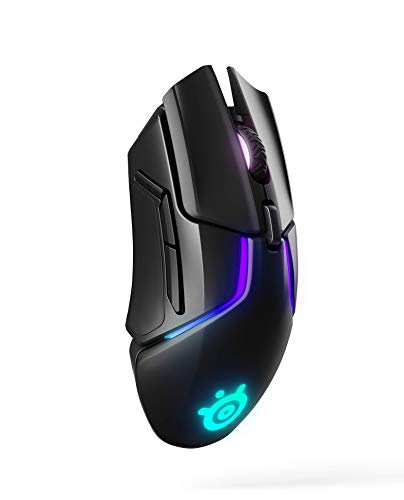 SteelSeries Rival 650 Quantum Wireless Gaming MouseWireless2.69 x 5.16 x 1.7 inches0.36 PoundsCheck on Amazon


Top 3 picks at a glance
What to Look for When Buying a Gaming Mouse
Before you start comparing specific models, it helps to understand which features actually matter and which are mostly marketing. Here is a breakdown of the key criteria that separate a good purchase from an expensive disappointment.
- Shape and size: This is the single most important factor. A mouse that does not fit your hand and grip style will feel wrong no matter how good the sensor is. Palm grippers generally want fuller rear support and a taller hump. Claw and fingertip grippers tend to prefer shorter, flatter shells. Measure your hand if you are unsure which shape category you fall into.
- Weight: The industry has swung decisively toward lighter mice, especially for FPS and competitive gaming. Sub-80-gram mice reduce fatigue and allow faster flicks. Heavier mice (100g and above) can still suit players who prefer stability and slower, more deliberate aiming, or who play slower-paced genres like MMOs and strategy games.
- Sensor quality: Modern optical sensors from Logitech, PixArt, and Razer are all accurate at common gaming polling rates. You are no longer choosing between a sensor that tracks well and one that does not. The differences are subtle and mostly relevant at extreme angles or speeds. Do not pay a premium purely for a sensor spec sheet.
- Switches: Mechanical switches give tactile feedback but can double-click over time. Optical switches resist that failure mode. Choose based on whether you value the crisp click feel or long-term reliability.
- Wireless vs. wired: Wireless is now genuinely competitive with wired in terms of latency and battery life for most players. The trade-off is usually added cost, weight (batteries), and the occasional need to charge. Wired eliminates all of those concerns and often saves you money for the same feature set.
- Cable and feet: If you go wired, a soft paracord-style cable is far more pleasant than a stiff rubber one. PTFE feet are standard now, but their size and quantity affect glide consistency.
- Button layout and software: MMO players want extra side buttons. FPS players often prefer simplicity. Bloatware from some manufacturers can be genuinely annoying, while others offer clean, lightweight configuration tools.
Logitech G Pro Series
The G Pro line has become something of a default recommendation in the FPS community, and for good reason. The shape is a versatile medium-large shell that works well for palm and claw grips. The HERO sensors have proven reliable over years of use, and the wireless Superlight variant is remarkably light for a feature-complete mouse. The main trade-off is that the shape is not for everyone, particularly players with smaller hands who may find the width and hump position awkward. Software is functional but occasionally feels clunky. The wired Superlight version is a genuinely great value for anyone who does not want to worry about charging.
If you want to compare current models in this line, you can check current price on Amazon.
- Excellent shape versatility for medium-large hands
- Proven sensor and reliable build quality
- Available in wired and wireless, with super-light options
- Cons: Not ideal for very small hands; software is dated in places
- Cons: Some users report scroll wheel durability concerns over heavy use
Razer DeathAdder Series
The DeathAdder is one of the most recognizable mouse shapes in gaming, and it has survived decades of redesigns because the ergonomic palm-grip shape genuinely works for many people. It is wider and more contoured than the G Pro, offering substantial support for the ring and pinky fingers. Recent iterations have gotten lighter and use Razer’s own optical sensors and switches. The downside is that the shape is divisive: if you do not like the way the body fills your palm, no amount of spec improvements will change that. It also tends to be heavier than competitors even in its latest forms, which matters for fast FPS play.
- Best-in-class comfort for palm gripers
- Wide body supports larger hands naturally
- Recent models use optical switches that resist double-clicking
- Cons: Shape is not forgiving for claw or fingertip styles
- Cons: Heavier than many competitors in the same price tier
SteelSeries Rival Series
The Rival line offers a symmetrical, medium-size shape that sits comfortably between the G Pro and smaller options. The Rival 600 and its successors introduced a dual-sensor weight system that lets you tune the feel without sacrificing trackability. For players who want some customization weight-wise and appreciate a clean, understated design without aggressive gaming aesthetics, this is a strong option. The trade-off is that the shape lacks a defining characteristic that makes it instantly stand out, and some players find it too narrow or too flat for comfortable long sessions.
Worth exploring if you want something in the middle ground: check current price on Amazon.
- Adjustable weight system with genuine trackability
- Neutral, low-profile design fits many hand shapes
- Build quality is consistently solid
- Cons: Does not excel at any one thing; shape is safe but forgettable
- Cons: SteelSeries Engine software is resource-heavy
Zowie EC Series (BenQ)
Zowie has built a devoted following among esports players by doing very little: no RGB, no software, no wireless options for a long time. The EC shape is a right-handed ergonomic that many players consider the gold standard for its class. It is slightly more compact than the DeathAdder while still offering excellent palm support. The recent addition of the wireless DW series and higher polling rate options means Zowie is no longer a feature desert, but the core appeal remains the same: you get a mouse that is about the shape and nothing else. If your priority is pure ergonomic comfort and you do not care about software customization, this is a serious contender. The catch is that Zowie is conservative with updates, so you may be buying a shape that has not changed in years.
- Exceptional ergonomic shape that ages well
- No software, no RGB, no bloat — plug and play
- Build quality and switch feel are excellent
- Cons: Limited color and finish options
- Cons: Historically behind the curve on weight reduction and wireless
Finalmouse Starlight Series
Finalmouse targets the ultra-lightweight niche with aggressive designs and a premium price tag. The Starlight line has consistently been among the lightest full-featured mice available, pushing well below 50 grams in some iterations. The shell has a distinctive look that you either love or find odd. It works best for fingertip and light claw grip, and less well for palm gripers who need rear support. The trade-off at this weight class is that durability and build rigidity can sometimes suffer. These are also often sold in limited drops, which means availability and resale pricing can be frustrating. If you are a competitive FPS player who has already graduated from sub-60g mice and wants to go even lighter, this is the most recognizable option.
You can check current price on Amazon to see if any models are in stock.
- Extremely light weight without sacrificing full sensor capability
- Distinctive design and shape suited to fingertip and claw grip
- Strong following in the competitive FPS community
- Cons: Premium price for what is functionally similar to lighter competitors
- Cons: Limited availability and occasional build quality inconsistencies
Glorious Model O Series
The Model O essentially popularized the honeycomb-shell ultra-light mouse at an accessible price point. If you want a sub-70g mouse without paying Finalmouse or Zowie premium pricing, the Model O and its variants (D, S, and Mini) are a sensible starting point. The shape is symmetrical and suits claw and fingertip gripers well. Recent models have moved to a solid shell option, addressing concerns about dust and durability with the original honeycomb design. Software is lightweight and does the job. The main downside is that the build quality and switch feel, while good for the price, do not quite match the premium end of the market. It is a great entry into lightweight competitive mice.
A strong budget-friendly lightweight option: check current price on Amazon.
- Great value for an ultra-light mouse
- Multiple size options (Mini, S, regular, D) to fit different hands
- Improved solid-shell variant addresses durability concerns
- Cons: Switches and build feel less premium than higher-priced rivals
- Cons: Honeycomb shell is now somewhat dated aesthetically
Frequently Asked Questions
Do I really need a gaming mouse, or will any mouse work?
For casual play or office work, any decent mouse will function. A gaming mouse matters when you need consistent tracking during fast movements, reliable switches that handle millions of clicks without failing, and shape options that reduce fatigue over long sessions. If you play competitive shooters, MOBAs, or strategy games for hours at a time, the difference is noticeable.
Is wireless gaming mouse latency still a real concern?
For the vast majority of players, no. Modern 2.4 GHz wireless connections from Logitech, Razer, and others have latency indistinguishable from wired in practical use. Only the most extreme competitive players or those using very high polling rates with specific hardware setups might notice anything. If you want the absolute lowest possible latency for theoretical reasons, wired still wins, but the difference is smaller than most people assume.
How many DPI should I set my mouse to?
There is no universal answer, but for most FPS games, a sensitivity that covers your full screen with a wrist-to-fingertip flick distance of 15 to 40 centimeters works well. DPI itself is just a hardware resolution setting. What matters is in-game sensitivity combined with DPI to produce a total cm/360 (centimeters of mouse movement for a full in-game rotation). Set your DPI to a value that gives you clean sensor tracking (usually 800 or 1600), and tune your feel through in-game sensitivity.
Final Thoughts
There is no objectively best gaming mouse, only the best mouse for your specific hand, grip style, and priorities. If you are still unsure, the single best piece of advice is to buy from a retailer with a generous return policy. Shape is impossible to judge from spec sheets and photos alone, and the only reliable test is how a mouse feels after a full hour of actual gameplay. Start with the shape category you think fits, order one or two, and send back whichever does not feel right after a week of use. Your hands will thank you.