
Building a Small Form Factor (SFF) PC is the closest thing to high-stakes Tetris in the consumer technology world. Done right, an SFF build is a marvel of engineering—a desk-space-saving powerhouse that rivals the performance of massive mid-tower desktops while fitting neatly into a minimalist office setup or a media console. Done wrong, it is a frustrating exercise in returning incompatible parts, routing stiff cables with tweezers, and watching your expensive graphics card thermal-throttle under heavy loads.
The single biggest mistake builders make when learning how to choose a case for sff build is purchasing their components in the wrong order. Many buyers fall in love with a sleek, ultra-compact aesthetic, hit “buy” on a 7-liter enclosure, and only later realize that their high-end triple-slot graphics card is physically too long, or that their power supply cables are too stiff to bend around the chassis spine. In the world of SFF, millimeters matter. Before you pull out your credit card, you must understand how to balance component clearance, thermal dynamics, and build complexity.
As an Amazon Associate we earn from qualifying purchases at no extra cost to you.


Our Top Picks

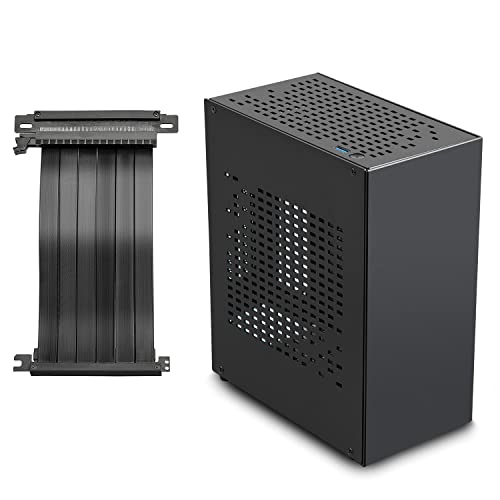


Top 3 picks at a glance
Decide These 3 Things First
To avoid costly compatibility errors, you must establish the boundaries of your build before looking at specific chassis designs. Make these three decisions first:
- Your Performance and Thermal Target: Are you building a modest home-office machine, a mid-range gaming console killer, or a rendering workstation? A 65-watt processor and a mid-range graphics card can easily live in a fanless, ultra-compact 5-liter case. However, if you are planning to drop in a 300-watt GPU and a high-end multi-core CPU, you will need a case that supports at least a 240mm or 280mm All-In-One (AIO) liquid cooler and has direct mesh ventilation.
- Motherboard Form Factor (Mini-ITX vs. Micro-ATX): True SFF cases are built around the Mini-ITX motherboard standard (170mm x 170mm). However, Mini-ITX motherboards carry a price premium. If you are on a tight budget, look for compact Micro-ATX cases (which are slightly larger, usually between 18 and 25 liters) that accept cheaper, full-featured Micro-ATX boards while still retaining a small desktop footprint.
- Footprint vs. Volume: SFF cases are measured in liters of volume, but how that volume is distributed dictates your desk space. A vertical “tower” style case takes up very little physical desk space (small footprint) but stands tall. A traditional “shoebox” style case has a larger footprint but fits easily on shelving units or under monitors.
1. Case Volume and Footprint Categories
Small Form Factor is generally defined as any computer chassis under 20 liters in total volume. Within this category, cases are divided into three distinct size brackets, each requiring different compromises:
- Ultra-Compact (Under 10 Liters): These cases (often between 4L and 9L) are designed for minimalist setups. They typically require low-profile CPU air coolers (under 47mm in height) and SFX power supplies. GPU compatibility is highly restricted; many only support dual-slot, mini-sized graphics cards under 200mm in length. Cable management in this tier is incredibly tight and often requires custom-length cables.
- Mid-SFF (10 to 15 Liters): This is the sweet spot for most gamers and creators. Cases in this range balance compact footprints with excellent hardware compatibility. They can typically accommodate standard-length triple-slot graphics cards (up to 320mm) and 240mm liquid cooling radiators.
- Large-SFF (15 to 20 Liters): Offering the most forgiving build experience, these enclosures are ideal for beginners. They often support standard ATX power supplies, massive CPU tower coolers up to 160mm tall, and thick triple-slot graphics cards up to 340mm in length. While they take up more physical space, their thermal performance is excellent, and they require far less patience to assemble.
2. Material Composition and Structural Rigidity
Because SFF cases are designed to be compact and sometimes portable, the materials used in their construction heavily impact their durability, thermal performance, and weight.
CNC-Milled Aluminum: Premium SFF cases often feature thick, anodized aluminum panels (ranging from 1.5mm to 3mm in thickness). Aluminum is incredibly lightweight, resists flexing, and acts as a minor heat sink. It gives the case a premium, high-end furniture feel, but it drives the retail price of the chassis well over $150.
SPCC Steel: Budget and mid-range cases typically utilize structural steel for the inner frame, sometimes paired with plastic or thin metal exterior panels. Steel is highly durable and cost-effective, but it adds significant weight. A steel SFF case can weigh between 3.5kg and 6kg empty, whereas an equivalent aluminum case might weigh under 2.5kg.
Panel Types (Mesh vs. Glass): Airflow is the lifeblood of small cases. Full mesh panels allow your intake fans and GPU to pull cool air directly from outside the chassis. Tempered glass panels look beautiful and showcase your components, but they trap heat. If you choose a case with glass panels, ensure there are dedicated, unobstructed ventilation channels along the top, bottom, and sides of the frame.
3. Internal Layout: Sandwich vs. Classic
How a case organizes its internal components determines what hardware will fit and how difficult the assembly process will be.
Classic Layout: In a classic layout, the motherboard is mounted directly to the side panel, and the graphics card plugs directly into the PCIe slot, extending horizontally or vertically. This layout is straightforward, requires no extra cables, and typically accommodates taller CPU air coolers (up to 160mm). However, it can limit the maximum length of your graphics card.
Sandwich Layout: This highly popular SFF layout places the motherboard on one side of a central structural spine and mounts the graphics card vertically on the opposite side, running parallel to the board. They connect via a flexible PCIe riser cable. The sandwich design allows for maximum GPU clearance in an incredibly thin chassis. Crucial Tip: If you choose a sandwich case, ensure the included PCIe riser cable matches your motherboard’s PCIe generation (e.g., PCIe 4.0 or PCIe 5.0). Running a PCIe 4.0 graphics card on a PCIe 3.0 riser cable without manually changing BIOS settings beforehand can result in a blank screen during boot.
4. Thermal Design and Cooling Compatibility
In a standard mid-tower case, pocketed hot air can dissipate into the large open volume of the chassis. In an SFF build, components are packed so closely that they radiate heat onto one another. Your cooling strategy must be planned with precision.
For air-cooled builds, check the manufacturer’s specified CPU cooler clearance. Low-profile coolers (like those ranging from 37mm to 47mm) are mandatory in ultra-compact cases but struggle to cool CPUs with a TDP (Thermal Design Power) rating over 125 watts. If you are running a high-end processor, look for a case that supports liquid cooling with room for a 240mm or 280mm radiator. Ensure the radiator thickness, combined with standard 25mm-thick fans, does not collide with your motherboard’s heatsinks or RAM modules.
5. Price Tiers and What You Get
The pricing structure of the SFF case market is highly dependent on manufacturing tolerances, material choices, and included accessories (like PCIe riser cables or carrying handles).
- Budget ($50 – $80): Cases in this tier are constructed primarily of steel and plastic. They are slightly larger (often 15L to 20L) to accommodate standard, less expensive components like ATX power supplies and Micro-ATX motherboards. They rarely include PCIe riser cables.
- Mid-Range ($80 – $130): Here you will find highly optimized designs featuring modular frames, better steel-to-aluminum ratios, and clever features like removable carrying handles or modular brackets. These cases offer a great balance of component compatibility and thermal performance.
- Premium ($130 – $250+): This tier features premium materials like CNC-machined aluminum, full-mesh side panels, and ultra-durable construction. They almost always include high-quality PCIe 4.0 or PCIe 5.0 riser cables (which alone retail for $30 to $60) and offer highly modular internal layouts that can be adjusted to favor either GPU thickness or CPU cooler height.
6. Assembly and Maintenance Complexity
Building in a small case requires a strict order of operations. Unlike large towers where you can install components in almost any order, SFF builds often require you to route power cables before mounting the motherboard, or install the liquid cooler radiator before popping in the graphics card.
Look for cases that offer high modularity—meaning panels, top brackets, and even the power supply cage can be completely unscrewed and removed. This “open frame” access during assembly saves hours of frustration. Additionally, check for dust filtration. Because SFF builds sit on desks where dust accumulates quickly, easily removable magnetic dust filters are essential for long-term maintenance.
Spec Checklist
When shopping for your enclosure, use this quick reference table to match your budget and hardware expectations with the appropriate case tier. If you are planning a cutting-edge build to last into 2026 and beyond, prioritizing PCIe 5.0 compatibility and ample GPU clearance is highly recommended.
| Feature / Spec | Budget Tier ($50 – $80) | Mid-Range Tier ($80 – $130) | Premium Tier ($130 – $250+) |
|---|---|---|---|
| Average Volume | 15L to 22L | 10L to 15L | 5L to 12L |
| Primary Materials | SPCC Steel, ABS Plastic | Steel frame, Aluminum panels | Anodized Aluminum, Tempered Glass |
| PSU Support | ATX or SFX (with adapter) | SFX / SFX-L | SFX Only |
| GPU Max Length | Up to 300mm | 310mm to 330mm | 320mm to 340mm (Sandwich layout) |
| Cooling Support | Air coolers up to 155mm | 240mm AIO / Low-profile air | 240mm/280mm AIO or Custom Loop |
| Included Riser | None (Direct motherboard mount) | Optional (PCIe 3.0 / 4.0) | Included (PCIe 4.0 / 5.0) |
Red Flags to Avoid
When comparing SFF cases online, keep an eye out for these design flaws that can ruin your building experience:
- Vague GPU Thickness Specs: A manufacturer might list a maximum GPU length of 320mm, but omit the maximum thickness. Modern high-end graphics cards can be 3.5 to 4 slots thick (over 75mm). If a case only supports strict dual-slot cards (40mm), your GPU will not fit, regardless of its length.
- No Cutouts for Cable Routing: Look closely at interior photos. If there are no routing holes or tie-down points between the power supply chamber and the motherboard tray, your cables will block your intake fans, causing major thermal issues.
- Proprietary Power Supply Requirements: Avoid cases that require proprietary external power bricks or non-standard internal power supplies unless you are building an ultra-low-power office machine. Stick to cases that support industry-standard SFX or SFX-L form factors.
- Sharp Interior Edges: Cheaply made budget cases often skip the deburring process during manufacturing. In the tight confines of an SFF build, sharp steel edges will slice through plastic power cables and your fingers alike.
FAQ
Do I need custom short cables for an SFF build?
While not strictly mandatory, custom-length, flexible silicone cables make SFF assembly vastly easier. Standard power supply cables are designed for large mid-towers; they are incredibly long and stiff, requiring you to bundle and shove excess cable mass into small voids, which severely chokes system airflow.
Can I run a high-end Intel i9 or AMD Ryzen 9 in a small case?
Yes, but you must choose a case that supports at least a 280mm AIO liquid cooler or has an open-air mesh design. High-end processors regularly pull over 200W of power under load, which will instantly thermal-throttle under the tiny low-profile air coolers forced by ultra-compact cases under 10 liters.
What is the difference between SFX and SFX-L power supplies?
SFX is the standard compact power supply size (125mm x 63.5mm x 100mm). SFX-L is slightly longer (125mm x 63.5mm x 130mm) to accommodate a larger, quieter 120mm fan. Many small cases do not have the extra 30mm of clearance required for SFX-L cables, so always verify PSU clearance specs before buying.
Are vertical SFF cases better than horizontal ones?
Vertical cases are generally better for saving physical desk space because their footprint is incredibly small. However, they can sometimes suffer from higher cable visibility, as the display and power cables exit from either the top or bottom of the tower, occasionally requiring right-angle adapters.









