
Small form factor cases are where PC builds live or die on airflow. Unlike a full tower, you don’t have spare cubic inches to absorb a bad decision — a case that’s 5 liters too small, or a fan mount that’s one size off, can turn a quiet, cool build into a throttling headache. The most common mistake buyers make is shopping by looks alone: a gorgeous walnut-and-aluminum chassis with zero mesh will cook a 200-watt GPU no matter how pretty it is on your desk.
The second mistake is assuming airflow advice for mid towers carries over. In a case under 25 liters, the GPU often accounts for 60–70% of the internal volume, fan positions are dictated by the motherboard tray, and a single 92mm exhaust can be the difference between a 68°C and an 84°C CPU under load. This guide walks through what actually matters, with the numbers you need before you click buy.
As an Amazon Associate we earn from qualifying purchases at no extra cost to you.
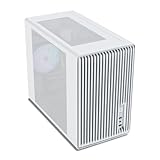


Our Top Picks
 ASUS Prime AP201 Tempered Glass Micro-ATX PC CaseTempered Glass|Black8.7 x 13.7 x 18.1 inches12.7 PoundsCheck on Amazon
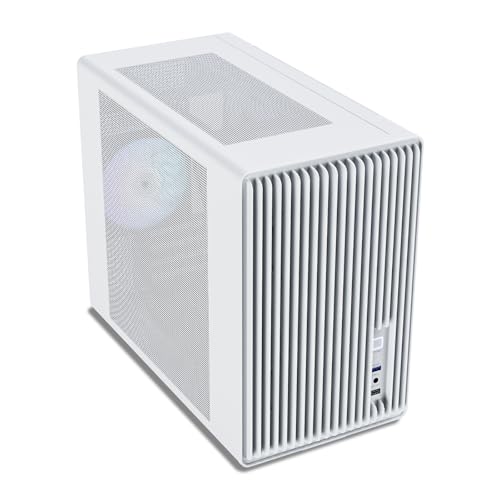


Top 3 picks at a glance
Decide These 3 Things First
1. Your components’ heat output. Add up your GPU’s rated board power and your CPU’s realistic sustained draw (not peak boost). A system pulling 350W total needs fundamentally different cooling than one pulling 650W. As a rough rule, aim for at least 1 cubic liter of case volume per 25W of sustained system heat if you’re using mesh panels, and closer to 1L per 15W with solid or glass panels.
2. Your size ceiling. Measure the physical space the case will live in — desk shelf, TV stand, under-monitor. Write down the maximum footprint in inches. Many buyers fall in love with a case and then discover it’s 2 inches too tall for their shelf. SFF cases range from roughly 8L sandwich-style designs to 35L micro-ATX “small” towers.
3. Your budget for the whole thermal problem. A $50 case with great mesh can outperform a $200 showcase case, but premium cases often include things that add real cost later: a PCIe 4.0 riser cable ($40–70 if bought separately), quality fans ($15–30 each), and SFX power supplies ($100–160). Decide whether you’re buying a case or a thermal solution.
Size and Volume: The Foundation of Everything
Case volume, measured in liters (height × width × depth in cm, divided by 1,000), is the single best predictor of thermal headroom. Small form factor generally means under 40L, and the market splits into rough tiers:
- Ultra-compact (8–14L): Mini-ITX only, typically requires SFX power supplies and low-profile coolers under 70mm tall. Expect GPU length limits of 305mm or less and 2–3 slot width maximum.
- Compact (15–25L): Still Mini-ITX, but with room for full-length GPUs (up to ~330mm) and 240mm radiators in some designs. This is the sweet spot for most high-performance small builds.
- Micro-ATX small towers (25–40L): Cases in the 30–40L range accept micro-ATX boards and often standard ATX power supplies, dramatically cutting total build cost while staying desk-friendly.
Check three dimensions before anything else: maximum GPU length, maximum CPU cooler height, and PSU clearance. A case like the Fractal Design Terra (~10.4L) supports GPUs up to 322mm but only with specific cooler height and PSU length combinations — SFF cases trade clearances against each other, so read the compatibility matrix, not just the headline numbers. If a listing doesn’t publish a compatibility chart, treat that as disqualifying.
Material and Panel Design: Where Air Comes From
Panels determine whether air enters the case at all. There are three common approaches:
- Fully mesh or perforated panels: Look for perforation coverage of at least 40–50% of the panel area with holes of 1.5–2mm. Fine mesh looks sleek but chokes flow if the open-area ratio drops below ~30%.
- Solid metal or wood panels: Attractive, quieter, and dust-resistant, but they force reliance on whichever edge vents exist. A walnut front panel like the one on the Fractal Terra’s higher-end variants is a deliberate trade — you’re accepting restricted intake in exchange for aesthetics and lower noise.
- Tempered glass: Worst for airflow where it covers fan mounts, best for showing off the build. Glass cases can work if the glass is only on one side and the front/top remain mesh.
On materials themselves: 0.8mm SPCC steel flexes and rattles; 1.0–1.2mm steel feels solid. Aluminum panels (typically 2–4mm thick) cut weight by 30–40% versus steel and dampen vibration, which is why premium SFF cases like the Terra use anodized aluminum. Wood fronts add warmth but check that the wood sits over ventilation cutouts rather than sealing them.
Construction Quality: Details That Predict Longevity
SFF cases take more handling stress than big towers because you’ll move them. Look for:
- Panel thickness: 0.8mm steel minimum for the frame; 1.0mm+ for panels you’ll grip frequently.
- Riser cable support: Sandwich and console-style layouts need a PCIe riser. A PCIe 3.0 riser will bottleneck a PCIe 4.0 GPU; bundled PCIe 4.0 risers (as on the Terra) are worth $40–70 of the price premium.
- Tool-less or captive fasteners: Thumbscrews or magnetic panels matter when you’re servicing a densely packed build quarterly.
- Cable routing channels: In a 15L case, a 20mm routing channel with tie points is the difference between clean airflow and a wire wall blocking your intake fan.
- Fit and finish tolerance: Panel gaps should be even; anything over 1mm of visible variance on aluminum panels suggests loose QC.
Cooling Layout and Real-World Performance
Ignore quoted fan counts and focus on placement. What matters in order:
- Intake area, not exhaust: Air needs somewhere to come from. A case with 2×140mm mesh front intakes will out-cool one with 3×120mm exhausts and a choked front.
- Fan size and static pressure: In SFF builds, 140mm fans move similar CFM to 120mm fans at 400–600 fewer RPM, meaning less noise. Thin 15mm fans are a last resort — they sacrifice roughly 30% of the airflow of a standard 25mm fan.
- Radiator support: If you run a 200W+ CPU, prioritize cases supporting 240mm or 280mm radiators with at least 45mm total thickness clearance (radiator plus fans). A 120mm-only mount will struggle above 150W sustained.
- Dust filtration: Removable mesh filters on intake panels. In a case you clean every 2–3 months, non-removable filters turn cleaning into a teardown.
For realistic expectations: a well-ventilated 20L mesh case with two 140mm intakes can hold GPU temperatures in the low-to-mid 70s°C under sustained gaming loads with a mid-range card. Heavily restricted showcase designs routinely run 10–15°C hotter on identical hardware. Rather than trusting either the manufacturer’s or a reviewer’s single test, look for whether the case gives you the fan flexibility to tune for your own components.
Budget options like the Vetroo M06 (~$50) or the ASUS Prime AP201 (~$80) achieve good airflow through straightforward mesh designs and sensible fan placement — proof that you don’t need exotic engineering, just unobstructed paths from intake to exhaust.
Price Tiers: What Each Dollar Buys You
- Budget ($30–70): Steel construction, tempered glass or basic mesh, 1–2 preinstalled fans (often 80–120mm), PCIe 3.0 risers at best. Examples in this tier include the Vetroo M06 and TGDGAMER slim micro-ATX. Expect adequate airflow if you choose mesh variants, but plan on adding $20–40 of fans.
- Mid-range ($70–130): Better steel gauge, USB-C front panels, PCIe 4.0 riser support, radiator mounts to 280mm, and more thoughtful ventilation. The ASUS Prime AP201 sits here.
- Premium ($130–250+): Aluminum panels, wood or premium finishes, bundled PCIe 4.0 riser cables, machined details, and refined layouts. The Fractal Terra at ~$200 is the archetype. You’re paying for materials and design, and for the included riser — the thermals can match a good mid-range case if the layout is mesh-forward.
The honest calculus: dollars spent on fans and a mesh-forward layout improve temperatures more reliably than dollars spent on panel finishes. If your total budget is $500 for the build, don’t put $200 into the case.
Warranty and Brand Support
Case warranties range from 1 year on budget brands to 5–10 years on established names (Fractal, for instance, backs many cases with extended or limited-lifetime coverage). For SFF specifically, warranty matters more than usual because riser cables and small fans are the first failure points, and replacement parts availability varies wildly. Before buying, check whether the manufacturer sells replacement fans, filters, and risers individually. A 2-year warranty from a brand with a parts store beats a 5-year warranty from a brand that ghosts your support ticket. Also verify the seller is an authorized retailer — gray-market cases often void warranty coverage.
Shipping and Assembly Considerations
SFF cases ship in compact boxes, but damage rates are higher than for full towers because aluminum panels dent easily. Check that the case ships with foam corner protection and that the retailer accepts returns on cosmetic damage — many budget listings are final-sale. On assembly: sandwich-style and ultra-compact cases typically take 2–4 hours for a first build due to tight clearances and cable routing, versus about an hour in a mid tower. If this is your first SFF build, a 25–40L micro-ATX case with a standard ATX power supply mount will save you both money (ATX PSUs run $40–80 versus $100–160 for SFX) and frustration.
Spec Checklist
| Spec | Budget ($30–70) | Mid-Range ($70–130) | Premium ($130–250+) |
|---|---|---|---|
| Volume | 28–40L | 18–35L | 10–25L |
| Steel/panel thickness | 0.8mm steel | 0.9–1.0mm steel | 2–4mm aluminum |
| Front panel | Basic mesh or solid | Fine mesh, ≥40% open area | Mesh options + premium solid finishes |
| Preinstalled fans | 1–2 (80–120mm) | 2–3 (120–140mm) | Varies; often 0–2 high-quality |
| Radiator support | 120mm, sometimes 240mm | 240–280mm | 240mm+ (layout dependent) |
| Riser cable | PCIe 3.0 or none | PCIe 4.0 supported | PCIe 4.0 included |
| GPU clearance | ~330mm | 330–365mm | 305–322mm (layout dependent) |
| Front I/O | USB-A, HD audio | USB-C + USB-A | USB-C (10–20Gbps) + USB-A |
| PSU standard | ATX or SFX | ATX or SFX | SFX/SFX-L |
| Dust filters | Top only, often fixed | Intake, removable | All intakes, removable magnetic |
| Warranty | 1–2 years | 2–3 years | 3 years to limited lifetime |
Red Flags
- No published compatibility chart. If the listing doesn’t state max GPU length, cooler height, and PSU clearance in millimeters, the manufacturer is hiding compromises.
- Glass over the front intake. A case whose only front panel is tempered glass has no real intake.
- “Supports 6 fans” but all 6 are exhaust or 80mm. Count usable intake positions with standard 120/140mm fans.
- PCIe 3.0 riser bundled with a PCIe 4.0-era design. You’ll pay to replace it and lose bandwidth on modern GPUs.
- Non-removable dust filters on the primary intake — cleaning requires a full teardown.
- Unbranded cases under $30 with “high airflow” claims. Thin steel, missing filters, and fans that whine above 1,500 RPM are the norm in this tier.
- Reviews that only praise the looks. If long-term owners don’t mention temperatures, that itself is information.
FAQ
Do smaller cases always run hotter?
Not necessarily — layout matters more than raw volume. A 20L mesh case with two 140mm front intakes can match or beat a poorly designed 40L tower with a solid glass front. What small volume removes is your margin for error: there’s less air mass to buffer heat spikes, so intake area and fan quality carry more weight.
Is it worth paying $200 for a premium SFF case?
It depends on what you value. If you build small regularly, the included PCIe 4.0 riser ($40–70 value), aluminum panels, and resale value soften the premium. If your goal is purely the lowest temperatures per dollar, a $50–80 mesh micro-ATX case with $30 of good fans will usually win. Pay the premium for materials and design, not for thermals alone.
How many fans do I actually need in a small form factor build?
For systems under 300W of sustained draw, two 120mm or 140mm intake fans plus natural exhaust (or one rear exhaust) is typically sufficient. Above 450W total system draw in a sub-25L case, plan on three fans or a 240mm radiator, and prioritize static-pressure-optimized fans on any radiator or restrictive mesh.
Should I buy a mesh case or a stylish solid-panel case going into 2026?
If your GPU draws over 200W — true of most current mid-range and higher cards — buy mesh, or a case offering both panel options so you can switch. Solid and wood-front designs are best reserved for builds under roughly 250W total sustained draw, home-theater PCs, or workloads where low noise matters more than peak performance. Many premium brands now sell alternate panels separately, which is the smartest way to hedge.









