An external SSD sits at an odd intersection: it is part backup device, part game library, part scratch disk for video edits. The buying question is not simply which drive is fastest, but which one will actually deliver its headline speed through the port you own, survive being tossed in a bag, and hold enough data that you are not shuffling files every week. A drive that is wonderful on a USB 3.2 Gen 2×2 port can feel ordinary on an older laptop.
This guide is for gamers expanding a console or handheld library, creators moving footage between a laptop and a desktop, and students who want a durable pocket drive. All eight drives below are judged from their listed specs only, covering capacity, interface, and the speed and durability claims, so use the checklist to match a drive to your ports before spending anything in 2026.
Our Top Picks

Top 3 picks at a glance
Quick Picks
As an Amazon Associate we earn from qualifying purchases at no extra cost to you.




| Product | Best for | Key spec from the title |
|---|---|---|
| SanDisk Extreme Portable 2TB | Rugged large-capacity storage | 1050MB/s, USB 3.2 Gen 2, IP65 |
| SanDisk Portable SSD 1TB | Everyday laptop and tablet use | Up to 1000MB/s reads, up to 2M drop |
| Samsung T7 2TB | Big libraries on common ports | USB 3.2 Gen 2, up to 1,050MB/s |
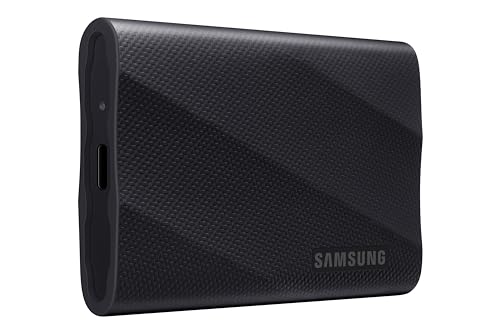
| Samsung T9 2TB | Fastest large-capacity transfers | USB 3.2 Gen 2×2, up to 2,000MB/s |
| Samsung T7 1TB | Mid-size general storage | USB 3.2 Gen 2, up to 1,050MB/s |
| Samsung T9 1TB | Fast transfers at mid capacity | USB 3.2 Gen 2×2, up to 2,000MB/s |
| SSK Portable SSD 500GB | Low-cost phone and PC carry drive | USB-C, A and C cables, OTG, up to 1050MB/s |
| SanDisk Extreme Portable 1TB (2000MB/s) | Rugged high-speed transfers | Up to 2000MB/s, IP65, up to 3M drop |
How to Choose
Match the interface to your port
The speed tiers split into two groups. Drives listing USB 3.2 Gen 2 top out near 1,000MB/s, while USB 3.2 Gen 2×2 models claim up to 2,000MB/s. The faster tier only delivers if your computer has a Gen 2×2 port, which is rare on laptops and older desktops. Plugged into a standard Gen 2 port, a 2,000MB/s drive falls back to the slower rate. If your machine lacks that port, the cheaper tier loses you almost nothing in everyday use.
Capacity thresholds for real workloads
Five hundred gigabytes handles documents, photos, and a few games. A 1TB drive is the sensible baseline for a modern game library, since single titles routinely exceed 100GB. Creators working with 4K footage should consider 2TB so projects do not need constant offloading. Remember that formatted capacity is slightly lower than the label.
Durability claims worth reading
Water and dust ratings such as IP65, and drop protection claims of two or three meters, matter if the drive travels in a backpack or gets used outdoors. A plain plastic or aluminum shell without a rating is fine for a desk. Treat drop numbers as manufacturer claims and not guarantees, and never rely on a single drive as your only backup.
What to ignore, and where cheaper drives cut corners
LED lights and color names do not change performance. Cheaper drives may sustain their peak speed for a shorter time, ship with a thinner warranty, or include only one cable type. Check that the cable supplied matches your port, because a USB-A to USB-C cable on a Gen 2×2 drive can limit transfer rates.
The 8 Best Options
SanDisk Extreme Portable 2TB
This 2TB drive lists up to 1050MB/s speeds, a USB-C connection over USB 3.2 Gen 2, IP65 water and dust resistance, and updated firmware. It is built for people who carry data in rough conditions, such as field photographers or travelers moving large libraries between sites. The updated-firmware note in the title suggests the maker has revised the drive since launch, which is a small point in its favor.
- Strength: IP65 resistance makes it better prepared for dust and splashes than an unrated shell.
- Strength: 2TB gives space for large game libraries or a full project archive.
- Trade-off: it sits at the premium tier, and Gen 2 speeds do not match the newer 2,000MB/s models.
Skip it if you only need a desk drive or want the fastest transfer ceiling.
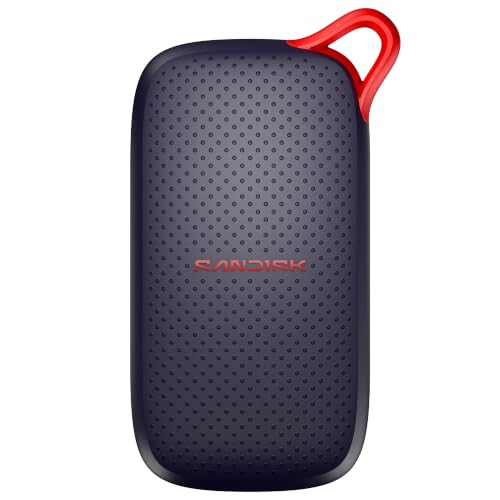
SanDisk Portable SSD 1TB
The listing promises up to 1000MB/s read speeds, compatibility with laptops and tablets, and survival of drops up to 2 meters. It reads as a straightforward everyday drive for students and office users who want a sturdy, simple storage upgrade. The new-model label implies a refresh of an older line, so it is worth confirming the interface on the box matches the port on your laptop or tablet before you buy.
- Strength: the 2M drop claim is useful for a bag-carried drive.
- Strength: 1TB is a practical middle capacity for documents plus a modest game library.
- Trade-off: the title states read speeds only and gives no water or dust rating.
Skip it if you need weather resistance or higher-tier speeds.
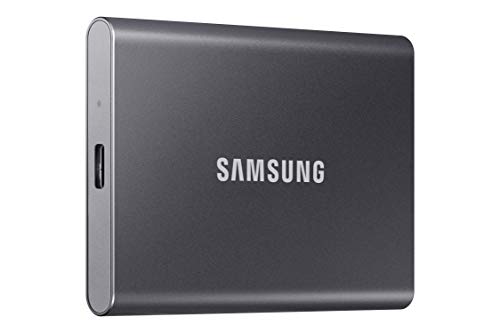
Samsung T7 2TB
The T7 in Titan Gray lists USB 3.2 Gen 2 with up to 1,050MB/s speeds, with positioning for gaming, students, and professionals. The 2TB size gives long-term headroom without moving to the faster interface tier. Because the interface is so widely supported, it is an easy drive to share between a desktop, a laptop, and a game console, which suits households with several devices.
- Strength: a widely compatible interface works on most modern laptops and consoles.
- Strength: 2TB handles a substantial library or a few projects at once.
- Trade-off: no durability rating is listed in the title, so protection is unspecified.
Skip it if you own a Gen 2×2 port and want the faster tier.
Samsung T9 2TB
The T9 steps up to USB 3.2 Gen 2×2 with speeds up to 2,000MB/s at 2TB. It targets gamers and professionals moving very large files, where doubled throughput cuts wait times for big transfers. Anyone copying raw footage or multi-gigabyte game installs several times a week will notice the difference more than someone who mostly stores documents.
- Strength: up to 2,000MB/s is roughly double the Gen 2 tier.
- Strength: 2TB capacity pairs well with such speed for large video files.
- Trade-off: it only reaches full speed on a matching Gen 2×2 port and sits at the premium tier.
Skip it if your computer lacks a Gen 2×2 or fast USB4 port.
Samsung T7 1TB
The 1TB T7 mirrors the larger model’s Gen 2 interface and 1,050MB/s claim in a smaller size. It suits a gamer who wants a plug-in library for a console or laptop, or a student backing up coursework and media. It is also the natural match for the 2TB sibling when you want identical behavior across two drives, one for home and one for travel.
- Strength: the same widely supported interface at a smaller capacity.
- Strength: a mid-range option that is easy to place in a bag.
- Trade-off: 1TB fills quickly with modern game installs.
Skip it if you will store 4K video or a large library.
Samsung T9 1TB
This model brings the Gen 2×2 interface and up to 2,000MB/s to a 1TB capacity. It makes sense for fast project work or game installs on a machine with a compatible port, without paying for 2TB. It is a sensible compromise when your machine has the fast port but your data needs are still moderate, such as one editing project at a time.
- Strength: the fast interface shortens large file copies.
- Strength: positioned for gaming, students, and professionals alike.
- Trade-off: it needs a matching Gen 2×2 port to reach the speed claim.
Skip it if you plug into older ports, where its speed advantage disappears.
SSK Portable SSD 500GB
The smallest drive in the group lists USB-C, up to 1050MB/s over USB 3.2 Gen 2, both A and C cables, SMART and TRIM support, an LED light, and OTG for phones. It fits someone moving documents and photos, not entire libraries. The included cable pair and phone support make it more flexible than many drives at this capacity, especially for people who switch between a phone, a laptop, and an older desktop.
- Strength: both cables ship in the box for desktop or laptop use.
- Strength: OTG support makes phone backups easy.
- Trade-off: 500GB is limiting for games or video.
Skip it if you need large capacity or a rugged rating.
SanDisk Extreme Portable 1TB (2000MB/s)
This newer SanDisk lists up to 2000MB/s transfers, IP65 water and dust resistance, and drop protection up to 3 meters. It combines speed and durability in a 1TB package for people who work outside the studio. A drive that survives a three-meter drop claim and shrugs off dust is useful on a job site, a camping trip, or a crowded commute where bags get dropped.
- Strength: fast and rugged in the same drive.
- Strength: the 3M drop claim is the highest listed here.
- Trade-off: full speed needs a compatible fast port, and it sits at the premium tier.
Skip it if your ports are older or you only need a basic backup disk.
Which One Fits Your Situation
You carry data outdoors or on location
The SanDisk Extreme Portable 1TB with 2000MB/s and 3M drop protection is the strongest fit. If you need more space, the SanDisk Extreme 2TB keeps the IP65 rating at Gen 2 speeds.
You game on a console or handheld with limited internal storage
The Samsung T7 1TB or 2TB covers most cases, since a Gen 2 interface works widely. Pick 2TB if you collect large titles.
You edit video and own a Gen 2×2 or USB4 port
The Samsung T9 2TB makes the speed advantage count. Confirm your port first, because the doubled throughput exists only on a matching connection.
You need a cheap pocket drive for phone and PC
The SSK Portable SSD 500GB covers documents and photos at a budget tier, and its OTG support helps with phones.
Common Mistakes
- Buying a 2,000MB/s drive for a computer that only has a Gen 2 or slower port.
- Choosing 500GB and running out of room after a few game installs.
- Assuming a drop rating makes the drive indestructible and skipping backups.
- Using a mismatched or low-grade cable that throttles transfers.
- Paying for a rugged rating when the drive will live on a desk.
Related guides
- How To Check Gpu Compatibility With Your Motherboard And Cpu
- High-Performance Gaming Desktop Specifications
- Desktop Computer For Working From Home
Frequently Asked Questions
Do I need the faster 2,000MB/s drives?
Only if your computer has a matching USB 3.2 Gen 2×2 port or a fast USB4 port. Otherwise a Gen 2 drive at around 1,000MB/s performs almost identically in practice.
How much capacity should I choose?
Choose 1TB for general use and games, 2TB for video work or a big library, and 500GB only for documents and light files. Formatted capacity is slightly below the label.
Are external SSDs good for gaming?
They work well for storing and launching many titles, especially on consoles and handhelds. Check the console’s supported interface before buying.
What does IP65 mean?
It indicates resistance to dust and low-pressure water jets under the conditions defined by the rating. It does not mean the drive can be submerged.