A 250GB drive is a narrow tool, and that is exactly why shoppers search for it. At this capacity you are not building a game library; you are buying a boot drive for an older desktop, a replacement for a failing laptop hard disk, or a cheap system partition that keeps Windows and a handful of apps snappy while bulk files live elsewhere. The decision is less about raw speed than about fit: interface, form factor, and whether the drive will actually leave your bench in one piece.
This guide is for upgraders working to a tight budget, people reviving a spare PC, and builders who want a small scratch or OS drive without paying for capacity they will never use. Every model below is judged only on what its listing states, so treat the numbers as the manufacturer’s claims and use the checklist further down to decide which claims matter for your machine in 2026.
Our Top Picks
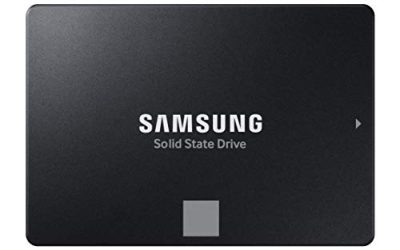
 Samsung 870 EVO SATA SSD 250GB 2.5” Internal0.25TB3.94 x 2.76 x 0.27 inches0.13 poundsCheck on Amazon


Top 3 picks at a glance
Quick Picks
As an Amazon Associate we earn from qualifying purchases at no extra cost to you.


| Product | Best for | Key spec from the title |
|---|---|---|
| PNY CS900 250GB | Simple HDD replacement | 2.5″ SATA III, up to 535/500MB/s read/write |
| Samsung 870 EVO 250GB (2.5″ listing) | Brand-name reliability seekers | 2.5″ SATA III internal SSD |
| Samsung 870 EVO 250GB (Magician listing) | Buyers who want drive-management software | Intelligent Turbo Write, Magician 6 Software |
| SSK Portable SSD 250GB | Carrying files between machines | USB-C, up to 1050MB/s, USB 3.2 Gen 2 |
| fanxiang S101 250GB | Lowest-effort budget upgrade | SATA III, read speed up to 500MB/s |
| Fikwot FS810 250GB | Squeezing the most from SATA | Up to 560MB/s, 3D NAND TLC |
| Ediloca 250GB | Rough-handling laptops | 520MB/s read, 3D TLC NAND, shock-resistant |
| WD Blue 3D NAND 250GB | Slim laptop bays | 2.5″/7mm, up to 550MB/s |
How to Choose
Interface and form factor come first
Seven of these eight drives are 2.5-inch SATA III units that talk over a 6Gb/s link, which tops out in the neighborhood of 550MB/s in real transfers. That ceiling is why the listed speeds cluster between 500 and 560MB/s. Before you buy, confirm your machine has a free SATA data port and a 2.5-inch bay or bracket. If the machine only offers M.2 slots, none of the internal drives here will plug in. Also confirm the power side: a desktop needs a spare SATA power lead from the supply, and a cheap splitter is often enough when the cables run short.
Thickness matters in laptops
Most thin notebooks accept 7mm drives, while some older models use 9.5mm trays with spacers. A drive that lists 7mm fits both with a shim, but a 9.5mm drive will not fit a 7mm bay. Check the listing for thickness; only the WD Blue spells it out here, so verify the others before assuming.
What the speed numbers really tell you
Sequential speeds around 500MB/s are all effectively saturated by the interface, so a 20MB/s gap between listings is invisible in daily use. What differs at 250GB is how a drive behaves when it fills up: small drives have less spare cache, and write speeds can sag once the cache is exhausted. Keep roughly 20 percent of the capacity free to avoid that cliff. Ignore peak-speed headlines and focus on brand support, warranty length, and firmware tools.
Where budget models cut corners
Lesser-known brands often use TLC flash without a DRAM cache, skip a software suite, and offer shorter support. That is acceptable for a secondary or media drive. For the boot drive in a machine you rely on, a known controller maker or a listing that mentions software and endurance features is a safer bet. External drives add a different trade: you gain portability but need a USB port that matches the speed claim. A USB 3.2 Gen 2 port is needed to approach the 1050MB/s figure; an older USB 3.0 port will cap the drive near 400MB/s, which is still faster than a hard disk but well short of the headline. Finally, remember that a 250GB capacity leaves little room for hibernation files and system restore points, so plan on trimming both if the drive will hold Windows alone.
The 8 Best Options
PNY CS900 250GB
The CS900 is a straightforward 2.5-inch SATA III drive aimed at everyday users upgrading from a spinning disk. The listing claims up to 535MB/s reads and 500MB/s writes, which is close to what the interface allows, and it names PC and laptop upgrades as its job.
- Strength: read and write figures are both stated, so you know what to expect when copying files.
- Strength: broad positioning for gamers, creators, and general users suggests a no-frills, compatible drive.
- Trade-off: the title offers no cache, endurance, or software details to separate it from cheaper rivals.
Skip it if you want a management app or a drive that spells out its flash type.
Samsung 870 EVO 250GB (2.5″ listing)
This listing sells the 870 EVO as a SATA SSD upgrade for desktop or laptop, with a pitch aimed at IT pros, creators, and everyday users. Samsung is among the best-known names in SATA storage, which counts for peace of mind on a boot drive.
- Strength: established brand makes support and firmware updates easier to find.
- Strength: standard 2.5-inch SATA form factor drops into nearly any bay.
- Trade-off: the title gives no speed figure, so you rely on the maker’s spec sheet.
Skip it if you want the lowest possible cost; brand-name drives usually sit in the mid-range tier.
Samsung 870 EVO 250GB (Magician listing)
The same 250GB 870 EVO capacity appears here, but the title adds Intelligent Turbo Write and Magician 6 software. Turbo Write is the feature that helps keep writes quick as the drive fills, and Magician handles firmware updates and health monitoring.
- Strength: software support gives you a way to monitor wear and update firmware.
- Strength: Turbo Write is aimed at keeping write speed steady during bursts.
- Trade-off: the title leaves out a speed figure and the form factor note is brief, so confirm the 2.5-inch size and the maker’s rated speeds before ordering.
Skip it if you only want a drive to disappear into a bay and never open a utility.
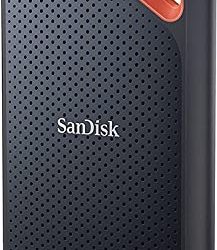
SSK Portable SSD 250GB
This is the one external drive in the group. It lists USB 3.2 Gen 2 with both USB-C and USB-A cables, speeds up to 1050MB/s, SMART and TRIM support, an LED light, and OTG for phones. It suits someone who wants a pocket drive, not a boot drive.
- Strength: both cable types mean it works with newer laptops and older desktops.
- Strength: the claimed speed is roughly double what a SATA drive can deliver.
- Trade-off: it is an external enclosure, so it cannot replace an internal drive without opening it.
Skip it if your goal is to speed up an internal system disk.
fanxiang S101 250GB
The S101 is a 2.5-inch SATA III drive that lists reads up to 500MB/s and pitches itself as an HDD upgrade for PCs and laptops. It sits at the plain, budget end of the field.
- Strength: the listing is clear about its purpose and standard interface.
- Strength: it suits a spare PC where cost matters more than software extras.
- Trade-off: only a read figure is given, and the speed claim is the lowest in the group.
Skip it if you plan to run heavy, sustained write workloads and want detailed endurance data.
Fikwot FS810 250GB
The FS810 states a 560MB/s ceiling, the highest SATA claim here, along with 3D NAND TLC flash and the SATA III 6Gb/s interface. For a cheap boot drive in a desktop or laptop, the spec list is complete and plain.
- Strength: the listing names the flash type, which many budget rivals omit.
- Strength: the speed claim reaches the practical limit of the interface.
- Trade-off: the brand is less established, so long-term support is harder to judge.
Skip it if brand-backed software and a long track record are priorities.
Ediloca 250GB
Ediloca lists 520MB/s reads, 3D TLC NAND, and shock resistance on a 2.5-inch SATA III drive. The shock-resistance note is a small but real selling point for a laptop that gets carried daily.
- Strength: solid-state design means no moving parts to fail when bumped.
- Strength: flash type is stated up front.
- Trade-off: no write speed or software is listed, so the spec sheet is thinner than some rivals.
Skip it if you need to verify write performance before buying.
WD Blue 3D NAND 250GB
The WD Blue pairs a familiar storage brand with SATA III, a 2.5-inch, 7mm profile, and speeds up to 550MB/s. The explicit 7mm height makes it the easiest choice for slim laptop bays.
- Strength: the thickness is stated, removing a common compatibility guess.
- Strength: strong brand recognition for a mid-range boot drive.
- Trade-off: it is a standard SATA drive, so it will not exceed 550MB/s however you use it.
Skip it if your motherboard has an open M.2 slot and you want faster NVMe storage.
Which One Fits Your Situation
Reviving an old laptop with a slow hard disk
Choose the WD Blue 250GB. Its stated 7mm height fits slim bays, and a SATA SSD swap is the biggest single speed improvement an aging laptop can get.
Building a cheap secondary desktop
The Fikwot FS810 250GB or fanxiang S101 250GB gives you a clean Windows install at the lowest tier. Pick the Fikwot if you want the flash type named on the listing.
Wanting software and a recognizable name
Go with the Samsung 870 EVO 250GB that lists Magician 6. Health monitoring and firmware updates matter more on a drive you will keep for years.
Moving files between a laptop and a phone or older PC
The SSK Portable SSD 250GB is the only external pick, with USB-C and USB-A cables included and OTG support. It is a carry drive, not an internal upgrade.
Common Mistakes
- Buying an internal SATA drive for a machine that only has M.2 slots, or the reverse.
- Choosing by peak MB/s when every SATA drive hits the same interface ceiling.
- Filling a 250GB drive to the brim, which slows writes and shortens useful life.
- Ignoring bay thickness in a slim laptop.
- Using an external drive as a boot drive and expecting internal-drive behavior.
Related guides
- How To Check Gpu Compatibility With Your Motherboard And Cpu
- High-Performance Gaming Desktop Specifications
- Prebuilt Gaming Pc Rtx 5070 Under 1500
Frequently Asked Questions
Is 250GB enough for Windows and a few games?
It is enough for Windows 11, core apps, and one or two smaller games. Modern AAA titles can take far more than that on their own, so most gamers use this size only for the operating system.
Will a SATA SSD work in my desktop?
Yes, if the board has a free SATA port and a power connector from the supply. A mounting bracket may be needed if the case only has 3.5-inch bays.
Do the two Samsung 870 EVO listings differ?
Both carry the 250GB size. One title highlights Intelligent Turbo Write and Magician 6 software, while the other emphasizes the 2.5-inch internal upgrade for desktop or laptop.
Can I use the SSK portable drive as my main drive?
It is built as an external drive, so it suits file transfers and backups. For the main operating system, an internal 2.5-inch SATA drive is the safer, simpler choice.