
Designing a modern home office or media room requires balancing processing performance with interior aesthetics. Whether you are broadcasting live gameplay, hosting video streams, or running a dedicated home media server, your computing hardware dictates both your workspace layout and your visual environment. Today’s home content creators face a distinct choice when selecting hardware: the hyper-compact, customizable barebones mini PC versus the traditional, plug-and-play prebuilt desktop tower.
A barebones mini PC offers a minimal footprint and near-silent operation, letting you curate internal storage and memory to fit your exact specifications. On the other hand, a full-sized prebuilt desktop provides uncompromised thermal headroom, dedicated graphics processing, and immediate out-of-the-box convenience. Understanding how each form factor impacts your room’s physical space, noise levels, power consumption, and streaming capabilities is essential to building a cohesive, functional home workstation.
As an Amazon Associate we earn from qualifying purchases at no extra cost to you.


Our Top Picks
Pros & cons
- Built-in 11.3 inch smart display shows live temps and usage
- 850W 80+ Gold PSU leaves headroom for upgrades
- Arrives fully assembled with Windows 11 Home installed
- Monitor must connect to the graphics card, not motherboard ports
- 360mm liquid cooler takes up significant case space


Top 3 picks at a glance
Quick Verdict
Choose a barebones mini PC if you prioritize a clutter-free desk, low power consumption, and quiet operation in a small room or apartment. It is ideal for creators who want to select their own RAM and storage, or those using lightweight encoding codecs and external capture hardware. Choose a prebuilt desktop if your streams rely on high-frame-rate 4K gameplay, heavy multi-canvas video rendering, or internal PCIe expansion cards. The prebuilt tower consumes significantly more physical space and energy, but delivers superior graphics performance and thermal stability for heavy workloads.
Side by Side
| Feature / Attribute | Barebones Mini PC | Prebuilt Desktop for Streaming |
|---|---|---|
| Usability & Setup | Requires manual installation of RAM, SSD, and OS. | Plug-and-play out of the box with pre-installed OS. |
| Durability & Thermals | Compact cooling fans; higher thermal density under load. | Large heatsinks, liquid cooling options, superior airflow. |
| Price Range | $200 – $500 (Base kit) + $120–$250 for RAM/Storage. | $850 – $2,200+ complete with all components included. |
| Maintenance Effort | Low dust accumulation; simple blow-out maintenance. | Requires regular internal dusting and cable management. |
| Space Needed | 0.5 to 5 Liters (~5″ x 5″ x 2″ to 8″ x 8″ x 4″). | 25 to 45 Liters (~8″ x 18″ x 18″ tower chassis). |
| Look & Aesthetic | Minimalist, hidden behind monitors or mounted under desks. | Prominent furniture piece; often features RGB lighting and glass panels. |
| Resale & Upgradability | Upgradable RAM/SSD; limited to external GPU expansions. | Fully modular; easily swap CPU, GPU, motherboard, and power supply. |
| Best For | Small apartments, living room media hubs, streamlined desks. | Dedicated gaming rooms, high-bitrate 4K live streaming. |
Where Barebones Mini Pc Wins
The primary advantage of a barebones mini PC lies in its architectural efficiency and spatial freedom. Occupying less than 5 liters of volume—and often weighing under 3 pounds—a mini PC can be VESA-mounted directly to the back of a monitor or mounted beneath a hardwood desk. This eliminates visual wire clutter, freeing up surface area for clean interior styling, audio interfaces, or lighting controls.
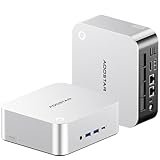
Barebones systems give you total control over critical component quality. Instead of accepting generic factory memory or entry-level drives, you can source high-speed DDR5 memory and ultra-fast PCIe NVMe storage tailored precisely to your video editing and streaming caches. Compact platforms like the ASRock DeskSlim X600 5L Mini PC Barebone allow builders to drop in desktop-class socketed processors while maintaining a micro footprint. Meanwhile, modern mini PCs like the AOOSTAR MACO AMD Ryzen 7 PRO 8845HS Mini PC provide high-speed USB4 and OCuLink connectivity, letting users connect an external graphics card (eGPU) only when extra rendering power is required.
Acoustically and thermally, mini PCs run significantly quieter during normal desktop tasks and ambient streaming. Drawing as little as 10 to 15 Watts at idle and topping out around 65 to 100 Watts under load, these units produce minimal ambient heat, keeping small home offices cooler during long broadcast sessions.
Where Prebuilt Desktop for Streaming Wins
While mini PCs excel at spatial efficiency, prebuilt desktop towers dominate in raw processing headroom and hardware video encoding. Streaming complex games while simultaneously encoding high-bitrate video feeds requires substantial graphics hardware. Prebuilt streaming desktops come equipped with full-sized, dedicated GPUs that feature specialized hardware encoders (such as NVENC or AV1), offloading processing strain from the CPU entirely.
Prebuilt systems eliminate configuration guesswork for buyers who prefer immediate productivity. Systems ranging from entry-level builds like the ZYNEEX Prebuilt Gaming Desktop PC up to enthusiast-grade rigs like the KOTIN Prebuilt Gaming PC RTX 5070 12GB arrive completely assembled, wired, and tested with Windows pre-installed. You simply plug in power, connect display cables, and launch your broadcasting software.
Thermal management in a full-sized mid-tower (occupying 25 to 45 liters of space) is inherently superior. Multiple 120mm or 140mm fans pull ambient air across components, maintaining lower internal temperatures during multi-hour streams. This thermal overhead prevents thermal throttling, ensuring smooth, drop-free frame rates. Furthermore, large desktop cases provide physical slots for internal PCIe capture cards, extra SATA storage drives, and multi-channel sound cards that mini PCs cannot accommodate internally.
Cost Over 5 Years
Evaluating total cost of ownership requires looking beyond the initial checkout price. A barebones mini PC carries an initial entry cost between $200 and $350 for the chassis, motherboard, and cooling system. Adding 32GB of DDR5 RAM ($100), a 1TB NVMe SSD ($70), and an operating system license ($100) brings the total system cost to roughly $470 to $620. Over a 5-year period, operating a 65W mini PC for 8 hours daily at an average power rate of around $0 per kWh results in approximately $150 in electricity costs.
A dedicated prebuilt streaming desktop commands a higher upfront investment, generally ranging from $850 for budget 1080p setups to $2,100+ for 4K streaming platforms. Power consumption for a full desktop system featuring a dedicated GPU averages 300 to 450 Watts during live streaming. Over 5 years of daily 8-hour use, electricity costs can total between $700 and $1,050.
However, the prebuilt tower offers longer modular viability. When graphics standards advance, you can replace the graphics card or power supply individually without throwing away the entire chassis or motherboard. Mini PCs without eGPU support may require complete replacement when higher encoding standards emerge, making their 5-year financial lifecycle comparable when hardware upgrades become necessary.
Which One for Your Home
Small Apartment or Studio
In a compact living space where your workstation double-functions as a dining table or living room sideboard, space efficiency is paramount. A barebones mini PC mounted behind your monitor maintains a pristine residential aesthetic. Its quiet operation ensures fans won’t disturb housemates or disrupt room ambiance during evening streams.
Family with Kids or Pets
Large desktop towers resting on the floor attract pet hair, dust bunnies, and accidental kicks from children. A mini PC elevated safely off the floor or secured behind a display shields sensitive components from hair and physical impacts. Alternatively, if choosing a prebuilt desktop, place the tower on an elevated, sturdy desk riser to keep dust filters clear and prevent tipping accidents.
Rental or Frequently Moved Space
If you relocate frequently or travel with your workspace setup, a barebones mini PC is effortlessly portable. Weighing under 3 pounds, the entire rig—along with power brick and cables—fits inside a standard backpack, turning any rental desk or hotel space into an instant streaming station.
Long-Term Home Office Setup
For dedicated home offices with custom cabinetry, integrated cable channels, and generous desk depth, a prebuilt desktop tower provides unmatched capability. The larger footprint allows for multi-monitor arrays, internal capture hardware, and uninterrupted thermal performance during professional 4K content creation.
FAQ
Can a barebones mini PC handle high-definition 4K streaming?
Yes, modern mini PCs equipped with integrated graphics (such as AMD Radeon 7000 or 8000 series graphics) feature hardware support for AV1, H.264, and HEVC video decoding and encoding. They can easily stream 4K video content or capture camera feeds. However, if you plan to play demanding 3D games and stream them simultaneously on the same system, an eGPU or a dedicated desktop PC is recommended.
What extra components do I need to buy for a barebones kit?
A barebones mini PC kit includes the outer case, motherboard, integrated processor, and power adapter. To complete the computer, you must separately purchase compatible RAM (typically SO-DIMM laptop-style memory or compact DDR5), a storage drive (M.2 NVMe SSD), and an operating system license.
Is a prebuilt desktop too loud for a bedroom media corner?
Not necessarily. While prebuilt desktops employ multiple cooling fans, larger 120mm or 140mm fans spin at lower RPMs than small mini PC fans to move the same volume of air. Under light usage, a well-ventilated mid-tower prebuilt can run virtually silent. Under maximum streaming load, however, GPU fan noise will become noticeable.
How does energy consumption compare over time?
As we look at home technology efficiency in 2026, mini PCs draw significantly less power—typically 15W idle to 85W under full load—compared to prebuilt gaming desktops that draw 300W to 600W under active streaming loads. Running a mini PC can save between $100 and $180 per year in electrical power depending on your local energy rates and daily usage hours.
Related guides
- Best Gaming PC for Fortnite: Eight Prebuilt Desktops Sorted by Refresh Rate Goal (2026)
- Best RX 9070 XT Prebuilt Gaming PCs: Seven Desktops and Three Cards Compared: 10 Compared (2026)
- CyberPowerPC vs iBUYPOWER Gaming PC: How the Two Brands Compare
- Best RX 9070 XT Prebuilt Gaming PC (2026): 5 Picks Compared









