
When you are designing a home office, a dedicated gaming nook, or a multi-purpose living room media center, the hardware you choose is more than just a list of specifications. It is a physical object that occupies space, generates heat, makes noise, and contributes to the visual flow of your room. For many homeowners and interior design enthusiasts, the standard computer tower is an eyesore. This has led to a growing debate: should you opt for a barebones PC kit or a prebuilt gaming PC?
The decision goes beyond raw processing power. It is about how much control you want over the physical footprint, the acoustic profile, and the aesthetic integration of the machine into your living space. A barebones kit offers a blank canvas, allowing you to choose ultra-quiet fans and compact cases that blend into Scandinavian-style shelving. A prebuilt gaming PC, on the other hand, offers immediate convenience, structured warranties, and a ready-to-run system that requires zero hours of assembly on your dining room table. Understanding how these two approaches impact your home, your budget, and your free time is key to making the right choice.
As an Amazon Associate we earn from qualifying purchases at no extra cost to you.

Our Top Picks
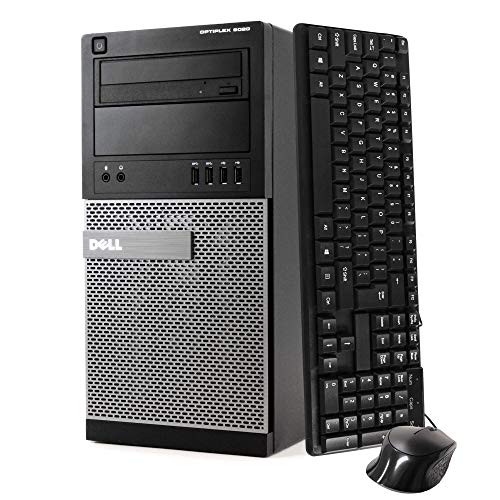 Dell Optiplex 9020 Mini Tower Desktop PC32G RAM | 1T16.4 x 6.9 x 14.2 inches16 PoundsCheck on Amazon

Quick Verdict
If you prioritize a custom, space-saving footprint, whisper-quiet acoustics, and the ability to handpick every component to match your home decor, choose a barebones PC kit. If you want a hassle-free, plug-and-play experience with a single unified warranty, and you do not mind a slightly larger physical footprint or standard factory aesthetics, a prebuilt gaming PC is the superior choice for your household.
Side by Side
To help you visualize how these two options compare across key home-focused metrics, we have broken down their core characteristics below:
| Feature | Barebones PC Kit | Prebuilt Gaming PC |
|---|---|---|
| Setup Comfort | Requires moderate hands-on assembly, thermal paste application, and component installation. | Pure plug-and-play; ready out of the box with an operating system pre-installed. |
| Durability & Quality | Highly durable; you select high-grade capacitors, power supplies, and quiet fans. | Varies by brand; some budget models use proprietary parts or plastic-heavy cases. |
| Price Range | $150 to $400 for the kit; total build costs range from $500 to $2,000+ once completed. | $300 for entry-level/renewed office conversions up to $3,000+ for high-end systems. |
| Maintenance | Easy to clean and dust; open architecture makes individual part replacement simple. | Can be difficult to service if proprietary cases or custom motherboard layouts are used. |
| Space Needed | Often ultra-compact (8 to 15 liters); fits easily on floating shelves or small desks. | Typically larger mid-towers (25 to 45 liters); requires dedicated desk or floor space. |
| Aesthetic Look | Highly customizable; can be tucked away discreetly or built into elegant, minimalist cases. | Often features aggressive styling, pre-configured RGB lighting, and prominent branding. |
| Resale Value | High resale value for individual, name-brand components sold separately. | Depreciates quickly as a single unit; proprietary parts are harder to resell. |
| Best For | DIYers, minimalist spaces, media centers, and custom-tailored home offices. | Families, busy professionals, and gamers who want instant setup without troubleshooting. |
Where Barebones PC Kit Wins
A barebones PC kit is the ultimate middle ground between building a computer entirely from scratch and buying a generic black box. The kit typically includes the chassis (case), the motherboard, and a pre-routed power supply unit (PSU). You are left to choose and install the processor (CPU), memory (RAM), storage (SSD), and sometimes a dedicated graphics card (GPU). This split structure offers several distinct advantages for your home environment.
First, barebones kits excel in spatial efficiency. Manufacturers design these kits to maximize every millimeter of internal space. For example, the ASRock DeskMeet X300 Mini PC Barebone Kit – AMD AM4 Socket, Supports Ryzen 5000/4000/3000G CPUs, DDR4-3200MHz, PCIe 3.0 x16, Dual M.2, USB 3.2 Gen2 Type-C, 500W PSU (No CPU/RAM/Storage Included), which retails around $200, packs a 500-watt power supply and a full motherboard into an incredibly compact 8-liter chassis. A chassis of this size measures roughly 6.6 inches wide, 8.6 inches high, and 14.7 inches deep. It can easily sit on a shallow bookshelf, hide behind a living room television, or sit on a small writing desk without dominating the workspace.
Second, barebones kits give you complete control over noise levels. In a shared home or a quiet bedroom, the high-pitched whine of a cheap computer fan can be incredibly distracting. When assembling a barebones kit, you can choose ultra-quiet, low-profile coolers and fluid-dynamic bearing fans. This allows you to build a machine that runs virtually silent under light loads, such as writing, streaming movies, or casual browsing.
Finally, there is the aesthetic advantage. Because you choose the final components, you are not forced to accept flashy, pulsing RGB lights or aggressive “gamer” branding that clashes with a calm, neutral interior design. You can build a sleek, matte-black or brushed-aluminum unit that looks more like high-end audio equipment than a gaming rig.
Where Prebuilt Gaming PC Wins
While the customization of a barebones kit is appealing, the absolute convenience of a prebuilt gaming PC cannot be overstated. When you purchase a prebuilt system, you are buying time, peace of mind, and immediate usability. For households with busy work schedules, children, or pets, spending a Saturday afternoon handling delicate silicon chips and troubleshooting BIOS screens is simply not practical.
A prebuilt PC arrives at your doorstep fully assembled, tested, and pre-loaded with an operating system. You do not have to worry about component compatibility, static electricity damage during assembly, or whether your power supply has the correct cable pins for your graphics card. Everything is guaranteed to work together from the second you press the power button.
For budget-conscious buyers or those looking for a secondary family computer, prebuilt systems can also offer incredible value through refurbished or renewed office models. Consider a system like the Dell Optiplex 9020 Mini Tower Desktop PC, Intel Core i7-4770-3.4 GHz, 32GB Ram, 1TB SSD Drive, WiFi, DVD-RW, Windows 11 Pro (Renewed), priced at around $310. While not a high-end dedicated gaming rig out of the box, a prebuilt tower like this offers a massive amount of storage, memory, and processing power for a fraction of the cost of building from scratch. It can serve as a dependable home workstation, a homework station for kids, or, with the addition of a budget low-profile graphics card, an entry-level gaming machine.
Additionally, prebuilt PCs come with a single, unified warranty. If a component fails in a barebones build, you must diagnose which part is broken, contact that specific manufacturer, and manage the return process yourself. With a prebuilt system, you deal with one customer support team, which often includes mail-in repair services or home-visit technicians depending on the service tier you purchase.
Cost Over 5 Years
When planning your home budget, looking only at the initial purchase price is a common mistake. A computer is an investment that incurs ongoing costs for electricity, maintenance, and eventual upgrades. Over a five-year lifecycle, the financial paths of these two options diverge significantly.
With a barebones PC kit, your upfront cost is divided. You might pay $200 for the barebones chassis, motherboard, and power supply, and another $400 to $600 for the CPU, RAM, storage, and graphics card. However, because you chose standard, modular parts, upgrading this system in three or four years is incredibly cost-effective. If your storage runs low or your processor starts to struggle with new software, you can spend $80 on a new M.2 SSD or $150 on a compatible processor upgrade. You reuse the case, the power supply, and the cooling system, keeping waste and costs low. Over five years, your total expenditure might look like $800 initially, plus $200 in mid-cycle upgrades, totaling $1,000.
With a prebuilt gaming PC, the initial cost is often higher or lower depending on whether you choose a premium gaming brand or a renewed system like the Dell Optiplex 9020 at around $310. However, prebuilts—especially compact or budget models—frequently use proprietary motherboards, non-standard power supplies, or restricted cases. If you want to upgrade a proprietary prebuilt in four years, you may find that a new graphics card will not physically fit in the case, or that the power supply lacks the necessary wattage and cannot be replaced with an aftermarket model. This often forces users to replace the entire computer rather than upgrading a single part. Over five years, a prebuilt user might spend $1,000 upfront, find themselves unable to upgrade, and end up purchasing an entirely new system for another $1,000, bringing the total five-year cost to $2,000.
Which One for Your Home
Every home has its own unique layout, routine, and aesthetic. Here is how to choose the right system based on your specific living situation.
Small Apartment or Studio
In a small apartment, space is your most valuable asset. You do not want a massive, humming tower taking up half of your desk or sitting on the floor gathering dust bunnies. For these tight spaces, a barebones PC kit is the clear winner. You can select an ultra-small form factor kit, such as the ASRock DeskMeet X300, and tuck it neatly onto a bookshelf or mount it behind a wall-mounted monitor. Because you can control the fan quality, you can ensure the machine runs silently, preventing annoying background hums in a one-room living space.
Family with Kids and Pets
If your home is filled with active children, curious cats, or shedding dogs, a prebuilt gaming PC is often the safer, more practical choice. Prebuilt towers are generally sturdier, heavier, and fully enclosed right out of the box, reducing the risk of a child knocking over a delicate mini-PC. Furthermore, building a barebones kit requires laying out tiny screws, thermal paste, and sensitive circuit boards on a kitchen table or desk—a process that is highly vulnerable to curious pets or kids. A prebuilt system can be unboxed, plugged in, and placed safely on a heavy floor stand or inside a ventilated cabinet in under ten minutes.
The Rental Home
If you rent your home, you likely face restrictions on drilling holes for cable management or modifying built-in desks. You also need to consider how easy your setup will be to pack up and move when your lease ends. A prebuilt PC is highly advantageous here. It comes in a single, sturdy box with custom-fitted foam packaging. When it is time to move, you simply slide the fully assembled tower back into its original box, wrap the power cable, and go. There are no loose internal components, custom-routed external power bricks, or delicate, custom-fitted parts to worry about shifting during transit.
The Long-Term Home
For those who own their home and plan to stay put for years, a barebones kit offers the best long-term integration. You can design your custom desk setup around the exact dimensions of your chosen chassis. You can route cables through custom-drilled grommets, mount the small chassis under your desk surface, and plan your component upgrades to keep the machine running fast and modern well into 2026 and beyond. A barebones kit allows your computer to evolve alongside your home office decor, ensuring you never have to replace a piece of furniture just because you bought a new computer.
FAQ
Are barebones PC kits hard to assemble for beginners?
No, they are much easier to assemble than building a PC entirely from scratch. Because the motherboard and power supply are already mounted and the internal cables are pre-routed by the manufacturer, you only need to install the CPU, RAM, storage drive, and graphics card. This typically requires only a screwdriver and about 30 to 60 minutes of careful work following the included step-by-step manual.
Do barebones PC kits come with an operating system?
Generally, no. Barebones kits do not include an operating system like Windows. You will need to purchase an operating system license separately and install it via a bootable USB drive once you have finished assembling the physical components. Prebuilt PCs, on the other hand, almost always come with Windows pre-installed and configured.
Can I use a barebones PC kit for high-end gaming?
Yes, absolutely. As long as the barebones chassis you choose has a PCIe x16 slot and enough physical clearance for a dedicated graphics card, you can build a powerful gaming rig. You will need to select a barebones kit with a sufficient power supply (such as 500W or higher) to support the power demands of modern gaming graphics cards.
Is it cheaper to buy a barebones kit or a prebuilt PC?
For entry-level performance, prebuilt PCs (especially renewed or refurbished models) are often cheaper upfront. However, for mid-range to high-end performance, a barebones kit can save you money because you do not pay the assembly and branding markups charged by prebuilt manufacturers. Additionally, barebones kits save you money in the long run due to their superior upgradability.
Related guides
- Best Gaming PC for Fortnite: Eight Prebuilt Desktops Sorted by Refresh Rate Goal (2026)
- Best RX 9070 XT Prebuilt Gaming PCs: Seven Desktops and Three Cards Compared: 10 Compared (2026)
- CyberPowerPC vs iBUYPOWER Gaming PC: How the Two Brands Compare
- Best RX 9070 XT Prebuilt Gaming PC (2026): 5 Picks Compared









