
You’ve picked your GPU, your CPU, your RAM speed. Then you hit the last line of the spec sheet: air cooling or liquid cooling. It’s the decision most buyers rush, and it shapes three things you’ll live with every single day — how loud your desk sounds during a late-night session, how much dust you’re pulling out of the case every few months, and what happens to the machine’s value when you eventually upgrade or sell.
The good news: neither choice is wrong. A well-matched tower air cooler keeps a Ryzen 7 or Intel i5 under control for years with almost zero maintenance. A sealed all-in-one liquid cooler gives you lower CPU temperatures, a cleaner interior, and more headroom if you plan to push a high-wattage chip. The bad news: the two options cost very different amounts over a typical five-year stretch, and one of them fails in ways the other simply can’t. Here’s how to choose before you spend a dollar.
As an Amazon Associate we earn from qualifying purchases at no extra cost to you.



Our Top Picks



Top 3 picks at a glance
Quick Verdict
Buy air cooling if: you game 10–20 hours a week, your CPU is a mid-range chip drawing under 150 watts, and you want a cooling setup you can install in 20 minutes and forget about for five years. Expect to spend $25–$100.
Buy liquid cooling if: you’re running a high-end CPU (think 170W+ parts like a Ryzen 9 or Core i7/i9), you want the quietest possible load noise, or the machine sits in a visible spot in your living space and the look matters. Expect to spend $90–$250 for a quality 240mm–360mm all-in-one, or buy a prebuilt that already includes it.
For roughly 7 out of 10 home gamers, a $40–$60 air cooler is the smarter buy. Liquid cooling earns its premium when you pair it with hardware that actually needs it.
Side by Side
| Factor | Air Cooling | Liquid Cooling (AIO) |
|---|---|---|
| Typical price range | $25–$100 | $90–$250 |
| Load noise | 35–45 dB under full load on good models | 28–38 dB under full load; pump adds a faint hum |
| Cooling capacity | Best under ~200W CPU heat output | Handles 250W+ chips; better sustained performance |
| Installation difficulty | Easy; 15–25 minutes, no experience needed | Moderate; 30–60 minutes, radiator mounting required |
| Maintenance | Dust the fins every 3–6 months | Dust the radiator; replace around the 5–6 year mark as coolant slowly permeates the pump |
| Failure mode | Fan dies → cheap $10–$15 swap, system still safe | Pump or seal fails → potential leak risk, full unit replacement $90+; systems usually shut down safely before damage |
| Space needed | Tall tower (typically 155–170mm) — check case clearance | Radiator needs 240–360mm of mounting space plus fan thickness |
| Weight | Heavy cooler (700g–1.4kg) stresses the motherboard during moves | Light on the board; radiator and hoses mount to the case |
| Lifespan | 7–10+ years; fans are replaceable | 5–7 years typical for the sealed unit |
| Best for | Budget builds, first PCs, low-maintenance homes | High-end CPUs, quiet rooms, showcase builds |
Where Air Cooling Wins
Long-term reliability. A tower cooler is a hunk of aluminum and copper with a fan bolted to it. There’s no pump, no fluid, no hoses. When the fan eventually wears out after 30,000–50,000 hours, you unscrew it and clip on a new one for about $12. Nothing else on the machine has a simpler repair path.
Value. A $45 air cooler cools a 65W–120W CPU just as effectively as a $150 liquid cooler. Every dollar you don’t spend on cooling is a dollar toward a better GPU, which is where actual gaming frames come from.
Fail-safe behavior. If an air cooler fails entirely, the CPU throttles or the system shuts down. No liquid anywhere near your graphics card. If you’ve ever carried a PC up a flight of stairs, you’ll also appreciate that the weight sits in your hands, not hanging off the motherboard socket.
Zero pump noise. Liquid coolers are quiet at the fans, but the pump produces a constant high-frequency hum that some people notice more than fan noise — especially at night in a small room.
Where Liquid Cooling for Gaming Pc Wins
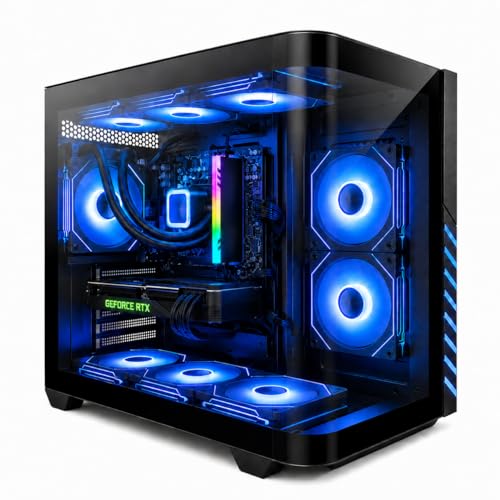
High-wattage CPUs. Modern flagship chips boost toward 200–250W under load. A 360mm AIO with three 120mm fans keeps those temperatures in a range where the CPU holds its maximum boost clocks, while most air towers will let it heat-soak and trim performance a few percent. If you’re buying a $1,200+ machine like a liquid-cooled Ryzen 7 8700F with an RTX 4060 Ti — the kind of prebuilt you’ll see listed around $1,150 — the AIO is part of why it sustains that performance in a compact case.
Acoustics under load. A large radiator surface lets fans spin slower for the same heat dissipation. In a 240mm-to-360mm setup, full-load noise typically drops into the low 30s dB — quiet enough to game in the same room as a sleeping partner or a napping toddler.
Case airflow and layout. Moving CPU heat out through a radiator mounted at the top or front of the case, rather than dumping it internally, drops your GPU’s intake temperature by a few degrees. In small-form-factor builds, that matters.
Aesthetics. There’s no way around it: a clean radiator, tubing, and a lit pump block photograph better and look more finished in an open-desk or living-room setup. If the PC is visible furniture in your home, liquid cooling buys presence.
Cost Over 5 Years
Air cooling: $40 cooler + one replacement fan at year 4 (~$12) + a $10 tube of thermal paste for a reapplication at year 3 = ~$62. Your time investment: one 10-minute dusting twice a year.
Liquid cooling: $140 AIO + one additional case fan to balance airflow (~$15) + a full replacement unit at year 5–6 as the sealed pump reaches end of life = ~$155 amortized, or plan on $155 again in year 6. Time investment: the same dusting, plus checking hose condition annually.
The hidden variable: resale. A five-year-old air-cooled PC sells on specs alone. A five-year-old liquid-cooled PC raises buyer questions — “has the pump ever leaked?” — that can shave money off a sale even when the unit is fine. If you sell your PCs every 3–4 years, air cooling’s simplicity works in your favor at the negotiating table.
One more cost angle: if you buy prebuilt, the decision is often made for you. A KOTIN Ryzen 7 9700X / RTX 5060 Ti machine at $1,499 typically ships with a capable tower air cooler keeping the price down, while the liquid-cooled 8700F/4060 Ti build at $1,158 prices the AIO in. Compare cooled versus cooled when shopping.
Which One for Your Home
Small Apartment or Studio
Space and noise are your constraints. A compact micro-ATX case with a low-profile air cooler (under 140mm tall) or a 240mm AIO both work — but the AIO frees interior space in tight cases and moves heat straight out. If your PC shares a room where you sleep, pair whichever you choose with a quiet room fan — something like a DREO tower fan running at 28dB on low can mask PC noise at night without adding much of its own. Lean liquid if the case is small; lean air if the budget is tight.
Family with Kids or Pets
Go air. Full stop. Curious hands, pet hair, and the occasional knocked-over desk are all better survived by a sealed fin stack than by hoses and fittings. Pet hair also clogs radiator fins faster than it clogs heatsinks, and a leaking loop near a carpeted floor is a scenario nobody wants. A $50 air cooler, dusted every few months, will outlast your kids’ interest in pressing the power button repeatedly.
Rental or Temporary Housing
Air cooling, again. You’ll be moving this machine in and out of cars and up stairs, and a 1.2kg tower cooler should be removed and repacked for the move anyway — which is easy. AIO hoses and radiator mounts don’t love repeated handling. Also worth noting for renters: many room-temperature complaints in small rentals are about air circulation, not your PC — a Levoit tower fan pushing air at 28ft/s across the room does more for comfort than any CPU cooler swap ever will.
Long-Term Home, Dedicated Gaming Space
This is liquid cooling’s home turf. If the machine stays put for 5+ years, sits in a room you’ve set up deliberately, and you’re running a 170W+ CPU, a 280mm or 360mm AIO delivers the quietest, most consistent performance and the best-looking build. Budget for replacement around year 6, or choose air cooling if you’d rather never think about it again — that’s a completely legitimate answer.
FAQ
Do liquid coolers leak?
Modern sealed all-in-one units leak very rarely — manufacturers rate them for 5–7 years and design them to fail by pump wear, not seal rupture. The realistic risk over the unit’s life is slow coolant permeation through the tubing, which shows up as gradually worsening temperatures, not a puddle. Still, a leak is a category of failure air cooling doesn’t have, and that matters to some buyers more than any benchmark.
Is liquid cooling worth it for a mid-range gaming PC?
Usually not. A Ryzen 5 or Core i5 drawing 65–120W is fully handled by a $35–$60 tower cooler with no meaningful performance difference. Put the $100 you saved toward a GPU tier up — that’s worth real frames per second. Liquid cooling pays off starting around the 150–170W CPU class.
How often should I clean my PC’s cooling system?
Every 3–6 months, depending on pets and carpet. Use compressed air on heatsink fins or radiator fins with the fans held still so they don’t over-spin. Wipe intake dust filters monthly. Five minutes of maintenance preserves both cooling performance and component lifespan.
Does better cooling make games run faster?
Indirectly, yes — and modestly. CPUs and GPUs throttle when hot, so keeping temperatures down lets them hold boost clocks longer. On a well-cooled mid-range system, the difference versus a stock cooler is typically a few percent in sustained performance. The bigger wins are lower noise, longer component life, and steadier frame pacing. For 2026’s high-wattage chips, though, strong cooling is less an upgrade and more a requirement.
Related guides
- Best Gaming PC for Fortnite: Eight Prebuilt Desktops Sorted by Refresh Rate Goal (2026)
- Best RX 9070 XT Prebuilt Gaming PCs: Seven Desktops and Three Cards Compared: 10 Compared (2026)
- CyberPowerPC vs iBUYPOWER Gaming PC: How the Two Brands Compare
- Best RX 9070 XT Prebuilt Gaming PC (2026): 5 Picks Compared









