
The modern home office is no longer just a place for spreadsheets and video calls; it has evolved into a multi-functional sanctuary where work, creative projects, and high-performance gaming converge. When planning to integrate a high-powered computer into your living space, you face a fundamental decision: a pc building kit vs preassembled gaming desktop. This choice is about far more than just frames per second or processing power. It directly affects your physical space, your interior aesthetic, your free weekend hours, and your long-term household budget.
Do you want to turn your dining room table into a temporary workshop, sorting through thermal paste, power cables, and delicate silicon chips while using a specialized tool like the STREBITO Precision Screwdriver Set 64-piece with Torx, Triwing, Gamebit (around $9)? Or do you prefer a seamless, plug-and-play experience where a sleek, fully engineered machine like the Alienware Aurora Gaming Desktop, RTX 5070, Intel Core Ultra 7 265F ($1999.99) arrives at your doorstep, ready to slide onto your desk and boot up in under five minutes? Choosing the right path requires looking at how each option fits into your daily domestic life.
As an Amazon Associate we earn from qualifying purchases at no extra cost to you.

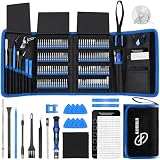


Our Top Picks
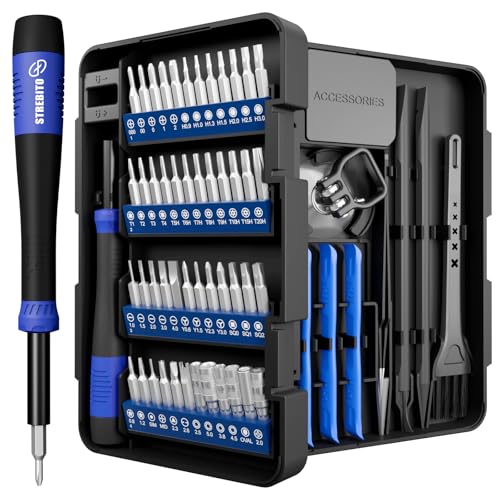 STREBITO Precision Screwdriver Set 64-piece with Torx64 in 17.87 x 6.3 x 0.74 Inches0.73 PoundsCheck on Amazon
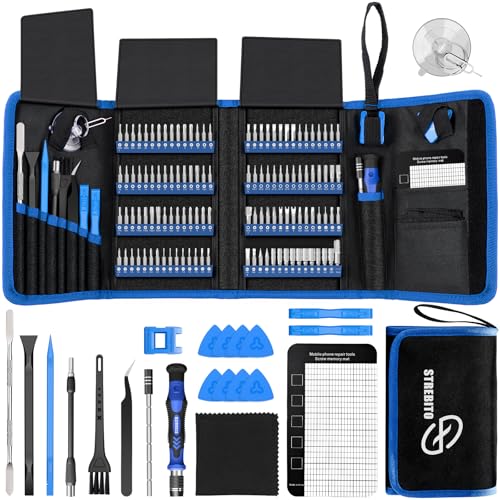 STREBITO Electronics Precision Screwdriver Sets 142-Piece with 1201428.66 x 5.51 x 1.57 Inches1.8 PoundsCheck on Amazon


Top 3 picks at a glance
Quick Verdict
If you prioritize your time, want a single unified warranty, and prefer an instant aesthetic fit for your home without any technical troubleshooting, a preassembled gaming desktop is your best option. However, if you want maximum value for your money, enjoy hands-on projects, and want a machine tailored to your exact desk dimensions and noise tolerance, a PC building kit (or sourcing your own matching parts) is the superior choice for your home.
Side by Side
To help you visualize how these two approaches compare across key household categories, here is a direct breakdown of what to expect from each option:
| Feature | PC Building Kit | Preassembled Gaming Desktop |
|---|---|---|
| Setup Time | 3 to 8 hours (assembly + software installation) | 10 to 20 minutes (plug-and-play) |
| Tool Requirement | Requires precision tools (screwdrivers, anti-static bands) | None (or a simple unboxing knife) |
| Customization Depth | Infinite (choose every fan, cable color, and case size) | Limited to pre-configured options from the builder |
| Hardware Warranty | Individual warranties per component (3 to 10 years) | Single system-wide warranty (usually 1 to 2 years) |
| Home Space Footprint | Can be optimized down to ultra-compact Mini-ITX sizes | Typically standard mid-to-large tower sizes |
| Average Weight | Variable (12 to 30 lbs depending on case choice) | Typically heavier (25 to 45 lbs due to metal/glass builds) |
| Noise Level Control | Excellent (user can select ultra-quiet 140mm fans) | Variable (some prebuilts use loud, proprietary fans) |
| Price Range | $600 to $3,000+ (maximum value per dollar spent) | $800 to $4,000+ (includes assembly and markup fees) |
| Long-term Upgradability | High (standardized parts are easily swapped out) | Moderate to Low (some brands use proprietary parts) |
| Best For | DIY enthusiasts, tinkerers, and custom space designs | Busy professionals, families, and plug-and-play users |
Where Pc Building Kit Wins
The primary advantage of a PC building kit or custom assembly is total control over your environment. When you purchase individual components, you can design a computer that respects the physical constraints of your home. For instance, if you have a minimalist desk with a shallow depth of 24 inches, you can select an ultra-compact Mini-ITX case that takes up a mere 12 by 7 inches of desk space. Preassembled options rarely offer this level of spatial optimization.
Furthermore, building your own PC allows you to control the acoustic footprint of the machine. Shared living spaces, studio apartments, and quiet home offices demand silent operation. By choosing your own high-efficiency 140mm fans and a quiet CPU cooler, you can keep your system’s noise level below 30 decibels under load—virtually silent to the human ear.
Building a kit also equips you with valuable technical skills and a collection of versatile home tools. Preparing for a build with a comprehensive kit like the STREBITO Electronics Precision Screwdriver Sets 142-Piece with 120 Bits (around $27) ensures you have every specialty bit needed not just for your computer, but for repairing smartphones, game consoles, and household smart devices. When a component eventually fails or becomes outdated, you will have the confidence and the tools to swap it out yourself, saving you expensive trips to local repair shops.
Where Preassembled Gaming Desktop Wins
The greatest asset of a preassembled gaming desktop is convenience and peace of mind. A prebuilt computer eliminates the anxiety of handling fragile, expensive silicon. There is no risk of bending delicate CPU pins, dropping a heavy glass panel onto a hardwood floor, or experiencing the dreaded “black screen” on your first boot attempt. Systems like the KOTIN Gaming PC Desktop, Ryzen 7 8700F, RTX 5060 Ti 8GB, 16GB DDR5, 1TB SSD ($1299.99) arrive fully assembled, thoroughly tested for stability, and pre-loaded with operating system drivers.
For busy households, time is a premium luxury. Building a PC from a kit requires clearing off a large workspace, organizing dozens of tiny screws, routing stiff power cables behind a metal chassis, and spending hours downloading software updates. A preassembled desktop turns a half-day labor project into a simple unboxing experience.
Additionally, prebuilt machines offer a single point of contact for customer support. If your preassembled desktop stops working, you deal with one manufacturer warranty. If a custom-built PC fails to boot, you must diagnose which specific component is at fault—be it the RAM, the motherboard, or the power supply—and coordinate individual return merchandise authorizations (RMAs) with different manufacturers, a process that can leave your home office down for weeks.
Cost Over 5 Years
To truly understand the financial impact of your choice, you must look beyond the initial checkout screen and calculate the total cost of ownership over a five-year lifecycle.
- Year 1 (Initial Purchase): A preassembled desktop carries an assembly premium, retail markup, and shipping costs for a heavy, oversized box. You will pay roughly $150 to $300 more for a preassembled system than you would for a custom kit of identical performance. However, the kit requires you to buy basic building tools if you do not already own them.
- Years 2 to 3 (Maintenance and Power): Both systems will consume similar amounts of electricity, but a custom build often utilizes more efficient, name-brand power supplies (such as 80-Plus Gold or Platinum units). Over three years, a highly efficient power supply can save you $30 to $50 on your home electric bill compared to a cheap, unrated power supply often found in budget prebuilts.
- Years 4 to 5 (Upgrades and Longevity): This is where the financial paths diverge. As software demands grow, your system will need upgrades. With a custom-built kit, you can easily swap out an aging graphics card or add a larger solid-state drive for a few hundred dollars. Many prebuilt manufacturers use proprietary motherboards, non-standard power connectors, and restricted chassis dimensions. Upgrading these systems often requires replacing the entire computer, turning a simple component upgrade into a major $1,000+ replacement cost.
Looking ahead to the hardware standards of 2026 and beyond, choosing standardized, highly compatible parts today ensures your home computer can be kept running at peak performance for a decade with small, cost-effective incremental upgrades.
Which One for Your Home
Every living situation has its own physical constraints, noise tolerances, and lifestyle patterns. Here is how to choose the right path for your specific home environment.
Small Apartment
In a small apartment or studio, space is your most valuable asset. A massive, heavy desktop tower will overwhelm a compact writing desk or dining table corner. If you live in tight quarters, a **PC building kit** is highly advantageous because it allows you to choose an ultra-compact Small Form Factor (SFF) case. These tiny cases can sit discreetly on a bookshelf or slip under a monitor riser, keeping your limited desk space clear for daily tasks.
Family with Kids and Pets
A home with energetic children and shedding pets requires a system built for durability and safety. In this environment, a **preassembled gaming desktop** is often the safer bet. Prebuilt cases are designed to be sturdy, fully sealed units with robust, tamper-resistant glass or metal side panels. They also arrive with professional cable management tucked neatly inside the chassis. This keeps loose wires away from curious hands and prevents pet dander from easily entering the system’s sensitive internal electronics.
Rental Home
If you rent your home, you likely face occasional moves. Moving a high-end desktop computer is always a delicate task. A **PC building kit** is ideal for renters because you can select a lightweight, durable aluminum chassis without heavy liquid cooling loops that could leak during a move. Because you built the system yourself, you will also know exactly how to pack, secure, and transport the internal components safely to your next apartment.
Long-Term Home
For those settled in a long-term home with a dedicated home office or gaming room, a **PC building kit** offers the ultimate integration. You can meticulously match the color scheme of your computer’s case, internal cabling, and RGB lighting to your home’s interior decor, desk wood tone, and wall paint. You can also design a custom desk-grommet system to route cables invisibly through your furniture, creating a clean, permanent workstation that enhances the room’s visual appeal.
FAQ
Is it cheaper to buy a PC building kit or a preassembled desktop?
Generally, a PC building kit is cheaper because you avoid the labor markups, retail margins, and proprietary software fees associated with prebuilt systems. Sourcing your own parts allows you to allocate your budget exactly where you want it, such as investing in a quieter cooling system or a faster storage drive.
How much physical space do I need to assemble a PC kit at home?
You need a clean, flat, non-carpeted surface of at least 4 by 3 feet—such as a clean dining room table or a large kitchen island. This gives you enough space to lay down your computer case, unbox your components safely, and organize your screws and tools without losing them.
What tools are absolutely necessary to build a PC kit?
At a minimum, you will need a magnetic Phillips #2 screwdriver to secure the motherboard and power supply, and a smaller precision screwdriver for tiny M.2 solid-state drive screws. Having a dedicated electronics repair set ensures you have the exact sizes needed to prevent stripping delicate metal threads.
What happens if a component in my custom PC kit breaks?
If a component fails in a custom-built PC, you must identify which specific part is broken and return it directly to that individual manufacturer under its specific warranty. While this requires more diagnostic work on your part, individual components often carry much longer warranties (3 to 10 years) than the standard 1-year warranty offered on most preassembled desktops.
Related guides
- Best Gaming PC for Fortnite: Eight Prebuilt Desktops Sorted by Refresh Rate Goal (2026)
- Best RX 9070 XT Prebuilt Gaming PCs: Seven Desktops and Three Cards Compared: 10 Compared (2026)
- CyberPowerPC vs iBUYPOWER Gaming PC: How the Two Brands Compare
- Best RX 9070 XT Prebuilt Gaming PC (2026): 5 Picks Compared









