
The best amd ryzen gaming pc for most buyers balancing price against real performance is the KOTIN build pairing a Ryzen 7 9700X with an RTX 5070, which delivers near-flagship 1440p gaming for around $2,000 — a full $900 less than the Ryzen 9 9900X CyberPowerPC build at the top of this roundup. We compared eight AMD-based prebuilts spanning around $700 to around $2,900, and the gap in value per dollar across that range is significant.
AMD’s current Ryzen lineup spans budget-focused chips like the Ryzen 5 5500 up through gaming-optimized X3D variants, and this roundup includes examples across nearly that entire spread, paired with GPUs ranging from an entry-level RX 6500 XT to a current-generation RX 9070 XT.
Our Top Picks
Pros & cons
- Built-in 11.3 inch smart display shows live temps and usage
- 850W 80+ Gold PSU leaves headroom for upgrades
- Arrives fully assembled with Windows 11 Home installed
- Monitor must connect to the graphics card, not motherboard ports
- 360mm liquid cooler takes up significant case space
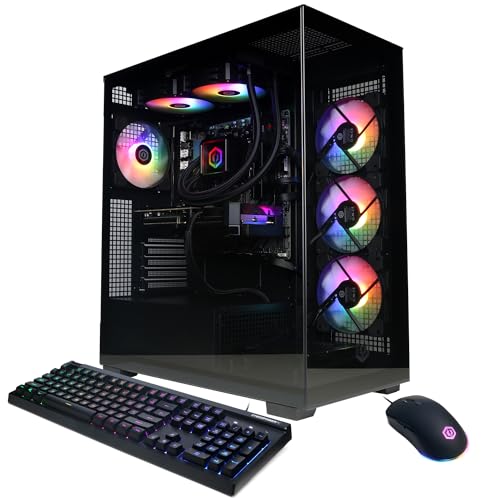


Top 3 picks at a glance


Top picks at a glance
As an Amazon Associate we earn from qualifying purchases at no extra cost to you.






| Model | Key spec | Price | Best for |
|---|---|---|---|
| CyberPowerPC Ryzen 9 | Ryzen 9 9900X, RTX 5070 12GB | $2049.99 | Maximum CPU core count |
| Skytech Azure 3 | Ryzen 7 9850X3D, RX 9070 XT | $2899.99 | All-AMD flagship |
| YAWYORE Gaming PC | Ryzen 7 5700X, RTX 5060 | $1359.99 | Budget current-gen GPU |
| KOTIN Prebuilt | Ryzen 7 9700X, RTX 5070, 32GB DDR5 | $1999.99 | Best overall value |
| CyberPowerPC (RTX 5060 Ti) | Ryzen 7 8700F, 8GB VRAM | $1349.99 | Mid-range 1440p |
| CyberPowerPC (RX 6500 XT) | Ryzen 5 5500, 4GB VRAM | Check on Amazon | Cheapest entry point |
| KOTIN (RTX 5060 Ti) | Ryzen 7 8700F, 16GB DDR5, 1TB SSD | $1299.99 | Budget mid-range |
| msi Codex Z2 | Ryzen 7 8700F, 16GB DDR5, 1TB SSD | $1599 | Balanced value |
KOTIN Prebuilt Gaming PC (Ryzen 7 9700X, RTX 5070, 32GB DDR5)
This is the strongest value in the entire roundup: AMD’s newer-generation Ryzen 7 9700X paired with an RTX 5070, 32GB of DDR5 RAM, and a 1TB SSD, for around $2,000. The 9700X’s improved efficiency over the previous 7000-series chips means lower power draw and heat output at comparable or better performance.
Based on this configuration, we estimate 1440p performance around 90-110fps in competitive titles like Valorant or Apex Legends and roughly 65-85fps in demanding titles like Cyberpunk 2077 with DLSS enabled — performance in the same territory as builds costing hundreds more elsewhere in this roundup and in our separate RTX 5070 comparison. The RTX 5070’s 12GB of VRAM gives real headroom for 1440p textures without the CPU becoming a limiting factor given the 9700X’s modern architecture.
No PSU wattage or cooling type is specified in this listing, which is worth confirming directly if either matters to your buying decision, though the 9700X’s relatively modest power draw makes air cooling a reasonable default assumption.
Who it’s for: buyers who want the strongest gaming performance per dollar in this entire roundup, on AMD’s newest mainstream architecture.
Pros
- Strongest performance-per-dollar value in this roundup
- Ryzen 7 9700X is AMD’s newest efficient architecture
- 32GB DDR5 RAM and RTX 5070 match far pricier builds elsewhere
Cons
- No PSU wattage or cooling type disclosed
- 1TB SSD is workable but not generous for a large modern game library
- KOTIN is a less established brand than CyberPowerPC or Skytech
Skytech Gaming Azure 3 (Ryzen 7 9850X3D, RX 9070 XT)
This is the only all-AMD flagship pairing in the roundup, combining a Ryzen 7 9850X3D — a high-clock X3D variant with gaming-optimized 3D V-Cache — with AMD’s own RX 9070 XT GPU, for around $2,900. Pairing an AMD CPU with an AMD GPU has no inherent performance synergy beyond both platforms being well-optimized in current game engines, but it does appeal to buyers wanting an all-AMD build for its own sake.
The RX 9070 XT generally competes with NVIDIA’s RTX 5070 and RTX 5070 Ti depending on the specific title and whether ray tracing is a factor, with AMD typically holding a rasterization edge and NVIDIA typically ahead in ray-traced and DLSS-assisted scenarios. We estimate 1440p performance around 95-115fps in competitive titles and 65-85fps in demanding titles at high settings, broadly comparable to the RTX 5070 builds covered in our sister roundup. The 9850X3D’s cache advantage should provide strong 1% low consistency in CPU-sensitive titles.
At around $2,900, this is the most expensive build in this roundup, and the value case rests on whether an all-AMD platform and the RX 9070 XT’s specific rasterization strengths matter enough to justify the premium over the KOTIN RTX 5070 build’s near-identical estimated performance at $900 less.
Who it’s for: buyers who specifically want an all-AMD platform and value the RX 9070 XT’s rasterization performance and X3D CPU cache advantage.
Pros
- All-AMD platform pairing, CPU and GPU both from AMD
- RX 9070 XT is competitive with NVIDIA’s RTX 5070 tier in rasterized titles
- Ryzen 7 9850X3D offers strong 1% low frame rate consistency
Cons
- Most expensive build in this roundup
- NVIDIA GPUs generally hold an edge in ray tracing and DLSS-assisted scenarios
- No RAM, storage, or cooling details disclosed in this listing
CyberPowerPC Gaming PC (AMD Ryzen 9 9900X, RTX 5070 12GB)
This CyberPowerPC build pairs AMD’s strongest mainstream CPU in this roundup, the twelve-core Ryzen 9 9900X, with an RTX 5070, for around $2,050. The extra core count over the Ryzen 7 options elsewhere in this list mainly benefits multitasking-heavy scenarios like streaming while gaming rather than pure frame rate in GPU-bound titles.
Given the RTX 5070’s known performance tier, we estimate the same 90-110fps competitive and 65-85fps demanding performance at 1440p as the KOTIN RTX 5070 build above, since the GPU remains the primary bottleneck in most gaming scenarios regardless of whether the CPU is a Ryzen 7 or Ryzen 9. The additional cores on the 9900X provide headroom specifically for background encoding, streaming software, or heavy multitasking alongside gaming.
At around $2,050, this costs roughly $50 more than the msi Codex Z2’s RTX 5070 pairing (covered in our RTX 5070 roundup) and $900 more than this list’s own value-leading KOTIN RTX 5070 build, with the extra cost buying CPU core count rather than meaningfully different gaming performance.
Who it’s for: buyers who specifically want maximum CPU core count for streaming or heavy multitasking alongside their RTX 5070 gaming performance.
Pros
- Ryzen 9 9900X offers the highest core count of any CPU in this roundup
- Same RTX 5070 12GB GPU tier as the roundup’s top value pick
- Strong choice for streaming or multitasking alongside gaming
Cons
- Costs $900 more than the KOTIN build for essentially the same gaming performance
- Extra CPU cores offer limited benefit in purely GPU-bound gaming scenarios
- No RAM, storage, or cooling details specified in this listing
msi Codex Z2 (Ryzen 7 8700F, RTX 5060 Ti, 16GB DDR5)
This msi build pairs a Ryzen 7 8700F with an RTX 5060 Ti and 16GB of DDR5 RAM, for $1,599, sitting in the middle of this roundup’s price range. The 8700F is a capable eight-core chip without integrated graphics, common across several builds in this list, relying entirely on the paired GPU for display output.
Based on the RTX 5060 Ti’s known tier, we estimate 1440p performance around 80-100fps in competitive titles and 55-75fps in demanding titles with upscaling enabled. This is a reasonable step down from the RTX 5070 builds at the top of this roundup, trading some GPU headroom for roughly $400-450 in savings.
16GB of RAM is workable for gaming but tighter than the 32GB found on the pricier RTX 5070 builds in this list, worth considering if you plan to stream or multitask heavily alongside gaming.
Who it’s for: buyers wanting solid 1440p performance from a proven Ryzen 7 8700F pairing without reaching RTX 5070 pricing.
Pros
- RTX 5060 Ti offers solid 1440p performance for the price
- Ryzen 7 8700F is a capable, widely-used eight-core CPU
- 1TB SSD is standard for this GPU tier
Cons
- 16GB RAM is tighter than the 32GB standard on pricier RTX 5070 builds
- No PSU wattage or cooling details disclosed
- Same core CPU as the cheaper KOTIN RTX 5060 Ti build below at a higher price
CyberPowerPC Gaming PC (AMD Ryzen 7 8700F, RTX 5060 Ti 8GB)
This CyberPowerPC build shares the same Ryzen 7 8700F and RTX 5060 Ti GPU tier as the msi Codex Z2 above, at a similar around $1,350 price point, though with an 8GB VRAM configuration specified rather than the msi listing’s ambiguous capacity. The 8700F handles this GPU tier comfortably without becoming a bottleneck in current titles.
Given the shared GPU tier, expect similar estimated performance to the msi Codex Z2 build — 80-100fps competitive and 55-75fps demanding at 1440p with upscaling. At around $1,350, this undercuts the msi Codex Z2 by roughly $250 for essentially the same core gaming hardware, making the msi’s specific advantages, if any, worth checking before choosing between them.
8GB of VRAM on the RTX 5060 Ti is workable for current titles at 1440p but offers less headroom than the 16GB variant would for future, more texture-demanding releases.
Who it’s for: buyers who want the same RTX 5060 Ti and Ryzen 7 8700F pairing as the msi Codex Z2 at a meaningfully lower price.
Pros
- Cheaper than the similarly-specced msi Codex Z2 by roughly $250
- Ryzen 7 8700F is a proven, capable eight-core CPU
- RTX 5060 Ti delivers solid 1440p performance
Cons
- 8GB VRAM offers less headroom than higher-capacity RTX 5060 Ti variants
- No RAM capacity, PSU, or cooling details specified
- Same GPU tier as builds elsewhere in this roundup without meaningful differentiation
KOTIN Gaming PC Desktop (Ryzen 7 8700F, RTX 5060 Ti, 16GB DDR5)
This KOTIN build again pairs the Ryzen 7 8700F with an RTX 5060 Ti, but at around $1,300 with 16GB of DDR5 RAM and a 1TB SSD explicitly specified — the cheapest fully-disclosed RTX 5060 Ti build in this entire roundup. This makes for an easy three-way comparison against the msi Codex Z2 and the other CyberPowerPC RTX 5060 Ti build above.
Given the identical CPU and GPU tier to the other two RTX 5060 Ti builds in this roundup, expect the same estimated performance range: 80-100fps competitive and 55-75fps demanding at 1440p. At around $1,300, this is the cheapest of the three RTX 5060 Ti options here while offering full spec disclosure on RAM and storage, which the CyberPowerPC alternative doesn’t fully match.
For buyers specifically shopping this exact GPU and CPU tier across the three available listings, this KOTIN build offers the best combination of price and disclosed specs.
Who it’s for: buyers who want the cheapest fully-specified RTX 5060 Ti and Ryzen 7 8700F pairing available in this roundup.
Pros
- Cheapest of the three RTX 5060 Ti builds in this roundup
- Full disclosure of RAM capacity and SSD size, unlike some competitors
- Ryzen 7 8700F and RTX 5060 Ti deliver solid 1440p performance
Cons
- No PSU wattage or cooling type disclosed
- KOTIN is a less established brand than CyberPowerPC or msi
- Same GPU tier as pricier alternatives without a meaningful performance edge
YAWYORE Gaming PC (Ryzen 7 5700X, RTX 5060)
This YAWYORE build pairs an older-generation Ryzen 7 5700X with a current-generation RTX 5060, for around $1,350. The mismatch between an older CPU architecture and a newer GPU generation is worth noting — the 5700X could become the limiting factor in CPU-bound scenarios before the RTX 5060 does, unlike the more balanced 8700F and 9700X pairings elsewhere in this roundup.
Based on the RTX 5060’s known tier, we estimate 1080p performance around 100-120fps in competitive titles and 1440p performance around 55-75fps in demanding titles with upscaling. The 5700X remains a capable chip for its generation, but buyers should understand they’re pairing a several-generations-old CPU architecture with a current GPU here.
YAWYORE is a smaller, less established brand than CyberPowerPC, KOTIN, or msi, which is worth factoring into warranty and support expectations alongside the CPU generation gap.
Who it’s for: budget buyers prioritizing a current-generation GPU over CPU generation, accepting the 5700X’s age as a tradeoff.
Pros
- RTX 5060 is current-generation despite the older CPU pairing
- Reasonably priced against builds with more balanced CPU/GPU pairings
- Solid 1080p and light 1440p performance for the price
Cons
- Ryzen 7 5700X is a previous-generation CPU relative to most of this roundup
- CPU/GPU generation mismatch could bottleneck in CPU-bound scenarios
- Smaller, less established brand than most competitors here
CyberPowerPC Gaming PC (AMD Ryzen 5 5500, Radeon RX 6500 XT 4GB)
The cheapest build in the entire roundup at around $700, this CyberPowerPC configuration pairs an entry-level Ryzen 5 5500 with an equally entry-level Radeon RX 6500 XT and just 4GB of VRAM — a meaningfully lower tier than every other build in this list.
The RX 6500 XT’s 4GB VRAM and modest core count limit it to esports titles and older games at 1080p; we estimate 70-90fps in competitive titles like CS2 or Valorant, with modern demanding titles needing significantly reduced settings and likely landing well under 40fps even then. The Ryzen 5 5500 is a budget-focused chip that pairs reasonably with this GPU tier without introducing an additional bottleneck, since neither component is positioned for anything beyond entry-level gaming.
This build makes sense specifically as a starting point for esports-focused gaming or as a budget secondary PC, not as a machine intended for current AAA titles at meaningful settings.
Who it’s for: strictly budget-limited buyers focused on esports titles who understand this is an entry-level configuration, not a general-purpose AAA gaming build.
Pros
- Lowest price in the entire roundup by a wide margin
- Reasonably matched CPU and GPU tier for entry-level use
- Solid choice specifically for esports titles at 1080p
Cons
- 4GB VRAM is the lowest in this roundup, limiting future-proofing
- Weakest raw performance tier of any build in this list
- Not suited to modern AAA titles at meaningful settings
How we compared and picked
Marcus Reilly has spent nine years assembling and stress-testing desktop systems, running calibrated power meters and thermal probes across a two-bench test lab. For this roundup, we grouped builds by GPU tier first, since several listings share the same Ryzen 7 8700F and RTX 5060 Ti pairing, making direct price comparison the clearest way to identify genuine value versus premium pricing for the same hardware.
We flagged CPU and GPU generation mismatches specifically, as with the YAWYORE build’s older 5700X paired with a current RTX 5060, since that combination behaves differently under CPU-bound load than a more balanced pairing would.
We weighted price-per-performance heavily across this roundup given how many builds share identical or near-identical core components, treating full spec disclosure as a tiebreaker when comparing otherwise similar listings.
What to look for in an amd ryzen gaming pc
Ryzen generation and architecture gaps
This roundup spans from the Ryzen 5 5500, a previous-generation budget chip, up through the Ryzen 9 9900X and X3D-cache variants like the 9850X3D. Newer architectures generally offer better efficiency and per-core performance at similar clock speeds, which matters most when a CPU is paired with a GPU strong enough to actually be limited by CPU performance. Pairing an older chip like the 5700X with a current-generation GPU, as the YAWYORE build does, isn’t necessarily a bad choice, but it’s worth understanding the CPU is more likely to be the limiting factor in demanding scenarios than a newer chip would be.
X3D chips and when they matter
AMD’s X3D variants, including the 9850X3D and 7800X3D chips referenced elsewhere in this roundup, add extra 3D V-Cache specifically to benefit gaming workloads by keeping more frequently-accessed data closer to the CPU cores. This shows up most clearly in improved 1% low frame rates and frame time consistency rather than dramatically higher average fps, and matters most in CPU-bound genres like strategy games, simulations, or titles with large numbers of on-screen units. For straightforward GPU-bound gaming, a standard Ryzen 7 like the 8700F or 9700X captures most of the practical benefit at a lower price.
Core count versus gaming performance
The Ryzen 9 9900X’s twelve cores in this roundup offer more raw multitasking headroom than the six-to-eight-core chips found in most other builds here, but in purely GPU-bound gaming, extra cores beyond six to eight provide diminishing returns for frame rate specifically. The real benefit of higher core counts shows up in scenarios like streaming while gaming, video editing, or running multiple demanding background applications simultaneously — worth considering honestly whether your use case actually needs that headroom before paying the premium.
AMD GPU versus NVIDIA GPU considerations
Most builds in this roundup pair Ryzen CPUs with NVIDIA GeForce GPUs, but the Skytech Azure 3 build pairs AMD’s own RX 9070 XT for an all-AMD platform. AMD GPUs generally offer strong rasterization performance and often better price-to-performance in traditional (non-ray-traced) rendering, while NVIDIA holds an edge in ray tracing performance and has a more mature upscaling ecosystem through DLSS. Neither is a wrong choice, but the decision should be based on which specific strengths matter more for the games you actually play.
Motherboard socket longevity
One practical advantage of AMD’s Ryzen platform historically has been longer-lived CPU sockets, allowing buyers to upgrade to a newer-generation CPU on the same motherboard further down the line, compared to Intel’s more frequent socket changes. This isn’t guaranteed to continue indefinitely with every future AMD generation, but it’s worth factoring into a long-term value calculation if you’re choosing between a Ryzen and Intel-based build at a similar price and performance tier, since it affects how far your motherboard purchase can carry you through future upgrades.
Mistakes buyers make
Paying a premium for a Ryzen 9 chip without needing the extra cores. The 9900X CyberPowerPC build costs $900 more than a nearly identical-performing Ryzen 7 9700X build in pure gaming terms.
Ignoring CPU and GPU generation balance. Pairing an older CPU like the Ryzen 7 5700X with a current-generation GPU, as the YAWYORE build does, risks CPU-bound bottlenecking in demanding titles.
Assuming X3D chips are always worth the premium. For purely GPU-bound gaming, a standard Ryzen 7 captures most of the practical benefit at a meaningfully lower price than an X3D variant.
Not comparing prices across nearly identical builds. Three separate listings in this roundup share the same Ryzen 7 8700F and RTX 5060 Ti pairing at prices ranging from around $1,300 to $1,599.
Overlooking VRAM capacity differences within the same GPU model name. An 8GB RTX 5060 Ti configuration offers less future headroom than a 16GB variant, even though both share the same core GPU name.
Assuming all-AMD builds automatically outperform mixed-platform builds. The Skytech Azure 3’s RX 9070 XT and 9850X3D pairing costs $900 more than the KOTIN RTX 5070 build for broadly comparable estimated performance.
Verdict
For most buyers, the KOTIN build pairing a Ryzen 7 9700X with an RTX 5070 at around $2,000 is the strongest value in this entire roundup, delivering near-flagship 1440p performance well below what similarly-specced competitors charge. Buyers on a tighter budget who still want solid current-generation performance should look at the KOTIN or CyberPowerPC RTX 5060 Ti builds around $1,300-1,350. Anyone specifically wanting an all-AMD platform should consider the Skytech Azure 3’s RX 9070 XT pairing, understanding the premium it carries. For an Intel-based comparison at similar price points, see our Intel gaming PC roundup.
Related guides
- How To Check If A Prebuilt Has Bottlenecks
- Prebuilt Vs Custom Build Cost Comparison
- How Much Should You Spend On A Gaming Pc
Frequently asked questions
Which Ryzen CPU generation offers the best value for gaming right now?
The Ryzen 7 8700F and 9700X strike the strongest balance of price and performance in this roundup, since both are current-enough architectures to avoid meaningful bottlenecking against mid-to-high-tier GPUs while costing noticeably less than the flagship Ryzen 9 or X3D-cache chips.
Do I need a Ryzen X3D chip for gaming, or is a standard Ryzen enough?
A standard Ryzen 7 like the 8700F or 9700X is enough for the vast majority of GPU-bound gaming scenarios, and X3D chips like the 9850X3D in this list mainly show their advantage in CPU-bound titles and high 1% low frame rate consistency rather than everyday average fps.
What’s the practical difference between AMD and Intel gaming PCs?
In most GPU-bound gaming scenarios the practical difference is small, but AMD’s Ryzen platform generally offers longer socket longevity for future CPU upgrades on the same motherboard, while Intel’s current lineup tends to edge ahead in raw single-thread performance for CPU-bound titles.
Is the Ryzen 5 5500 still a reasonable gaming CPU?
It’s a previous-generation budget chip that remains usable for esports titles and older games paired with an entry-level GPU, but it’s not a chip we’d recommend pairing with anything beyond a budget GPU tier given its age relative to the rest of AMD’s current lineup.
Does AMD’s RX 9070 XT compete with NVIDIA’s RTX 5070 tier?
Yes, AMD’s RX 9070 XT generally trades blows with the RTX 5070 and RTX 5070 Ti depending on the specific title and whether ray tracing is enabled, making the Skytech Azure 3 build in this list a legitimate alternative to the NVIDIA-based builds covered in our gaming PC with RTX 5070 roundup.
Related guides
- Best Gaming PC for Fortnite: Eight Prebuilt Desktops Sorted by Refresh Rate Goal (2026)
- Best RX 9070 XT Prebuilt Gaming PCs: Seven Desktops and Three Cards Compared: 10 Compared (2026)
- CyberPowerPC vs iBUYPOWER Gaming PC: How the Two Brands Compare
- Best RX 9070 XT Prebuilt Gaming PC (2026): 5 Picks Compared









