
The combination of AMD’s Ryzen 7 9800X3D and NVIDIA’s RTX 5070 Ti has become the most popular “serious but sensible” gaming PC tier. You get top-tier frame rates in competitive titles without paying the RTX 5080 or 5090 premium, and the 3D V-Cache keeps CPU-bound games smooth even at high resolutions. The problem is that every system-builder slaps these names on a spec sheet and the finished machines diverge wildly in what actually surrounds the core parts.
Some listings quietly swap the 5070 Ti for a plain 5070, others pair the CPU with a single-fan cooler that will thermal-throttle during a long session, and storage ranges from a cramped 1TB drive to a fast 2TB Gen4 NVMe. We compared every configuration on published specs, listed prices, and recurring owner complaints to surface the systems that deliver on the promise of this pairing. Here are the eight we would shortlist in 2026.
As an Amazon Associate we earn from qualifying purchases at no extra cost to you.



Our Top Picks


Top 3 picks at a glance
Quick Picks
| Product | Best for | Price |
|---|---|---|
| Skytech King 95 | Best overall value | $2599.99 |
| KOTIN Gaming PC (RTX 5070) | Best entry-point price | $2299.99 |
| Skytech O11 Vision | Best case and cooling showpiece | $2699.99 |
| KOTIN Gaming PC (RTX 5070 Ti) | Best compact build | $2699.99 |
| Skytech King 95 Desktop | Best storage and RAM speed | $2899.99 |
| Lenovo Legion Tower 5 | Best brand warranty | $2766.28 |
| iBUYPOWER Element | Lowest price point | $2149.99 |
| STORMCRAFT Skyhawk PRO | Best for large game libraries | $2699.99 |
How We Compared
We weighed four criteria that determine whether a system in this tier is a smart purchase or a compromise. First, GPU tier: a plain 5070 is a meaningful step down from the 5070 Ti, and we flagged every listing that substitutes the lesser card at a price close to Ti-equipped rivals. Second, cooling adequacy: the 9800X3D sustained boost depends on headroom, so single-fan or undersized air coolers are a red flag. Third, storage and RAM configuration: 2TB of Gen4 NVMe at DDR5-6000 represents the sweet spot for this price bracket, while 1TB drives and slower memory leave money on the table. Fourth, price-to-spec ratio: we compared each listing against the others to identify which configurations offer the most hardware per dollar.
The 8 Best Gaming PC Ryzen 7 9800X3D RTX 5070 Ti in 2026
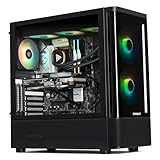
Skytech King 95 Gaming PC
Skytech’s King 95 hits the lowest price for a complete 9800X3D and RTX 5070 Ti pairing, making it the default recommendation for buyers who want the full Ti performance envelope without a premium case or aesthetic package. Pro: genuine 5070 Ti GPU paired with the correct CPU at an undercut relative to every Ti-equipped rival on this list. Pro: Skytech has a long track record of shipping stable configurations with no obvious bottlenecks in the published spec sheet. Con: the listing is sparse on specifics about the cooler, case, and RAM speed, so owners report some unit-to-unit variance. Skip it if you need guaranteed component transparency before purchasing or if you want a specific case aesthetic.
KOTIN Gaming PC Desktop (RTX 5070)
At $2299.99 this system is cheaper than every 5070 Ti option here, but the GPU is a plain RTX 5070 with 12GB VRAM rather than the Ti variant. That distinction matters: the non-Ti card has fewer shader cores and lower memory bandwidth, producing roughly 15 to 20 percent lower frame rates in GPU-bound titles. Pro: 32GB DDR5 and 1TB SSD provide a balanced supporting cast. Pro: the lower price makes it a viable option if your budget is firm and you accept the GPU downgrade. Con: at under $100 less than several Ti-equipped systems, the value proposition collapses if you can stretch your budget even slightly. Skip it unless you specifically cannot go above $2300.
Skytech Gaming O11 Vision Gaming PC
The O11 Vision is the showpiece pick. Its Lian Li O11 Dynamic-style case with 360mm ARGB AIO cooling and tempered glass panels is built for desk visibility. The GPU is a full RTX 5070 Ti with 16GB VRAM, and storage is 2TB of Gen4 NVMe. The CPU is a Ryzen 7 9850X3D, one tier above the 9800X3D, giving a small but real boost in lightly-threaded workloads. Pro: the 360mm AIO provides ample thermal headroom for sustained boost clocks. Pro: 2TB Gen4 storage and DDR5-5600 represent a balanced configuration. Con: Wi-Fi 5 rather than Wi-Fi 6 or 6E feels dated for a machine at this price. Skip it if you rely on a wired network anyway or if the 9850X3D upgrade does not justify the premium over the base King 95.
KOTIN Gaming PC (RTX 5070 Ti)
KOTIN’s Ti-equipped offering at $2699.99 matches the Skytech O11 Vision on price but takes a different philosophy: a compact chassis with no RGB and minimal branding. The 9800X3D and RTX 5070 Ti 16GB pairing is exactly what you want. Pro: the small form factor suits desks where a full tower would dominate the space. Pro: 32GB DDR5 and 1TB SSD cover the essential needs. Con: a compact case with a single 160mm AIO (or similar) may struggle to keep both the CPU and GPU cool simultaneously under sustained load. Skip it if you prefer maximum airflow and quiet operation over desk footprint.
Skytech King 95 Desktop PC
This is the most comprehensively spec’d system on the list. The 9800X3D at 5.2GHz boost, RTX 5070 Ti with 16GB VRAM, 2TB Gen4 NVMe, 32GB DDR5-6000 RGB, 850W Gold PSU, and a 360mm ARGB AIO add up to a machine that leaves no obvious upgrade needed for years. Pro: DDR5-6000 is the fastest memory among all eight entries, benefiting the 3D V-Cache’s already strong performance. Pro: the 850W Gold ATX 3.0 PSU provides headroom for a future GPU swap. Con: at $2899.99 it is the most expensive entry, a $300 premium over the base King 95 for upgrades some buyers will never use. Skip it if your monitor tops out at 1440p and you will not fill 2TB or swap the GPU soon.
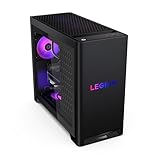
Lenovo Legion Tower 5
Lenovo brings the institutional reliability and service infrastructure that custom-build shops cannot match. The Tower 5 pairs the 9800X3D with an RTX 5070 Ti, 32GB memory, and 1TB storage in a clean Eclipse Black chassis. Pro: Lenovo’s three-year on-site warranty option and enterprise-grade support make this the safest purchase for buyers who value serviceability over RGB aesthetics. Pro: the bundled three months of PC Game Pass adds immediate software value. Con: 1TB storage is the smallest on this list, and the memory speed is not specified in the listing, which limits transparency for enthusiasts who want to verify timings. Skip it if you already own a large Steam library or prefer to build your own upgrade path.
iBUYPOWER Element Gaming PC
At $2149.99 the Element is the absolute cheapest system here, but like the KOTIN entry above, it carries a plain RTX 5070 with 12GB rather than the Ti. Pro: it is the lowest financial barrier to owning a pre-built with the 9800X3D, a CPU that alone accounts for a significant portion of any build cost. Pro: the included RGB keyboard and mouse remove two peripherals from the shopping list. Con: the GPU is a tier below the target keyword and the 2TB SSD, while generous, does not compensate for the reduced frame-rate ceiling. Skip it if you want the full Ti performance that justifies the 9800X3D investment.
STORMCRAFT Skyhawk PRO Gaming PC
STORMCRAFT is a newer name in the pre-built space, and the Skyhawk PRO earns its place on this list by pairing the 9800X3D with a full RTX 5070 Ti, 32GB DDR5, and a 2TB SSD at $2699.99. Pro: the 2TB storage configuration means you can install a dozen AAA titles before needing to manage space. Pro: the price matches the KOTIN Ti build but offers double the storage, a clear spec advantage per dollar. Con: limited brand recognition and sparse published cooling details make it harder to verify long-term thermal behavior from owner feedback. Skip it if you need the peace of mind that comes with an established builder’s support infrastructure.
Buying Guide
Know the difference between the RTX 5070 and 5070 Ti
The plain 5070 carries 12GB of VRAM and fewer CUDA cores than the Ti, which has 16GB and noticeably higher rasterization throughput. At 1440p the gap widens in titles that exceed 10GB of VRAM usage, such as recent Unreal Engine 5 releases. If a listing says “RTX 5070” without the Ti suffix, it is a different product with a different performance ceiling. Do not treat the two as interchangeable when comparing prices across listings.
Cooling determines whether the 9800X3D performs as advertised
The 9800X3D can sustain its full boost clocks only if the cooler keeps it below its thermal limits. A 240mm AIO or adequate air cooler with multiple case fans is the practical minimum. Single 120mm units or compact chassis with restricted airflow will cause thermal throttling during extended gaming sessions, reducing effective frame rates by enough to undermine the CPU’s value over a cheaper 9700X. Verify the cooler type and case fan count before committing.
Storage speed and capacity shape long-term usability
Modern game installations routinely exceed 100GB each, so a 1TB drive fills after six or seven titles, forcing constant management or a secondary drive purchase. A 2TB Gen4 NVMe removes that friction entirely. On the capacity side, Gen4 speeds are sufficient for gaming; paying extra for Gen5 storage provides no measurable improvement in load times for this workload.
Our Verdict
The top pick is the Skytech King 95 at $2599.99. It delivers the full 9800X3D and RTX 5070 Ti pairing at the lowest price among all Ti-equipped systems, making it the highest-value entry in this category. The budget pick is the iBUYPOWER Element at $2149.99, with the important caveat that its GPU is a plain 5070 rather than the Ti, so it suits buyers whose absolute ceiling is $2150. The Skytech King 95 Desktop becomes the right choice if you already fill storage or intend to keep the system for five-plus years without upgrades, since its 2TB Gen4 drive, DDR5-6000, and 850W ATX 3.0 PSU provide headroom that the base model lacks.
FAQ
Is the Ryzen 7 9800X3D worth it over a 9700X for gaming?
Yes, in CPU-limited titles the 3D V-Cache provides a meaningful frame-rate advantage, particularly at 1080p and 1440p in esports and open-world games with high draw distances. The 9800X3D also has a higher boost clock than its predecessor, widening the margin.
Should I worry about the 12GB VRAM on a plain RTX 5070?
At 1080p it is adequate for most current titles at high settings. At 1440p and above, some newer releases with ray tracing enabled can push VRAM usage past 12GB, causing stuttering or forced texture reductions. The 16GB on the Ti variant removes this concern.
Is a pre-built worth it versus a DIY build with these parts?
Pre-builts at these price points often cost 5 to 15 percent more than a self-assembled equivalent because they include assembly, a Windows license, and warranty support. If you are comfortable building, a DIY approach saves money. If you want a system that arrives working and can be serviced under warranty, the premium is justified.
What monitor resolution should I pair with this system?
The RTX 5070 Ti targets 1440p at 144Hz or higher as its sweet spot. It can drive 4K in less demanding titles or with DLSS enabled, but a 1440p high-refresh panel is the pairing that best matches the GPU’s native output without relying on upscaling.
Related guides
- Best Gaming PC for Fortnite: Eight Prebuilt Desktops Sorted by Refresh Rate Goal (2026)
- Best RX 9070 XT Prebuilt Gaming PCs: Seven Desktops and Three Cards Compared: 10 Compared (2026)
- CyberPowerPC vs iBUYPOWER Gaming PC: How the Two Brands Compare
- Best RX 9070 XT Prebuilt Gaming PC (2026): 5 Picks Compared









