
The difference between a good PCIe Gen4 NVMe M.2 SSD and a great one is often measured in sustained write speed, thermal behavior, and price per gigabyte rather than the headline sequential read number. A drive that claims 7,450 MB/s on the box but throttles after two minutes of heavy writes will feel slower in real-world use than a competitor that posts slightly lower burst numbers but holds its pace through a full game installation or a large file transfer.
We compared the eight drives below on their published specifications, current street pricing, and recurring themes from owner feedback across gaming and workstation use. The goal is straightforward: help you pick the right pcie gen4 nvme m.2 ssd for your budget and workload without wading through marketing fluff that every manufacturer recites identically.
As an Amazon Associate we earn from qualifying purchases at no extra cost to you.





Our Top Picks
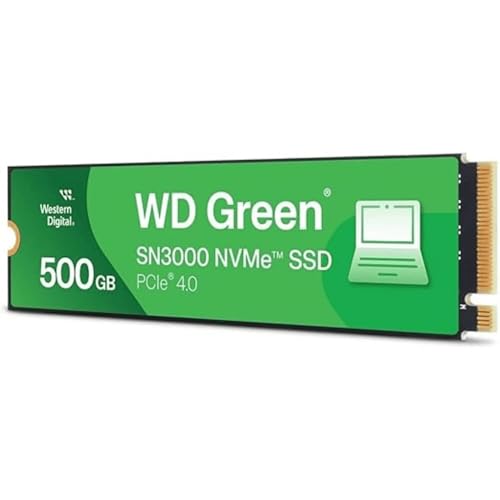 Western Digital 500GB WD Green SN3000 NVMe Internal500GB3.15 x 0.9 x 0.09 Inches0 PoundsCheck on Amazon





Top 3 picks at a glance
Quick Picks
| Product | Best for | Price |
|---|---|---|
| Samsung SSD 990 PRO 2TB | Maximum sequential performance in large games and creative workloads | $389 |
| Samsung SSD 990 PRO 1TB | The same flagship controller at half the capacity | Check on Amazon |
| Kingston NV3 1TB | Budget PCIe Gen4 build where capacity matters more than peak speed | Check on Amazon |
| WD_Black SN7100 1TB | Handheld gaming and laptops where sustained write matters | Check on Amazon |
| WD_Black SN7100 2TB | Same strengths as the 1TB in double the capacity | $305 |
| WD Green SN3000 500GB | Entry-level Gen4 upgrade from a SATA drive | Check on Amazon |
| SIX NVMe M.2 1TB with Heatsink | PS5 storage expansion without buying a separate heatsink | Check on Amazon |
| SanDisk Optimus 5100 1TB | Workstation and content-creation workloads under sustained load | Check on Amazon |
How We Compared
We filtered this list on four criteria that consistently separate winners from losers in the pcie gen4 nvme m.2 ssd category. First, sustained sequential write speed, not just burst reads, because game installations and video exports stress writes far more than reads. Second, thermal efficiency under load, which determines whether a drive holds its rated speed inside a cramped laptop or PS5 bay. Third, price per gigabyte, since capacity is what limits how many titles or project files you keep local. Fourth, controller maturity and firmware reputation, because a drive with an unstable firmware history will fail you when it matters most.
The 8 Best Pcie Gen4 Nvme M.2 Ssd in 2026
Samsung SSD 990 PRO 2TB
The 990 PRO remains the spec ceiling for consumer PCIe 4.0, and the 2TB model is where it makes the most sense. With up to 7,450 MB/s sequential read, it saturates the Gen4 x4 bus almost completely, and Samsung’s Pascal controller and sixth-generation V-NAND hold thermal limits better than most competitors in owner reports.
- Pro: Highest published sequential read speed in the Gen4 consumer class.
- Pro: Samsung Magician software gives granular firmware and thermal control.
- Con: The price premium over mid-tier drives is substantial for the small real-world gain in game load times.
Skip it if you are building a budget gaming rig and will never saturate 7,450 MB/s outside of synthetic benchmarks.
Samsung SSD 990 PRO 1TB
Identical controller and NAND to the 2TB at roughly 62% of the price, the 1TB 990 PRO delivers the same up to 7,450 MB/s read speed. Owner feedback consistently notes a small sustained-write disadvantage versus the 2TB because the lower capacity drive has fewer NAND dies to parallelize writes across, but it is marginal for most users.
- Pro: Flagship Gen4 speed at a sub-$240 price point.
- Pro: Proven firmware track record with long-term stability reports.
- Con: Slightly slower sustained writes than the 2TB variant under heavy multi-gigabyte transfers.
Skip it if you need more than 1TB of fast local storage and can stretch the budget to the 2TB or a larger mid-tier drive.
Kingston NV3 1TB
Kingston positions the NV3 as an entry Gen4 drive, and at around $160 it undercuts most name-brand competitors. The up to 6,000 MB/s read speed is noticeably below the flagships, but for a gaming drive that loads assets rather than streaming sustained sequential data, the gap is hard to feel. Owner reports flag modest sustained write performance once the DRAM-less architecture’s small cache fills.
- Pro: Lowest per-gigabyte cost among the drives on this list.
- Pro: Reliable Kingston warranty and broad OEM compatibility.
- Con: DRAM-less design means write speed drops on very large transfers.
Skip it if your workload involves repeated multi-gigabyte writes such as video editing or large database imports.
WD_Black SN7100 1TB
The SN7100 is Western Digital’s answer to the efficiency-focused segment, pairing up to 7,250 MB/s read and up to 6,900 MB/s write with next-gen TLC 3D NAND. What stands out in owner feedback is its low power draw, making it a favorite in Steam Deck and ROG Ally builds where battery life and thermal headroom are constraints.
- Pro: Excellent read-write balance for a mid-price drive.
- Pro: Low power consumption benefits laptops and handhelds.
- Con: Fewer long-term reliability reports than the Samsung 990 PRO.
Skip it if you need maximum sustained sequential throughput in a desktop tower with ample cooling.
WD_Black SN7100 2TB
The same SN7100 architecture at double the capacity, still rated up to 7,250 MB/s read and 6,900 MB/s write. The 2TB model has more NAND dies to spread writes across, which in practice means the high sustained-write figures are easier to maintain over longer transfers compared to the 1TB.
- Pro: Strong sustained write performance for game and media installs.
- Pro: Competitive price per gigabyte in the 2TB tier.
- Con: Price gap over the 1TB narrows the value calculus if you do not need the extra space.
Skip it if your library fits comfortably on 1TB and you would rather spend the difference on other components.
Western Digital 500GB WD Green SN3000
At around $96 for 500GB, the WD Green SN3000 is the cheapest way into PCIe Gen4 on this list. Up to 5,000 MB/s read is well below the performance tier, but it is still roughly double the ceiling of SATA SSDs, making it a tangible upgrade for anyone still running a boot drive on older interfaces.
- Pro: Lowest absolute price to reach Gen4 speeds.
- Pro: WD Green line targets low power, useful in older laptops with limited thermal headroom.
- Con: 500GB fills up fast with even two or three modern AAA titles installed.
Skip it if you plan to store more than a single game library or expect the drive to serve as long-term primary storage.
SIX NVMe M.2 SSD 1TB with Heatsink
The SIX drive ships with an integrated heatsink and claims up to 7,350 MB/s read, placing it close to flagship territory on paper. At around $170, it undercuts the Samsung 990 PRO 1TB while including thermal hardware that PS5 owners must buy separately. Owner feedback on firmware maturity is thinner than for the established brands.
- Pro: Bundled heatsink adds value for PS5 expansion and tight desktop builds.
- Pro: Competitive read speed at a mid-range price.
- Con: Less transparent firmware update history and fewer long-term reliability reports.
Skip it if you prefer drives from manufacturers with well-documented firmware pipelines and extensive enterprise deployments.
SanDisk Optimus 5100 1TB
The Optimus 5100 targets workstation and content-creation users who need consistent performance over long sustained transfers rather than peak burst reads. At around $180, it sits in the middle of this list on price, with published specs emphasizing Gen4 bandwidth and reliability under professional loads.
- Pro: Tuned for sustained performance over long write sessions.
- Pro: SanDisk’s data-center pedigree informs its firmware engineering.
- Con: No headline sequential read number provided to compare directly against the fastest drives here.
Skip it if you are a gamer chasing the lowest possible load times and want the highest published read figure available.
Buying Guide
Sustained Write Speed Matters More Than Burst Read
Every manufacturer leads with sequential read because it produces the biggest benchmark numbers. In practice, the operation that stresses your pcie gen4 nvme m.2 ssd most is a sustained write: installing a 150GB game, exporting a video timeline, or copying a large archive. A drive that holds its rated write speed through a multi-gigabyte transfer will feel faster than one that bursts high and then drops once its cache is exhausted. Prioritize the rated sequential write figure or owner-reported sustained-write behavior over the read number when comparing two drives at the same price.
Thermal Design and Form Factor Constraints
Motherboard M.2 slots vary in available clearance, and handheld consoles like the PS5 or Steam Deck impose strict height and heat limits. A drive without an integrated heatsink may throttle in a PS5 slot, while a tall heatsink can interfere with GPU clearance on a compact desktop board. Check your target device’s supported M.2 2280 thermal envelope before purchasing, and decide whether you need an included heatsink or plan to add a third-party one.
Capacity and the Price-Per-Gigabyte Curve
The 2TB tier consistently offers a better per-gigabyte price than 1TB across every brand on this list, because the drive controller and PCB cost is spread across more NAND. If your budget stretches, moving to 2TB is often the single most effective value improvement. Below 500GB, per-gigabyte pricing rises sharply and the usable space fills quickly with modern game sizes.
Our Verdict
Top pick: the WD_Black SN7100 1TB wins on the best balance of speed, power efficiency, and price for the widest range of buyers, including gamers, laptop users, and handheld owners. Budget pick: the Kingston NV3 1TB at around $160 delivers genuine Gen4 performance at the lowest per-gigabyte cost for anyone building a value-focused gaming machine. Condition for another winner: if you need 2TB in a PS5 expansion slot and want the highest available read speed with a heatsink included, the SIX NVMe M.2 1TB with Heatsink is the most practical single-box solution.
FAQ
Will a PCIe Gen4 SSD work in a Gen3 slot?
Yes. PCIe is backward compatible, so a Gen4 drive in a Gen3 M.2 slot will function normally but cap at Gen3 sequential speeds, roughly half the theoretical bandwidth. You lose nothing beyond peak throughput.
Do I need a heatsink for my nvme ssd?
For desktop builds in well-ventilated cases, many Gen4 drives run fine without one, though a heatsink prevents thermal throttling during long writes. For PS5 expansion or compact laptops, a heatsink is strongly recommended and sometimes required by the device manufacturer.
Is Gen4 worth over Gen3 for gaming specifically?
For loading existing game levels, the real-world difference is small because assets are read in short bursts that both generations handle well. Gen4 shines in direct-storage titles and Windows features like Storage Sense, and in any workload that combines reads and writes simultaneously.
How long do these drives last in a gaming PC?
Consumer NVMe SSDs on this list are rated for several hundred terabytes written, far exceeding typical gaming use where write volumes stay low. Most owners will replace the drive for capacity reasons long before it reaches its endurance limit.









