
The best inversion tables for back stretching at home are the Teeter FitSpine X3 for its refined ankle-lock and safety design, the Ironman Gravity 4000 for higher weight capacity, and a compact folding model such as the Innova ITM5900 when storage space matters more than premium padding.
For someone who spends long gaming sessions at a desk, an inversion table can provide a controlled way to unload the back temporarily—but it is not a treatment for every kind of back pain. Choose by user fit first, then ankle security, frame stability, adjustment range, and storage footprint. A table that is difficult to lock, awkward to fold, or poorly matched to your height is unlikely to become a useful routine.
As an Amazon Associate we earn from qualifying purchases at no extra cost to you.


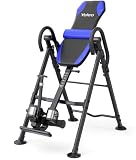
Our Top Picks
 INNOVA HEALTH AND FITNESS ITM5900 Advanced Heat andOne Size47 x 28 x 62 Inches60 poundsCheck on Amazon


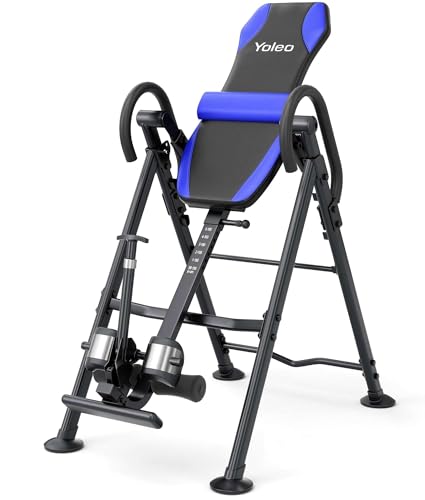
Top 3 picks at a glance
Best inversion tables by user and room
| Best for | Recommended type | Useful target specifications | Models to investigate |
|---|---|---|---|
| Most home users | Premium padded table with adjustable ankle system | 300 lb capacity, approximately 4 ft 8 in–6 ft 6 in height range, safety tether, handles | Teeter FitSpine X3 or X1 |
| Heavier users | Reinforced steel-frame table | At least 350 lb capacity, wide base, substantial locking hardware | Ironman Gravity 4000 |
| Small rooms or shared spaces | Folding table with transport wheels | Folded depth under about 25 in, secure hinge, adjustable tether | Innova ITM5900 or a comparable folding model |
| Occasional stretching on a budget | Basic manual-rotation table | 250 lb or greater capacity, padded backrest, height markings, safety strap | Body Champ IT8070 or a similar entry-level design |
Teeter FitSpine X3: best overall design
The Teeter FitSpine X3 is a strong all-around choice when ease of use and ankle comfort matter more than the lowest price. Its adjustable ankle-lock system is designed to distribute pressure more evenly than a simple foam roller or fixed clamp. The table also uses a tether to limit the maximum inversion angle, which is useful for beginners who should not immediately rotate fully upside down.
The FitSpine range is intended for users roughly 4 ft 8 in to 6 ft 6 in, with a commonly listed user capacity around 300 lb. Confirm the exact label for the current version before buying, particularly if your weight is close to the limit. The X3 generally offers more padding and convenience features than the X1, while the X1 is the better value if you do not need every accessory.
Why it stands out
- More refined ankle support than basic heel-cup designs.
- Height markings make repeat setup easier for multiple household users.
- Adjustable tethering helps control the rotation angle.
- Thick padding is better suited to short, regular sessions.
Its drawbacks are cost and footprint. Premium inversion tables commonly fall around $300–$600, and the frame still occupies meaningful floor space when open. For a gaming room, measure the clearance behind the chair and in front of the desk—not just the folded dimensions.
Ironman Gravity 4000: best for a higher-capacity frame
The Ironman Gravity 4000 is worth considering when capacity and a sturdy steel frame are the priorities. It is commonly specified for users up to about 350 lb and for a broad height range near 4 ft 9 in to 6 ft 6 in, though the manufacturer’s current documentation should take precedence.
This type of table typically has a generous backrest, padded ankle supports, handholds, and a safety tether. The trade-off is bulk: reinforced frames tend to be heavier and less convenient to move between rooms. That is acceptable if the table will remain in a dedicated exercise area, but less appealing in a bedroom or gaming setup that must be cleared daily.
Capacity is not the only stability measurement
Do not treat a 350 lb rating as permission to use a table that barely fits your body. Leave a margin below the published capacity for clothing, shoes, and movement. A practical target is to choose a table rated at least 10–15 percent above your body weight. For a 280 lb user:
280 lb × 1.15 = 322 lb
That calculation points toward a 350 lb-rated table rather than a 300 lb model. It does not replace the manufacturer’s restrictions, but it reduces the chance that you are operating at the edge of the frame, hinge, and ankle-lock ratings.
Innova ITM5900: best when storage is the deciding factor
The Innova ITM5900 is a recognizable compact-style option for users who need a folding inversion table and do not want to pay premium-table prices. Innova’s lineup varies by version, so check the exact product label for capacity, height range, and folded dimensions. Basic ITM-series tables often provide adjustable height, padded ankle holders, a safety strap, and a foldable frame.
The key question is whether “folding” actually solves your storage problem. A table may fold thinner while remaining tall and heavy. Measure three spaces:
- Open width: allow room to mount and dismount without hitting a desk or monitor stand.
- Open length: include the space used by the headrest and rear frame at full rotation.
- Folded height and depth: compare these with a closet, wall gap, or under-bed storage area.
For a shared room, prioritize a model with transport wheels and a positive locking mechanism. A lightweight table that shifts during rotation is not a bargain if you avoid using it.
Budget tables: what to inspect before choosing
Entry-level models such as the Body Champ IT8070 can be suitable for occasional, gentle stretching if the user fits the published height and weight limits. They usually cost roughly $150–$300, depending on construction and accessories. The important distinction is not the number of accessories but the quality of the contact points: ankle clamps, pivot bushings, frame feet, and the strap that limits rotation.
Look for a height-adjustment scale rather than a single sliding tube with no markings. Small changes in the center-of-gravity setting can alter how quickly the table rotates. A beginner should be able to make a conservative adjustment, test it, and return to the same setting later.
Ankle locks, padding, and safety features that matter
Ankle-lock design
- Heel-cup systems: common and inexpensive, but pressure can concentrate around the ankles.
- Adjustable roller or ratchet systems: faster to secure and often more comfortable, especially for repeated use.
- Ergonomic ankle systems: usually cost more but can reduce the need to over-tighten the lock.
The lock should close firmly without requiring extreme force. Put on the same footwear you expect to use during sessions and confirm that both ankles sit symmetrically. Never rely on a loose strap as the primary restraint.
Padding
More padding is not automatically better. Very soft padding can make the body sink unevenly, while thin padding can create pressure around the hips and shoulders. Look for a backrest that supports the pelvis and upper back without forcing the neck into a sharp angle. Headrests and lumbar cushions are useful only if they preserve a neutral, comfortable position.
Safety features
- A tether or stop system to limit the maximum angle.
- A stable, wide base with non-slip feet.
- Locking pins or securely captured adjustment hardware.
- Handles that remain reachable while mounting and returning upright.
- A frame that does not wobble when you shift your weight.
A practical first-session setup
Set the table to the manufacturer’s height mark closest to your actual height, then use the least aggressive angle available. Secure both ankles, keep your head supported, and rotate only a few degrees for the first minute. If the table tips rapidly, return upright and reduce the balance setting; the goal is controlled movement, not a fast flip.
For a first week, try one or two sessions of about 30–60 seconds, separated by a comfortable upright rest. Increase duration only if there is no ankle pressure, dizziness, headache, worsening pain, or numbness. A gentle angle of approximately 15–30 degrees is enough for many beginners; full inversion is not required to evaluate whether the equipment feels useful.
Who should avoid buying one without medical guidance?
Ask a qualified clinician before using an inversion table if you have uncontrolled high blood pressure, heart or circulation problems, glaucoma or other eye-pressure concerns, osteoporosis, recent surgery, pregnancy, significant balance problems, or symptoms such as leg weakness, progressive numbness, or loss of bladder or bowel control. Stop immediately if inversion causes sharp pain, faintness, chest discomfort, or neurological symptoms.
For most buyers, the decision is simple: choose the Teeter FitSpine X3 for the most polished home experience, the Ironman Gravity 4000 when a higher capacity is essential, or a compact Innova-style table when storage controls the budget. In every case, verify the current capacity, height range, folded dimensions, and ankle-lock instructions before purchase.
Frequently asked questions
How much room should I leave around an inversion table?
Leave enough open space to mount and dismount without hitting nearby furniture, and account for the full length of the table when rotated. Measure its open width and length, including the headrest and rear frame, as well as its folded height and depth. A folding design may still be tall and heavy, so check that its actual folded shape fits your intended storage spot.
Should I wear shoes when using an inversion table?
Use the same footwear you expect to wear during sessions when checking the ankle locks. Confirm that both ankles sit symmetrically and that the lock closes firmly without extreme force. The article does not specify one required type of footwear, but stresses that a loose strap should never be the primary restraint.
Do I need to hang fully upside down for back stretching?
No, full inversion is not required to see whether the equipment feels useful. The article suggests that a gentle angle of approximately 15–30 degrees is enough for many beginners. Start with the least aggressive angle available and focus on controlled movement rather than rotating quickly or fully upside down.
How can I tell if an inversion table is adjusted correctly?
Set the table to the manufacturer’s height mark closest to your actual height, then test the least aggressive angle. If it tips rapidly, return upright and reduce the balance setting. Small changes in the center-of-gravity setting can affect how quickly it rotates, so marked adjustments help you repeat a conservative setup.
When should I stop an inversion session?
Stop if you experience ankle pressure, dizziness, headache, worsening pain, or numbness. The article advises starting with one or two sessions of about 30–60 seconds, with a comfortable upright rest between them, and increasing duration only if those symptoms do not occur. Sharp pain is also a reason to stop immediately.








