
As an Amazon Associate we earn from qualifying purchases at no extra cost to you.



Our Top Picks


Top 3 picks at a glance
The Short Answer
Most small form factor (SFF) cases accept GPUs between 210mm and 330mm long, with a slot width of two to three slots and a maximum thickness of roughly 40–60mm. If you’re shopping for a compact build, start by looking for cards around 240–280mm long and no more than 2.5 slots thick — that range fits the widest variety of small cases without forcing you into stripped-down performance.
To put it simply:
– **Tightest SFF builds (under 15L):** GPUs up to about 220mm (8.7 inches)
– **Mid-size SFF cases (15–25L):** GPUs up to 300–330mm (11.8–13 inches)
– **Compact mATX cases (20–30L):** GPUs up to 350–415mm (13.8–16.3 inches)
The single most important number is not the case’s volume in liters — it’s the **maximum GPU length clearance** listed by the case manufacturer, measured in millimeters. Always compare that number to the specific length of the card you’re buying, not just the GPU chip’s name.
Standard Sizes
GPU sizing can feel chaotic because manufacturers add backplates, thick coolers, and chunky shrouds. These are the common reference points:
| GPU Category | Typical Length | Typical Thickness | Power Draw |
|---|---|---|---|
| Low-profile card | 160–180mm (6.3–7.1 in) | 1–2 slots, under 40mm (1.6 in) | 30–75W |
| Compact / ITX card | 200–250mm (7.9–9.8 in) | 2 slots, 40–45mm (1.6–1.8 in) | 120–220W |
| Mid-range full-size card | 260–300mm (10.2–11.8 in) | 2–2.5 slots, 45–55mm (1.8–2.2 in) | 200–300W |
| Full-size performance card | 300–340mm (11.8–13.4 in) | 2.5–3.5 slots, 55–75mm (2.2–3.0 in) | 300–450W |
And here’s how popular small case categories compare, using real examples on the market:
| Case | Approx. Volume | Max GPU Length | Approx. Price |
|---|---|---|---|
| Metalfish T40 Mini ITX | ~11L | ~200mm (7.9 in) | Check on Amazon |
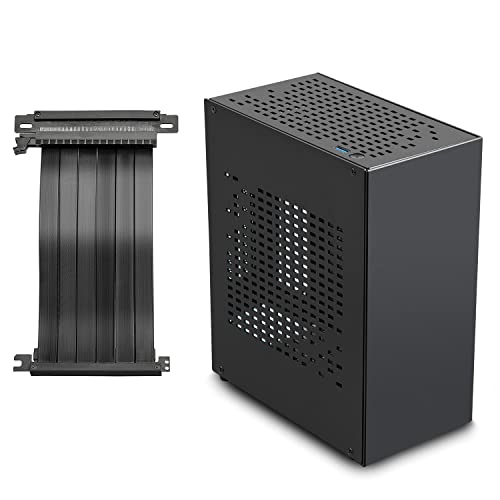
| JOYJOM Aluminum Mini ITX (with PCIe 3.0 riser) | ~8–10L class | ~210–230mm (8.3–9.1 in) | Check on Amazon |
| Lian Li B4-mATX | 21.3L | 358mm (14.1 in) | Check on Amazon |
| Lian Li A3-mATX (Wood Black Mesh) | ~26L | 415mm (16.3 in) | Check on Amazon |
Notice the price curve: spending $10–30 more on the case can triple your GPU clearance. That’s often a smarter investment than squeezing a shorter, more expensive card into a tiny chassis.
How to Measure Your Space
Before you buy either the case or the card, take these steps:
- Check the case spec sheet for “max GPU length.” Manufacturers list this in millimeters. Subtract 5mm as a safety buffer for cable bend radius and manufacturing tolerance.
- Check the slot clearance. Count how many expansion slots the case has. A 3-slot card needs 3 slots of room plus clearance above for airflow. Cards listed as “2.5 slot” or “3.5 slot” physically exceed those slot counts.
- Look up the exact card model, not just the GPU name. Two cards with the same chip can differ by 60mm in length and 20mm in thickness depending on the cooler design.
- Measure the riser or orientation if applicable. Cases like the JOYJOM use a PCIe riser cable so the card mounts parallel to the motherboard. Confirm the riser’s rated PCIe generation (3.0 in this example) is acceptable for your card — modern cards lose only a small amount of performance on a 3.0 riser, but it’s worth knowing.
- Account for power connectors. Cards with 12V-2×6 or 8-pin connectors angled out the end need extra rear clearance. Side-angled connectors need clearance between the card and the case’s front panel.
- Verify cooler and radiator conflicts. If your case also holds a 360mm AIO (as both Lian Li examples support), confirm the GPU length spec assumes that radiator placement — moving the radiator can steal 20–40mm of GPU room.
By Room or Use Case
Living Room / Home Theater PC
HTPC builds under the TV need short cards that run quiet. Aim for cards 170–210mm long at 2 slots or less, in a case in the 8–12L range. A compact card drawing 120–180W paired with a low-noise case like the Metalfish T40 keeps fan noise unobtrusive during movies. Horizontal cases also benefit from cards with a sturdy backplate to prevent sag.
Desk / Small Apartment Setup
If your desk space is measured in inches, a 15–22L case strikes the best balance. Cases like the Lian Li B4-mATX (21.3L, 358mm GPU clearance) accept nearly any mid-range card while staying smaller than a shoebox. A 260–300mm card in the 200–280W class fits here comfortably with room for a 360mm AIO.
LAN Party / Portable Gaming
Portability means watching total weight — a fully built SFF system with a large GPU and 850W power supply can hit 18–25 lbs (8–11 kg). Prioritize cards under 280mm and under 2.5 slots, plus a case with a handle or reinforced panels. The JOYJOM’s aluminum construction keeps chassis weight down, which matters when you’re carrying the rig to a friend’s place every weekend.
Max Performance in Minimal Space
If you refuse to compromise on the GPU, invert the problem: pick the case last. The Lian Li A3-mATX takes cards up to 415mm — long enough for virtually any consumer card on the market — while staying under 30L. Pair it with a 300–450W card and a quality 850W power supply, and you lose almost nothing versus a mid-tower build.
Common Sizing Mistakes
- Ignoring thickness. Length gets all the attention, but a 3.5-slot card physically blocks fans or side panels in cases designed around 2 slots. Check thickness in millimeters, not just “slots.”
- Forgetting power connector clearance. A card that “fits” on paper can still press its power cable against the glass or front panel. Budget an extra 20–30mm for connectors.
- Trusting GPU name instead of card dimensions. Reference-model cards are often shorter than partner cards with triple-fan coolers. Look up the specific board partner model.
- Overlooking GPU sag. Long, heavy cards (some exceed 2 kg / 4.4 lbs) flex without support. In a small case, an anti-sag bracket or a vertical mount with a riser solves this — but only if the case supports it.
- Underestimating airflow. Zero clearance between the card’s fans and the side panel means the card recirculates hot air. Leave at least 10–15mm of breathing room where possible, and favor mesh-panel cases.
- Cheaping out on the power supply. A high-wattage GPU in an SFX chassis needs an SFX or SFX-L power supply rated at least 150W above the card’s TDP. Don’t size the PSU to the case; size it to the components.
FAQ
Will a 300mm GPU fit in any small form factor case?
No. Cases under about 15 liters typically max out between 200 and 230mm. A 300mm card generally needs a case in the 18–25L class or larger, such as the Lian Li B4-mATX with its 358mm clearance. Always check the case’s published maximum GPU length rather than guessing by volume.
What does “2.5 slot” or “3 slot” GPU mean?
It describes how much vertical space the card’s cooler occupies on the motherboard. One slot is about 20mm. A “2.5 slot” card is roughly 45–50mm thick and slightly overhangs the second expansion slot. Your case must physically accommodate that height, which in small cases is often the binding constraint, not length.
Is a PCIe 3.0 riser cable a problem for a modern GPU?
Usually not. Running a current-generation card through a PCIe 3.0 riser costs only a small amount of performance in gaming, often in the low single digits. It matters more for bandwidth-heavy workloads. If you’re buying a case with a riser, confirm the riser’s rated generation and whether it’s a flexible cable or a rigid riser card.
How big is too big — should I just build a mid-tower instead?
If the card you want is over 340mm long, over 3.5 slots thick, and draws more than 400W, you’re paying a premium to fight your case. Either choose a compact mATX case like the Lian Li A3-mATX (415mm GPU clearance for around $89), which handles nearly anything, or accept a standard mid-tower. The sweet spot for small builds remains cards in the 240–300mm, 200–300W range — enough performance for high-refresh gaming at 1440p while keeping the build genuinely small. With case and component makers continuing to prioritize compact designs heading into 2026, there’s never been a wider selection of properly-sized cards for small form factor builds.









