
White themed PC builds look incredible when they come together — and look cheap fast when they don’t. The most common mistake is buying a case, fans, and GPU one at a time based on “will it look good in photos” instead of checking whether the whites actually match. There’s no universal white: some parts are warm ivory, some are stark cool white, and some are glossy while others are matte. A build mixing three shades reads as messy even with great components inside.
The second mistake is treating white parts as purely cosmetic. A white case with weak airflow cooks a hot GPU. A white PSU with no listed efficiency rating is a gamble you plug into your wall. And the third mistake is underestimating small parts — screws, standoffs, and standoffs in the wrong finish stand out badly against a white interior.
As an Amazon Associate we earn from qualifying purchases at no extra cost to you.


This guide breaks down what actually matters, in the order you should decide it, with the numbers to check before you click buy.
Our Top Picks
 MUSETEX ATX PC Case 7 PWM ARGB Fans16.73"D x 8.35"W x 18.5"H16.73 x 8.35 x 18.5 inches15 PoundsCheck on Amazon
 Kernmax 507Pcs Professional Computer Screws Assortment Kit#6-320.5 x 0.35 x 0.35 inchesCheck on Amazon
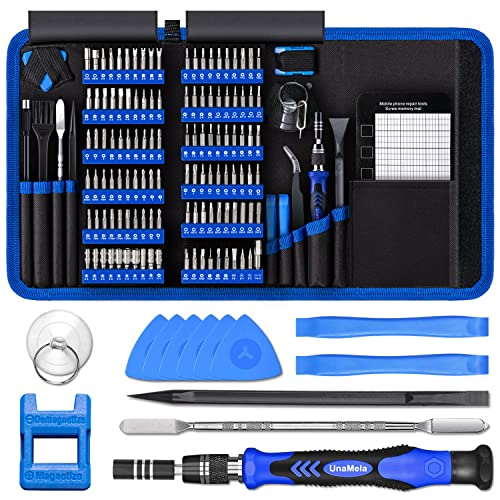 PC Building Tool Kit 140-IN-1: Computer Tool KitSmall9.45 x 5.7 x 1.57 inches1.6 PoundsCheck on Amazon

Top 3 picks at a glance
Decide These 3 Things First
1. Your color story. Pick one of three directions before shopping: all-white everything (case, fans, cables, GPU, cooler), white-and-black (white case, black internals — hides mismatched components and usually saves $50–150), or white with silver accents. All-white builds look the cleanest but cost more, because white variants of GPUs and PSUs often carry a $20–60 premium over black equivalents.
2. Your total budget. A complete white themed build realistically breaks down as: case $70–130, fans $30–90, cooler $30–150, PSU $60–130, plus $10–20 for screws and tools. Know which categories you’ll compromise on (usually fans and tools) and which you won’t (usually PSU and airflow).
3. Your component sizes. Measure before buying anything. Your GPU length, CPU cooler height, and motherboard form factor dictate which cases are even options. Nothing ruins a build plan like a 340mm GPU that doesn’t fit a 320mm-max case clearance.
Case Size and Compatibility
Start with the case because everything else lives inside it. Mid tower ATX cases — the most popular category — typically measure 380–470mm tall, 210–240mm wide, and 400–480mm deep, and support ATX, Micro-ATX, and Mini-ITX motherboards.
Check these clearances against your parts list:
- GPU clearance: aim for at least 30mm more than your graphics card’s length. Most modern GPUs run 287–340mm long.
- CPU cooler height: air coolers run 150–168mm tall; confirm the case lists equal or greater clearance. A 168mm cooler will not fit a case with 160mm max.
- Radiator support: if you plan liquid cooling, confirm 240mm, 280mm, or 360mm mounting points and note where — front, top, or side.
- PSU length: most cases accept 160–180mm power supplies; high-wattage units can run 200mm+.
Full-view dual tempered glass panels, like those on the MUSETEX K2-style mid towers (~$90), show off the interior from both sides — which is exactly why white builds benefit from them. But glass on both sides means check panel thickness (4mm is standard) and that the case includes a front mesh or vented intake option. A fully enclosed dual-glass front looks sleek and strangles airflow; you want at least 50% mesh area on the intake side.
Weight matters too: quality mid towers run 15–22 lbs. Under 12 lbs usually signals thin steel (under 0.8mm SPCC), which resonates with fan vibration.
Material and Finish Quality
White finishes vary more than any other color, so this is where mismatch happens.
- Steel: 0.8–1.0mm SPCC steel is the mid-tower standard. Thin 0.5–0.6mm panels flex and ding.
- Tempered glass: confirm it’s actually tempered — usually etched or labeled — not acrylic. Acrylic scratches within months.
- Finish type: matte white hides fingerprints and dust better than glossy; glossy shows every cable through the glass. Most quality white cases are matte powder-coated.
- Plastic parts: check fan frames and front panels for a yellowish tint in product photos — cheap white ABS yellows within 1–2 years, especially near heat.
Matching tip: parts from the same brand’s white line usually share one shade. Mixing brands means comparing finish photos side by side, and when in doubt, go white-on-black internals rather than chasing three near-identical whites.
Construction and Airflow
A white build’s worst enemy is heat you can see dust settling on. Prioritize:
- Intake area: mesh front panels with 1–1.5mm perforations outperform solid or angled glass fronts by 3–6°C under load in typical mid towers.
- Pre-installed fans: cases shipping with 6–7 PWM ARGB fans (like the K2 category at ~$90) save $60–100 versus buying fans separately. Confirm they’re PWM (4-pin) not DC, and that at least 3 are intake.
- Dust filters: magnetic, removable filters on front, top, and bottom. White builds show gray dust fast — removable filters you can rinse in a sink are non-negotiable.
- Cable management: look for 15–25mm of space behind the motherboard tray and at least 2–3 rubber grommets. In a glass-panel build, cable clutter is fully visible.
Also check fan specs: 1,200–1,800 RPM case fans with 30–60 CFM airflow and under 30 dBA noise are the sweet spot. A case claiming seven fans but with no listed CFM or noise figures is telling you something.
Performance Considerations Beyond Looks
White parts sometimes trade performance for aesthetics. Watch for these:
- PSUs: buy 80 Plus Bronze minimum, Gold preferred. A 650–750W Gold unit ($70–110) covers most single-GPU builds; white variants from reputable brands run $10–25 over black. Never buy a white PSU from a brand you can’t verify — no-name white PSUs are the single riskiest white purchase.
- CPU coolers: white air coolers perform identically to black ones from the same model line — just confirm the height and TDP rating (a 150W+ TDP cooler handles most mainstream CPUs).
- RAM and SSDs: white heatspreaders add no thermal downside at typical speeds, but avoid white shrouds on high-end NVMe drives if the shroud replaces the motherboard’s thermal pad.
Price Tiers: What Each Level Buys You
Budget ($300–450 total for case, fans, cooler, PSU, accessories): Expect a steel mid tower with one to three pre-installed fans, matte white paint, and a Bronze-rated PSU. Examples in this range include cases around $70–90 with 6–7 included ARGB fans, screw kits around $8, and a 140-piece tool kit near $20. Perfectly viable — the compromises are thinner steel and louder fans.
Mid ($450–700): Dual tempered glass, mesh airflow front, daisy-chainable ARGB fans, Gold-rated PSU, and a name-brand white cooler. This is the sweet spot for most builders in 2026.
Premium ($700+): Aluminum panels, integrated fan/controller ecosystems, 80 Plus Platinum or Titanium white PSUs, and full cable customization ($40–80 for white sleeved extension cables). You’re paying for finish consistency and silence, not raw performance.
Warranty and Support
- Cases: 1–3 years is standard; premium brands offer 5+.
- PSUs: the strongest warranty signal in the whole build — 7–10 years indicates the manufacturer trusts the internals. Avoid any PSU under 5 years of coverage.
- Fans: 2–5 years; ARGB failures usually trace to the controller, so check whether the controller is covered separately.
- Screw and tool kits: these are commodity items — the Kernmax 507-piece kit (~$8) and similar 400-piece assortments (~$7) rarely carry warranties, so judge them on steel hardness (HRC 45+ for screwdriver bits) and case organization rather than guarantees.
Delivery and Assembly Considerations
Tempered glass panels are the main shipping risk. Buy cases with foam corner protection and individual panel boxing; inspect for chips along panel edges within 48 hours of delivery, since damage claims past that window get harder.
Plan roughly 3–5 hours for a first-time build. Keep the 140-in-1 style tool kit ($15–25) and a screw assortment kit on hand — you’ll need Phillips #2 for most screws, standoffs for the motherboard (usually 9 for ATX), and M.2/SSD screws that routinely go missing mid-build. Lay screws out on a tray by type before starting; the most common first-build delay is hunting for one motherboard standoff.
Spec Checklist
| Spec | Budget | Mid | Premium |
|---|---|---|---|
| Case steel thickness | 0.6mm | 0.8mm | 1.0mm+ or aluminum |
| Pre-installed fans | 2–3 | 4–6 | 6–7+ daisy-chain |
| Front intake | Partial mesh | Full mesh | Full mesh + bottom intake |
| GPU clearance | 330mm | 360mm | 400mm+ |
| PSU rating | 80 Plus Bronze | 80 Plus Gold | Platinum/Titanium |
| Dust filters | Top only | Front/top/bottom | All, magnetic + washable |
| Glass | Single panel | Dual 4mm tempered | Dual, tool-less, tinted options |
| Warranty | 1 year | 3 years | 5–10 years |
| Case + fans + PSU total | $150–250 | $250–400 | $400–700 |
Red Flags
- No listed steel thickness, fan CFM, or noise figures — brands that publish nothing are hiding compromises.
- White PSU from an unknown brand, or any PSU without an 80 Plus rating.
- “Tempered glass” with no thickness listed (it’s probably acrylic).
- Fan-only listings that include ARGB controllers with no software compatibility or button control described.
- Case listings showing a white exterior but a black or unfinished interior — fine if intentional, but check photos carefully if you want an all-white look.
- Screw kits without labeled compartments; a 400–500 piece kit dumped in one bag wastes an hour of your build.
- Listings with stock renders only and no real photos of the white finish — renders always exaggerate brightness and hide tint.
FAQ
Do white PC parts cost more than black ones?
Usually yes, slightly. White variants of PSUs, coolers, and GPUs typically run $10–60 above black equivalents due to lower production volumes. Cases and fans are often the same price in both colors. Budget an extra $50–100 across a full white build.
Will white PC parts yellow over time?
Cheap ABS plastic can yellow within 1–2 years, especially near heat sources. Powder-coated steel, painted aluminum, and quality fan frames hold their color far longer. Avoid the cheapest no-name white peripherals and front panels if longevity matters to you.
How do I match whites from different brands?
Compare real product photos side by side in the same lighting, not renders. Matte finishes from different brands blend better than glossy ones. When in doubt, use black internals with a white case — the contrast looks deliberate even when shades differ slightly.
Are cases with pre-installed fans worth it?
Almost always, at the budget and mid tiers. A case with 6–7 included PWM ARGB fans at ~$90 saves $60–100 versus buying equivalent fans separately. The included fans rarely match premium standalone fans on noise or bearings, but they’re more than adequate for a first build.









