
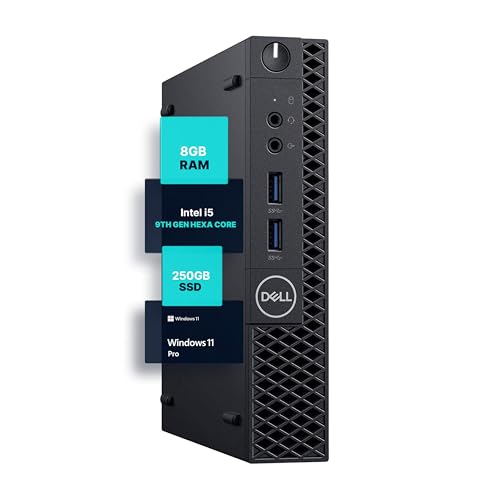
Shopping for a streaming PC forces a decision most buyers don’t expect to make: not which GPU or CPU, but how much physical space that hardware deserves in your home. The real question behind “small form factor vs mid tower for streaming pc” is whether you want a machine that disappears into your setup or one that announces itself and leaves room to grow. A compact desktop like the Dell Optiplex 3070 Micro measures roughly 7 by 7.2 by 1.4 inches and weighs about 3 pounds, while a typical mid tower stands 17 to 19 inches tall, weighs 25 to 35 pounds empty, and takes up a noticeable chunk of desk or floor. Both can stream. The difference shows up in airflow, upgrade paths, noise, and how the machine fits into the rest of your life.
Our Top Picks



Top 3 picks at a glance
Quick Verdict
If you stream console gameplay via a capture card, play light-to-medium titles, or work in a small apartment, a small form factor (SFF) machine is the smarter buy — it’s quiet, sips power (often 65 to 150 watts under load versus 300 to 500+ for a gaming tower), and tucks behind a monitor. If you encode video while playing demanding games at high settings, or you want to swap GPUs and add drives over the years, a mid tower is worth its footprint. For most streamers on a budget under $500, a renewed SFF business desktop handles streaming duties surprisingly well. For dedicated game streaming at 1080p60 or above with real gaming muscle, plan on $900 to $2,000 for a tower with a discrete GPU.
As an Amazon Associate we earn from qualifying purchases at no extra cost to you.


Side by Side
| Factor | Small Form Factor | Mid Tower |
|---|---|---|
| Typical size | Roughly 12 x 4 x 12 inches (SFF) or under 8 inches per side (micro) | Roughly 18 x 8 x 18 inches |
| Weight | 3 to 15 pounds | 25 to 35 pounds empty, 40+ pounds built |
| Power draw | 65 to 180W under load | 300 to 550W under load |
| Comfort (noise/heat) | Fans can ramp audibly under sustained load; limited cooling headroom | Larger, slower fans run quieter at the same performance level |
| Durability and longevity | Proprietary parts shorten service life; 4 to 6 years practical use | Standard parts, easy repairs; 7 to 10+ years with upgrades |
| Price range | $200 to $500 (renewed business PCs) to $800+ (high-end SFF builds) | $600 to $1,500 prebuilt; $2,000+ for flagship configurations |
| Maintenance | Dust cleaning is fiddly; often no room for extra fans or big coolers | Tool-less panels, standard filters, easy GPU and drive swaps |
| Space needed | Behind a monitor, on a shelf, or VESA-mounted | Needs dedicated desk or floor space with ventilation clearance |
| Look | Discreet, blends into an office or living room | Showpiece hardware, ARGB lighting, tempered glass |
| Best for | Console streamers, small spaces, budget buyers | Game streamers, tinkerers, long-term builds |
Where Small Form Factor Wins
Space efficiency. A micro PC like the Dell Optiplex 3070 Micro hangs off a VESA mount or hides behind a monitor stand entirely. If your streaming setup shares a room with a dining table or doubles as a bedroom workspace, that matters more than raw specs.
Running costs. An SFF machine drawing 80 to 150 watts during a four-hour stream uses roughly a third of the electricity of a gaming tower. Over a year of daily streaming, that difference can reach $50 to $100 depending on your local rates.
Budget entry point. Renewed business desktops are the quiet bargain of the streaming world. A Dell Optiplex 7050 SFF with an Intel i7-7700, 32GB of RAM, and a 1TB SSD sells for around $400 — more than enough to run OBS, a webcam, chat overlays, and a capture card for console streaming. The cheaper Optiplex 3070 Micro at roughly $210 covers the same job with lighter multitasking headroom at 8GB of RAM.
Aesthetics. Not everyone wants RGB glow in the living room. An SFF box looks like office equipment, which is exactly what some households prefer.
Where Mid Tower for Streaming Pc Wins
Thermal headroom. Streaming is a sustained workload — encoding while gaming pushes both CPU and GPU for hours. A mid tower with two or three intake fans and a 240mm or 280mm radiator keeps boost clocks high where a cramped SFF chassis throttles. That’s the difference between a stable 1080p60 stream and dropped frames late into a session.
Upgrade path. Standard ATX parts mean you can drop in a new GPU in three years, add a second NVMe drive for recordings, or upgrade the PSU — none of which are realistic in most SFF machines, which use proprietary motherboards and limited-wattage power supplies.
Value per dollar of performance. Something like the ZYNEEX prebuilt with a Ryzen 5 5500, RTX 3050 6GB, 16GB of RAM, and a 1TB NVMe SSD at around $900 delivers genuine game-while-streaming capability that no compact machine near that price can match. At the high end, an Alienware Aurora with an RTX 5070 and a Core Ultra 7 at roughly $2,000 handles 1440p gaming and encoding simultaneously without breaking a sweat.
Port and expansion room. Mid towers offer spare PCIe slots for capture cards, room for 3.5-inch drives to store VOD archives, and front-panel connectivity for cameras and audio interfaces.
Cost Over 5 Years
Small form factor route: Start at $200 to $500 for a renewed business PC. Add a USB capture device if you stream consoles ($20 to $80). Electricity at roughly 100W average for 15 hours of weekly streaming runs about $30 to $60 over five years. The catch: proprietary parts mean a failed motherboard or PSU often ends the machine’s life, so budget for full replacement around year five. Realistic five-year total: $350 to $700, with a replacement likely on the horizon.
Mid tower route: Start at $900 for a capable RTX 3050-class prebuilt, or up to $2,000 for an RTX 5070 configuration. Electricity at 400W average for the same usage runs $150 to $250 over five years. Maintenance is cheap — fans and filters cost pocket change, and upgrades extend life rather than replace it. A GPU swap around year four ($300 to $600) keeps the system current. Realistic five-year total: $1,200 to $2,800 depending on how ambitious your upgrades are — but you end year five with a machine that’s still fast, not a recycling trip.
The SFF path wins on pure dollars spent; the mid tower wins on dollars per year of usable performance.
Which One for Your Home
Small Apartment or Shared Space
Go small form factor. A micro PC mounted behind your monitor leaves your desk clear for a microphone arm and camera, and the low heat output keeps a small room comfortable during long sessions. The Optiplex 3070 Micro at around $210 is a genuinely complete console-streaming station once you add a capture device. If you also game on the same machine, stretch to the $400 Optiplex 7050 SFF with 32GB of RAM instead.
Family with Kids or Pets
Surprisingly, a mid tower on the floor is the more durable choice — SFF desktops perched on desks get knocked, and their tiny power bricks and proprietary chargers are expensive to replace. A sturdy tower with tempered glass should be placed where paws and toys can’t reach, but its standard parts mean a pet-chewed cable or spilled-liquid incident is a $30 fix, not a total loss. Look for models with solid side panels rather than glass if young children are in the picture.
Rental or Temporary Living Situation
SFF wins again. You may move every year or two, and a 3- to 10-pound machine in a padded sleeve travels safely in a suitcase. No landlord negotiations about shelving, no dedicated power circuit concerns, and if a renewal-graded machine dies in transit, you’re out a few hundred dollars rather than a thousand-plus. Keep the original box if you can — renewed business PCs often arrive in compact, repack-friendly packaging.
Long-Term Home Base
If you’ve settled and streaming is a serious hobby or side income, buy the mid tower. The upgrade path means your $900 Ryzen 5 and RTX 3050 machine today becomes a mid-range rebuild in four years with one GPU and RAM swap, not a full purchase. Streamers who record VODs locally will appreciate the drive bays, and the quieter thermals make six-hour sessions more pleasant for both you and your microphone.
FAQ
Can a small form factor PC handle streaming at all?
Yes — with the right workload. Console streaming through a capture card is CPU-light and works well on a renewed Optiplex-class SFF machine. Streaming a modern AAA game from the same box is where SFF struggles: there’s no room for a powerful discrete GPU, and sustained encoding can push compact chassis into audible fan noise and thermal throttling.
Is a mid tower too loud for streaming?
No, not if configured well. A mid tower’s larger fans move more air at lower RPM, so a decent tower under gaming load is typically quieter than a stressed SFF machine. Keep it a few feet from your microphone, and fan noise rarely appears on stream.
Do I need a capture card in either form factor?
Only if you’re streaming from a console or a second PC. A USB capture device works with both form factors, though internal PCIe capture cards — which are often more reliable at 1080p60 and above — require the expansion slots only a mid tower offers.
Which form factor holds resale value better?
Mid towers built from standard parts sell more easily because buyers can inspect and upgrade them. Renewed SFF business desktops depreciate hard and sell cheap — a $400 Optiplex might bring $150 after three years — while a well-maintained gaming tower with a recognized GPU retains a larger share of its value on the secondhand market heading into 2026.
Related guides
- Best Gaming PC for Fortnite: Eight Prebuilt Desktops Sorted by Refresh Rate Goal (2026)
- Best RX 9070 XT Prebuilt Gaming PCs: Seven Desktops and Three Cards Compared: 10 Compared (2026)
- CyberPowerPC vs iBUYPOWER Gaming PC: How the Two Brands Compare
- Best RX 9070 XT Prebuilt Gaming PC (2026): 5 Picks Compared









