
Most buyers shop for a prebuilt gaming PC the way they shop for a car: they compare horsepower, ignore everything else, and regret it two years later. The spec sheet tells you what the machine can do on day one. It says nothing about the power supply inside, whether the case actually moves air, or what happens when the GPU dies in month fourteen. And with GPU prices still doing unpredictable things heading into 2026, the difference between a smart purchase and an overpriced one can be $500 on near-identical hardware.
The mistakes are consistent. People overspend on the CPU and shortchange the GPU, even though the graphics card does roughly 70–80% of the work in modern games at 1440p and above. People accept a proprietary case or motherboard because the total spec looks good on paper. People pay $2,000 for 1TB of storage in a 200-game world. And people ignore the warranty terms until they need them.
As an Amazon Associate we earn from qualifying purchases at no extra cost to you.


Here is what actually matters, in the order you should think about it.
Our Top Picks
Pros & cons
- Built-in 11.3 inch smart display shows live temps and usage
- 850W 80+ Gold PSU leaves headroom for upgrades
- Arrives fully assembled with Windows 11 Home installed
- Monitor must connect to the graphics card, not motherboard ports
- 360mm liquid cooler takes up significant case space
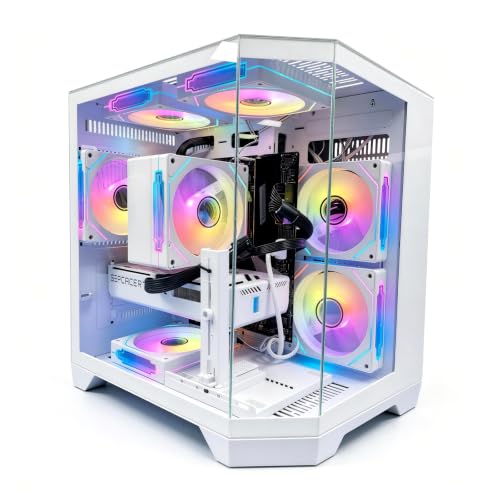


Top 3 picks at a glance
Decide These 3 Things First
1. Your resolution and refresh rate. This single decision determines your entire budget. Competitive shooters at 1080p, 240Hz? You need a strong CPU and a midrange GPU. Single-player games at 1440p, 144Hz? That is the sweet spot for most people and where midrange cards shine. 4K, 120Hz? Budget $1,800 minimum, realistically $2,200+. Buying a $1,300 machine for 4K gaming is the single most common way buyers waste money.
2. Your real budget, including a monitor. If you do not already own a good display, subtract $200–$500 from your PC budget. A $2,899 tower paired with a 1080p 60Hz office monitor is a waste on both ends. Decide the total spend first, then divide.
3. Upgradability tolerance. A standard ATX case with a standard motherboard lets you swap the GPU, add RAM, and drop in more storage for years. A compact proprietary chassis may lock you out of all three. If you upgrade every 2–3 years, this matters more than 5% of benchmark performance.
Once those three are settled, evaluate every machine against the factors below.
GPU Before CPU: The 70/30 Rule
In games, the graphics card matters far more than the processor at 1440p and 4K. A rough guide: at 1080p, budget roughly 40–50% of the total system cost for the GPU; at 1440p and above, 50–60% is reasonable. A system like the LXZ with a Ryzen 7 8700F and RTX 5060 at $1,299 puts its money in the right place for 1080p/1440p gaming. A machine like the KOTIN (RTX 5070, Ryzen 7 9700X, $2,099) steps up sensibly for high-refresh 1440p.
Beware top-heavy builds: a flagship CPU paired with a midrange GPU is a marketing pattern, not a gaming machine. The CPU should be a tier below the GPU in spending priority, not above it. If you see a $2,000 build with a $600 CPU and a $550 GPU, walk away — that same money spent GPU-first buys meaningfully more frames.
One caveat: if you play simulation games, strategy titles, or competitive esports at very high frame rates, CPU weight rises. That is the audience for something like a Ryzen 7 9850X3D machine — and why the Skytech at $2,899 pairs it with an RX 9070 XT rather than a modest card. X3D-class chips are worth the premium primarily for those workloads; for general 1440p gaming, a standard Ryzen 7 or Core Ultra 7 is plenty.
RAM and Storage: Where Sellers Cut Corners
RAM: 16GB is the functional floor for new gaming builds; 32GB is the sweet spot and what you should demand at any price above $1,800. Check the speed too — DDR5-6000 is the sweet spot for current AMD platforms, and DDR5-5600 or faster for Intel. Slower DDR5-4800 sticks in a premium build are a quiet downgrade.
Storage: Modern games routinely eat 100–150GB each. 1TB fills up within a year of serious gaming; 2TB should be standard above $2,000. More important than capacity is the drive type: insist on an NVMe PCIe Gen4 SSD with advertised reads of at least 5,000 MB/s, not a SATA drive or a budget DRAM-less NVMe. Sellers rarely list the SSD model — if the listing does not name a specific drive (a WD Black SN770/SN850X, Samsung 990, Crucial T500 class), assume it is the cheapest drive available and price accordingly.
Check physical expansion too. Two M.2 slots on the motherboard is the practical minimum; one slot with a filled drive means your “upgradable” PC is not.
Case, Cooling, and Airflow
This is where prebuilts quietly fail. A great GPU throttled by a stagnant case loses 5–15% of its performance and runs loud doing it.
What to look for in the listing and photos:
- Mesh front panel, not solid glass or steel. A closed front starves fans of air.
- At least two or three intake/exhaust fans included. One rear fan is a red flag on a $1,500+ build.
- Case volume of roughly 25–65 liters. Anything smaller (compact micro-ATX builds around 15–20L) needs careful cooling design to avoid noise.
- A tower that fits your desk: measure your space and compare to the listed dimensions. Mid-tower cases commonly run 17–20 inches deep and 18–21 inches tall; some full-ATX gaming cases exceed 22 inches and will not fit under a shallow desk.
Cooling type should scale with price: a decent air cooler (a 120mm tower or better) is fine for 65–105W CPUs; above roughly $1,800, expect a 240mm or 360mm all-in-one liquid cooler. Be skeptical of a 360mm AIO on a budget CPU in a cheap case — it is showroom dressing.
The Power Supply: The Component Nobody Checks
The PSU is the most-skipped spec and the most common point of failure. Requirements scale directly with your GPU:
- RTX 5060 / RX 9060 class: 550–650W is sufficient
- RTX 5070 / RX 9070 class: 650–750W
- RTX 5080 / RX 9070 XT and above: 750–850W
More important than wattage is quality and form factor. Insist on 80 Plus Bronze minimum, Gold preferred, from a named brand. And here is the quiet differentiator: ATX-format PSUs can be swapped in any case. Proprietary prebuilts often use SFX or custom-shaped units and custom wiring, which means a dead PSU five years out may require a proprietary replacement — if one is still sold. Ask, or buy standard.
Also verify the PSU has headroom: a 750W unit powering a 650W-recommended GPU leaves room for a future GPU upgrade. A PSU sized exactly to the current build does not.
Proprietary vs. Standard Parts
This factor determines your PC’s lifespan more than any benchmark. Check the listing and photos for:
- Standard ATX or micro-ATX motherboard in a standard case — upgradeable RAM, storage, GPU, and PSU.
- Standard PCIe power connectors on the GPU, not custom cabling.
- Two (ideally four) DIMM slots — two filled with 16GB means you can add two more sticks later.
Some large-brand towers use proprietary motherboards, front-panel connectors, and PSUs to save cost. Performance out of the box can be identical to a boutique build; the problem arrives at upgrade or repair time, when the only option is the original manufacturer at original-manufacturer prices. Boutique builders (Skytech and similar) generally use standard parts throughout. Big-name systems like the Alienware Aurora trade some of that flexibility for design, support infrastructure, and financing convenience — a legitimate choice, but know what you are trading.
Price Tiers: What Your Money Should Buy
- $1,000–$1,400 (entry): Midrange GPU (RTX 5060 / RX 9060 class), 6–8-core CPU, 16GB DDR5, 1TB Gen4 NVMe, air cooling, standard ATX case. Target: 1080p high settings, entry 1440p. Example target: the LXZ at $1,299.
- $1,700–$2,200 (mid): Upper-midrange GPU (RTX 5070 class), 8-core CPU, 32GB DDR5-6000, 1–2TB NVMe, 240mm AIO or quality air cooler. Target: 1440p at high refresh. The KOTIN at $2,099 and Alienware at around $2,000 sit here — compare them on parts standards and warranty, not just specs.
- $2,500–$3,500 (premium): High-end GPU (RX 9070 XT / RTX 5080 class), top-tier CPU (X3D or Core Ultra 9 class), 32GB fast DDR5, 2TB NVMe, 360mm AIO, premium case and PSU with upgrade headroom. Target: 4K/120 or extreme-refresh 1440p. The Skytech at around $2,900 is the shape of a sensible premium build: GPU-first spending.
If a listing does not fit these ratios — a $2,500 build with 16GB RAM, or a $1,300 build with a 360mm AIO and a weak GPU — someone spent the money in the wrong place.
Warranty and Support: Read This Before the Specs
- Length: 1 year is the industry floor; look for 2–3 years on parts and labor from boutique builders. Big brands often offer 1 year standard with paid extensions — factor that into the true price.
- Who pays shipping if the PC must go back for repair. Round-trip shipping on a 30-pound tower can run $80–$150.
- Window for DOA/defect returns: 30 days minimum from the retailer.
- Labor-only vs. parts-and-labor: a “free repair” warranty that charges you for the failed part is worth little.
- Component warranties: if the builder uses retail parts, individual components often carry their own 3–5 year manufacturer warranties. Ask whether the builder’s warranty supersedes or complements these.
Weigh the tower too — expect 25–35 pounds for a mid-tower gaming PC. If warranty service requires shipping, that weight is your cost.
Spec Checklist
| Spec | Budget ($1,000–$1,400) | Mid ($1,700–$2,200) | Premium ($2,500–$3,500) |
|---|---|---|---|
| GPU | RTX 5060 / RX 9060 class | RTX 5070 / RX 9070 class | RX 9070 XT / RTX 5080 class |
| CPU | Ryzen 5/7 8000 series, Core Ultra 5 | Ryzen 7 9700X, Core Ultra 7 | X3D chip or Core Ultra 9 class |
| RAM | 16GB DDR5-5600+ | 32GB DDR5-6000 | 32GB DDR5-6000+ |
| Storage | 1TB Gen4 NVMe | 1–2TB Gen4 NVMe | 2TB Gen4/Gen5 NVMe |
| PSU | 600–650W, 80 Plus Bronze | 650–750W, Gold | 850W+, Gold, ATX format |
| Cooling | 120mm tower air | 240mm AIO or premium air | 360mm AIO |
| Case | ATX mid-tower, mesh front, 2+ fans | ATX mid-tower, 3+ fans | Premium airflow case, 4+ fans |
| Warranty | 1 year parts & labor | 2 years preferred | 2–3 years, standard parts |
Red Flags
- “Gaming PC” with no named PSU brand or wattage. This almost always means a cheap generic unit.
- Single-channel RAM (one 16GB stick instead of 2x8GB) — costs 5–15% in frame rates on some games.
- Top-heavy specs: a $600 CPU with a $500 GPU in a $2,000 build.
- SATA SSD or unbranded NVMe in anything above $1,500.
- One rear exhaust fan in a case with a glass front panel.
- Listings that omit the motherboard model. Usually hiding a proprietary board.
- “Up to” clock speeds with no base specifications listed.
- Stock photos only. If the builder will not show the actual interior, assume the worst cable management and cooling.
FAQ
Are prebuilt gaming PCs worse than building your own?
On raw performance per dollar, a self-build usually wins by roughly 10–15% because there is no assembly labor margin. But prebuilt pricing has narrowed, and a prebuilt gets you a single warranty covering the whole machine, professional cable management, and validated compatibility. For a first gaming PC or anyone who does not want to troubleshoot, a prebuilt from a builder using standard parts is a defensible choice.
How long will a prebuilt gaming PC last?
Expect 4–6 years of comfortable 1080p/1440p gaming from a budget build, and 5–8 years from a premium one, before you are choosing between a GPU upgrade and a full replacement. Standard parts (ATX case, ATX PSU, spare RAM slots, two M.2 slots) can stretch that lifespan by years; a proprietary build often cannot be upgraded past its original GPU.
Is it better to buy a prebuilt on sale or build during a GPU price drop?
If you find a prebuilt where the GPU alone would cost 60% or more of the total system price, that is genuinely a good deal — builders sometimes get GPU inventory at prices individual buyers cannot. If GPU prices are spiking, prebuilts become relatively better value; when GPUs are cheap, building wins. Do not wait indefinitely for a perfect window, though — a machine you buy now is a machine you get to play on now.
Do I need to upgrade anything out of the box?
A well-specced prebuilt should need nothing on day one. The most common worthwhile add-ons within the first year: a second storage drive once your 1TB fills (about $60–$90 for a 1TB Gen4 NVMe), one or two extra case fans if the build shipped with only one, and a Wi-Fi/Bluetooth card if the motherboard lacks it. Resist upgrading RAM from 16GB to 32GB until a specific game actually needs it.
Related guides
- Best Gaming PC for Fortnite: Eight Prebuilt Desktops Sorted by Refresh Rate Goal (2026)
- Best RX 9070 XT Prebuilt Gaming PCs: Seven Desktops and Three Cards Compared: 10 Compared (2026)
- CyberPowerPC vs iBUYPOWER Gaming PC: How the Two Brands Compare
- Best RX 9070 XT Prebuilt Gaming PC (2026): 5 Picks Compared









