
Our Top Picks
 Cooler Master NR200P V2 Mini-ITX PC Case ReadyMini-ITX14.65 x 7.28 x 11.5 inches10.85 poundsCheck on Amazon


Top 3 picks at a glance

The Short Answer
Most Mini-ITX builds fit a graphics card between 7.5 and 12.5 inches long (190 to 318 mm), but the real limit depends on the specific case—not the Mini-ITX motherboard size. Compact 5-liter cases may only accept a 7 to 8.5 inch (180 to 215 mm) GPU, while larger Mini-ITX cases can accommodate cards up to 13.5 or 14 inches (343 to 357 mm).
Before buying a GPU, compare four measurements: length, height, thickness, and power-connector clearance. Length gets the most attention, but a card that is too tall can hit the side panel, and a 3.5- or 4-slot card can conflict with the case frame, bottom fans, or power supply.
As an Amazon Associate we earn from qualifying purchases at no extra cost to you.


For a safe fit, choose a GPU that is at least 0.4 inch (10 mm) shorter than your case’s published maximum GPU length. For very small sandwich-style cases, leave 0.6 to 0.8 inch (15 to 20 mm) of extra space at the power-connector end, especially when using traditional 8-pin PCIe connectors or a 16-pin 12V-2×6 cable.
Mini-ITX does not automatically mean low-power graphics. In 2026, larger ITX cases can house high-end, full-length GPUs, but the smallest portable builds still require careful parts matching and often use shorter dual-fan cards.
Standard Sizes
Graphics cards are not manufactured in fixed size classes, but these ranges are useful when comparing listings. Always use the card maker’s stated dimensions rather than relying on labels such as “Mini,” “Compact,” or “ITX.” A compact GPU from one brand may still be longer than another brand’s standard two-fan model.
| GPU Size Category | Typical Length | Typical Height | Typical Thickness | Typical Weight | Best Case Match |
|---|---|---|---|---|---|
| Single-fan / ITX GPU | 6.7–7.9 in 170–200 mm |
4.3–4.8 in 110–122 mm |
1.6–2.2 in 40–56 mm |
1.0–1.8 lb 0.45–0.82 kg |
4–7 L ultra-compact cases |
| Short dual-fan GPU | 7.9–9.8 in 200–250 mm |
4.4–5.1 in 112–130 mm |
1.8–2.5 in 46–64 mm |
1.5–2.5 lb 0.68–1.13 kg |
6–12 L Mini-ITX cases |
| Standard dual-fan GPU | 10.0–12.2 in 254–310 mm |
4.6–5.4 in 117–137 mm |
2.0–3.0 in 51–76 mm |
2.0–3.5 lb 0.9–1.6 kg |
12–20 L Mini-ITX cases |
| Large triple-fan GPU | 12.0–14.1 in 305–358 mm |
5.3–6.0 in 135–152 mm |
2.5–4.0 in 64–102 mm |
3.0–5.5 lb 1.36–2.50 kg |
Large ITX cases with dedicated GPU clearance |
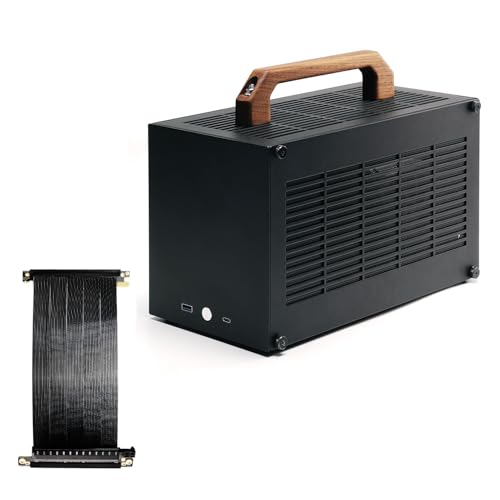
Case volume offers a rough clue, but it is not a guarantee. A 5-liter case such as the SGPC K39 is built around compact components and commonly favors short, approximately 7.5-inch (190 mm) cards. An 8.3-liter design such as the SGPC K49BL can support more substantial hardware, depending on its exact layout and power-supply configuration. These compact cases typically sell in the neighborhood of $90 to $135.
At the roomier end, a case such as the Cooler Master NR200P V2 is still Mini-ITX but is designed for a much longer vertically mounted GPU, with a stated clearance up to 357 mm (14.1 inches). It is a different category from a tiny travel-oriented case, despite using the same motherboard format. Expect many larger Mini-ITX cases with broad GPU support to fall around $80 to $170, before fans, riser cables, or other upgrades.
How to Measure Your Space
- Find the case manufacturer’s GPU clearance specification. Look for the maximum GPU length in millimeters first. This is more precise than inches. If the case lists “up to 300 mm,” treat that as the absolute physical maximum, not the recommended shopping target.
- Measure usable length inside the case. Measure from the rear expansion-slot bracket to the first obstruction at the front of the GPU area. Obstructions may include a front fan, radiator, drive bracket, cable channel, or power supply.
- Check GPU height from the PCIe slot upward. Standard cards are usually about 4.4 to 5.4 inches (112 to 137 mm) tall. Taller cards can place their power sockets close to the side panel, particularly in narrow sandwich-layout cases.
- Count expansion slots for thickness. A two-slot card needs about 1.6 inches (40 mm); a 2.5-slot card needs roughly 2.1 inches (54 mm); a three-slot card needs about 2.4 inches (61 mm). Do not assume the number of rear slot covers tells the whole story, since shrouds often extend beyond them.
- Allow for cable bend space. Add at least 0.8 inch (20 mm) above the GPU power connection for flexible 8-pin cables. For a 16-pin GPU power cable, 1.2 to 1.4 inches (30 to 35 mm) is a more comfortable target unless you are using a cable designed for tight bends.
- Subtract space for installed cooling hardware. A front-mounted 25 mm fan reduces GPU length clearance by about 1 inch. A radiator plus fan can consume 2.0 to 2.5 inches (51 to 64 mm), depending on radiator thickness.
- Confirm the power supply layout. In some Mini-ITX cases, an SFX or SFX-L power supply shares space with the graphics card. An SFX unit is typically 4.9 x 2.5 x 3.9 inches (125 x 63.5 x 100 mm), while an SFX-L model is longer at 5.1 inches (130 mm), which can reduce cable room.
By Room or Use Case
Small Desk or Dorm Room Build
For a compact desk setup, target a 7.5 to 10 inch (190 to 254 mm) GPU. This range works well in many small Mini-ITX cases without forcing tight cable bends or blocking airflow. A dual-fan card around 8.5 inches (216 mm) long is often the practical sweet spot: it is easier to cool than a tiny single-fan card but remains compatible with many 6- to 10-liter enclosures.
Plan for a 450 to 650 watt SFX power supply for many mainstream gaming cards, depending on the GPU and CPU you select. Shorter GPUs can cost about $250 to $650 in mainstream performance categories, while compact premium models may cost more than a physically larger version with similar specifications.
Living Room or Media Cabinet PC
A living room build benefits from low noise and controlled heat more than from the smallest possible case. Choose a case with room for a 10 to 12.5 inch (254 to 318 mm) GPU and at least two case fans. This gives you access to quieter dual- and triple-fan coolers that do not need to spin as aggressively.
Leave at least 2 inches (51 mm) behind the case for exhaust airflow and avoid sealing the system into a cabinet. If the cabinet door must close, select a ventilated enclosure and verify that both side-panel and rear exhaust vents remain uncovered.
Portable LAN or Travel Build
For a PC you will carry regularly, a 5- to 8-liter case and a GPU under 8.5 inches (215 mm) make the most sense. Keep total system weight in mind: a compact build with a 1.5-pound GPU is far easier to transport than one carrying a 5-pound triple-fan card.
Use a rigid internal layout, secure any GPU riser cable, and avoid putting unnecessary pressure on the PCIe slot during transport. A padded case or small equipment bag should fit the PC with at least 1 inch (25 mm) of protective padding around each side.
High-Performance Small-Space Gaming Build
If you want a powerful GPU without moving to a conventional mid-tower, select a larger Mini-ITX chassis with a published clearance of 13.5 inches (343 mm) or more. A case rated for 357 mm can accommodate many large triple-fan cards, but you still need to check thickness and connector clearance.
High-end cards may call for a 750 to 1,000 watt power supply, depending on the manufacturer’s recommendation and the processor installed. In this category, an SFX power supply is often preferable because it preserves room for GPU cables and front intake airflow.
Common Sizing Mistakes
Buying by GPU name alone: One graphics chip can appear on cards ranging from 7 inches to more than 14 inches long. Compare the exact board partner model number and dimensions.
Using maximum clearance as the target size: A 300 mm card in a 300 mm bay may technically fit but can be frustrating to install and may leave no space for cables, fans, or vibration isolation. A 10 mm margin is the minimum; 15 to 20 mm is better.
Ignoring thickness: A 3.5-slot GPU may physically enter a case with three rear openings yet overlap bottom fans or press against a side panel. Use the manufacturer’s thickness measurement in millimeters.
Forgetting radiator conflicts: Adding a front radiator later can turn a 330 mm GPU space into a 270 mm GPU space. Plan the cooling layout before ordering either component.
Overlooking power supply cables: A GPU may fit, but stiff cables can prevent the side panel from closing. This is especially important with taller cards and narrow cases.
FAQ
Can any GPU fit in a Mini-ITX build?
No. Mini-ITX refers to the motherboard size, which is 6.7 x 6.7 inches (170 x 170 mm). The case determines GPU compatibility. Some Mini-ITX cases only fit 200 mm cards, while others fit GPUs up to approximately 357 mm long.
What is the safest GPU length for a small Mini-ITX case?
For broad compatibility with compact cases, choose a card 8.5 inches (215 mm) long or shorter. For an ultra-small 5-liter enclosure, a card under 7.9 inches (200 mm) is usually the safer starting point.
Will a 3-slot GPU fit in a Mini-ITX case?
It can, but only if the case explicitly supports that thickness. Many larger Mini-ITX cases accept 2.5- to 3-slot cards, while ultra-compact sandwich cases may be limited to about 2 slots or 2.5 slots. Check the maximum thickness in millimeters.
Do I need a GPU support bracket in a Mini-ITX case?
Usually not for a vertically mounted GPU or a short card under about 2 pounds (0.9 kg). For a heavy horizontal triple-fan GPU, a support bracket can reduce long-term stress on the PCIe slot if the case has room for one. In a tightly packed Mini-ITX build, the case frame or bottom padding may already provide support.









