
As an Amazon Associate we earn from qualifying purchases at no extra cost to you.



Our Top Picks


Top 3 picks at a glance
The Short Answer
Most compact PC cases accept CPU coolers between 135mm and 155mm tall (about 5.3 to 6.1 inches), while ultra-compact and small-form-factor builds typically top out at 70mm (2.75 inches) or less. The Cooler Master Q300L series, for example, lists a maximum CPU cooler height of 159mm (6.26 inches), which means popular tower coolers in the 150–158mm range will fit, but anything taller will press against the side panel.
Before buying, check two numbers: the cooler’s listed height in millimeters and your case’s maximum CPU cooler clearance. The cooler must be at least 2–3mm shorter than the clearance to account for manufacturing tolerances. If you’re building in a slim case or a console-style chassis, low-profile coolers in the 35–70mm range are usually the only option, and some compact cases rely entirely on a 120mm or 240mm liquid AIO instead.
Standard Sizes
Cooler heights fall into a few well-defined categories, and matching them to case classes is the fastest way to narrow your search.
| Cooler Class | Typical Height | Inches | Common Use | Approx. Price Range |
|---|---|---|---|---|
| Ultra low profile | 35–45mm | 1.4–1.8 in | HTPC, 1U-style slim cases, mini-ITX console builds | $15–$40 |
| Low profile | 50–70mm | 2.0–2.8 in | Compact mini-ITX cases, slim micro-ATX builds | $20–$55 |
| Compact tower | 120–145mm | 4.7–5.7 in | Micro-ATX and small ATX cases | $15–$45 |
| Standard tower | 150–160mm | 5.9–6.3 in | Mid-tower and roomy micro-ATX cases | $20–$90 |
| Flagship tower | 163–170mm | 6.4–6.7 in | Full towers and large mid-towers only | $50–$150 |
For reference, popular case clearances:
| Case | Max CPU Cooler Clearance | Form Factor |
|---|---|---|
| Cooler Master Q300L (V1) | 159mm / 6.26 in | Micro-ATX |
| Cooler Master Q300L (V3) | 159mm / 6.26 in | Micro-ATX |
Sample coolers that pair well with those clearances:
| Cooler | Height | Rated Capacity | Price |
|---|---|---|---|
| ID-COOLING SE-903-XT V2 | 152mm / 5.98 in | 150W TDP | Check on Amazon |
| ID-COOLING IS-40X V3 | 45mm / 1.77 in | 4 heatpipes, slim 92mm fan | Check on Amazon |
The SE-903-XT V2’s 152mm height leaves 7mm of margin inside a Q300L, which is a comfortable fit. The IS-40X V3, at 45mm, is designed for cases with clearances under 70mm where a tower cooler physically cannot fit.
How to Measure Your Space
- Find the case spec sheet. Search the manufacturer’s product page for “CPU cooler max height” or “CPU cooler clearance.” This single number saves you the most guesswork.
- Measure manually if the spec is unavailable. With the motherboard installed, measure from the center of the CPU socket straight out to the side panel, then subtract 6–8mm to account for the motherboard standoff depth and the base of the cooler.
- Check RAM clearance separately. Tower coolers often overhang the first RAM slot. Many compact boards use tall RGB modules at 40–45mm; if your cooler’s fin stack starts close to the socket, choose low-profile RAM (roughly 32mm or under) or a cooler with a raised fin stack.
- Confirm the fan orientation and width. A 152mm cooler with a 25mm-thick fan occupies the full height; removing the fan and mounting it as a pull configuration changes nothing vertically but can matter horizontally in narrow cases.
- Weigh the cooler against your motherboard support. Air coolers above roughly 1kg (2.2 lbs) benefit from a backplate, which most include. Check that your case has the cutout behind the socket for backplate installation.
- Leave at least 2–3mm of margin. A cooler that exactly matches the clearance rating risks rubbing the panel or failing to seat evenly.
By Room or Use Case
Desk-Top Micro-ATX Build
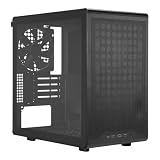
Cases like the Cooler Master Q300L V1 (around $39) and the V3 with tempered glass (around $50) sit comfortably on or under a desk at roughly 15.5 x 7.9 x 15.2 inches (386 x 200 x 386mm). With 159mm of cooler clearance, compact towers in the 140–155mm range are ideal. The ID-COOLING SE-903-XT V2 at 152mm and around $13 is a common pick here; budget $13–$35 for a cooler in this class. Note that the Q300L’s transparent or glass side panel shows off the build, so cable management behind the 200mm-wide chassis matters more than in a plain steel case.
Small-Form-Factor and Mini-ITX Cubes
Console-style ITX cases commonly restrict coolers to 48–70mm. That means a low-profile unit such as the ID-COOLING IS-40X V3 (45mm, around $26) is the ceiling for air cooling, typically paired with a 65–95W CPU. If your processor draws 105W or more, plan on a 240mm AIO liquid cooler (if the case supports one) rather than fighting a height limit. Expect to pay $25–$60 for quality low-profile cooling.
Home Theater PC (HTPC) Under the TV
Slim HTPC cases often allow only 35–50mm of clearance and prioritize silence. A 45mm cooler with a slim 92mm fan like the IS-40X V3 keeps total height under 2 inches and works well with 35–65W processors. Pair it with a case fan running at low RPM, and check that the case height itself (often 70–105mm total) accommodates the cooler plus any raised motherboard components.
Under-Desk or Floor Compact Tower
If the case sits on the floor or tucked under a desk, clearance limits relax. A compact ATX or micro-ATX case with 160–170mm clearance opens up standard tower coolers and 120mm or 140mm dual-tower designs. Budget $25–$60 for a tower cooler capable of handling a 150–220W processor load, and verify case width of at least 190–210mm so RAM and the front fan don’t conflict.
Common Sizing Mistakes
- Ignoring VRM and RAM height. A cooler may clear the side panel but collide with tall memory or the chipset heatsink. Low-profile RAM (under 32mm) avoids this in tight builds.
- Forgetting the 2–3mm tolerance buffer. Fitting a cooler at exactly the stated maximum often results in panel contact or uneven mounting pressure.
- Confusing cooler height with case width. Height is measured perpendicular to the motherboard, from the CPU socket outward. Case width numbers include the panel thickness and cable channels.
- Buying a big cooler for a low-watt CPU. A 45mm cooler handling 95W is sufficient for a 65W processor; a 158mm dual-tower is wasted money and weight in a compact case.
- Overlooking airflow direction. In narrow micro-ATX cases like the Q300L, a tower cooler blowing toward the rear exhaust works best; mounting the fan to blow toward the glass panel traps heat.
- Skipping the socket compatibility check. Height isn’t the only constraint — confirm the cooler supports your socket (AM5 and LGA1700/1851 mounting hardware, for example) before checkout.
FAQ
Will a 155mm cooler fit in a case with 159mm clearance?
Yes. That leaves 4mm of margin, which is within the safe range. Anything within about 2mm of the limit is risky; anything 5mm or more under is a comfortable fit.
What cooler height do I need for a 150W CPU?
A single-tower cooler rated for 150W or more, typically 150–155mm tall with four or more heatpipes, handles that load. The ID-COOLING SE-903-XT V2 (152mm, 150W rating, around $13) is an example of this class. Check that your case clears 155mm+.
Is a low-profile cooler enough for gaming?
For a 35–65W CPU at moderate settings, a quality 45–70mm low-profile cooler is fine. For 105W+ gaming processors, low-profile cooling usually can’t hold sustained boost clocks, so look for a case that accepts a 140mm+ tower or a 240mm AIO.
How do I measure cooler height if it’s not listed?
Measure from the flat bottom of the cold plate (the part that contacts the CPU) to the highest point of the fin stack or fan, whichever is taller. Include the fan in the measurement — a “142mm cooler plus 25mm fan” often means 155mm installed height, unless the fan nests into the fins.
Related guides
- Best Gaming PC for Fortnite: Eight Prebuilt Desktops Sorted by Refresh Rate Goal (2026)
- Best RX 9070 XT Prebuilt Gaming PCs: Seven Desktops and Three Cards Compared: 10 Compared (2026)
- CyberPowerPC vs iBUYPOWER Gaming PC: How the Two Brands Compare
- Best RX 9070 XT Prebuilt Gaming PC (2026): 5 Picks Compared









