
Setting up a home video editing studio is a balancing act between creative ambition, technical demands, and domestic reality. Unlike a standard office setup, a high-performance video editing workstation is a significant physical presence. It draws substantial power, generates noticeable heat, and produces a constant hum from cooling fans. It is not just a computer; it is an appliance that shares your living space.
When deciding on a prebuilt workstation vs custom build for video editing, the dilemma is rarely just about raw processing power. The real decision involves how much time you want to spend troubleshooting hardware, how you manage the aesthetics of your home workspace, and how you want to allocate your budget over the lifespan of your machine. A prebuilt machine offers immediate, out-of-the-box productivity with a unified warranty. On the other hand, a custom build gives you granular control over every single component, allowing you to optimize for silent operation, specific desk footprints, and targeted performance upgrades.
As an Amazon Associate we earn from qualifying purchases at no extra cost to you.



Whether you are editing 4K timeline sequences in a shared family room, a dedicated home office, or a compact studio apartment, your hardware choice will shape your daily working environment. Let us break down how these two approaches compare across every practical metric for home-based editors.
Our Top Picks
Pros & cons
- Built-in 11.3 inch smart display shows live temps and usage
- 850W 80+ Gold PSU leaves headroom for upgrades
- Arrives fully assembled with Windows 11 Home installed
- Monitor must connect to the graphics card, not motherboard ports
- 360mm liquid cooler takes up significant case space



Top 3 picks at a glance
Quick Verdict
For most home editors who want to plug in their system and immediately start cutting footage, a prebuilt workstation is the smartest choice. It eliminates assembly hassle, guarantees component compatibility, and provides a single point of contact for customer support if anything goes wrong. However, if you require a whisper-quiet workspace, have highly specific aesthetic preferences for your home office, or want the freedom to upgrade individual components over the next decade, a custom build is unmatched. It allows you to tailor your cooling systems and case sizes to fit your exact domestic environment.
Side by Side
To help you visualize how these two approaches fit into your home and work life, here is a direct comparison of their key attributes:
| Feature | Prebuilt Workstation | Custom Build for Video Editing |
|---|---|---|
| Comfort (Noise & Heat) | Standard fan curves can be loud under heavy rendering loads; limited acoustic dampening. | Highly customizable; can select silent fans and premium liquid cooling for quiet operation. |
| Durability & Reliability | Built with standardized or proprietary parts; tested as a complete system before shipping. | Dependent on component quality; individual parts often carry longer individual manufacturer warranties. |
| Price Range | $1,000 to $4,000+ (includes assembly, software installation, and system-wide warranty support). | $800 to $6,000+ (pure component cost; your labor is free, saving on markup). |
| Maintenance | Simple; single manufacturer to contact for hardware failures or technical support. | Hands-on; you must diagnose issues, open the case, and RMA individual parts yourself. |
| Space Needed | Fixed sizes; typically mid-to-full towers ranging from 15 to 22 inches in height. | Flexible; can be built into ultra-compact Small Form Factor (SFF) cases to save desk space. |
| Look & Aesthetics | Consistent, polished designs; ranges from sleek office minimalist to aggressive gaming styles. | Completely personalized; choose your own case colors, RGB lighting, glass panels, or wood accents. |
| Resale Value | Moderate; brand recognition makes complete systems easier to sell on local markets. | Higher for individual premium components, but harder to sell as a complete unbranded unit. |
| Best For | Busy professionals, beginners, and those who prioritize uptime and immediate productivity. | Tech-savvy editors, enthusiasts, and those with specific noise, space, or performance requirements. |
Where Prebuilt Workstation Wins
The primary advantage of a prebuilt workstation is simplicity. Video editing is a demanding profession that requires your full focus. Spending an entire weekend researching motherboard chipsets, power supply ratings, and thermal paste application is time taken away from actual client work. When you buy prebuilt, the system arrives fully assembled, with the operating system preloaded and drivers configured.
For example, systems like the KOTIN Prebuilt Gaming PC RTX 5070 12GB, Ryzen 7 9700X, 32GB DDR5, 1TB SSD (priced at $2099.99) show how prebuilt options offer ready-to-go power. With a modern processor and a high-end graphics card, a machine like this handles complex color grading and timeline scrubbing without requiring you to turn a single screwdriver. Similarly, the Alienware Aurora Gaming Desktop, RTX 5070, Intel Core Ultra 7 265F (priced at $1999.99) delivers massive processing capabilities in a distinct, engineered chassis that is fully tested for thermal efficiency right out of the box.
Additionally, prebuilt systems offer a single, unified warranty. If your computer crashes mid-render, you only have one customer support line to call. They will diagnose whether the issue lies with the RAM, the processor, or the power supply, and often send a technician to your home or provide a prepaid shipping label for repairs. For professionals whose income depends on their machine running daily, this minimized downtime is invaluable.
Where Custom Build for Video Editing Wins
Where the custom build path truly shines is in the absolute control it grants you over your workspace environment. In a home office, ambient noise levels are critical. Many prebuilt systems use proprietary, cost-effective fans that can sound like a jet engine when rendering a heavy 4K sequence. When building a custom PC, you can select premium, ultra-quiet 140mm fans, thick sound-dampening case panels, and massive dual-tower CPU coolers. This allows you to create a machine that remains whisper-quiet even under full load, preserving the peace of your home.
Customization also allows you to allocate your budget exactly where your editing software needs it. If you work primarily in DaVinci Resolve, you can prioritize a massive GPU and 64GB of high-speed system memory. If you are building a top-tier machine comparable to the Supernova Apex Elite Custom Computer (which retails around $5000), you can hand-select every part—from a titanium-rated power supply that lowers your home electricity bill to lightning-fast PCIe Gen 5 storage drives that load massive raw footage files instantly.
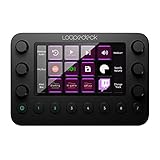
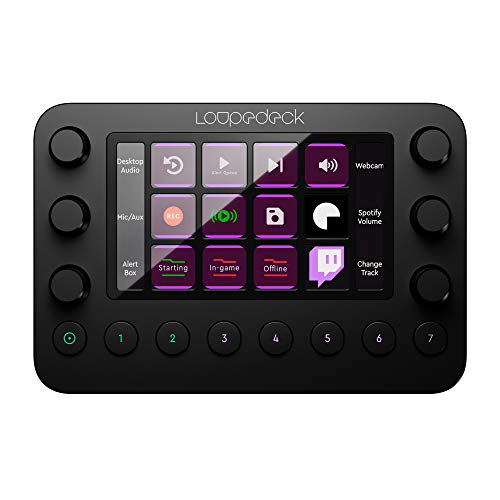
A custom build also lets you curate your physical desktop layout. You can choose beautiful, minimalist cases featuring real wood panels, anodized aluminum finishes, or compact footprints that sit elegantly next to high-end editing consoles. Adding specialized desk tools like the Loupedeck Live – The Custom Console for Live Streaming, Photo and Video Editing with Customizable Buttons, Dials and LED Touchscreen (priced at $189.5) alongside a custom-built PC creates a highly personalized, efficient workstation that feels like an intentional part of your home decor rather than an eyesore.
Cost Over 5 Years
When calculating the true cost of a video editing workstation, you must look beyond the initial checkout screen. A high-performance computer incurs ongoing costs in power consumption, maintenance, and eventual hardware upgrades over a five-year lifecycle.
With a prebuilt system, your initial cost is higher due to assembly labor and retail markups. Over five years, maintenance costs can also rise if proprietary parts fail out of warranty. Many large manufacturers use custom motherboard shapes or proprietary power supply connectors. If your motherboard fails in year four, you may not be able to buy a standard replacement off the shelf, forcing you to purchase an entirely new system or pay premium prices for manufacturer-specific replacement parts.
Conversely, a custom build has a lower initial component cost for equivalent performance, though it requires your unpaid labor to assemble. The true financial benefit of a custom build emerges in years three through five. If your graphics card becomes outdated or your storage fills up, you can easily open the case and swap in a new component in fifteen minutes. Standardized parts ensure total compatibility, meaning you can keep your case, power supply, and cooling systems for a decade while upgrading the internal brains of the computer as technology advances. This modular approach significantly lowers the long-term cost of ownership.
Which One for Your Home
Your living situation plays a massive role in deciding which path to take. Here is how to evaluate your choice based on your home environment.
Small Apartment
In a small apartment or studio, space and noise are your primary constraints. You likely do not have a dedicated room for your office, meaning your computer may sit in your living room or bedroom. A custom build is highly advantageous here because it allows you to build a Small Form Factor (SFF) PC. Using an ITX motherboard, you can pack workstation-grade power into a case no larger than a shoebox (under 15 liters in volume), keeping your desk clean and clutter-free.
Family with Kids/Pets
If you share your home with children or curious pets, durability and safety are paramount. Prebuilt workstations win in this scenario. They are housed in sturdy, standardized cases that are fully closed, with well-engineered button placements and robust dust filtration. They are built to withstand accidental bumps, and their lack of delicate, exposed custom liquid-cooling loops means you do not have to worry about leaks or physical damage from active household members.
Rental
For renters who move every year or two, portability and ease of transport are key considerations. A prebuilt workstation is highly convenient because it arrives in a custom-engineered shipping box with custom-molded foam. Keeping this box makes moving your system incredibly safe and easy. Additionally, if you move to a rental with older electrical wiring, prebuilt systems are thoroughly tested for power efficiency, reducing the risk of tripping sensitive older circuit breakers in historic rental homes.
Long-Term Home
If you own your home and have a dedicated, permanent office space, a custom build is the ultimate choice. It allows you to design a dream workstation integrated directly into your room’s aesthetic. You can coordinate your PC’s color scheme with your furniture, run cables cleanly through custom desk grommets, and even mount the PC on a wall or inside a ventilated cabinet to completely isolate noise. This is the ideal environment to maximize the lifespan and upgradability of a custom-designed rig as we move toward 2026 and beyond.
FAQ
Is a gaming PC good for video editing?
Yes, gaming PCs make excellent video editing workstations. Both tasks require powerful multi-core processors, high-end graphics cards to accelerate rendering, and fast solid-state drives. However, video editing typically benefits from more system RAM (32GB to 64GB) than standard gaming, so you may need to add extra memory to a gaming system for optimal editing performance.
How much RAM do I need for 4K video editing in 2026?
For smooth 4K video editing, 32GB of DDR5 RAM is the absolute minimum standard. If you work with heavily compressed footage, multi-camera sequences, or extensive motion graphics in After Effects, upgrading to 64GB or even 128GB of RAM will prevent system slowdowns and ensure smooth real-time playback.
Which is quieter: a prebuilt or a custom-built workstation?
A custom-built PC is almost always quieter. When building your own system, you can choose specialized, whisper-quiet fans, silent liquid-cooling loops, and cases with thick sound-dampening foam. Prebuilt systems often use standard, mass-produced fans that can become quite loud when the computer is rendering heavy files.
How long does a custom video editing PC last compared to a prebuilt?
While both systems can perform well for 5 to 7 years, a custom PC generally has a longer functional lifespan because it is easier to upgrade. When a prebuilt system slows down, proprietary parts can make upgrading difficult. With a custom build, you can easily swap out individual parts like the graphics card or processor to keep up with demanding software updates over time.









