
Buying a power supply sounds like a simple errand until you hit the product page and see the word “modular” next to a $30 price jump. Suddenly you’re staring at two boxes that deliver the same wattage and wondering what you’re actually paying for. The real decision a buyer faces isn’t which PSU is “better” in the abstract — it’s whether you need the flexibility of detachable cables, or whether you’d rather pocket the savings and deal with a few extra wires tucked behind your case panel. This guide walks through both options the way we’d compare any big home purchase: on comfort, cost, upkeep, and long-term value, with real numbers at every step.
Our Top Picks
 SUAWY 106 Inch Modular Sectional Sofa with Pull106 inch23.3 x 106 x 18.3 inches297.6 poundsCheck on Amazon
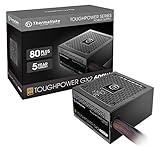
 Thermaltake Toughpower GX2 80+ Gold 600W SLI/Crossfire Ready600W9.3 x 7.7 x 4.6 inchesCheck on Amazon


Top 3 picks at a glance
Quick Verdict
If you’re building a clean, high-performance PC in a case with a tempered glass side panel, a modular power supply is worth the premium. If you’re outfitting a family desktop, an office tower, or a budget build that lives under a desk, a non-modular PSU like the Thermaltake Smart 500W at around $39 delivers the same reliable wattage for roughly 30–50% less. For most households — especially those upgrading a shared computer or setting up a kid’s first build — non-modular wins on pure value. Modular wins when aesthetics, airflow, and future upgradability justify spending $80–$150 instead of $40–$70.
As an Amazon Associate we earn from qualifying purchases at no extra cost to you.



Side by Side
| Factor | Modular PSU | Non-Modular PSU |
|---|---|---|
| Cable setup | Attach only the cables you need; detachable connectors | All cables permanently attached, whether used or not |
| Price range | $80–$200 for 650–850W units | $40–$75 for 500–600W units |
| Case cleanliness | Fewer wires, easier cable management, better showcase look | Extra unused cables to bundle and hide behind the panel |
| Airflow | Less cable clutter can slightly improve airflow in tight cases | Clutter can restrict airflow in compact builds |
| Reliability risk | Connector contacts add a small potential failure point over years | Hardwired cables mean fewer connection points |
| Upgrades | Swap or add cables for new GPUs, extra drives | Usually sufficient; fixed cables limit unusual configurations |
| Installation time | 20–40 minutes for a careful first build | 15–25 minutes, plus wrestling unused cables into place |
| Space needed | Same physical footprint (ATX ~150mm wide), but roomier interior | Same footprint, but the rear chamber needs slack for coiled extras |
| Warranty trend | Typically 7–10 years on quality units | 5 years is common, e.g., Thermaltake’s Toughpower GX2 600W |
| Best for | Enthusiast builds, glass-panel cases, frequent upgraders | Budget builds, family PCs, office and living-room setups |
Where Modular Wins
Cable management and appearance. In a case with a glass side panel, every visible wire shows. A modular unit lets you connect only the 24-pin motherboard cable, the 8-pin CPU cable, and the GPU cables you actually use. The result is a build that looks professionally assembled and takes maybe 15 minutes less to tidy up.
Airflow in compact cases. If you’re building in a small form factor case — think under 20 liters of volume — leftover cables have nowhere to hide. Removing them entirely frees up precious clearance around the GPU and intake fans.
Future flexibility. Planning to add a second hard drive in two years, or upgrade from a 6-pin GPU to a triple-8-pin model? You connect a new cable instead of rerouting a tangled nest. Enthusiasts who rebuild or upgrade every 2–3 years get real, repeated value from this.
Higher-tier components. Modular units skew toward premium lines, so you’ll often find 80+ Gold or Platinum efficiency ratings, hybrid fan modes, and 10-year warranties bundled in. You’re not just paying for detachable cables — you’re usually stepping up the whole quality ladder.
Where Non Modular Power Supply Wins
Price, unambiguously. A capable 500W 80+ White certified unit like the Thermaltake Smart 500W sells for around $39. Step up to the non-modular 600W 80+ Gold Thermaltake Toughpower GX2 at around $59 and you get higher efficiency and a 5-year warranty — still less than half the cost of many modular equivalents. Over the life of a budget build, that $50–$100 difference buys a decent keyboard, a monitor arm, or a chunk of a furniture upgrade elsewhere in the room.
Fewer connection points. Hardwired cables eliminate the small resistance and wear risk at modular connectors. It’s a modest advantage, but in a “build it and forget it” family PC, fewer points of failure is genuinely reassuring.
Simplicity for beginners. There’s no cable-sorting step, no risk of plugging in the wrong modular cable (a real hazard if you mix cables between PSU models). You unpack, install, and stuff the extras behind the basement panel. Done.
Hidden builds don’t care about looks. If your tower sits under a desk, behind a cabinet door, or beside the couch as a living-room media PC, the extra cables are invisible. Paying for cable flexibility you’ll never see is wasted money — the same logic that says you don’t need a designer sectional if the room’s real traffic pattern calls for something durable and dark gray.
Cost Over 5 Years
Let’s model two realistic scenarios:
Budget family PC: Thermaltake Smart 500W non-modular at around $39. Typical power draw of 200–300W at 80% efficiency costs roughly $35–$55 per year in electricity at the U.S. average of about 17¢/kWh. Five-year total: roughly $215–$315, no replacements expected. If you eventually upgrade the whole PC, the PSU often carries over.
Enthusiast build: A modular 750W 80+ Gold unit at $110–$130. Higher efficiency at mid loads shaves maybe $5–$10 per year versus a Bronze unit under similar use. Five-year total: roughly $385–$425 including electricity, with the modular unit far more likely to survive a GPU upgrade without replacement. That resale matters — used quality PSUs from reputable brands hold 30–50% of their value, while budget units sell for very little secondhand.
Bottom line: the modular premium is real (~$50–$90 upfront) but amortizes to $10–$18 per year if you keep the unit across two build cycles. If you build once and use it until it dies, non-modular is simply cheaper.
Which One for Your Home
Small Apartment
Space is at a premium, so your PC probably shares duty as a media center or WFH machine. Go non-modular: a $40–$60 unit like the Smart 500W or Toughpower GX2 600W does the job, and the compact desk footprint matters more than cable aesthetics. Spend the savings on furniture that earns its footprint — a space-smart piece like the Korser 110-inch boneless modular sectional (which needs zero assembly and no tools) solves a living room the way a non-modular PSU solves a build: simply, and without fuss.
Family with Kids or Pets
Reliability and value rule. Non-modular wins: fewer connectors, lower cost, and honestly nobody sees inside the case. A 500–600W unit in the $40–$75 range with a 5-year warranty covers typical family desktops with room to spare. Put the savings toward durable, washable furnishings — deep-seat corduroy sectionals and dark gray sleeper sofas (around $760) survive juice spills better than anything precious.
Rental or Short-Term Home
If you might move in 1–2 years, portability and resale matter. A mid-range modular unit travels well and resells, but for a rental, non-modular is still the pragmatic call — cheap enough that you won’t mourn it, reliable enough to last the lease. Spend thoughtfully only on items that move with you and hold value.
Long-Term Home
This is where modular earns its keep. If your PC lives in a visible spot — a glass-paneled tower on a desk in your finished basement or office — and you upgrade every few years through 2026 and beyond, buy a quality modular 750W+ unit once and keep it across multiple builds. Pair it with furniture you also plan to keep: modular, reconfigurable pieces suit a long-term home where the room’s purpose evolves.
FAQ
Can you add modular cables to a non-modular power supply?
No. Non-modular PSUs have cables hardwired to the internal board, and there is no safe retrofit. Converting requires replacing the unit entirely. Never attempt to open a PSU — internal capacitors hold dangerous charge even when unplugged.
Are modular power supplies less reliable?
Not meaningfully. Quality modular connectors from reputable brands add a negligible failure risk — well within typical 7–10 year warranty expectations. The bigger reliability factors are build quality, efficiency rating, and warranty length, not modularity itself.
Is a modular PSU worth it for a first build?
Usually not. First-time builders benefit from the simplicity and lower cost of a non-modular unit, and unused cables can be coiled behind the case panel in any standard mid-tower. Upgrade to modular when you’re building a showcase PC or upgrading frequently.
How much wattage do I actually need?
Most mainstream desktops draw 200–350W under load. A 500W PSU like the Thermaltake Smart handles typical office and family builds; a 600W 80+ Gold unit covers mid-range gaming GPUs with headroom. High-end graphics cards may need 750–850W. Choose wattage first, then decide whether modularity fits your budget.









